
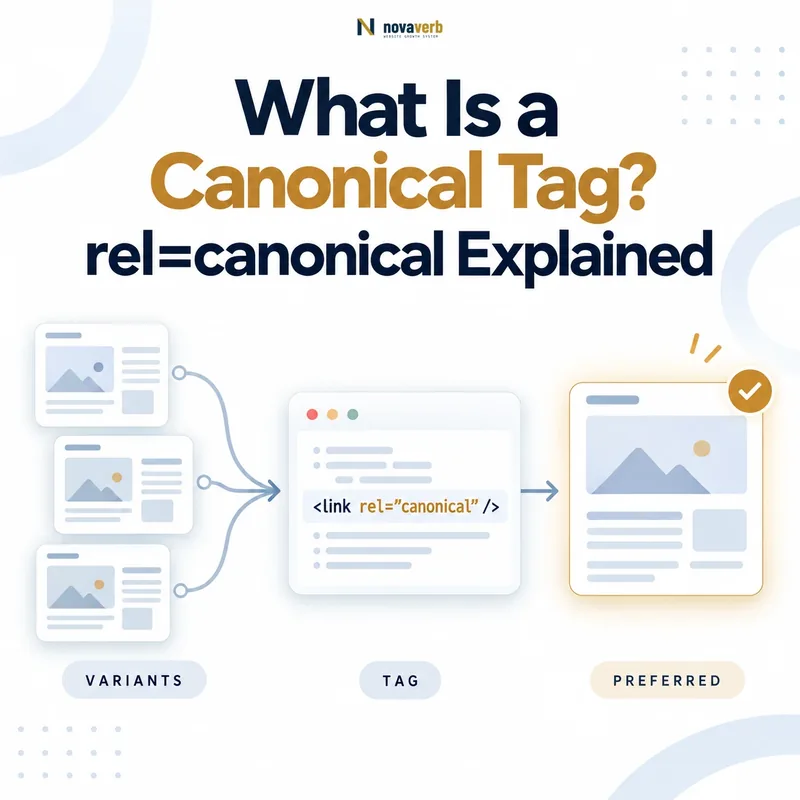
A canonical tag is an HTML link element that identifies the preferred URL for a page that is duplicated or substantially similar to another URL. Search engines can use the declaration to group related URLs, consolidate indexing signals and select one representative version for search results.
<link rel="canonical"
      href="https://www.example.com/preferred-page/">
The tag is normally placed inside the page’s <head>. A canonical URL should be crawlable, return a usable response and represent the content shown on the declaring page.
Use Crawl Explorer to inspect declared canonicals, status codes, indexability and internal links across the site. For prioritized technical findings, use Site Health Audit.
What Does rel=canonical Mean?
rel="canonical" means that the linked URL is the preferred representative of the current page and any duplicate or closely similar versions. The declaration helps search engines understand which URL the site wants associated with indexing signals and search-result visibility.
The element contains three important parts:
| Part | Example | Meaning |
|---|---|---|
| Link element | <link> |
Declares a relationship between the current document and another resource. |
| Relationship | rel="canonical" |
States that the linked resource is the preferred representative. |
| Destination | href="https://example.com/page/" |
Provides the absolute URL being proposed as canonical. |
The canonical declaration does not redirect visitors. Both the duplicate and preferred URLs can remain accessible unless another technical control changes their behavior.
How Does a Canonical Tag Work?
A canonical tag contributes to Google’s decision about which URL should represent a set of duplicate or substantially similar pages. Google evaluates the tag together with redirects, sitemap inclusion, internal links, protocol preferences and the content of each URL.
- Google discovers multiple URLs. The URLs may come from internal links, sitemaps, redirects, external links or previous crawls.
- Google compares their main content. URLs with duplicate or highly similar primary content may be grouped into a canonical cluster.
- Google evaluates canonical signals. These may include redirects,
rel="canonical", sitemap inclusion and internal-link consistency. - Google selects a representative URL. The chosen URL becomes the Google-selected canonical for that cluster.
- Duplicate versions are usually shown less often. Google generally serves the canonical version in search and may crawl duplicates less frequently.
Google describes redirects and canonical annotations as strong canonicalization signals, while sitemap inclusion is weaker. Signals can reinforce one another when they consistently identify the same preferred URL.
What Is a Canonical URL?
A canonical URL is the representative URL selected for a page or cluster of duplicate pages. The site can declare a preferred URL, but Google independently chooses the URL it considers the most appropriate representative.
| Term | Meaning | Where it comes from |
|---|---|---|
| User-declared canonical | The preferred URL declared through the page’s canonical tag or another site-controlled method. | Website HTML, HTTP header, redirects and sitemap signals. |
| Google-selected canonical | The URL Google ultimately selects to represent the duplicate cluster. | Google’s canonicalization systems. |
| Self-referencing canonical | A canonical declaration that points to the same preferred URL on which it appears. | The canonical page’s own HTML or HTTP header. |
| Cross-domain canonical | A canonical declaration that points to an equivalent page on another domain. | The duplicate page published on the secondary domain. |
When Should You Use a Canonical Tag?
Use a canonical tag when multiple accessible URLs contain duplicate or substantially similar primary content and one URL should represent the group in search. The preferred destination should provide an equivalent user experience rather than merely sharing a few keywords.
Common situations include:
- Tracking parameters: Campaign or analytics parameters create alternate URLs for the same page.
- Sorting parameters: Category pages can be ordered differently while showing substantially the same inventory.
- Print versions: A printer-friendly page duplicates the primary article.
- HTTP and HTTPS variants: Both protocol versions remain accessible during or after a migration.
- Preferred hostname variants: Both
wwwand non-wwwversions resolve. - Product variants: Several URL parameters display substantially the same core product page.
- Syndicated content: An authorized copy appears on another domain and points to the original source.
- A/B testing URLs: Temporary variants are substantially similar to the original page.
Preferred page:
https://example.com/shoes/Duplicate variant:
https://example.com/shoes/?sort=priceThe sorting URL may declare the clean category URL as canonical when both pages provide substantially the same primary content and the clean URL is the intended representative.
When Should You Not Use a Canonical Tag?
Do not use a canonical tag when the destination does not provide duplicate or substantially equivalent primary content. Canonicalization is not a general method for transferring authority from weak pages to strong pages.
A canonical tag is usually inappropriate when:
- The pages serve different search intents.
- A product page points to a broad category page merely because the product is unavailable.
- A blog post points to the homepage to avoid indexing the article.
- Two location pages contain distinct local information.
- A translated page points to a different-language version.
- A pagination page points to page one despite containing different items.
- The original URL should permanently forward users to a replacement.
- The page should be removed from search rather than grouped with another page.
What Is a Self-Referencing Canonical?
A self-referencing canonical is a canonical declaration on the preferred page that points back to that same page’s canonical URL. It makes the preferred version explicit and can help separate the clean URL from tracking, sorting or other accidental variants.
Page URL:
https://www.example.com/technical-seo/

Canonical:
<link rel="canonical"
      href="https://www.example.com/technical-seo/">
Google recommends placing a canonical annotation on the canonical page itself. The declared URL should match the preferred protocol, hostname, path and trailing-slash convention used by the site.
A self-referencing canonical is especially useful when:
- Tracking parameters may be added to the URL.
- The CMS can generate multiple paths to the same content.
- External sites may link to parameterized versions.
- The site needs a consistent preferred hostname or path format.
Canonical Tag vs 301 Redirect
Use a canonical tag when duplicate URLs must remain accessible; use a redirect when the old URL should forward visitors and crawlers to a replacement. Both can influence canonicalization, but they produce different user and server behavior.
| Dimension | Canonical tag | 301 redirect |
|---|---|---|
| User experience | The current URL remains visible and accessible. | The visitor is forwarded to the destination URL. |
| Server response | The page usually returns its normal successful response. | The old URL returns a redirect response. |
| Primary purpose | Group duplicate or highly similar accessible URLs. | Replace or move a URL. |
| Signal strength | Strong canonicalization signal. | Strong canonicalization signal. |
| Typical example | Tracking or sorting variant that users may still access. | Old article permanently moved to a new URL. |
| Maintenance risk | Conflicts can arise when content or other signals disagree. | Chains and irrelevant redirects can create crawl and UX problems. |
When a URL has permanently moved and no longer needs to remain accessible under the old address, a redirect is generally clearer. When two variants must continue working independently for users, canonicalization may be more suitable.
Canonical Tag vs noindex
A canonical tag asks search engines to group a page with a preferred equivalent, while noindex asks them not to include the page in search results. The two directives express different outcomes and should not be combined without a clear reason.
| Goal | Preferred control |
|---|---|
| Group duplicate pages and consolidate them around one representative URL | rel="canonical" |
| Keep a page accessible but exclude it from search results | Crawlable noindex |
| Permanently move an old URL | Relevant redirect |
| Protect private information | Authentication or authorization |
| Remove a page with no replacement | 404 or 410 |
noindex to the declaring page can create unclear intent. Google recommends canonicalization rather than noindex when the goal is to consolidate duplicate pages within a site.
Canonical Tag vs hreflang
Canonical tags select a representative URL among duplicates, while hreflang identifies language or regional alternatives that should remain independently eligible. Localized pages generally need self-referencing canonicals rather than all pointing to one language version.
<link rel="canonical"
      href="https://example.com/en/product/">

<link rel="alternate"
      hreflang="en"
      href="https://example.com/en/product/">

<link rel="alternate"
      hreflang="fr"
      href="https://example.com/fr/product/">
The English page above identifies itself as canonical and lists the French page as a language alternative. The French page should normally identify itself as canonical and reciprocally reference the English page.
Can You Use rel=canonical in an HTTP Header?
Yes. A canonical relationship can be declared in an HTTP Link header, which is particularly useful for PDFs, documents and other non-HTML resources. Google supports HTTP-header canonicalization for web search results.
HTTP/1.1 200 OK
Content-Type: application/pdf
Link: <https://www.example.com/html-guide/>; rel="canonical"
This response proposes the HTML guide as the canonical representative of the PDF. The relationship should be accurate: the destination must contain equivalent or substantially similar primary information.
For an HTML page, a canonical element in the document head is usually easier to inspect and maintain. Avoid declaring different canonical URLs in the HTML and HTTP header.
Can You Use rel=canonical in an HTTP Header?
Yes. A canonical relationship can be declared in an HTTP Link header, which is particularly useful for PDFs, documents and other non-HTML resources. Google supports HTTP-header canonicalization for web search results.
HTTP/1.1 200 OK
Content-Type: application/pdf
Link: <https://www.example.com/html-guide/>; rel="canonical"
This response proposes the HTML guide as the canonical representative of the PDF. The relationship should be accurate: the destination must contain equivalent or substantially similar primary information.
For an HTML page, a canonical element in the document head is usually easier to inspect and maintain. Avoid declaring different canonical URLs in the HTML and HTTP header.
What Are the Most Common Canonical Tag Mistakes?
The most damaging canonical mistakes declare the wrong destination, create conflicting signals or prevent the preferred URL from being crawled and indexed. A syntactically valid canonical can still be operationally incorrect.
| Mistake | Why it causes problems | Preferred correction |
|---|---|---|
| Every page canonicalizes to the homepage | The homepage is not equivalent to most internal pages. | Use self-canonicals or a genuinely equivalent destination. |
| Canonical points to a redirected URL | The declaration creates an unnecessary intermediate destination. | Point directly to the final preferred URL. |
| Canonical points to a 404 or 5xx URL | The proposed representative is unavailable. | Restore the URL or select a valid equivalent page. |
| Canonical destination is noindexed | The preferred representative is being excluded from search. | Align the indexing and canonicalization decision. |
| Several canonical tags appear | Search engines receive conflicting destinations. | Output one consistent canonical relationship. |
| Relative URLs resolve incorrectly | The final canonical may point to an unintended host or path. | Use a validated absolute canonical URL. |
| Pagination canonicalizes to page one | Later pages can contain distinct items and are not necessarily duplicates. | Use self-canonicals unless a true duplicate relationship exists. |
| Localized pages canonicalize to English | Valid language alternatives may lose independent eligibility. | Use same-language self-canonicals with hreflang. |
| Internal links target duplicates | The site repeatedly reinforces a nonpreferred URL. | Link directly to the canonical version. |
How Do You Check a Canonical Tag?
Check both the declared canonical and the wider signals supporting it. Finding a canonical element in the source code is only the first step; the destination, response, indexability, internal links and Google-selected canonical also require verification.
- Open the source HTML. Search inside the document head for
rel="canonical". - Check the rendered HTML. Confirm that JavaScript does not remove or replace the declaration.
- Open the canonical destination. Verify that it resolves to the expected final URL.
- Check the response status. The destination should normally return a usable successful response.
- Check indexability. Review robots directives, authentication and canonical conflicts.
- Compare page content. Confirm that the declaring page and destination are duplicate or substantially equivalent.
- Review internal links. Confirm that navigation and contextual links use the preferred URL.
- Review sitemap inclusion. The sitemap should usually list the preferred canonical URL rather than duplicates.
- Use URL Inspection. Compare the user-declared canonical with Google’s selected canonical.
Use Crawl Explorer to evaluate canonical declarations across the complete crawled URL inventory rather than checking pages one at a time.
How Should Canonical Tags Be Implemented?
Implement canonical tags through a deterministic URL policy rather than manual page-by-page guesses. The CMS should generate one valid absolute canonical URL based on the site’s preferred protocol, hostname, path and content relationship.
A reliable implementation should:
- Output the canonical element inside the document head.
- Use the preferred HTTPS protocol and hostname.
- Use an absolute URL.
- Apply the site’s trailing-slash and lowercase conventions consistently.
- Point duplicate pages to a truly equivalent destination.
- Use self-referencing canonicals on preferred HTML pages.
- Avoid canonical chains and redirected destinations.
- Keep HTML, HTTP headers, sitemaps and redirects consistent.
- Ensure JavaScript does not overwrite a correct server-rendered value.
- Test templates after CMS, plugin and theme updates.
Canonical Tag Checklist
A canonical implementation passes QA when the declared URL is technically valid, substantially equivalent and supported by the site’s other URL signals.
- One canonical declaration is present.
- The element appears inside the HTML head.
- The canonical uses an absolute URL.
- The preferred protocol and hostname are correct.
- The destination returns the expected response.
- The canonical does not point through a redirect.
- The destination is crawlable where intended.
- The destination is not noindexed.
- The pages contain duplicate or substantially similar content.
- The canonical does not point to an unrelated category or homepage.
- The canonical page contains a self-reference.
- Internal links use the preferred URL.
- Sitemap entries use the preferred URL.
- Redirects do not point toward another canonical.
- JavaScript does not overwrite the declaration.
- Localized pages use appropriate same-language canonicals.
- Pagination pages are not incorrectly collapsed into page one.
- PDF and document canonicals are checked in HTTP headers.
- Google-selected canonical is reviewed in Search Console.
- Template regressions are checked after deployment.
Frequently Asked Questions About Canonical Tags
What is a canonical tag?
Is a canonical tag a directive?
Does every page need a canonical tag?
What is a self-referencing canonical?
Can a canonical tag point to another domain?
Does a canonical tag redirect users?
Does a canonical tag remove a page from Google?
Can a canonical point to a noindexed page?
Should pagination pages canonicalize to page one?
Should tracking URLs have canonical tags?
Why is Google choosing a different canonical?
How can I audit canonical tags sitewide?
Audit Canonical URLs Across Your Website
A valid canonical audit checks more than the presence of a tag. Review whether every declaration points to an equivalent, crawlable and indexable destination, then verify that redirects, internal links and sitemap entries support the same preferred URL.
Crawl Explorer maps canonical declarations at URL level. Site Health Audit prioritizes conflicts such as missing canonicals, multiple declarations, redirected destinations, noindexed canonicals and sitemap inconsistencies.
Novaverb connects canonical declarations with response status, indexability, sitemap inclusion and internal-link evidence so teams can distinguish a valid preference from a conflicting implementation.