
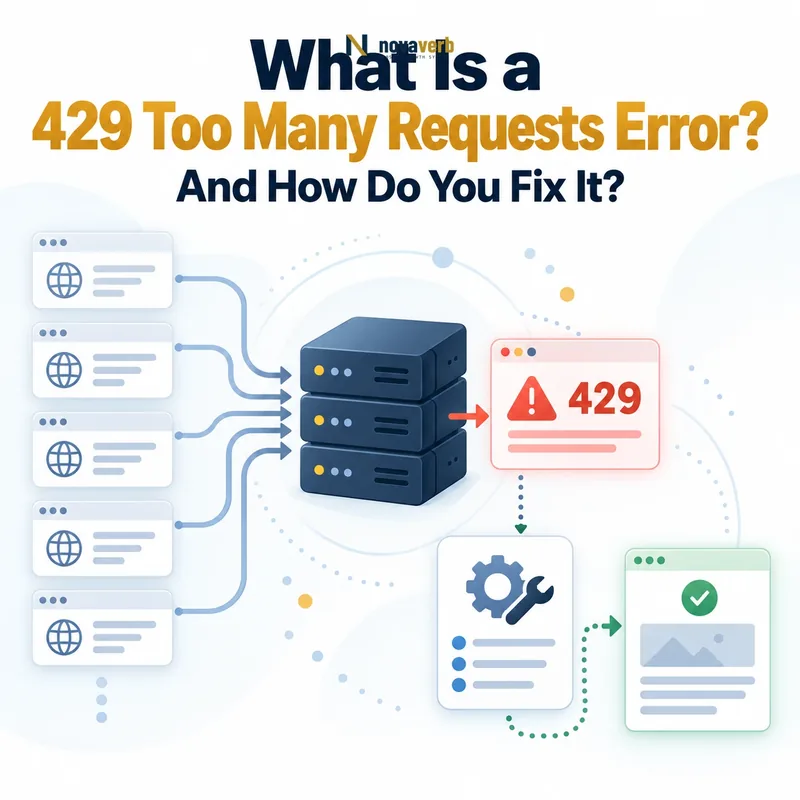
What Does 429 Too Many Requests Mean?
A 429 Too Many Requests response means that the server has applied a rate limit because the identified client sent more requests than the permitted threshold during a defined period.
The response can indicate that:
- A request limit exists: The service controls how frequently a client may perform an operation.
- A threshold was exceeded: The request count, concurrency or resource quota crossed the configured boundary.
- The limit has a scope: It may apply to an IP address, account, API key, user, endpoint, hostname or another identifier.
- The restriction may be temporary: Access can resume after a window resets, capacity becomes available or the client reduces its request rate.
- The client should slow down: Immediate repeated requests can extend or repeatedly trigger the restriction.
The status does not reveal the exact quota, counting algorithm or identity used by the server. Those details must come from response headers, documentation, logs or the service provider.
How Does an HTTP 429 Response Work?
An HTTP 429 response is returned after a rate-limiting system identifies the requester, measures its recent activity and determines that the applicable threshold has been exceeded.
- A browser, crawler, app or API client sends a request.
- The service identifies the rate-limit key.
- The service checks the current count, quota or concurrency level.
- The request exceeds the permitted threshold.
- The server rejects or postpones the operation.
- The response returns
429 Too Many Requests. - The client waits, slows down or follows the published recovery policy.
HTTP/1.1 429 Too Many Requests
Content-Type: application/json
Retry-After: 60

{
  "error": "rate_limit_exceeded",
  "message": "Try again later."
}
The server may count fixed-window requests, rolling-window requests, tokens, concurrent operations or another resource unit.
What Is Rate Limiting?
Rate limiting is a control that restricts how many requests, operations or resource units a client may use within a defined period or concurrency boundary.
| Rate-limit model | How it works | Typical behavior |
|---|---|---|
| Fixed window | Counts requests during fixed intervals such as each minute. | The count resets at the next interval. |
| Sliding window | Measures requests over a continuously moving period. | Reduces boundary bursts. |
| Token bucket | Requests consume tokens that refill over time. | Allows controlled bursts while enforcing an average rate. |
| Leaky bucket | Requests are processed at a controlled output rate. | Excess demand is queued or rejected. |
| Concurrency limit | Restricts simultaneous in-flight operations. | New requests wait or fail while capacity is occupied. |
| Quota limit | Restricts total usage during a billing or operational period. | Access may remain restricted until the quota resets or increases. |
Rate limiting protects service availability, controls costs, enforces product plans and reduces abuse. It should still provide enough information for legitimate clients to recover safely.
What Causes a 429 Too Many Requests Error?
A 429 error is caused when a client exceeds a request-rate, concurrency, quota or abuse-prevention rule enforced by an API, application, CDN, firewall or another serving layer.
| Cause | Example | Evidence to inspect |
|---|---|---|
| Rapid repeated requests | A client calls the same endpoint hundreds of times per minute. | Request timestamps and rate-limit counters |
| High concurrency | Many workers use the same API key simultaneously. | In-flight requests and worker count |
| Retry loop | A failed request is retried immediately without a limit. | Application logs and repeated request pattern |
| Shared identity | Many users share one NAT IP address or credential. | Rate-limit key and traffic distribution |
| Low configured threshold | A firewall allows fewer legitimate requests than the site needs. | Rule configuration and normal traffic baseline |
| Automation burst | A scheduled job launches thousands of requests at once. | Cron schedule, queue depth and concurrency settings |
| Quota exhaustion | An API account reaches its hourly or monthly allowance. | Provider dashboard and quota headers |
| Credential abuse | A leaked token is used by unauthorized clients. | Credential usage, IP history and security logs |
| Bot protection | A CDN classifies automated traffic as excessive. | Firewall events and bot-management decisions |
The public response alone cannot prove whether the client is misbehaving or the limit is too restrictive. Compare request behavior with the intended policy and available capacity.
Who Is Being Rate Limited?
The rate-limited identity is the key the server uses to group and count requests, which may not be the individual person who sees the error.
A limit may apply to:
- IP address: All clients sharing the address contribute to the same counter.
- User account: Requests from one authenticated user are grouped together.
- API key: Multiple applications using one credential share the same limit.
- Access token: Usage is counted against one authorization token.
- Application: The provider limits an entire registered integration.
- Endpoint: One expensive route has a stricter threshold.
- Hostname or origin: A CDN limits total traffic reaching one service.
- Organization or subscription: Several users share one plan-level quota.
This explains why one person can receive 429 despite making only a few visible requests: background jobs or other clients may share the same identity.
429 Error vs 403 Forbidden
A 429 means the client exceeded an allowed request rate. A 403 means the server understood the request but refuses to authorize it.
| Dimension | 429 Too Many Requests | 403 Forbidden |
|---|---|---|
| Primary meaning | The request rate or quota is too high. | The requester is not permitted to access the resource. |
| Typical recovery | Wait, reduce request rate or obtain more quota. | Correct authorization or access policy. |
| Time dependency | Often temporary | May persist until permissions change |
| Retry-After | Can communicate a waiting period. | Not normally central to the response. |
| Correct use | Rate limiting | Authorization refusal |
Using 403 to represent rate limiting hides the temporary request-pressure condition and can cause search crawlers to interpret the response as an access restriction.
429 Error vs 503 Service Unavailable
A 429 means the identified client exceeded a request limit. A 503 means the service itself is temporarily unable to handle the request.
| Dimension | 429 Too Many Requests | 503 Service Unavailable |
|---|---|---|
| Error class | 4xx client error | 5xx server error |
| Defining condition | The requester exceeded a policy or quota. | The service lacks temporary availability or capacity. |
| Scope | May affect one client or identity. | May affect many or all clients. |
| Retry-After | Can indicate when the client should retry. | Can indicate expected service recovery. |
| Typical correction | Reduce request pressure or adjust a justified quota. | Restore service capacity or complete maintenance. |
An overloaded service may return either code depending on whether the system applies a client-specific limit or reports broad temporary unavailability.
429 Error vs 502 Bad Gateway
A 429 represents intentional rate limiting. A 502 means a gateway or proxy received an invalid response from an upstream server.
| Dimension | 429 Too Many Requests | 502 Bad Gateway |
|---|---|---|
| Cause category | Request policy or quota exceeded | Invalid server-to-server response |
| Architecture requirement | Can occur without a proxy. | Requires a gateway or proxy relationship. |
| Intent | The system deliberately rejects excess requests. | The intermediary cannot complete the upstream exchange. |
| Primary evidence | Rate-limit counters and client identity | Gateway and upstream logs |
| Preferred correction | Slow the requester or revise a justified policy. | Repair the upstream response path. |
429 Error vs 504 Gateway Timeout
A 429 means the client sent requests too frequently. A 504 means a gateway did not receive an upstream response within its configured deadline.
| Dimension | 429 Too Many Requests | 504 Gateway Timeout |
|---|---|---|
| Failure type | Policy enforcement | Upstream latency failure |
| Request processing | The request may be rejected immediately. | The gateway normally waits before failing. |
| Primary problem | Too many requests from the counted identity | An upstream operation took too long |
| Primary evidence | Quota and request-rate data | Gateway timing and distributed traces |
| Correction | Reduce request volume or concurrency. | Reduce upstream latency or align justified timeouts. |
What Does the Retry-After Header Mean?
Retry-After tells the client the minimum period it is asked to wait before issuing another request after a rate-limit response.
A delay in seconds:
HTTP/1.1 429 Too Many Requests
Retry-After: 120
The client is asked to wait 120 seconds.
A specific HTTP date:
HTTP/1.1 429 Too Many Requests
Retry-After: Wed, 05 Aug 2026 18:30:00 GMT
The client is asked to wait until the stated GMT time.
Review the syntax in MDN’s Retry-After reference.
What Are RateLimit Response Headers?
Rate-limit headers communicate quota and timing information that helps clients understand their current allowance and avoid unnecessary 429 responses.
RateLimit-Limit: 100
RateLimit-Remaining: 0
RateLimit-Reset: 60
Retry-After: 60| Header concept | What it may communicate | Client use |
|---|---|---|
| Limit | Total allowance for the relevant policy | Plan request volume before the threshold is reached. |
| Remaining | Estimated requests or units still available | Reduce concurrency as the allowance approaches zero. |
| Reset | Time until the quota window changes | Schedule future work instead of retrying immediately. |
| Retry-After | Minimum wait requested after rejection | Pause before the next attempt. |
Header names and semantics can vary between providers and standards versions. Follow the service’s current documentation rather than assuming every API uses the same format.
How Long Does a 429 Error Last?
A 429 lasts until the applicable rate-limit condition clears, which may take seconds, minutes, hours or an entire quota period depending on the policy.
The duration can depend on:
- The fixed or sliding request window
- The token refill rate
- The number of excess requests
- Whether retries continue adding pressure
- The client identity being counted
- The API plan or account quota
- Whether the restriction escalates after repeated violations
- Whether an administrator must manually restore access
Use Retry-After and provider documentation when available. Without those signals, stop aggressive retries and increase the delay between controlled attempts.
Can an API Cause a 429 Error?
Yes. APIs commonly return 429 when a client exceeds per-second, per-minute, concurrent, daily or account-level usage limits.
API clients frequently trigger 429 by:
- Launching too many parallel requests
- Sharing one API key across many workers
- Polling instead of using webhooks
- Requesting unchanged data repeatedly
- Ignoring rate-limit headers
- Retrying immediately after failure
- Failing to batch supported operations
- Exceeding a purchased quota
- Running several integrations against the same account
The correct response is to comply with the published quota, reduce unnecessary calls, cache reusable data, batch operations where supported or request a legitimate quota increase.
Can WordPress Cause 429 Too Many Requests?
WordPress can contribute to 429 errors when plugins, themes, scheduled tasks, REST API calls, login attempts or external integrations generate requests faster than a hosting or security limit allows.
Common WordPress sources include:
- A plugin repeatedly calls an external API.
- WP-Cron launches overlapping jobs.
- A broken AJAX request loops in the browser.
- A security plugin rate-limits login attempts.
- A backup or import plugin sends large request bursts.
- An SEO crawler and cache preloader run simultaneously.
- XML-RPC or REST endpoints receive automated traffic.
- A plugin retries a failed request without backoff.
Inspect the exact URL, initiating plugin, cron schedule, browser network log and security-rule event. Deactivating every plugin at once may restore access but does not identify the responsible request pattern.
Can Cloudflare or a CDN Return 429?
Yes. A CDN can return 429 when an edge rate-limit, bot-management rule, firewall policy or platform quota identifies excessive traffic from the requester.
Review:
- The CDN response headers and event identifier
- The exact firewall or rate-limit rule matched
- The client IP, user agent and request path
- Whether verified search crawlers were recognized correctly
- Whether several users share one public IP
- Whether the origin or the CDN generated the response
- The request rate before and after caching
- Regional differences between edge locations
A CDN can protect the origin from abusive traffic, but a poorly scoped rule can also block legitimate users, APIs or search crawlers.
Can a Firewall or Security Plugin Cause 429?
Yes. Firewalls and security plugins can return 429 when login attempts, API calls, page requests or suspicious patterns exceed configured thresholds.
False positives can occur when:
- Many legitimate users share one IP address.
- A reverse proxy does not forward the real client IP correctly.
- A health checker requests the same endpoint frequently.
- A search crawler is not verified correctly.
- A mobile app creates background request bursts.
- An administrator performs repeated login or save actions.
- The threshold was copied from a lower-traffic environment.
- Several security layers count the same traffic separately.
Confirm the matching rule, rate-limit key and normal request baseline before raising the threshold.
Can Cron Jobs and Automation Trigger 429?
Yes. Scheduled jobs and automation often trigger 429 when many tasks begin at the same time, share one credential or retry failed work without coordination.
Common patterns include:
- Every job starts exactly at the top of the hour.
- Several servers run the same cron schedule.
- A missed schedule launches several delayed jobs together.
- Workers share one API token.
- The queue has no global concurrency limit.
- Failed requests are retried immediately.
- The job downloads unchanged data repeatedly.
- Large data sets are split into too many small requests.
Distribute job start times, centralize request quotas, queue work, cache results and use bounded retries with jitter.
Can AI Agents and Crawlers Trigger Rate Limits?
Yes. AI agents and crawlers can trigger 429 when they explore many URLs, call tools concurrently or retry operations without respecting shared limits.
Common causes include:
- Parallel agents use the same API key.
- The agent repeats equivalent tool calls.
- Each page triggers additional API enrichment.
- The crawler ignores Retry-After.
- Several crawl sessions target the same host.
- The system lacks per-host concurrency limits.
- Failed requests create recursive retry loops.
- The agent does not cache previous results.
Use explicit budgets, per-host queues, deduplication, caching, maximum retries and traceable user-agent identification where appropriate.
Can Googlebot Receive a 429 Response?
Yes. Googlebot can receive 429 when a server, CDN or firewall decides that its request rate exceeds the allowed threshold.
A 429 may be intentional when:
- The server is under temporary crawl pressure.
- A large crawl competes with user traffic.
- A CDN applies a verified-bot rate limit.
- A particular URL group is unusually expensive.
It may be accidental when:
- Googlebot is grouped with unverified bots.
- All crawler traffic shares one overly strict rule.
- The CDN fails to verify Googlebot correctly.
- The origin sees only the proxy IP and counts all traffic together.
Review how access controls affect discovery in What Is Crawlability in SEO?.
Are 429 Errors Bad for SEO?
A short, limited 429 response does not automatically cause ranking loss, but widespread or prolonged rate limiting can prevent Googlebot from retrieving pages and reduce crawl activity.
SEO risk increases when:
- Googlebot receives 429 across many URLs.
- The homepage or robots.txt is rate limited.
- XML sitemaps repeatedly return 429.
- New pages cannot be crawled after publication.
- Important changes remain unavailable to crawlers.
- JavaScript, CSS or rendering endpoints are restricted.
- The CDN rate-limits verified search crawlers accidentally.
- Normal responses do not return after the temporary event.
The status can be the correct short-term signal during overload, but it cannot make long-term inaccessibility harmless.
How Does Google Handle 429 Responses?
Googlebot treats 429 as a temporary signal that it should reduce request pressure and retry affected URLs later.
- Googlebot requests a URL.
- The server or CDN returns 429.
- Google cannot retrieve the intended content from that request.
- The response contributes to crawl-rate adjustment.
- Googlebot may retry the URL later.
- Persistent unavailability can cause crawling to slow substantially.
- Long-term inability to retrieve pages can eventually affect indexing.
Google does not provide a guaranteed period during which rankings or indexing remain unchanged.
See Google’s crawling-error guidance.
Can 429 Errors Reduce Googlebot Crawling?
Yes. Returning 429 tells Googlebot to reduce request pressure, and broad or repeated responses can significantly reduce crawl activity.
Crawl reduction becomes more likely when:
- Many URLs return 429 during the same period.
- The same directories remain restricted across retries.
- Robots.txt and sitemap files also return 429.
- The CDN blocks Googlebot across regions.
- The site continues rate limiting after capacity recovers.
- Successful requests are rare between rejected requests.
- Rate limiting combines with server timeouts or 5xx errors.
Crawl activity may recover after stable successful responses return, but recovery timing is not guaranteed.
Review the wider resource-allocation model in What Is Crawl Budget?.
Can Long-Term 429 Responses Affect Indexing?
Yes. If Google repeatedly cannot retrieve a URL because of long-term 429 responses, discovery, content refresh and eventual indexing can be affected.
Risk depends on:
- How long the rate limit remains active
- How many crawlable URLs are affected
- Whether the page was already indexed
- How often Googlebot normally revisits it
- Whether successful responses return between failures
- Whether canonical, rendering and sitemap resources are accessible
- Whether the entire hostname is restricted
A correct 429 is preferable to a misleading 200, 403 or 404, but it does not preserve inaccessible content indefinitely.
Should You Return 429 or 503 to Googlebot?
Return 429 when Googlebot’s request rate is the defining problem. Return 503 when the service is temporarily unavailable more broadly.
| Condition | Preferred status | Reason |
|---|---|---|
| Googlebot exceeds a crawler-specific limit | 429 | The identified requester exceeded the permitted rate. |
| Most clients cannot be served because of overload | 503 | The service itself is temporarily unavailable. |
| Planned sitewide maintenance | 503 | The content is temporarily unavailable to everyone. |
| One bot creates excessive request bursts | 429 | The rule is client-specific. |
| No healthy application instances remain | 503 | The failure is service-wide. |
Use the status that accurately describes the condition. Both should be temporary and removed when normal service resumes.
Should a 429 Error Page Return 200?
No. A page displayed because the requester exceeded a rate limit should return 429 rather than 200 OK.
| Response | Meaning | Use |
|---|---|---|
429 Too Many Requests |
The client exceeded an allowed request rate. | Correct for active rate limiting |
200 OK |
The requested resource was delivered successfully. | Incorrect when only an error message is returned |
403 Forbidden |
The server refuses authorization. | Incorrect when the true condition is temporary rate limiting |
A helpful branded page can explain the waiting period, but the response status must remain accurate.
Should You Block Googlebot in Robots.txt Instead?
No. Robots.txt is not the appropriate tool for temporarily telling Googlebot to reduce request pressure during server overload.
Blocking in robots.txt can:
- Prevent Googlebot from retrieving the actual 429 response
- Block content crawling after capacity has recovered
- Remain active longer than the incident
- Apply too broadly to important URL groups
- Create a crawlability problem separate from server capacity
Use an accurate temporary HTTP response and restore successful access when the incident ends.
Validate current directives with the Robots.txt Checker.
How Do You Find 429 Errors?
Find 429 errors by combining live HTTP checks, application logs, CDN events, API dashboards, crawl data and client-side request traces.
| Evidence source | What it reveals | Limitation |
|---|---|---|
| HTTP status checker | Current status, body and Retry-After header | May not reproduce identity-specific limits |
| Browser network panel | Which frontend request receives 429 | Covers one user session |
| Application logs | Client identity, endpoint and matched limit | Requires useful structured logging |
| CDN or firewall events | Edge rule, IP, region and bot decision | May not show application-generated limits |
| API dashboard | Quota use, reset period and key-level limits | Depends on provider visibility |
| Website crawl | URLs returning 429 during crawl | The crawler itself may trigger the limit |
| Search Console | Access problems encountered by Google | Not a complete real-time incident monitor |
Group responses by client identity, endpoint, time window, rule, region and credential. This reveals whether the issue is user-specific, crawler-specific or service-wide.
Inspect one URL with the HTTP Status & Redirect Chain Tracer.
How Do You Diagnose a 429 Error?
Diagnose a 429 by identifying the response source, rate-limit key, threshold, counting window and request pattern that crossed the limit.
- Capture the exact request and response.
- Record Retry-After and rate-limit headers.
- Identify whether the CDN, application or API returned 429.
- Determine the counted identity.
- Document the threshold and reset policy.
- Measure request rate and concurrency before failure.
- Find every process sharing the identity.
- Check for retry loops, polling and duplicate work.
- Compare the rule with legitimate traffic baselines.
- Test a controlled lower request rate.
- Verify recovery after the window resets.
- Monitor the next comparable traffic period.
“Too many requests” is an observation. A root cause identifies which client generated the traffic, why it generated that pattern and why the applied policy rejected it.
How Do Clients Fix 429 Too Many Requests?
Clients fix repeated 429 responses by slowing requests, respecting Retry-After, limiting concurrency and removing unnecessary or duplicated calls.
- Stop immediate retries.
- Read Retry-After and provider-specific quota headers.
- Wait for the requested period.
- Reduce parallel workers.
- Cache reusable responses.
- Batch operations where the API supports batching.
- Replace polling with webhooks where available.
- Deduplicate equivalent requests.
- Add exponential backoff and random jitter.
- Set a maximum retry count.
- Queue excess work instead of discarding control.
- Request a legitimate quota increase when justified.
How Do Website Owners Fix Repeated 429 Errors?
Website owners fix repeated 429 errors by correcting the request source or rate-limit policy while preserving protection against abuse and overload.
| Verified cause | Possible correction | Required verification |
|---|---|---|
| Frontend request loop | Stop duplicate polling or repeated AJAX calls. | Browser request volume returns to baseline. |
| Overlapping cron jobs | Use locking, queues and distributed schedules. | Only the intended number of jobs runs. |
| Overly strict firewall rule | Correct the threshold or counted identity. | Legitimate traffic succeeds while abusive traffic remains controlled. |
| Shared proxy IP | Use trusted client-IP forwarding or authenticated limits. | Clients are counted accurately. |
| Plugin retry loop | Patch, configure or replace the component. | Retries follow bounded backoff. |
| Googlebot false positive | Correct verified-crawler handling safely. | Verified Googlebot receives intended responses. |
| Legitimate demand exceeds policy | Increase capacity and revise the limit based on evidence. | Performance and abuse controls remain healthy under load. |
After the correction, test representative users, search crawlers, API clients and regions. Confirm that the rule does not merely move the failure to another layer.
How Do You Implement Exponential Backoff?
Exponential backoff increases the delay after each failed attempt, while random jitter prevents many clients from retrying at the same instant.
JavaScript example
async function requestWithBackoff(url, options = {}, maxRetries = 5) {
  for (let attempt = 0; attempt <= maxRetries; attempt++) {
    const response = await fetch(url, options);

    if (response.status !== 429) {
      if (!response.ok) {
        throw new Error(`HTTP ${response.status}`);
      }
      return response;
    }

    if (attempt === maxRetries) {
      throw new Error("Rate limit persisted after maximum retries");
    }

    const retryAfter = response.headers.get("Retry-After");
    const retrySeconds = retryAfter && /^\d+$/.test(retryAfter)
      ? Number(retryAfter)
      : null;

    const exponentialDelay = Math.min(1000 * 2 ** attempt, 30000);
    const jitter = Math.floor(Math.random() * 1000);
    const waitMs = retrySeconds !== null
      ? retrySeconds * 1000 + jitter
      : exponentialDelay + jitter;

    await new Promise(resolve => setTimeout(resolve, waitMs));
  }

  throw new Error("Unexpected retry state");
}
Python example
import random
import time
from email.utils import parsedate_to_datetime
from datetime import datetime, timezone

import requests


def retry_after_seconds(value: str | None) -> float | None:
    if not value:
        return None

    if value.isdigit():
        return float(value)

    try:
        target = parsedate_to_datetime(value)
        now = datetime.now(timezone.utc)
        return max(0.0, (target - now).total_seconds())
    except (TypeError, ValueError):
        return None


def get_with_backoff(url: str, max_retries: int = 5) -> requests.Response:
    for attempt in range(max_retries + 1):
        response = requests.get(url, timeout=30)

        if response.status_code != 429:
            response.raise_for_status()
            return response

        if attempt == max_retries:
            raise RuntimeError("Rate limit persisted after maximum retries")

        retry_after = retry_after_seconds(response.headers.get("Retry-After"))
        exponential = min(2 ** attempt, 30)
        jitter = random.uniform(0, 1)
        delay = retry_after if retry_after is not None else exponential
        time.sleep(delay + jitter)

raise RuntimeError("Unexpected retry state")How Do You Prevent a Retry Storm?
Prevent a retry storm by limiting attempts, adding jitter, coordinating shared quotas and stopping retries when the service remains unavailable.
Use:
- Random jitter: Prevents clients from retrying simultaneously.
- Maximum attempts: Stops infinite retry loops.
- Maximum total time: Ends work after an operational deadline.
- Global concurrency control: Coordinates all workers sharing one limit.
- Circuit breakers: Pause calls when failures cross a threshold.
- Queues: Smooth bursts into a controlled processing rate.
- Request deduplication: Prevents identical work from being repeated.
- Idempotency keys: Protect supported write operations from duplication.
A retry should be a controlled recovery attempt, not an automatic multiplication of demand.
Common 429 Error Mistakes
Common mistakes retry immediately, raise limits without analysis, hide the status or attempt to bypass controls instead of reducing inefficient demand.
| Mistake | Why it fails | Preferred correction |
|---|---|---|
| Refreshing repeatedly | Each refresh can add more counted requests. | Wait and retry once after the stated period. |
| Ignoring Retry-After | The client continues violating the requested delay. | Honor the header and add jitter. |
| Infinite retries | Demand grows while the service is limiting traffic. | Use bounded attempts and a total deadline. |
| Raising the threshold blindly | Abuse or inefficient clients remain uncontrolled. | Identify the request source and capacity first. |
| Returning 200 for the error page | The response falsely reports successful content delivery. | Return the accurate 429 status. |
| Using 403 for rate limiting | The temporary request-pressure condition is hidden. | Use 429 when rate is the defining problem. |
| Blocking Googlebot in robots.txt | Crawling permission is confused with temporary load control. | Use a temporary HTTP response. |
| Rotating IPs or accounts | The client attempts to evade legitimate controls. | Reduce demand or obtain authorized quota. |
| Limiting only per worker | Combined traffic can still exceed the shared quota. | Coordinate limits globally. |
| Closing after one successful request | The request burst can recur on the next schedule. | Monitor the next comparable traffic period. |
429 Too Many Requests Checklist
A 429 task passes QA when the rate-limit source, counted identity, threshold, triggering request pattern and safe recovery behavior are documented.
- The exact request URL is recorded.
- The request method is recorded.
- The failure timestamp is recorded.
- The 429 response is captured.
- The response body is preserved.
- Retry-After is recorded.
- Rate-limit headers are recorded.
- The responding layer is identified.
- The rate-limit key is identified.
- The threshold is documented.
- The counting window is documented.
- The reset behavior is documented.
- Request rate is measured.
- Concurrency is measured.
- Shared credentials are identified.
- Shared IP addresses are evaluated.
- Retry loops are checked.
- Polling behavior is checked.
- Duplicate requests are checked.
- Cron schedules are checked.
- Automation bursts are checked.
- CDN and firewall events are reviewed.
- Googlebot impact is evaluated.
- Robots.txt remains accessible.
- Sitemaps remain accessible.
- Backoff includes jitter.
- Retries have a maximum count.
- Non-idempotent actions are protected.
- The fix preserves abuse protection.
- Monitoring confirms no recurrence.
Frequently Asked Questions About 429 Errors
What does 429 Too Many Requests mean?
Is 429 a client error or server error?
How long does a 429 error last?
What does Retry-After mean?
Can refreshing make 429 worse?
What is the difference between 429 and 503?
Can an API return 429?
Can WordPress cause 429?
Can Cloudflare return 429?
Can Googlebot receive 429?
Can 429 errors hurt SEO?
How can I check whether a URL returns 429?
Find the Rate Limit Before Raising It
Start with the exact request and capture the 429 status, Retry-After value, response source and counted identity. Then connect the rejection to its threshold, time window, request pattern and business purpose before modifying the rule.
Use the free HTTP checker for one URL, review crawlability when search bots are affected and move to a broader audit when rate limiting appears across many URLs.
Novaverb connects HTTP responses, crawl evidence and URL-level diagnostics so teams can distinguish a legitimate protection rule from an accidental traffic bottleneck.
Use the Decision Ladder to determine whether the next action should be client backoff, queue control, rule correction, capacity expansion or security escalation.