
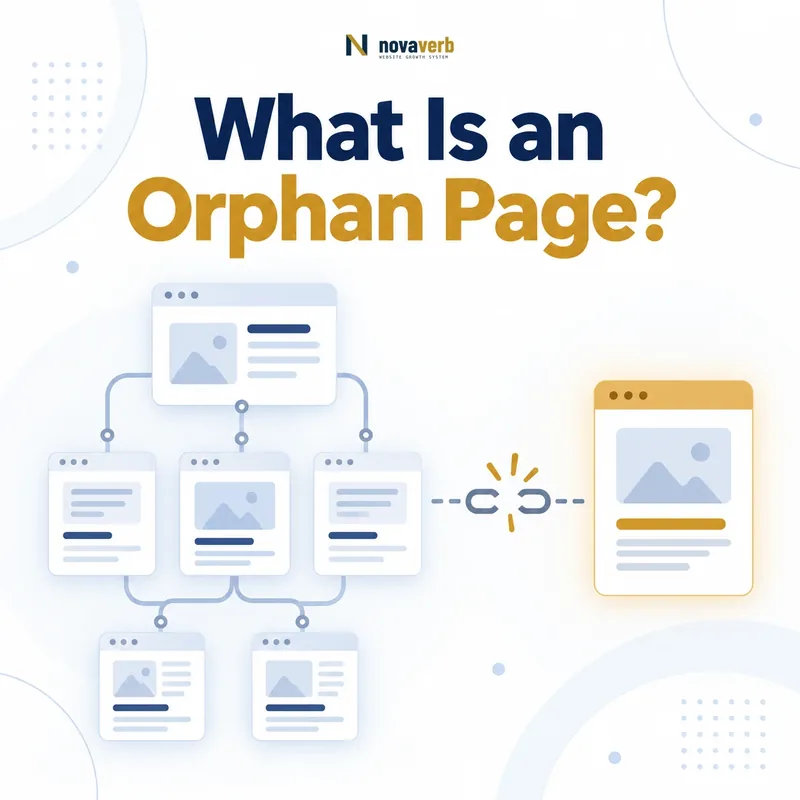
What Is an Orphan Page?
The definition depends on scope and link rules. A page can look orphaned in a crawl limited to one subdomain while another owned subdomain links to it. Links hidden behind forms, scripts or inaccessible states may also be excluded from a crawler’s graph.
A crawl cannot discover a true orphan by following links alone. Detection requires comparing crawled URLs with independent sources such as sitemaps, analytics, search data, server logs, CMS records, databases and backlink destinations.
- Known URL exists
- Page may return a valid response
- No qualifying internal inlinks in scope
- Can still receive external traffic
- May appear in sitemap or database
- Requires an independent discovery source
- Status must be verified on the live site
- Identify a URL present in an approved source outside the crawl graph.
- Confirm that no crawlable internal link reaches it.
- Check whether the page is canonical, accessible and intended to exist.
- Decide whether to connect, consolidate, redirect or remove it.
- Crawl again to verify the chosen outcome.
| Page condition | Orphan? | Reason |
|---|---|---|
| Valid page with no internal inlinks | Yes, within defined scope | Disconnected from link graph |
| Page linked only externally | Yes | Backlink is not internal inlink |
| Page listed only in sitemap | Yes | Sitemap is discovery source, not page link |
| Page linked from navigation | No | Has crawlable internal inlink |
| Page linked from another subdomain | Depends on scope | Cross-subdomain rule matters |
| Deleted URL with no links | Not an active orphan page | Historical or error URL |
An orphan page is established by comparing known live URLs with a clearly defined internal link graph, not by one crawl list alone.
Orphan Pages vs Dead-End and Isolated Pages
A landing page can have no inlinks yet provide useful navigation after arrival, making it orphaned but not dead-end. A popular article can have many inlinks but no onward path, making it a dead end but not orphaned.
A small documentation section may link among its own pages but receive no connection from the main site. That isolated cluster requires a hub or navigation decision rather than one link per page.
- Incoming internal links
- Outgoing internal links
- Connection to main graph
- Cluster-level connectivity
- External backlinks
- Sitemap and navigation presence
- Intentional versus accidental isolation
- Build the internal source-to-destination graph.
- Confirm whether the page has inbound internal links.
- Check whether it also links onward to other pages.
- Measure how strongly it connects to its relevant topic cluster.
- Assign the correct label from the observed relationship.
| Condition | Incoming links | Outgoing links |
|---|---|---|
| Orphan page | None qualifying | Any number |
| Dead-end page | One or more possible | None useful |
| Isolated page | Very few or weak | Very few or weak |
| Isolated cluster | Internal cluster links only | Internal cluster links only |
| Normal page | Connected by useful inlinks | Useful onward paths |
| Campaign landing page | Can be intentionally none | Conversion path may exist |
Classify direction and graph scope precisely so the fix adds the missing connection instead of changing the wrong side of the page.
What Causes Orphan Pages?
A redesign can remove a hub while its child pages remain live. Editors can publish a URL without adding it to related content or navigation. Campaign teams may create landing pages intended for paid traffic and forget to define retirement or discoverability rules.
Some orphan states are intentional: confirmation pages, private utility pages or short-lived campaign destinations may not belong in public navigation. Intentional does not mean unmanaged; ownership, access, index state and retirement still need documentation.
- Site migration and redirect gaps
- Navigation or taxonomy redesign
- Deleted hub or category page
- Campaign landing pages
- CMS publishing outside templates
- Unlinked product or location pages
- Test and staging content exposed
- Faceted or parameter URLs
- Expired offers and events
- Find the publishing, migration or template event that created the URL.
- Compare the page with current navigation and content hubs.
- Inspect removed links, redirects and canonical changes.
- Confirm whether campaigns or feeds still expose the page.
- Fix the creating workflow as well as the individual URL.
| Cause | Typical orphan set | Prevention |
|---|---|---|
| Migration | Legacy live URLs | URL inventory and mapping |
| Redesign | Former navigation children | Graph comparison |
| Campaign | Landing and thank-you pages | Lifecycle owner |
| CMS workflow | New unpublished-to-navigation URLs | Publish checklist |
| Product retirement | Old feature pages | Replacement decision |
| Facets | Parameter combinations | Index and crawl rules |
| Deleted hub | Entire isolated cluster | Hub dependency review |
Most orphan pages reveal a missing publishing, migration or retirement decision rather than a standalone internal-link problem.
Why Do Orphan Pages Matter for SEO?
A valuable product or guide with search demand, traffic or backlinks may be under-supported if nothing relevant links to it. An obsolete campaign page may create duplicate or misleading content instead. These pages require opposite decisions.
Do not assume adding any internal link will improve rankings. Measure crawl discovery, search performance, traffic, backlinks, conversions and topic fit, then decide whether the page deserves a place in the architecture.
- Limited internal discovery
- Missing topical and navigational context
- Disconnected user journeys
- Unmaintained outdated content
- Wasted backlink destinations
- Duplicate or competing pages
- Incomplete conversion paths
- Hidden content inventory debt
- Determine whether the page supports an active user or business need.
- Check whether crawlers and visitors have a discovery path.
- Review Search Console separately for Google-owned search evidence.
- Assess overlap with stronger canonical destinations.
- Choose a repair based on value and evidence, not the label alone.
| Potential impact | Evidence | Possible decision |
|---|---|---|
| Discovery gap | Logs and crawl data | Add meaningful connection |
| Search opportunity | Queries and impressions | Improve and link |
| Backlink waste | Verified external sources | Restore architectural fit |
| Content duplication | Intent and page comparison | Merge or canonicalize |
| Obsolete experience | Expired offer or facts | Redirect or remove |
| Conversion gap | User journey evidence | Connect relevant path |
Orphan status starts the review; user, search, backlink and business evidence determine whether the page should be connected, consolidated or retired.
How Do You Find Orphan Pages?
Use sitemaps, analytics landing pages, search performance pages, server logs, CMS exports, database routes, paid campaign destinations and backlink targets. Each source has coverage and freshness limits, so retain source labels and dates.
Normalize protocol, host, case, trailing slash, parameters, fragments, canonicals and redirects before comparison. Otherwise one page can appear as several false candidates or a real orphan can be hidden behind URL variants.
- Define domain, subdomain and link scope
- Crawl from approved site entry points
- Export every page with internal inlink count
- Collect sitemap URLs
- Collect analytics and search landing URLs
- Collect server-log and CMS URLs
- Collect paid campaign and backlink destinations
- Normalize and resolve URL variants
- Subtract linked crawl URLs from known URLs
- Verify the remaining candidates live
- XML sitemap URLs absent from the internal crawl graph
- Analytics landing pages with no crawlable inbound links
- Search Console pages missing from a first-party crawl
- CMS inventory URLs not connected by internal navigation
- Backlink destinations that the current site graph cannot reach
| URL source | What it can reveal | Limitation |
|---|---|---|
| Crawl | Connected internal graph | Cannot discover true orphans |
| XML sitemap | Submitted or managed URLs | Can contain stale entries |
| Analytics | Pages with measured visits | Misses zero-traffic pages |
| Search data | Pages with impressions or clicks | Coverage and date limits |
| Server logs | Requested URLs | Bots and noise |
| CMS or database | Published records | May include drafts or deleted rows |
| Backlink index | Externally linked destinations | Provider coverage varies |
Orphan discovery is a set-difference problem that requires both a crawl graph and independent URL inventories with consistent normalization.
How Do You Verify an Orphan Page?
A crawler can miss links rendered after interaction, blocked by authentication or generated through scripts. The page may redirect, canonicalize elsewhere, return a soft failure or be intentionally excluded from the public architecture.
Inspect source templates and exact inlink reports. Confirm whether sitemap, analytics or CMS data is current and whether the candidate is a page users should reach directly.
- Open the candidate URL
- Check response and final destination
- Review canonical and index state
- Confirm page type and ownership
- Search the rendered site for internal links
- Check navigation, hubs and related content
- Review alternate templates and subdomains
- Validate the discovery source date
- Decide intentional or accidental orphan status
- Record evidence and confidence
- A live response from the suspected orphan URL
- No qualifying internal source found in the fresh crawl
- Normalized protocol, host, path and parameter handling
- Canonical and indexability state recorded separately
- A timestamped source proving how the URL was discovered
| Verification check | False positive removed | Output |
|---|---|---|
| Redirect resolution | Legacy URL | Final page |
| Canonical review | Duplicate URL variant | Canonical target |
| Rendered links | Script-generated inlink | Actual graph state |
| Scope review | External subdomain link | Scoped classification |
| Source freshness | Stale sitemap or analytics row | Current candidate |
| Page purpose | Private utility or confirmation | Intentional status |
A page should enter the repair queue only after its live state, scope, canonical destination, inlinks and intended audience have been verified.
How Do You Prioritize Orphan Pages?
A linked research asset with verified external citations but no internal discovery may be a strong connection candidate. A thin legacy page duplicating a current guide should move toward consolidation rather than receiving new links.
Separate quick internal-link fixes, hub creation, content improvement, redirects, removals and intentional exceptions. The queue should state the page’s purpose and proposed architectural role.
- Confirm the page is live and accidental
- Measure search and traffic evidence
- Inspect verified backlinks
- Review conversions and user purpose
- Compare duplicate or competing pages
- Assess freshness and content quality
- Identify a logical parent, hub or peer
- Choose connect, improve, merge, redirect or remove
- Score impact, effort and confidence
- Assign owner and retest date
- Pages serving an active customer or conversion journey
- Useful resources already receiving relevant external visits
- Current pages unintentionally removed from topic navigation
- Duplicate or obsolete pages needing consolidation
- Low-value generated URLs requiring prevention at the source
| Priority factor | Connect or improve | Merge or retire |
|---|---|---|
| Search demand | Relevant impressions and queries | No unique intent |
| Traffic | Qualified sessions | No meaningful use |
| Backlinks | Verified relevant citations | No valuable sources |
| Conversions | Supports user task | Expired journey |
| Content | Unique current value | Thin duplicate |
| Architecture | Clear hub or parent | No logical role |
Priority reflects whether the page deserves a durable architectural role, not merely whether adding a link is technically easy.
How Do You Fix and Prevent Orphan Pages?
Choose source pages where a link advances the reader’s task. Avoid adding arbitrary footer links or mass-generated related links solely to change an inlink count.
Use SEO tools to connect crawl findings with owners and verify the repaired graph. Monitor linked destinations and link rot after migrations so resolved pages do not become orphaned again.
- Choose the page’s intended architectural role
- Identify relevant source pages or hub
- Write descriptive user-centered anchors
- Add links in crawlable rendered HTML
- Update navigation or sitemap when appropriate
- Merge overlapping content
- Redirect only to equivalent destinations
- Remove obsolete pages with a defined response
- Document intentional exceptions
- Recrawl and verify inbound links
- Add contextual links from genuinely relevant pages
- Restore appropriate hub or navigation placement
- Consolidate overlapping content into the chosen destination
- Redirect retired URLs only when a relevant replacement exists
- Monitor publishing and migration workflows for recurrence
| Orphan condition | Best-fit fix | Verification |
|---|---|---|
| Valuable unique guide | Add contextual and hub links | Crawl shows relevant inlinks |
| New product page | Connect product architecture | User path works |
| Duplicate content | Merge and redirect | One canonical destination |
| Expired campaign | Redirect or remove | No misleading live offer |
| Private utility | Intentional exclusion controls | Access and index state documented |
| Isolated cluster | Create parent hub | Cluster connected to main graph |
Run an initial page check with the free website SEO checker, inspect the live site graph in Crawl Explorer, and review Novaverb pricing when comparing continuous orphan-page monitoring with a one-time audit.
An orphan-page fix succeeds when the page gains the correct architectural role - or is retired intentionally - not when its inlink count merely becomes nonzero.