
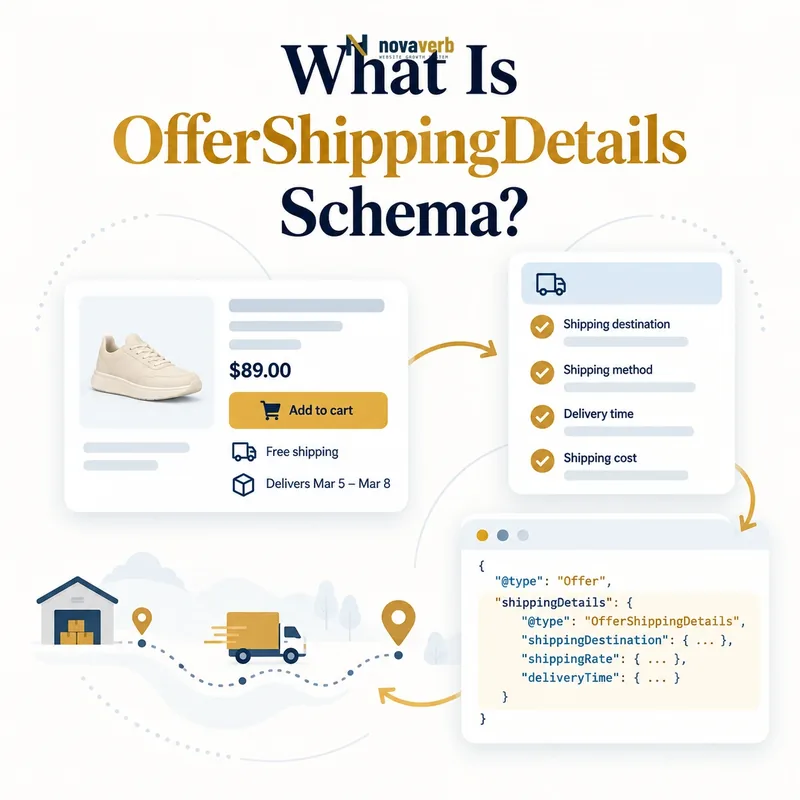
What Is OfferShippingDetails Schema?
OfferShippingDetails is a structured-data type that connects a product Offer with its shipping destination, cost, delivery time, exclusions, origin, and available shipping service.
It describes fulfillment for a specific commercial offer rather than the merchant's complete policy. Multiple shipping details can sit on one Offer when rates or delivery windows differ by region or service. The entity should reflect choices a customer can actually receive at checkout.
- Identify the exact page, asset, entity or relationship described in this section.
- Inspect the live implementation and retain the observed evidence.
- Compare the observation with the intended meaning and its primary specification.
- Correct any mismatch, then retest the live result.
- Record the accountable owner and review date.
| Property | Question answered | Typical type |
|---|---|---|
| shippingDestination | Where does this rule apply? | DefinedRegion |
| shippingRate | What does delivery cost? | MonetaryAmount |
| deliveryTime | How long will delivery take? | ShippingDeliveryTime |
| doesNotShip | Is the region excluded? | Boolean |
- Attach details to the relevant Offer.
- Represent each destination and service truthfully.
- Match rates and timing visible to customers.
Use the free backlink checker while reviewing links to commerce pages.
Primary specification: Schema.org definition for OfferShippingDetails.
OfferShippingDetails is accurate when one entity describes one coherent shipping rule customers can actually use.
How Is OfferShippingDetails Different From a Shipping Policy?
OfferShippingDetails describes shipping for an individual Offer, while MerchantShippingPolicy describes broader organization-level shipping rules that many offers can share.
The two models can overlap in topics but differ in scope. A merchant policy may define national service areas and standard delivery settings. An oversized product can still require an Offer-specific surcharge or exclusion. Duplicating the entire policy on every product increases maintenance risk, while relying only on a global policy can hide product exceptions.
- The exact page, asset, entity or relationship covered by this section
- The live implementation rather than an editor-only preview
- The primary specification or first-party record defining the expected behavior
- The validation result, accountable owner and review date
| Model | Scope | Best use |
|---|---|---|
| OfferShippingDetails | One Offer or product-specific option | Rate, region, delivery and exceptions |
| MerchantShippingPolicy | Organization or market policy | Reusable merchant-wide rules |
| Checkout quote | One session and address | Final payable shipping |
| Visible product copy | Customer-facing explanation | Terms and limitations |
- Identify rules shared across the catalog.
- Place reusable rules in the merchant policy.
- Model true product exceptions at Offer level.
- Keep checkout as the final transactional source.
- Test an ordinary and exceptional product.
See Merchant Shipping Policy schema for the reusable policy model.
Use the policy for shared rules and OfferShippingDetails for shipping facts specific to an offer or delivery option.
Which OfferShippingDetails Properties Should You Use?
Most implementations need shippingDestination, shippingRate, and deliveryTime, with doesNotShip, shippingOrigin, or hasShippingService added when those facts materially define fulfillment.
More properties do not automatically make the markup better. Each value should come from the same logistics rules that power customer-facing estimates. A rate without a destination is hard to interpret, and a delivery window without handling time can understate the wait before the carrier receives the package.
- Identify the exact page, asset, entity or relationship described in this section.
- Inspect the live implementation and retain the observed evidence.
- Compare the observation with the intended meaning and its primary specification.
- Correct any mismatch, then retest the live result.
- Record the accountable owner and review date.
| Property | Use | Evidence source |
|---|---|---|
| shippingDestination | Country, state or postal region | Shipping zone configuration |
| shippingRate | Cost or maximum cost | Rate table |
| deliveryTime | Handling plus transit | Fulfillment and carrier data |
| shippingOrigin | Dispatch region | Warehouse routing |
| hasShippingService | Named delivery service | Service catalog |
- Use a stable source for every property.
- Keep destination and rate inside the same rule.
- Represent ranges honestly when timing varies.
- Omit unsupported details rather than guessing.
The entity should be minimal enough to maintain and complete enough to avoid misleading totals or timing.
Choose only properties that describe a verified, internally coherent shipping option.
How Do You Mark Up Shipping Rates and Free Shipping?
Represent a fixed shipping charge with MonetaryAmount, use zero for genuinely free delivery, and model minimum-order thresholds only when the customer's Offer qualifies under the stated rule.
Currency must match the Offer's market. A free-shipping badge may apply only above a cart threshold, to members, or within the contiguous United States. Publishing a zero rate on every product when the threshold has not been met creates a false total-cost claim. Conditional settings need the proper structured model or a narrower Offer scope.
- The exact page, asset, entity or relationship covered by this section
- The live implementation rather than an editor-only preview
- The primary specification or first-party record defining the expected behavior
- The validation result, accountable owner and review date
| Rate case | Structured approach | Check |
|---|---|---|
| Flat $6.95 shipping | MonetaryAmount 6.95 USD | Matches checkout region |
| Always free | MonetaryAmount 0 USD | No hidden minimum |
| Free over $50 | Conditional rate setting | Threshold and currency match |
| Calculated carrier rate | Use defensible maximum or settings | Do not invent a fixed amount |
- Identify rate type and currency.
- Map destination and eligibility.
- Confirm whether the product alone meets a threshold.
- Generate the appropriate shipping entity.
- Compare with checkout using a safe test address.
Review priceCurrency to keep product and shipping amounts coherent.
A shipping rate is truthful only when the stated customer and destination can obtain it without undisclosed conditions.
How Do You Define Shipping Destinations?
Define shipping destinations with DefinedRegion using supported country, state, or postal-code criteria, and create separate shipping details when rates or delivery times differ across regions.
“United States” is not always one shipping zone. Alaska, Hawaii, territories, military addresses and remote postal codes may have different rates or exclusions. Combining them with the continental states can understate costs and delivery windows. Region rules should match logistics configuration rather than marketing shorthand.
- Identify the exact page, asset, entity or relationship described in this section.
- Inspect the live implementation and retain the observed evidence.
- Compare the observation with the intended meaning and its primary specification.
- Correct any mismatch, then retest the live result.
- Record the accountable owner and review date.
| Region pattern | Modeling choice | Risk to avoid |
|---|---|---|
| Contiguous US | Country plus state exclusions or defined zone | Assuming all US addresses |
| Alaska and Hawaii | Separate rule | Using continental rate |
| Postal-code range | DefinedRegion postal criteria | Overlapping zones |
| International market | Separate country rule | Currency and customs ambiguity |
| No delivery area | doesNotShip with region | Silent checkout rejection |
- Use ISO country and subdivision codes where applicable.
- Make region sets mutually understandable.
- Test boundary postal codes.
- Update rules when carriers or warehouses change.
A destination rule is valuable only when the shipping engine recognizes the same geographic boundary.
Destination markup should mirror real shipping zones closely enough that price and delivery promises remain valid at the address boundary.
How Do Handling Time and Transit Time Work?
Handling time covers order receipt through carrier handoff, transit time covers carrier movement to the destination, and together they form the delivery estimate.
In JSON-LD, use handlingTime for warehouse processing and transitTime for carrier travel. Warehouse processing and carrier travel are different operational intervals. A two-day carrier service can still arrive in four days when handling takes two days. QuantitativeValue ranges should use consistent units, while business days, cutoff times, weekends and holidays must match fulfillment logic.
- The exact page, asset, entity or relationship covered by this section
- The live implementation rather than an editor-only preview
- The primary specification or first-party record defining the expected behavior
- The validation result, accountable owner and review date
| Timing component | Starts | Ends |
|---|---|---|
| Handling time | Order is received | Package reaches carrier |
| Transit time | Carrier accepts package | Customer receives shipment |
| Total delivery | Order receipt | Final delivery |
| Cutoff time | Daily processing boundary | Determines starting business day |
- Measure warehouse processing separately.
- Map transit ranges by destination and service.
- Apply business-day calendars.
- Include cutoff and timezone behavior.
- Compare estimates with real fulfillment outcomes.
Do not publish the fastest observed delivery as a general maximum. Use ranges that the operation can defend.
Delivery timing is reliable when handling, transit, cutoff and business-day rules reproduce the actual promise shown to shoppers.
How Do Multiple Shipping Methods Work?
Create separate OfferShippingDetails entities when economy, standard, expedited, pickup, or regional services have different rates, destinations, or delivery windows.
Combining the cheapest rate with the fastest delivery time creates an offer that does not exist. Each option must keep its own cost and timing together. A customer may see free five-day shipping and paid two-day shipping on the same product, which requires two coherent entities rather than one optimistic summary.
- Identify the exact page, asset, entity or relationship described in this section.
- Inspect the live implementation and retain the observed evidence.
- Compare the observation with the intended meaning and its primary specification.
- Correct any mismatch, then retest the live result.
- Record the accountable owner and review date.
| Service | Rate | Delivery window |
|---|---|---|
| Economy | Free | 5–8 business days |
| Standard | $6.95 | 3–5 business days |
| Expedited | $18.00 | 1–2 business days |
| Store pickup | Separate fulfillment context | Location-specific readiness |
- Preserve rate and time by service.
- Keep destinations attached to each option.
- Do not blend best values from different methods.
- Remove services that checkout no longer offers.
Newer ShippingService relationships can make a reusable delivery service explicit, but the Offer must still connect to conditions that apply to it.
Multiple shipping methods require multiple internally consistent options, not a composite of the cheapest and fastest claims.
What OfferShippingDetails Mistakes Are Common?
Common mistakes include claiming free shipping without its threshold, omitting destination scope, combining rates with the wrong delivery windows, using conflicting currencies, and copying one rule across excluded regions.
Another defect is treating a static marketing estimate as real logistics evidence. Structured data can remain unchanged while warehouses, carrier contracts or holiday calendars shift. Syntax validators cannot confirm that a postal address receives the rate or timing shown, so a safe checkout comparison is essential.
- The exact page, asset, entity or relationship covered by this section
- The live implementation rather than an editor-only preview
- The primary specification or first-party record defining the expected behavior
- The validation result, accountable owner and review date
| Mistake | Root cause | Durable fix |
|---|---|---|
| Free rate everywhere | Threshold ignored | Model eligibility |
| No destination | Global assumption | Add DefinedRegion |
| Fast time with cheap rate | Services merged | Separate options |
| USD product, CAD shipping | Market context split | Align currencies |
| Stale carrier rule | No configuration sync | Generate from logistics source |
- Extract each shipping entity independently.
- Trace region, rate and time to one source rule.
- Fix the authoritative logistics mapping.
- Regenerate affected Offers.
- Test representative destination boundaries.
Correcting the shipping source prevents thousands of product pages from reproducing the same false promise.
Shipping schema errors require complete rule reconciliation across destination, cost, service and delivery time.