
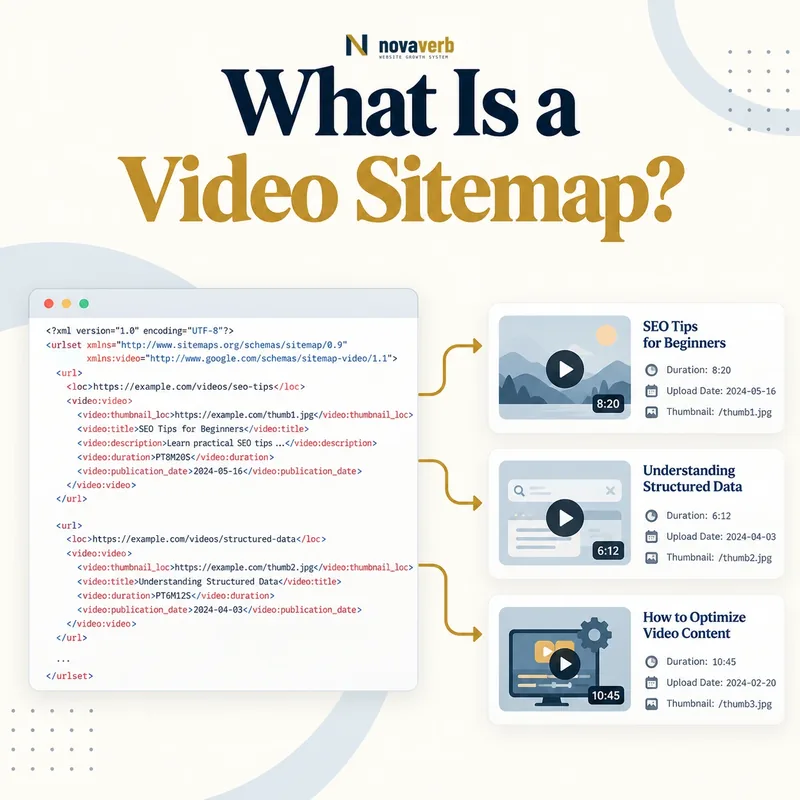
What Is a Video Sitemap?
The video record sits inside the normal URL entry for the page where the video is presented. A site can add video elements to an existing sitemap or maintain a dedicated video sitemap. The file describes the relationship among the landing page, visual preview, metadata and playback location.
A video sitemap is a discovery aid, not a guarantee of indexing or a substitute for a useful page. The host page, thumbnail and player or media URL must remain publicly accessible. Strong Video SEO still requires accurate packaging, captions, transcripts, page context and reliable playback.
- Identify the exact page, asset, entity or relationship described in this section.
- Inspect the live implementation and retain the observed evidence.
- Compare the observation with the intended meaning and its primary specification.
- Correct any mismatch, then retest the live result.
- Record the accountable owner and review date.
| Record part | What it identifies | Role |
|---|---|---|
| Page loc | Host page URL | Defines where the video appears |
| video:video | One video record | Groups video metadata |
| thumbnail_loc | Public thumbnail image | Supplies visual preview |
| title | Video name | States the subject |
| description | Video summary | Explains the content |
| content_loc | Direct media file | Exposes playable video bytes |
| player_loc | Dedicated player URL | Exposes an embeddable player |
- Map videos to their real host pages.
- Keep required media URLs public.
- Match sitemap metadata to visible content.
Primary specification: Google Search video sitemap documentation.
A video sitemap is a structured page-to-video map that exposes real, public video content without replacing content quality or delivery.
How Does a Video Sitemap Work?
The crawler discovers the sitemap through the normal sitemap workflow, reads each page <loc> and parses nested video elements. It can use the thumbnail, title and description to understand the proposed asset, then request the host page and either the direct media file or player URL.
Live responses remain decisive. A sitemap cannot bypass authentication, robots rules, firewall blocks or expired signatures. If the host page does not present the video prominently, or if metadata describes another clip, the map is inconsistent. The generator should read from the same publishing records that power the visible page and player.
- The exact page, asset, entity or relationship covered by this section
- The live implementation rather than an editor-only preview
- The primary specification or first-party record defining the expected behavior
- The validation result, accountable owner and review date
| Stage | Action | Pass evidence |
|---|---|---|
| Generate | Create page-video relationship | Current content record |
| Publish | Serve namespaced XML | Successful sitemap response |
| Parse | Read required fields | Valid video element |
| Fetch page | Request landing page | Video is visibly relevant |
| Fetch thumbnail | Request preview image | Stable successful image |
| Fetch media/player | Request playback target | Public accessible resource |
| Reconcile | Compare visible and XML metadata | Title and description stay aligned |
- Select eligible video-page pairs.
- Generate complete XML records.
- Publish and expose the sitemap.
- Monitor every referenced response.
The flow is publish an accurate record, expose every referenced URL, then let live page and playback evidence confirm the relationship.
When Do You Need a Video Sitemap?
A small site with a few semantic embeds, clear page copy and strong internal links may not need a dedicated file. A course platform, publisher, product-demo library, recipe site, property portal or support center may benefit because its video inventory is large and changes often.
Use evidence to decide. Check whether important videos are discovered, whether host pages are crawled and whether player or media URLs are accessible. If discovery is already complete, improving thumbnails, transcripts, page context or performance may create more value. The sitemap should solve a real inventory problem.
- Identify the exact page, asset, entity or relationship described in this section.
- Inspect the live implementation and retain the observed evidence.
- Compare the observation with the intended meaning and its primary specification.
- Correct any mismatch, then retest the live result.
- Record the accountable owner and review date.
| Site situation | Likely value | Reason |
|---|---|---|
| Large tutorial library | High potential | Many video-page pairs |
| New video catalog | High potential | Needs faster inventory exposure |
| JavaScript player | Useful when discovery is weak | Playback URL may be hidden |
| Separate media host | Useful | Explicitly maps external delivery |
| Small semantic blog | Low to moderate | Normal crawl may be sufficient |
| Decorative background video | Low | Not primary searchable content |
| Private training portal | None for private videos | Resources require authentication |
- Prioritize business-critical videos.
- Measure discovery before implementation.
- Exclude private and incidental media.
Build a video sitemap for a measured discovery and monitoring need, not simply because the platform supports XML export.
Which Video Sitemap Fields Are Required?
The page <loc> identifies the landing page. video:thumbnail_loc, video:title and video:description describe the video. At least one playback route is required: video:content_loc for the media file or video:player_loc for the dedicated player.
XML entities in titles, descriptions and URLs must be escaped or safely wrapped where supported. The player or content URL is not the same as the host-page URL. Required fields should come from validated records, not guessed by a crawler or reconstructed from filenames.
- The exact page, asset, entity or relationship covered by this section
- The live implementation rather than an editor-only preview
- The primary specification or first-party record defining the expected behavior
- The validation result, accountable owner and review date
| Field | Requirement | Quality check |
|---|---|---|
| Page loc | Host page URL | Final canonical public page |
| video:video | Parent video element | One logical record per video |
| thumbnail_loc | Required preview URL | Public valid image |
| title | Required video title | Matches visible subject |
| description | Required summary | Matches visible content |
| content_loc | One playback option | Direct supported media file |
| player_loc | Alternative playback option | Dedicated embeddable player |
| Namespace | Required XML vocabulary | Correct sitemap and video declarations |
- Identify the final host page.
- Validate thumbnail and metadata.
- Select direct media or player location.
- Escape and validate the XML.
Every required field should identify the same current video and resolve to a stable public resource.
Which Optional Video Fields Matter?
Duration can help describe the clip, while publication date records its first release. Expiration date should appear only when the video truly becomes unavailable. Live status distinguishes an active stream from on-demand media. Subscription and restriction fields should match actual access and availability.
Optional metadata creates maintenance obligations. A stale live flag, expired date or outdated country restriction can contradict the player. View counts and ratings should come from real settled measurements, not invented promotional values. Omit fields that the platform cannot keep accurate.
- Identify the exact page, asset, entity or relationship described in this section.
- Inspect the live implementation and retain the observed evidence.
- Compare the observation with the intended meaning and its primary specification.
- Correct any mismatch, then retest the live result.
- Record the accountable owner and review date.
| Optional field | Useful when | Risk if stale |
|---|---|---|
| duration | Known playback length | Wrong expectation |
| publication_date | Original publish time is tracked | False freshness |
| expiration_date | Access truly ends | Video disappears unexpectedly |
| live | Stream status is current | On-demand clip marked live |
| requires_subscription | Access gate exists | Mismatch with player |
| restriction | Country availability differs | Eligible regions hidden |
| platform | Device support differs | Working devices excluded |
| uploader | Creator identity is relevant | Outdated or wrong attribution |
| view_count/rating | Measured values are trustworthy | Fabricated popularity |
- Write only supported fields.
- Update time-sensitive values promptly.
- Never fabricate popularity or freshness.
Optional metadata is valuable only when it remains truthful through the video’s entire publication and access lifecycle.
How Should Hosted and Embedded Videos Be Listed?
For self-hosted media, content_loc can identify the actual video file when it is publicly retrievable. A specialized host may provide a stable player URL instead. For a third-party embed, use the specific embed address rather than a generic channel, watch page or account URL.
The parent page must add real value and present the video as a meaningful part of its content. Repeating one clip across many weak pages creates ambiguous ownership. Decide which page is the primary video destination, then keep visible metadata, sitemap values and any structured data consistent.
- The exact page, asset, entity or relationship covered by this section
- The live implementation rather than an editor-only preview
- The primary specification or first-party record defining the expected behavior
- The validation result, accountable owner and review date
| Video model | Location field | Watch for |
|---|---|---|
| Self-hosted MP4 | content_loc | Public range and media access |
| Adaptive stream with player | player_loc | Stable dedicated player |
| Specialized video host | content_loc or player_loc | Provider URL longevity |
| Third-party iframe | player_loc | Use exact embed URL |
| Channel or profile page | Not a playback location | Too broad |
| Temporary signed stream | Avoid when it expires quickly | Future access failure |
| Same video on many pages | Choose primary ownership | Duplicate weak host pages |
- Identify the actual playback architecture.
- Choose a stable content or player URL.
- Map it to the strongest host page.
- Verify access without session state.
List the exact playback resource used by a meaningful host page and keep page ownership intentional across duplicate embeds.
How Do Video Sitemaps Affect SEO?
The file can expose a newly published or difficult-to-discover clip along with its preview and context. It also gives teams a defined inventory to compare with crawl, video visibility and traffic evidence. This is especially useful when a player’s internal URLs are not obvious from basic HTML.
The sitemap cannot repair misleading packaging, inaccessible captions, weak host pages or poor playback. Review Video SEO for the complete content workflow and XML sitemaps for general URL eligibility. A video page still needs unique value, internal discovery and a clear next action.
- Identify the exact page, asset, entity or relationship described in this section.
- Inspect the live implementation and retain the observed evidence.
- Compare the observation with the intended meaning and its primary specification.
- Correct any mismatch, then retest the live result.
- Record the accountable owner and review date.
| SEO outcome | Possible contribution | Separate requirement |
|---|---|---|
| Video discovery | Explicit media mapping | Playback URLs must work |
| Metadata understanding | Title, description and thumbnail | Visible page must agree |
| New inventory exposure | Updated sitemap record | Publishing lifecycle must sync |
| Diagnostics | Defines expected video set | Need crawl and performance evidence |
| Rankings | No guarantee | Content value and relevance |
| Engagement | No direct improvement | Packaging and playback quality |
| Conversion | No built-in path | Page and CTA must support action |
- Use the sitemap to expose real value.
- Measure discovery separately from engagement.
- Keep page and video metadata aligned.
A video sitemap adds SEO value only when it exposes worthwhile, accessible videos whose host pages and metadata already deserve discovery.
What Video Sitemap Mistakes Are Common?
A thumbnail may return 403 because hotlink protection expects a browser referrer. A player may require cookies or a geographic state not represented in the sitemap. The title and description may belong to an earlier video after an embed is replaced. These errors make the map unreliable.
Automated generators may list background videos, ads or every embedded clip regardless of page importance. They may preserve deleted episodes or mark every page as modified on each build. Deprecated fields can remain in old templates. Validate the current field set and live responses instead of copying a legacy XML example.
- The exact page, asset, entity or relationship covered by this section
- The live implementation rather than an editor-only preview
- The primary specification or first-party record defining the expected behavior
- The validation result, accountable owner and review date
| Mistake | Symptom | Fix |
|---|---|---|
| Broken thumbnail | Preview URL returns error | Publish stable public image |
| Blocked player | Playback fails without session | Expose eligible player access |
| Metadata mismatch | Title describes another clip | Generate from current record |
| Unrelated host page | Video is incidental or absent | Map only relevant primary pages |
| Expired signed URL | Works briefly then fails | Use durable public location |
| Stale live status | Ended stream remains live | Synchronize event lifecycle |
| Deprecated field | Validation or ignored data | Update generator schema |
| Deleted video retained | Repeated fetch failures | Remove during unpublish |
- Validate XML and required fields.
- Fetch every referenced URL type.
- Compare metadata with the rendered page.
- Test publish, update and removal events.
The most harmful video sitemap is one whose metadata looks complete while its public thumbnail, player or host page no longer matches.