
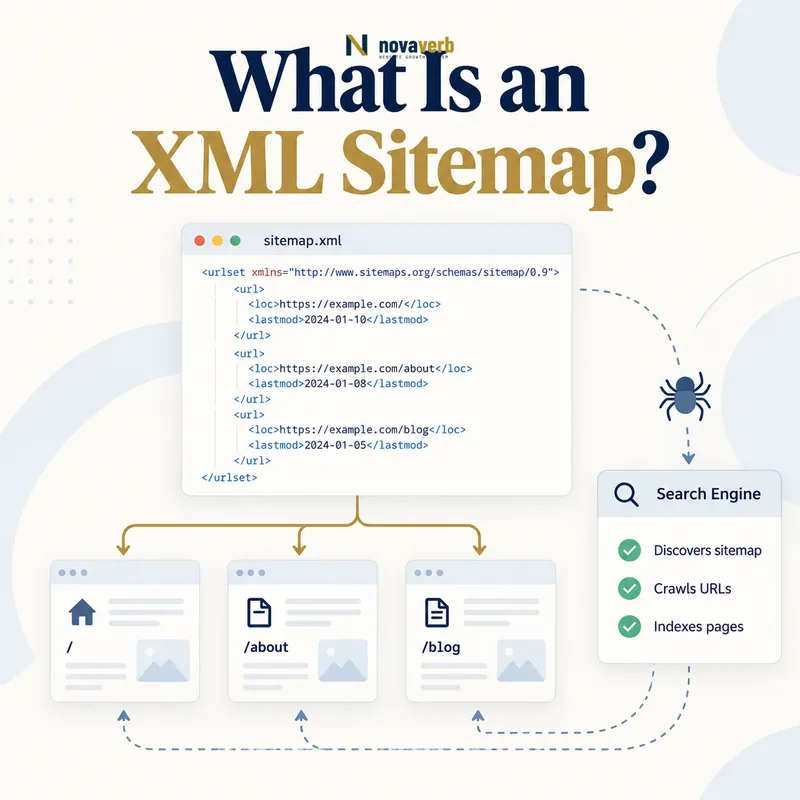
What Is an XML Sitemap?
The standard format uses a UTF-8 XML document with a sitemap namespace, a <urlset> container and one <loc> value for each URL entry. Optional fields can describe meaningful modification time, expected change frequency or relative priority, although these values are hints rather than commands.
A sitemap is not a replacement for internal links, crawlable navigation or indexable pages. It can reveal a URL, but the URL’s response, canonical signals, content and access controls determine what happens next. A high-quality sitemap therefore acts as an honest inventory of URLs the site wants evaluated.
- Identify the exact page, asset, entity or relationship described in this section.
- Inspect the live implementation and retain the observed evidence.
- Compare the observation with the intended meaning and its primary specification.
- Correct any mismatch, then retest the live result.
- Record the accountable owner and review date.
| Element | Required? | Purpose |
|---|---|---|
| urlset | Yes for URL sitemap | Contains URL entries and namespace |
| url | Yes per entry | Wraps one page record |
| loc | Yes per entry | Provides the absolute page URL |
| lastmod | Optional | Records meaningful page modification time |
| changefreq | Optional | Describes expected update pattern |
| priority | Optional | Expresses relative importance within the site |
| sitemapindex | Required for an index | Lists multiple sitemap files |
- List preferred public URLs.
- Keep metadata truthful.
- Use internal links as the primary site structure.
Primary specification: Sitemaps protocol specification.
An XML sitemap is a discovery inventory of preferred public URLs, not a shortcut around crawlability, relevance or indexing rules.
How Does an XML Sitemap Work?
The sitemap can be referenced in robots.txt, submitted through a search platform or discovered through other known locations. A crawler reads the file, extracts eligible URL records and decides which addresses to request. The sitemap does not force a visit schedule or guarantee that every URL will be indexed.
When a listed page is fetched, its live response becomes authoritative evidence: status code, redirects, robots directives, canonical URL, language signals and content. If those signals contradict the sitemap, the XML file is merely exposing inconsistency. A generator should therefore draw from the same publishing state that controls public pages.
- The exact page, asset, entity or relationship covered by this section
- The live implementation rather than an editor-only preview
- The primary specification or first-party record defining the expected behavior
- The validation result, accountable owner and review date
| Stage | Action | Possible outcome |
|---|---|---|
| Publish | Serve sitemap publicly | File becomes discoverable |
| Parse | Read valid URL records | URLs enter discovery queue |
| Schedule | Crawler prioritizes requests | Some URLs fetched sooner or later |
| Fetch | Request the live page | Status and content observed |
| Reconcile | Compare canonical and directives | Consistent or conflicting signals |
| Refresh | Read changed sitemap later | New and updated URLs discovered |
- Generate records from eligible content.
- Publish valid XML.
- Expose the sitemap location.
- Monitor page outcomes and generator drift.
The working flow is discover the sitemap, parse URL records, fetch selected pages and reconcile each live response with the declared inventory.
Which URLs Belong in an XML Sitemap?
Include useful product, category, service, article, documentation, location and other canonical pages that represent the site’s searchable inventory. Use the final HTTPS host and preferred trailing-slash convention. The URL should not require authentication, cookies or a special referrer.
Exclude redirects, 404s, server errors, noindex pages, alternate parameter versions, session URLs, internal search results and duplicates that canonicalize elsewhere. A temporary unpublished page should enter the sitemap only after it becomes publicly ready. If a page is intentionally removed, update the sitemap rather than preserving it as a historical list.
- Identify the exact page, asset, entity or relationship described in this section.
- Inspect the live implementation and retain the observed evidence.
- Compare the observation with the intended meaning and its primary specification.
- Correct any mismatch, then retest the live result.
- Record the accountable owner and review date.
| URL type | Include? | Reason |
|---|---|---|
| Canonical successful page | Yes | Preferred public inventory |
| Redirecting URL | No | Destination should be listed instead |
| 404 or removed page | No | No current content |
| Noindex page | No | Conflicts with index intent |
| Tracking parameter URL | No | Duplicate or campaign variant |
| Paginated canonical page | Depends on independent value | Use actual canonical strategy |
| Private account page | No | Not publicly accessible |
| Temporary staging URL | No | Wrong environment and host |
- Use final canonical URLs.
- Exclude contradictory status and robots states.
- Synchronize additions and removals with publishing.
Every sitemap URL should express one clear claim: this is the preferred public page the site currently wants discovered.
What Do lastmod, changefreq and priority Mean?
lastmod field records when a page meaningfully changed, while changefreq and priority are optional hints about update patterns and relative importance within the site.A useful lastmod value changes when the page’s indexable content or important structured information changes, not whenever the sitemap is regenerated. It can use a date or full timestamp in a compatible date-time format. Updating every URL to today on each build destroys the field’s informational value.
changefreq describes an expected pattern but does not schedule crawling. priority ranges from 0.0 to 1.0 and is relative within the site; assigning 1.0 everywhere conveys no distinction and does not make a page outrank another domain. Omit optional fields that the publishing system cannot maintain honestly.
- The exact page, asset, entity or relationship covered by this section
- The live implementation rather than an editor-only preview
- The primary specification or first-party record defining the expected behavior
- The validation result, accountable owner and review date
| Field | Useful value | Misuse |
|---|---|---|
| lastmod | Actual meaningful page update | Sitemap generation time for every URL |
| changefreq | Realistic editorial pattern | Attempted crawl command |
| priority | Relative internal distinction | 1.0 on every page |
| loc | Final absolute canonical URL | Redirect or parameter variant |
| Index lastmod | Time child sitemap changed | Newest page time copied blindly |
| No optional fields | Valid simple URL list | Invented metadata for completeness |
- Define what counts as a meaningful update.
- Store that time with the content record.
- Write only accurate optional fields.
- Test that unchanged pages retain their dates.
Use optional sitemap metadata only when it represents real content lifecycle information and remains consistent over time.
What Are Sitemap Limits and Sitemap Indexes?
Compression with Gzip can reduce transfer size, but the uncompressed XML must still remain within the size limit. A sitemap index uses <sitemapindex>, one <sitemap> record per child file and a required child <loc>. It can also carry an optional modification time for each child sitemap.
Splitting far below the protocol ceiling can improve operations. Group files by content type, locale, publishing window or stable shard so teams can isolate failures and changes. Avoid generating thousands of tiny files without a monitoring reason. Each shard should have a predictable ownership and refresh policy.
- Identify the exact page, asset, entity or relationship described in this section.
- Inspect the live implementation and retain the observed evidence.
- Compare the observation with the intended meaning and its primary specification.
- Correct any mismatch, then retest the live result.
- Record the accountable owner and review date.
| Structure | Protocol ceiling | Operational guidance |
|---|---|---|
| URL sitemap | 50,000 URLs | Shard earlier when monitoring benefits |
| URL sitemap size | 50 MB uncompressed | Compress transfer if useful |
| Sitemap index | 50,000 child sitemaps | Use stable purposeful groups |
| Index size | 50 MB uncompressed | Keep retrieval efficient |
| Gzip file | Allowed | Validate after decompression |
| Shard naming | No mandated business scheme | Use durable type, locale or period |
| Nested management | Multiple indexes possible | Keep ownership and discovery clear |
- Measure both compressed and uncompressed size.
- Shard by a stable business dimension.
- Monitor every child sitemap independently.
Use sitemap indexes to create a manageable, observable inventory - not merely to stay under the formal limits.
How Do XML Sitemaps Affect SEO?
The greatest value appears on large, new, frequently changing or weakly linked sites where important URLs might otherwise be found slowly. A clean sitemap also gives teams a defined set to compare against crawl, indexing and traffic data. That makes diagnosis faster when a template or publishing feed fails.
A sitemap cannot make thin content useful, repair a soft 404 or distribute internal link equity. Review orphan pages, internal link audits, soft 404s and crawl depth separately. Discovery should reinforce, not substitute for, coherent site architecture.
- The exact page, asset, entity or relationship covered by this section
- The live implementation rather than an editor-only preview
- The primary specification or first-party record defining the expected behavior
- The validation result, accountable owner and review date
| SEO outcome | Potential sitemap value | Separate requirement |
|---|---|---|
| New URL discovery | Explicitly exposes address | Page must be public and useful |
| Update discovery | Accurate lastmod can signal change | Content must actually change |
| Large-site coverage | Organizes many URLs | Internal architecture still required |
| Diagnostics | Defines expected inventory | Need crawl and indexing evidence |
| Ranking | No direct guarantee | Relevance, quality and authority |
| Link equity | No distribution by itself | Internal and external links |
| Removal | Stops advertising deleted URL | Correct HTTP status remains required |
- Define the intended indexable inventory.
- Compare it with the sitemap.
- Compare both with live crawl evidence.
- Fix the publishing or linking root cause.
Sitemaps add SEO value when they expose a truthful inventory and help teams find gaps between publishing intent and live search evidence.
What XML Sitemap Mistakes Are Common?
Reserved characters in URLs must be escaped for XML, and the document should be UTF-8. A valid-looking browser view can still hide namespace or encoding errors. URLs should belong to the permitted site scope and use consistent host, protocol and path conventions.
A generator may read database rows without applying publication, canonical or deletion logic. That creates entries for drafts, expired products or parameter variants. Another common failure is splitting files by a changing count so most URLs move between shards on every build, making monitoring and modification data noisy.
- Identify the exact page, asset, entity or relationship described in this section.
- Inspect the live implementation and retain the observed evidence.
- Compare the observation with the intended meaning and its primary specification.
- Correct any mismatch, then retest the live result.
- Record the accountable owner and review date.
| Mistake | Observed symptom | Fix |
|---|---|---|
| Malformed XML | Parser or fetch error | Schema-aware validation |
| Unescaped ampersand | Broken URL record | XML entity escaping |
| Redirect URL | Extra hop and mixed intent | List final destination |
| Noindex URL | Conflicting signals | Exclude from index inventory |
| False lastmod | Every URL appears new | Use content modification time |
| Mixed host or protocol | Entries rejected or inconsistent | Use permitted canonical host |
| Stale deleted page | Repeated 404 fetch | Synchronize deletion lifecycle |
| Unstable sharding | Files churn every build | Use durable shard keys |
- Validate XML after generation.
- Apply the same eligibility rules as the public site.
- Track generator changes as production changes.
A sitemap is trustworthy only when its syntax, URL eligibility and publishing lifecycle all match the live website.
How Do You Audit an XML Sitemap?
Fetch the index and every child file exactly as a crawler would. Record status, redirects, content type, encoding, compressed and uncompressed size, URL count and last modification behavior. Parse with namespace awareness and normalize URLs without hiding meaningful differences.
For each URL, inspect final status, redirect chain, robots directives, canonical target, language state and content type. Segment conflicts by template or generator source. Compare the sitemap with database or CMS records to find eligible URLs missing from the file as well as ineligible URLs included. Rerun after a controlled publish and removal.
- The exact page, asset, entity or relationship covered by this section
- The live implementation rather than an editor-only preview
- The primary specification or first-party record defining the expected behavior
- The validation result, accountable owner and review date
| Audit check | Evidence | Pass condition |
|---|---|---|
| Delivery | Status and content type | Successful XML or valid compressed response |
| Protocol limits | URL count and uncompressed bytes | Within 50,000 and 50 MB |
| XML validity | Namespace-aware parser | No malformed records |
| URL response | Status and redirects | Direct successful page |
| Index intent | Robots and canonical | Eligible self-consistent URL |
| lastmod | Content record comparison | Changes only with meaningful updates |
| Coverage | CMS vs sitemap set | No important eligible omissions |
| Removal | Deleted record test | URL leaves sitemap promptly |
- Fetch index and child files.
- Validate XML, counts and sizes.
- Crawl every listed URL or a risk-based sample.
- Compare with canonical inventory.
- Fix generator logic and retest lifecycle events.
A sitemap audit passes when valid XML lists the full intended canonical inventory and every sampled live response confirms that intent.