
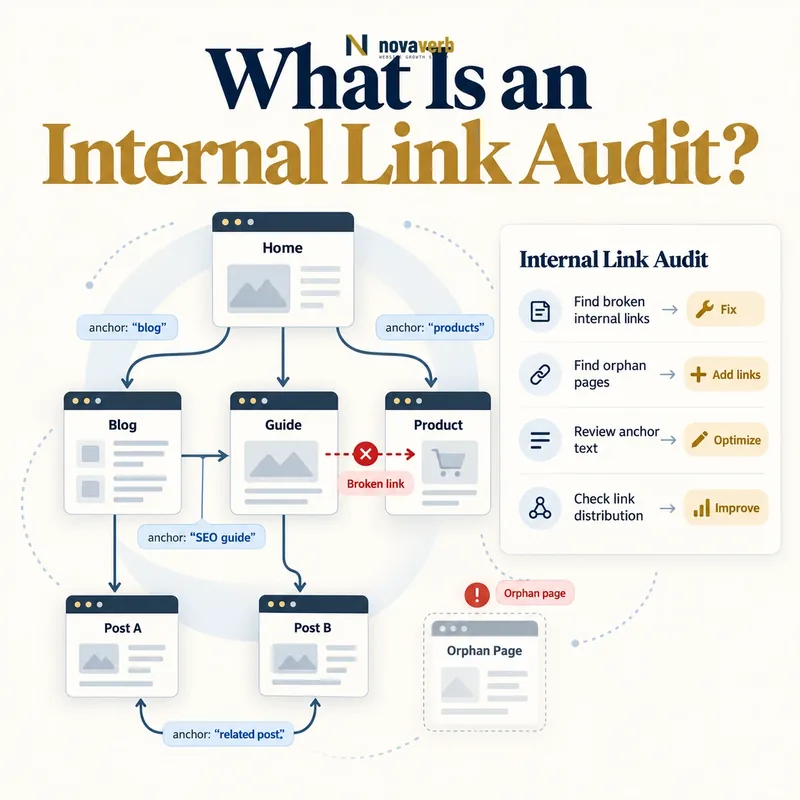
What Is an Internal Link Audit?
The audit maps exact source URL, destination URL, link placement and anchor, then groups issues such as broken destinations, redirect chains, orphan pages, dead ends, excessive depth, duplicated templates and irrelevant paths.
A useful audit produces prioritized actions with owners and verification steps. A spreadsheet of every internal link is an input, not the finished outcome.
- Defined website and subdomain scope
- Rendered page crawl
- Source-to-destination edges
- Anchor and placement context
- Status and redirect evidence
- Graph and page classifications
- Priority, owner and action
- Post-fix verification
- Define the website scope and canonical host.
- Crawl every allowed internal destination.
- Build the source-to-destination link graph.
- Classify issues by evidence and affected pages.
- Fix the highest-value paths and crawl again.
| Audit layer | Question | Output |
|---|---|---|
| Technical | Do links resolve correctly? | Errors and redirects |
| Graph | How are pages connected? | Depth, inlinks and outlinks |
| Context | Why does each link exist? | Anchor and placement |
| Journey | Can users continue usefully? | Entry and exit paths |
| Architecture | Do hubs and clusters match intent? | Structural findings |
| Operations | Who fixes what first? | Prioritized queue |
An internal link audit connects exact link evidence with page purpose, graph role and accountable repair decisions.
What Data Does an Internal Link Audit Need?
Keep raw link edges beneath page-level summaries. A count cannot show which template created links, whether anchors are useful or whether one broken destination affects thousands of pages.
Join crawl results with sitemap, analytics, search landing pages, server logs, CMS records and conversion data where relevant. Label source and date because each system has different coverage and freshness.
- Source URL and page type
- Raw and final destination
- Response and redirect chain
- Canonical and index state
- Anchor or linked element
- Placement and template
- Rendered visibility
- Inlink, outlink and depth metrics
- Traffic, search and conversion evidence
- Start with a fresh first-party crawl.
- Normalize URLs without merging distinct pages.
- Record every source page, destination and anchor.
- Join page status, canonical and indexability signals.
- Preserve the crawl timestamp for later comparison.
| Data field | Why retain it | Decision supported |
|---|---|---|
| Source URL | Exact link origin | Template or content fix |
| Final destination | True user landing | Redirect and relevance check |
| Anchor | User expectation | Copy improvement |
| Placement | Navigation, body or footer | Context classification |
| Page type | Group shared behavior | Batch repair |
| Performance | Measure page value | Priority |
| Verification date | Evidence freshness | Retest cadence |
A trustworthy audit preserves exact edges and joins them with page, template and first-party outcome evidence.
What Problems Should an Internal Link Audit Find?
Not every unusual pattern is an error. Legal footers naturally repeat, confirmation pages can be terminal and deep archival content may have limited prominence. Classify page purpose before assigning severity.
Use orphan page, dead-end page and link rot definitions consistently so one URL does not receive conflicting labels from different teams.
- Broken internal destinations
- Redirect chains and loops
- Orphan pages
- Dead-end pages
- Isolated content clusters
- Excessive crawl depth
- Noncanonical destinations
- Weak or misleading anchors
- Overlinked templates
- Missing hubs and breadcrumbs
- Confirm the issue against the live source page.
- Check the destination response and canonical state.
- Identify every affected source before counting impact.
- Separate broken behavior from intentional navigation.
- Assign the repair to the page or template owner.
| Finding | Evidence | Typical action |
|---|---|---|
| Broken link | Failed final destination | Repair or remove |
| Redirect hop | 3xx to equivalent page | Update source URL |
| Orphan page | Known URL absent from graph | Connect, merge or retire |
| Dead end | No useful internal exits | Add next path |
| Deep valuable page | High shortest-path depth | Improve architecture |
| Noncanonical target | Link points to duplicate | Link to canonical |
| Template excess | Repeated low-value edges | Refine component |
Consistent issue definitions keep technical, content and architecture teams working from the same graph evidence.
How Do You Crawl Internal Links Correctly?
Include canonical host rules, subdomain decisions, URL parameters, case, trailing slashes and fragments in the crawl specification. A small normalization mistake can split one page into many nodes or merge distinct URLs.
Test desktop, mobile, authenticated and unauthenticated states when templates vary. A component can create a healthy graph for one user state and dead ends for another.
- Define host, protocol and subdomain scope
- Choose approved crawl entry points
- Set parameter and fragment rules
- Render JavaScript-dependent pages
- Record raw and final destinations
- Resolve redirects and canonicals
- Capture anchor, placement and template
- Repeat for important user states
- Store crawl time and configuration
- Validate representative pages manually
- Rendered and raw HTML link destinations where available
- Redirect chains and final response codes
- Canonical targets and robots directives
- Navigation, body, footer and template link locations
- Crawl timestamps and explicit exclusions
| Crawl control | Why it matters | Failure prevented |
|---|---|---|
| Scope | Defines internal graph | Cross-site contamination |
| Rendering | Finds client-generated links | False dead ends |
| Normalization | Creates stable nodes | Duplicate inflation |
| Redirect resolution | Finds true destinations | Hidden chains |
| User state | Captures template variation | Missing authenticated paths |
| Manual sample | Checks crawler interpretation | Confident wrong report |
A reproducible audit records the crawl rules and verifies representative rendered pages before trusting graph-wide conclusions.
How Do You Analyze Internal Link Structure?
Raw link count can be dominated by global navigation and footers. Separate unique source pages, template links and contextual body links so a page with thousands of repeated edges is not mistaken for one with broad editorial support.
Use crawl depth as a graph measure, not a universal quality score. A page may be deep because it is archival, while a key conversion or reference page may need a shorter relevant path.
- Calculate reachability from primary entry points
- Measure shortest internal path
- Count unique source pages
- Separate template and contextual links
- Identify hubs and isolated clusters
- Map anchors to destination intent
- Compare important pages with peers
- Overlay traffic, search and conversion value
- Flag structural exceptions
- Open representative paths manually
- Pages receiving no crawlable internal links
- Important destinations buried behind long paths
- Templates creating repeated low-value links
- Anchors that do not explain destination context
- Clusters that are isolated from their parent topics
| Graph metric | What it describes | Caution |
|---|---|---|
| Inlinks | Incoming edge volume | Templates can inflate |
| Unique source pages | Breadth of internal support | Page relevance still matters |
| Outlinks | Available continuation paths | More is not always better |
| Depth | Shortest path from entry | Depends on scope |
| Hub score | Connection role | Needs topic context |
| Cluster isolation | Weak main-graph connection | Can be intentional |
Graph metrics become useful only after template repetition, page purpose and real user value are included in the interpretation.
How Do You Prioritize Internal Link Findings?
A navigation bug affecting every product page outranks one old blog redirect. A valuable orphan with backlinks and conversions may outrank thousands of low-value parameter URLs.
Group findings into incidents, batch template fixes, page-level improvements, architecture projects and intentional exceptions. Each action should name a source, destination or component and a testable completion condition.
- Verify the issue on live representative pages
- Measure affected pages and users
- Identify shared template or release cause
- Assess traffic, search and conversion value
- Check backlinks to affected destinations
- Estimate repair confidence and risk
- Group duplicate findings into one event
- Score impact and effort
- Assign owner and deadline
- Define post-fix verification
- User-facing links that return errors
- Important pages with no reliable discovery path
- Redirect chains repeated across shared templates
- Priority destinations placed unnecessarily deep
- Large link patterns whose fix affects many sources
| Priority factor | High | Low |
|---|---|---|
| Technical severity | Broken primary journey | One extra redirect |
| Reach | Shared component | Single low-use page |
| Page value | Revenue, search or backlinks | No measurable use |
| User impact | Task blocked | Minor wording issue |
| Confidence | Repeated live evidence | One uncertain crawl |
| Repair leverage | One fix restores many edges | Manual isolated change |
The best priority queue groups root causes and ranks restored user value rather than sorting by the largest issue count.
How Do You Fix Internal Link Problems?
Choose links because they advance the reader’s task, not because a tool recommends a target count. A relevant contextual path is more defensible than a mass-added footer link intended only to change metrics.
Update shared components at their source and verify every page type they reach. For migrations, link directly to final canonical destinations and preserve only redirects that serve valid external or historical paths.
- Repair broken source-to-destination paths
- Update links to final canonical URLs
- Add relevant inlinks to valuable orphans
- Add useful exits to dead ends
- Create or improve topic hubs
- Rewrite misleading anchors
- Reduce irrelevant template repetition
- Merge or retire obsolete pages
- Test mobile and user-state variants
- Recrawl affected scope
- Replace broken destinations at their source
- Link orphaned pages from genuinely relevant content
- Shorten unnecessary redirect chains
- Use descriptive anchors that fit the sentence
- Remove links that provide no navigation value
| Problem | Fix | Verification |
|---|---|---|
| Broken destination | Restore, replace or remove | Valid relevant final page |
| Redirect chain | Update source to final URL | Direct path |
| Orphan page | Add meaningful hub or contextual link | New crawlable inlink |
| Dead end | Add relevant onward path | User journey continues |
| Weak anchor | Clarify destination promise | Context and target align |
| Isolated cluster | Create main-graph connection | Hub path exists |
| Template excess | Refine shared component | Regression radius checked |
An internal link is fixed when its source context, technical path and final destination work together for the intended user journey.
How Do You Monitor Internal Links After an Audit?
Compare the same crawl scope and configuration over time. Track newly introduced issues separately from historical debt so releases can be evaluated without hiding regressions inside a large baseline.
Use the SEO tools system to connect findings, owners and retests. Cross-check externally linked destinations with Backlinks Explorer and the free Backlink Checker before retiring valuable URLs.
- Save the baseline crawl configuration
- Record issue and graph metrics
- Retest completed fixes
- Run checks after navigation and template releases
- Compare new versus existing issues
- Monitor linked high-value destinations
- Alert the responsible component owner
- Review intentional exceptions
- Measure user and search outcomes
- Run periodic architecture reviews
- Previously failing source and destination pairs
- Newly created orphan or dead-end pages
- Redirects introduced by migrations or publishing
- Changes in crawl depth for priority destinations
- Template changes that alter sitewide link patterns
| Monitoring event | Check | Success evidence |
|---|---|---|
| Content publish | Inlinks and useful exits | Page connected |
| Migration | Redirects and final links | No broken journey |
| Template release | Graph and rendered variants | No widespread regression |
| Page retirement | Internal and external destinations | Valid replacement plan |
| Routine crawl | New issue delta | Debt does not grow silently |
| Architecture change | Depth and cluster reachability | Important paths preserved |
Start with the free backlink checker for a representative source review, use the SEO tools system to connect crawl findings with repair work, and review Novaverb pricing when comparing ongoing monitoring with a one-time audit.
A link audit becomes a durable system when new releases are checked against a reproducible graph baseline and every regression has an owner.