
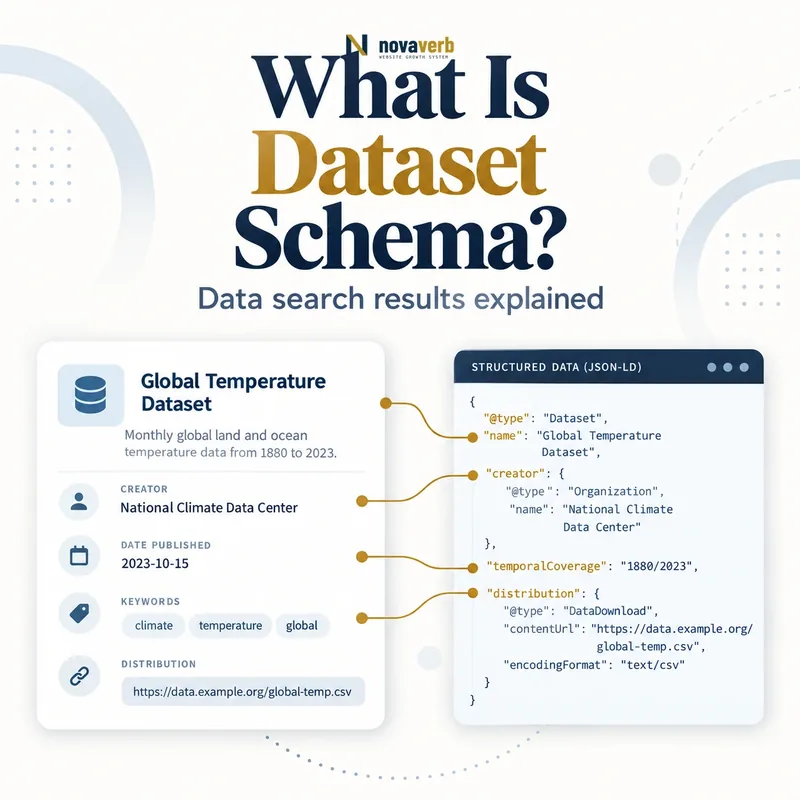
What Is Dataset Schema?
A dataset can be a CSV, table collection, proprietary file, image collection, trained model resource or another structured object intended for analysis. The Dataset node describes metadata about the collection rather than embedding every observed value. A landing page gives users context, documentation, access conditions and provenance.
Markup does not make private exports public safely, prove research quality or guarantee discovery. The described resource must genuinely exist, and access, licensing, update cadence and limitations need to match the user experience.
- Identify the exact page, asset, entity or relationship described in this section.
- Inspect the live implementation and retain the observed evidence.
- Compare the observation with the intended meaning and its primary specification.
- Correct any mismatch, then retest the live result.
- Record the accountable owner and review date.
| Property or node | Represents | Evidence source |
|---|---|---|
| Dataset | Organized data collection | Canonical landing page |
| name | Unique dataset title | Publication record |
| description | Scope and purpose | Documentation |
| creator | Responsible entity | Provenance record |
| license | Use and reuse terms | Legal policy |
| distribution | Available data package | Release storage |
| temporalCoverage | Time period represented | Methodology |
| spatialCoverage | Geographic extent | Collection design |
| variableMeasured | Measured fields or concepts | Data dictionary |
- Describe a genuine analyzable collection.
- Publish clear provenance and access terms.
- Keep metadata separate from the raw observations.
Primary specification: Schema.org definition for Dataset.
Dataset schema is a discovery record for a real data collection, not a label for any page containing numbers or a private export.
How Does Dataset Schema Work?
A parser reads the Dataset name and description, then follows relationships to a DataCatalog, DataDownload files, identifiers and coverage. One dataset can have several distributions such as CSV, JSON and Parquet without becoming several distinct datasets. Versioned releases may remain separate identities or connected editions according to the publication policy.
Syntax validation cannot verify that a download contains the documented columns, that a license grants the stated rights or that geographic coverage is complete. Reliable implementation comes from the same release, legal and documentation sources that govern the actual data.
- The exact page, asset, entity or relationship covered by this section
- The live implementation rather than an editor-only preview
- The primary specification or first-party record defining the expected behavior
- The validation result, accountable owner and review date
| Stage | Graph action | Failure example |
|---|---|---|
| Define | Choose one meaningful collection | Unrelated reports merged |
| Identify | Assign stable URL or identifier | Title used as unstable ID |
| Describe | Write specific scope | Generic keyword summary |
| Prove | Connect creator and provenance | Publisher confused with data source |
| License | Link exact usage terms | Homepage linked as license |
| Distribute | List real files and formats | Broken download URL |
| Maintain | Version metadata and files together | New file under old coverage dates |
- Define the collection and release scope.
- Assign a canonical landing page and ID.
- Document creator, methods and coverage.
- Connect license and distributions.
- Validate files and metadata together.
The graph works when one stable dataset identity connects accurate documentation, provenance, rights and functioning distributions.
Dataset vs DataCatalog vs DataDownload
A public SEO benchmark dataset can have one landing page and multiple DataDownload nodes for CSV and JSON files. A research portal that lists hundreds of datasets is a DataCatalog. Search, category or catalog pages should not recreate each dataset as a new identity when canonical landing pages already exist.
Use includedInDataCatalog to connect a dataset with its repository. A download is not the dataset itself because files can change format, compression or hosting while the underlying collection remains the same publication.
- Identify the exact page, asset, entity or relationship described in this section.
- Inspect the live implementation and retain the observed evidence.
- Compare the observation with the intended meaning and its primary specification.
- Correct any mismatch, then retest the live result.
- Record the accountable owner and review date.
| Resource | Schema type | Example |
|---|---|---|
| One SEO crawl benchmark collection | Dataset | Documented research release |
| Repository of public research releases | DataCatalog | Dataset discovery portal |
| CSV package | DataDownload | Comma-separated distribution |
| Parquet package | DataDownload | Columnar distribution |
| Dataset landing page | WebPage plus Dataset main entity | Documentation and access page |
| Catalog search result | Collection or search page | Not a new dataset |
| Dashboard visualization | CreativeWork or WebPage context | May use a dataset |
| Private customer export | Not public Dataset markup | Access-controlled operational data |
- Give each dataset a canonical landing page.
- Use DataDownload for each format.
- Use DataCatalog for the repository, not the file.
Model the collection, repository and downloadable packages as separate connected entities rather than interchangeable URLs.
Which Dataset Properties Matter Most?
Current supported dataset discovery guidance requires name and description. The description should explain what the data measures, unit or population, collection method, limitations and intended use at a level useful to a researcher. Unique names help distinguish regional, temporal and methodological releases.
Identifiers such as a DOI or repository ID preserve provenance. License should point to the exact version of the terms. Use creator for the entity that created the collection and publisher for the entity releasing it only when those roles differ. Connect organizations through Organization schema.
- The exact page, asset, entity or relationship covered by this section
- The live implementation rather than an editor-only preview
- The primary specification or first-party record defining the expected behavior
- The validation result, accountable owner and review date
| Property | Priority | Audit question |
|---|---|---|
| name | Required for supported discovery | Is it unique and descriptive? |
| description | Required for supported discovery | Does it explain scope and limitations? |
| identifier | High | Is it stable and resolvable? |
| creator | High | Who produced the data? |
| publisher | Situational | Who released the collection? |
| license | High for reuse | Are exact rights unambiguous? |
| datePublished | Useful | When did this release become public? |
| version | Useful | Which edition is represented? |
| variableMeasured | Useful | What fields or concepts are measured? |
- Create a unique dataset name.
- Document scope, method and limitations.
- Assign stable identifiers.
- Clarify creator, publisher and license.
- Add coverage, variables and version.
Start with a distinctive title and complete scope description, then add provenance, rights, coverage and distribution facts from authoritative records.
How Should Licenses and Provenance Be Marked Up?
A generic terms homepage is not a precise dataset license. Use a durable URL for the applicable Creative Commons, open-data or custom license version. If access is free but reuse is restricted, isAccessibleForFree and license still answer different questions.
Derived datasets should cite their source collections and transformation methodology. sameAs can connect the same dataset in another repository, not a related article or similar dataset. Creator, funder and publisher should reflect the actual data lifecycle rather than whichever brand hosts the landing page.
- Identify the exact page, asset, entity or relationship described in this section.
- Inspect the live implementation and retain the observed evidence.
- Compare the observation with the intended meaning and its primary specification.
- Correct any mismatch, then retest the live result.
- Record the accountable owner and review date.
| Metadata question | Property or record | Common error |
|---|---|---|
| Who created the data? | creator | Hosting platform claimed as creator |
| Who published this release? | publisher | Creator and publisher assumed identical |
| Who funded collection? | funder | Sponsor omitted or treated as author |
| What source was transformed? | isBasedOn or provenance documentation | Derived work presented as original |
| May users access without payment? | isAccessibleForFree | Confused with open license |
| May users reuse it? | license | No specific terms URL |
| Is this the same dataset elsewhere? | sameAs | Related study linked as same entity |
| Which release is cited? | identifier and version | Mutable latest URL only |
- Separate access from reuse rights.
- Distinguish creator, publisher and funder.
- Document derived-data sources and transformations.
Clear rights and provenance let users evaluate whether they may access, trust, reproduce and reuse the dataset.
How Should Coverage, Variables and Versions Be Described?
Temporal coverage describes the data period, not the publication date. A dataset released in 2026 may contain observations from 2020 through 2025. Spatial coverage can represent a country, state, coordinates or another defined place, but should not exaggerate sampling beyond the methodology.
Variable names need user-understandable labels and a linked data dictionary for codes, units, null behavior and transformations. Version changes should follow a documented policy: corrections, added periods, schema changes and methodology revisions may deserve different release treatment.
- The exact page, asset, entity or relationship covered by this section
- The live implementation rather than an editor-only preview
- The primary specification or first-party record defining the expected behavior
- The validation result, accountable owner and review date
| Concept | Strong metadata | Weak metadata |
|---|---|---|
| temporalCoverage | Explicit observation interval | Publication year only |
| spatialCoverage | Defined sampled geography | Worldwide without evidence |
| variableMeasured | Named concepts and units | Column1, Column2 |
| Data dictionary | Types, codes and null rules | No field definitions |
| version | Documented release identifier | Always latest |
| Revision notes | Changes and impact stated | File silently replaced |
| Sampling frame | Population and exclusions | Universal claim |
| Methodology | Collection and transformation steps | Tool name only |
- Separate observation and publication dates.
- State geographic and population scope.
- Define variables, units and missing values.
- Assign a version to material releases.
- Publish revision and methodology notes.
Coverage, variables and versioning make a dataset interpretable by separating what was observed from when and how the release was published.
How Should Dataset Downloads Be Structured?
Multiple formats can serve different users without changing the underlying Dataset identity. Content URLs should reach the file or documented access route rather than a broken session-dependent endpoint. If authentication or payment is required, state that clearly and do not claim free accessibility.
Large or frequently updated files benefit from checksums, byte size, compression details and release timestamps in the visible documentation, even when a particular property is not required for supported search discovery. Test downloads from a clean session.
- Identify the exact page, asset, entity or relationship described in this section.
- Inspect the live implementation and retain the observed evidence.
- Compare the observation with the intended meaning and its primary specification.
- Correct any mismatch, then retest the live result.
- Record the accountable owner and review date.
| Distribution case | Markup approach | Quality check |
|---|---|---|
| CSV file | DataDownload with text/csv or equivalent | Header matches dictionary |
| JSON file | DataDownload with JSON format | Schema documented |
| Parquet file | DataDownload with format identified | Reader compatibility stated |
| ZIP archive | State compression and contained format | Archive opens correctly |
| API access | Document access endpoint appropriately | Authentication and limits clear |
| Paid dataset | Represent access truthfully | No false free flag |
| Versioned release | Version-specific content URL | File does not mutate silently |
| Temporary signed URL | Prefer durable access landing route | Crawler is not given expired link |
- Use durable working access URLs.
- Label formats and versions accurately.
- Test downloads without privileged sessions.
A useful distribution record tells users exactly what file they can obtain, in which format, under which access conditions and for which release.
What Dataset Schema Mistakes Are Common?
Automated report pages are especially risky. A chart or SEO dashboard is not automatically a public dataset, and an internal crawl export may contain customer URLs, credentials, analytics or proprietary measurements. Public schema must never make access-controlled operational data discoverable.
Catalog templates can also duplicate the same Dataset identity across search pages, categories and landing pages. Use canonical pages and sameAs deliberately. Validation cannot detect false rights, leaked data or file-content mismatch.
- The exact page, asset, entity or relationship covered by this section
- The live implementation rather than an editor-only preview
- The primary specification or first-party record defining the expected behavior
- The validation result, accountable owner and review date
| Mistake | Risk | Correction |
|---|---|---|
| Article with one table marked Dataset | Wrong resource model | Use Article or WebPage |
| Generic repeated dataset name | Discovery ambiguity | Use unique scoped titles |
| License omitted or vague | Reuse uncertainty | Link exact terms |
| Broken or expiring contentUrl | Failed access | Use durable route |
| Publication date used as coverage | Misleading period | Separate date concepts |
| Catalog copies create new IDs | Identity fragmentation | Canonicalize landing page |
| Private crawl export marked public | Customer data leak | Remove markup and enforce access |
| File columns differ from metadata | Research error | Validate distribution against dictionary |
- Confirm public dataset eligibility.
- Check privacy and access boundaries.
- Reconcile identity and canonical copies.
- Verify rights, coverage and versions.
- Download and inspect every distribution.
Dataset markup fails when the resource is not a real public collection or its identity, rights, files and privacy controls do not agree.