
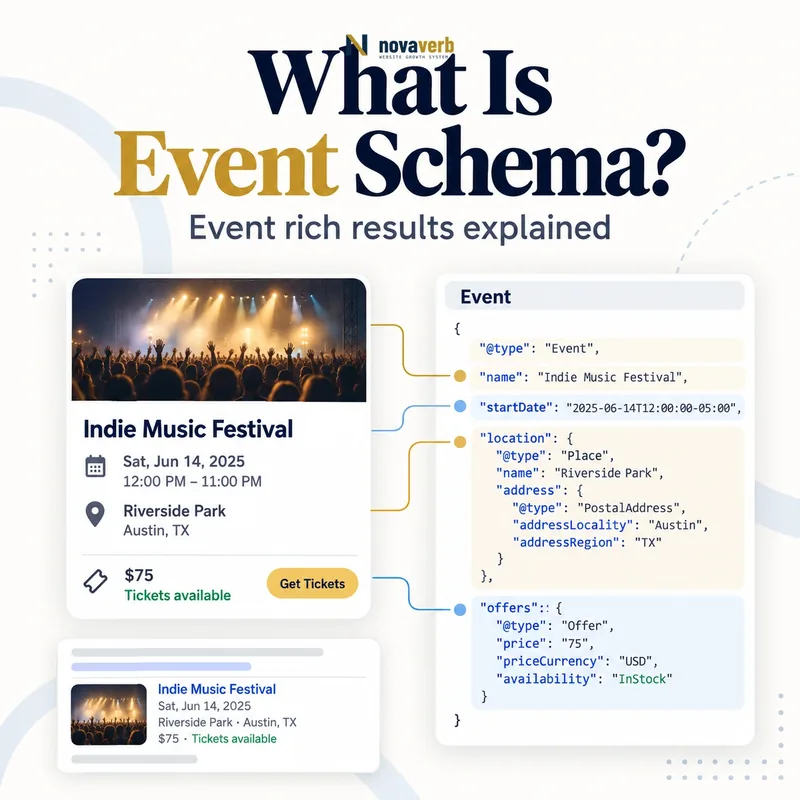
What Is Event Schema?
The Event type covers concerts, conferences, workshops, festivals, sports and other scheduled experiences, with more specific subtypes available. One canonical leaf page should describe one event or performance in enough detail for a person to decide whether and how to attend.
Markup does not turn business hours, discounts, travel packages or ordinary product availability into events. It cannot verify that tickets exist, force a search feature or rescue inaccurate dates and venues. Every structured fact must match the visible event and operational systems.
- Identify the exact page, asset, entity or relationship described in this section.
- Inspect the live implementation and retain the observed evidence.
- Compare the observation with the intended meaning and its primary specification.
- Correct any mismatch, then retest the live result.
- Record the accountable owner and review date.
| Property | Represents | Evidence source |
|---|---|---|
| name | Specific event title | Published program |
| startDate | Event start with timezone | Scheduling system |
| endDate | Event end | Scheduling system |
| location | Venue or supported event location | Venue contract or platform |
| eventAttendanceMode | Offline, online or mixed format | Event operations |
| eventStatus | Scheduled, moved, postponed or canceled state | Organizer decision |
| organizer | Entity responsible for event | Event record |
| performer | Featured participant | Program agreement |
| offers | Ticket or registration access | Ticketing system |
- Model one real scheduled event.
- Use operational dates, venue and status.
- Connect only genuine tickets and organizers.
Primary specification: Schema.org definition for Event.
Event schema is a machine-readable schedule for a genuine attendable experience, not a promotional wrapper for products or recurring business activity.
How Does Event Schema Work?
A parser reads the name, start time and location, then evaluates supporting properties such as image, description and offers. A physical venue uses Place and PostalAddress. Schema.org also defines VirtualLocation and mixed attendance, although individual search features can support a narrower subset.
Syntax validation cannot prove the venue is booked, the organizer authorized the listing or a ticket remains available. Event, venue and ticketing systems must stay synchronized. Updates should change status and schedule without silently replacing the event identity.
- The exact page, asset, entity or relationship covered by this section
- The live implementation rather than an editor-only preview
- The primary specification or first-party record defining the expected behavior
- The validation result, accountable owner and review date
| Stage | Graph action | Failure example |
|---|---|---|
| Create | Assign event ID and URL | Series page used as one event |
| Schedule | Set dated start and end | Timezone omitted |
| Locate | Connect real venue | City used without street address |
| Classify | Choose event subtype and attendance mode | Webinar presented as physical |
| Sell | Connect accurate Offer | Sold-out ticket shown available |
| Update | Change status and previous date | Postponed event duplicated |
| Close | Preserve truthful completed or canceled state | Old registration remains active |
- Confirm a single public event.
- Assign canonical identity and schedule.
- Map venue and attendance mode.
- Connect organizer and ticket source.
- Maintain status through completion.
The graph works when one stable event entity mirrors the schedule, access and status users see on the canonical page.
Which Event Schema Properties Matter Most?
The event name should contain the actual title rather than generic labels, prices, URLs or calls to action. Date values need ISO 8601 formatting and a timezone offset when time is known. A physical Place should include the venue name and complete address.
Use the most specific truthful event subtype. Connect the organizer through the business identity described in Organization schema. Optional data is useful only when it stays synchronized with the registration and scheduling source.
- Identify the exact page, asset, entity or relationship described in this section.
- Inspect the live implementation and retain the observed evidence.
- Compare the observation with the intended meaning and its primary specification.
- Correct any mismatch, then retest the live result.
- Record the accountable owner and review date.
| Property | Priority | Audit question |
|---|---|---|
| name | Required for supported event experience | Is it a specific visible title? |
| startDate | Required | Does time and timezone match operations? |
| location | Required for current supported experience | Is the full physical venue accurate? |
| endDate | Useful | Does it represent real completion? |
| eventStatus | High lifecycle value | Is the latest operational state shown? |
| eventAttendanceMode | Useful Schema.org context | Is format offline, online or mixed? |
| image | Recommended | Is it representative and accessible? |
| description | Recommended | Can users understand the event? |
| offers | Recommended for registration | Does ticket access work? |
- Use a unique descriptive event name.
- Publish exact timezone-aware dates.
- Verify venue and ticket access.
Prioritize specific identity, time and place before enriching an event with media, participants and ticket details.
How Should Event Dates and Time Zones Be Marked Up?
Timezone handling is essential for US events because daylight saving rules can change the offset. The schedule source should store a time-zone identifier and generate the correct offset for the event date rather than hardcoding a winter offset for a summer event.
A multi-day event can use one start and end when admission covers the continuous program. Separate performances with distinct tickets or attendance choices should use separate Event entities. Do not use an all-day date when the event has a known public start time.
- The exact page, asset, entity or relationship covered by this section
- The live implementation rather than an editor-only preview
- The primary specification or first-party record defining the expected behavior
- The validation result, accountable owner and review date
| Schedule case | Markup approach | Quality check |
|---|---|---|
| One timed session | Start and end DateTime with offset | Matches visible local time |
| All-day event | Date when genuinely all day | No hidden start time |
| Multi-day conference | Opening start and final end | One continuous program |
| Separate ticketed performances | Separate Event per performance | Each has unique URL or identity |
| Postponed event | Status plus previousStartDate when known | New date handled truthfully |
| Rescheduled event | Updated start/end and appropriate status | Same event identity retained |
| Canceled event | EventCancelled status | Do not erase history silently |
| Daylight saving boundary | Correct offset for each date | No fixed-zone assumption |
- Store the event’s local time zone.
- Generate the correct date-specific offset.
- Separate distinct ticketed performances.
- Preserve previous dates on reschedule.
- Test displayed and structured time together.
Accurate timezone-aware dates let users understand when the event occurs and prevent schedule ambiguity across regions and daylight changes.
How Should Online and Hybrid Events Be Handled?
An online webinar can still be modeled semantically as an Event with OnlineEventAttendanceMode and a controlled access location. A hybrid conference can include both a Place and VirtualLocation with MixedEventAttendanceMode. Keep private access URLs out of public markup when registration is required.
Search consumers differ. Generic schema validity does not establish eligibility for every event experience. Teams should document why they maintain online event markup and measure actual discovery rather than repeating outdated screenshots or unsupported CTR forecasts.
- Identify the exact page, asset, entity or relationship described in this section.
- Inspect the live implementation and retain the observed evidence.
- Compare the observation with the intended meaning and its primary specification.
- Correct any mismatch, then retest the live result.
- Record the accountable owner and review date.
| Attendance model | Schema.org representation | Current Event Search expectation |
|---|---|---|
| Physical-only event | OfflineEventAttendanceMode plus Place | Potentially eligible when other rules pass |
| Online-only webinar | OnlineEventAttendanceMode plus VirtualLocation | Not supported by current physical-event experience |
| Hybrid conference | MixedEventAttendanceMode plus Place and VirtualLocation | Physical component may support eligibility |
| Private stream URL | Use registration or safe public route | Do not expose access token |
| Recorded on-demand video | VideoObject, not scheduled event by default | Not a live event |
| Recurring office hours | Separate scheduled sessions when real | Business hours are not events |
| Virtual product demo session | Online Event when genuinely scheduled | No physical-event promise |
| Livestream with venue audience | Mixed mode when both are real | Venue and online facts must agree |
- Model actual attendance mode.
- Protect private streaming access.
- Never equate valid schema with feature eligibility.
Use accurate online or mixed Schema.org modeling, while separating semantic validity from the physical-location rules of a specific search feature.
How Should Event Tickets and Offers Be Marked Up?
A free event can use a zero price when registration or attendance is genuinely free. A waitlist is not InStock, and a sold-out event should update availability promptly. Multiple ticket tiers can be represented when the page and consumer support them without mixing benefits or dates.
Do not put promotional phrases in the event name. Early-bird pricing needs valid dates and replacement when it expires. Ticket URLs should reach the specific event offer rather than a generic homepage, broken checkout or private administrative route.
- The exact page, asset, entity or relationship covered by this section
- The live implementation rather than an editor-only preview
- The primary specification or first-party record defining the expected behavior
- The validation result, accountable owner and review date
| Ticket case | Markup approach | Quality check |
|---|---|---|
| Free registration | Offer with price 0 and currency | No hidden mandatory fee |
| Paid general admission | Exact price and currency | Checkout matches |
| Multiple tiers | Distinct Offers when supported | Benefits and inventory remain clear |
| Early-bird ticket | Offer validity dates | Expired price removed |
| Sold out | OutOfStock or appropriate availability | Registration cannot proceed |
| Waitlist | Truthful availability and page language | Not presented as guaranteed ticket |
| At-door sales | Represent only when operationally supported | Availability is current |
| Third-party ticketing | Specific authorized Offer URL | Event identity and price agree |
- Identify the public ticket inventory.
- Set price, currency and availability.
- Connect the event-specific checkout.
- Expire promotional offers on time.
- Test registration from a clean session.
Offer markup is useful only when price, availability and registration destination describe the ticket a user can actually obtain.
How Should Event Status Changes Be Managed?
Cancellation does not always require deleting the page. Keeping the canonical event page with EventCancelled can help ticket holders understand what happened. Postponed events may lack a new date; communicate uncertainty visibly instead of inventing a placeholder schedule.
When a date changes, retain the same event identity and use previousStartDate where appropriate. If the venue or attendance mode changes, update location and access details together. Ticket refunds and new registration terms belong in visible user guidance.
- Identify the exact page, asset, entity or relationship described in this section.
- Inspect the live implementation and retain the observed evidence.
- Compare the observation with the intended meaning and its primary specification.
- Correct any mismatch, then retest the live result.
- Record the accountable owner and review date.
| Change | eventStatus approach | Page action |
|---|---|---|
| Canceled | EventCancelled | Explain cancellation and ticket policy |
| Postponed without new date | EventPostponed | Remove false new date |
| Rescheduled | Appropriate rescheduled status and previous date | Show old and new schedule |
| Moved online | EventMovedOnline where supported by model | Update attendance and access |
| Venue change | Scheduled status may remain | Replace Place and directions |
| Sold out | Offer availability change | Keep event schedule truthful |
| Completed | Past dates and inactive offers | Preserve archive if useful |
| New separate performance | New Event identity | Do not overwrite original occurrence |
- Keep the canonical event identity stable.
- Update status, date, venue and tickets together.
- Preserve clear attendee guidance.
Status markup should preserve event identity and communicate the exact operational change users need to act on.
What Event Schema Mistakes Are Common?
Calendars often generate one Event node on a list page and another on the detail page with different IDs. Recurring series can collapse many independently ticketed dates into one range. Ticket platforms and organizer sites may also disagree about price, status or venue.
Events must be real and publicly attendable under the applicable feature rules. Membership-only, invitation-only or misleading listings should not be promoted as generally bookable. Validation cannot prove admission, authorization or operational status.
- The exact page, asset, entity or relationship covered by this section
- The live implementation rather than an editor-only preview
- The primary specification or first-party record defining the expected behavior
- The validation result, accountable owner and review date
| Mistake | User or SEO risk | Correction |
|---|---|---|
| Coupon marked as Event | Wrong resource model | Use offer or promotion context |
| Business hours marked as Event | Artificial schedule entities | Use LocalBusiness hours |
| Generic name such as Webinar | Poor event identity | Use specific public title |
| Timezone missing | Wrong attendance time | Add date-specific offset |
| City-only location | Venue ambiguity | Use complete Place and address |
| Series collapsed into one Event | Ticket and date confusion | Separate occurrences |
| Canceled event remains scheduled | Failed attendance | Update eventStatus |
| Private stream link exposed | Access and security leak | Use safe registration route |
- Confirm each item is a genuine event.
- Reconcile names, dates and time zones.
- Verify venue, attendance and offers.
- Separate independently ticketed occurrences.
- Test cancellation and reschedule states.
Event markup fails when the scheduled experience, time, place, access or lifecycle is false, fragmented or stale.