
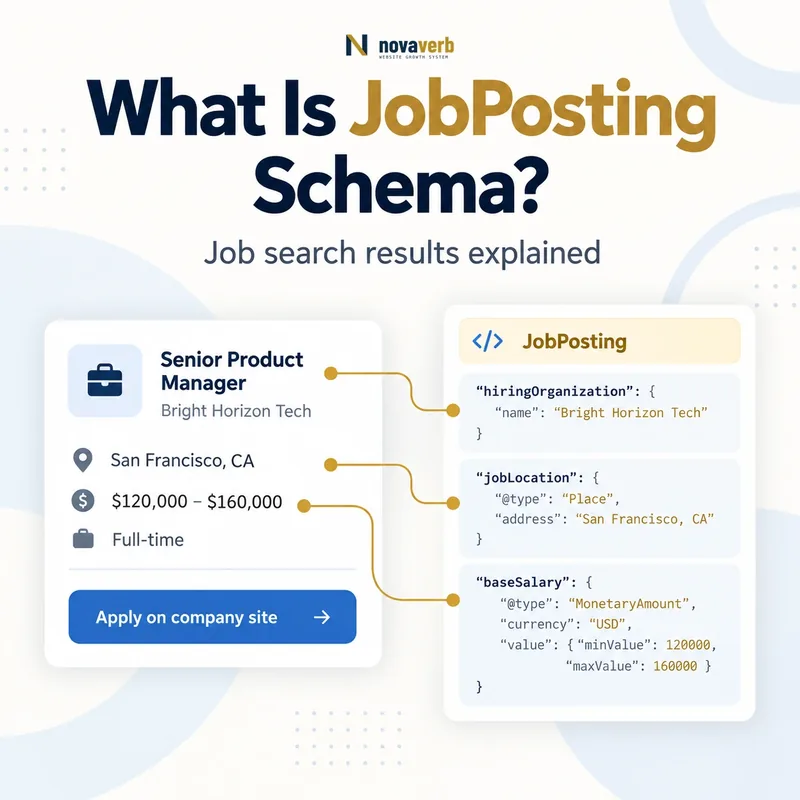
What Is JobPosting Schema?
The markup belongs on the most detailed page for a single job. It helps a search system distinguish the role from the careers site, hiring organization and location. The structured fields should come from the same recruiting source that powers the visible description and application flow.
JobPosting markup does not create a vacancy, authorize recruiting for another company or guarantee inclusion in a job-search experience. Fake roles, resume collection without an open position, expired listings and applicant fees remain unacceptable even when the JSON-LD validates.
- Identify the exact page, asset, entity or relationship described in this section.
- Inspect the live implementation and retain the observed evidence.
- Compare the observation with the intended meaning and its primary specification.
- Correct any mismatch, then retest the live result.
- Record the accountable owner and review date.
| Property | Represents | Evidence source |
|---|---|---|
| title | Actual role title | Approved requisition |
| description | Complete job details | Recruiting record |
| datePosted | Original public posting date | ATS publication event |
| validThrough | Application expiration | Requisition lifecycle |
| hiringOrganization | Authorized employer | Corporate recruiting record |
| jobLocation | Physical work location | Role approval |
| jobLocationType | Remote work mode | Employment policy |
| applicantLocationRequirements | Eligible applicant geography | Hiring and payroll policy |
| baseSalary | Visible compensation range | Approved compensation band |
- Represent one genuine open role.
- Source fields from the recruiting system.
- Keep application and expiration status synchronized.
Primary specification: Schema.org definition for JobPosting.
JobPosting schema is a machine-readable record for one real, open and directly applicable role - not a recruiting advertisement template.
How Does JobPosting Schema Work?
A crawler reads the rendered page and compares the structured job with visible information. Required fields such as title, description and datePosted establish the vacancy, while recommended fields improve filtering and candidate understanding. The hiring organization should reference the real authorized employer.
Syntax validity cannot prove a requisition is open, salary is approved or applicants are allowed from a stated location. The ATS, HR policy and application endpoint remain authoritative. Automation should remove or expire markup as soon as the position closes.
- The exact page, asset, entity or relationship covered by this section
- The live implementation rather than an editor-only preview
- The primary specification or first-party record defining the expected behavior
- The validation result, accountable owner and review date
| Stage | Graph action | Failure example |
|---|---|---|
| Open | Create from approved requisition | Evergreen resume pool marked as job |
| Publish | Set original datePosted | Date refreshes every crawl |
| Describe | Include complete visible details | Schema hides requirements |
| Locate | Add physical or remote rules | Headquarters used for remote role |
| Compensate | Map visible approved salary | Hidden range only in JSON-LD |
| Apply | Provide working path | Login required to read job |
| Close | Expire or remove markup | Filled role stays active |
- Approve and identify the requisition.
- Publish one canonical detail page.
- Map visible role and eligibility fields.
- Test the complete application flow.
- Expire the posting when hiring ends.
The graph works when one canonical job page mirrors the active requisition and its real employer, eligibility and application conditions.
Where Should JobPosting Schema Be Used?
A careers index can link to job detail pages but should not carry a JobPosting node for every listing. Each role needs its own readable description without requiring login. Multiple physical locations for the same approved requisition can be represented where the property supports them, but unrelated roles require separate pages.
Third-party boards may mark up authorized listings when their records are accurate and application paths work. A company must not publish jobs on behalf of another employer without authorization or use a vacancy as a lead-generation disguise.
- Identify the exact page, asset, entity or relationship described in this section.
- Inspect the live implementation and retain the observed evidence.
- Compare the observation with the intended meaning and its primary specification.
- Correct any mismatch, then retest the live result.
- Record the accountable owner and review date.
| Page situation | Use JobPosting? | Reason |
|---|---|---|
| Single open job detail | Yes | One complete active role |
| Careers listing page | No | Contains several jobs |
| Search results page | No | Dynamic list, not role detail |
| Talent community signup | No | No specific open position |
| Career fair invitation | No | Event, not vacancy |
| Authorized board listing | Potentially | Must represent real employer and job |
| Expired role archive | No active markup | Applications are closed |
| One role with approved locations | Yes with location array | Same requisition across locations |
- Keep markup off list and search pages.
- Require a public complete description.
- Do not disguise lead collection as hiring.
The eligible surface is one accessible leaf page for one real role with a working application route.
Which JobPosting Properties Matter Most?
The title must be the role title only. Do not add the company, salary, location, job code, “apply now” or keyword variants to manipulate discovery. The description should include responsibilities, qualifications, skills, hours, education and experience requirements that candidates can read on the page.
A requisition identifier can help deduplicate feeds and URLs. hiringOrganization can connect to the employer identity described through Organization schema. Optional fields should be omitted when the recruiting system cannot maintain them accurately.
- The exact page, asset, entity or relationship covered by this section
- The live implementation rather than an editor-only preview
- The primary specification or first-party record defining the expected behavior
- The validation result, accountable owner and review date
| Property | Priority | Audit question |
|---|---|---|
| title | Required | Is it only the concise role title? |
| description | Required | Is the complete job visible? |
| datePosted | Required | Is it the original public date? |
| hiringOrganization | High | Is this the authorized employer? |
| jobLocation | High for onsite or hybrid | Does it match the approved workplace? |
| jobLocationType | Required for fully remote representation | Is the role truly remote? |
| validThrough | High lifecycle control | When do applications close? |
| employmentType | Useful | Does classification match the role? |
| identifier | Useful | Is the requisition ID stable? |
- Use the approved role title.
- Publish the complete job description.
- Preserve original posting and closing dates.
- Identify employer and work location.
- Add stable requisition and employment details.
Prioritize complete visible job facts and lifecycle controls before adding optional filters or promotional properties.
How Should Remote and Hybrid Jobs Be Marked Up?
Remote does not automatically mean worldwide. Payroll registration, tax, employment authorization, time zones, security and team coverage may limit eligible states or countries. Represent only the geography approved by the employer and show those restrictions visibly.
A hybrid role is not a fully remote role merely because some days can be worked from home. Provide the actual office location and explain the on-site schedule in the description. Do not create fake city locations to capture regional searches.
- Identify the exact page, asset, entity or relationship described in this section.
- Inspect the live implementation and retain the observed evidence.
- Compare the observation with the intended meaning and its primary specification.
- Correct any mismatch, then retest the live result.
- Record the accountable owner and review date.
| Work arrangement | Markup approach | Quality check |
|---|---|---|
| Fully remote within United States | TELECOMMUTE plus Country requirement | Employer can hire in stated area |
| Remote in selected states | TELECOMMUTE plus approved AdministrativeArea values | Every state is visible and current |
| Worldwide remote | TELECOMMUTE with truthful broad eligibility | Operational hiring supports it |
| Hybrid role | Physical jobLocation plus description | On-site expectation is clear |
| On-site role | Physical jobLocation | No remote flag |
| Traveling field role | Base or service context described accurately | Do not invent storefronts |
| Temporary remote exception | Use approved permanent role model | Do not publish temporary perk as role type |
| Multiple offices | Approved location array | One requisition genuinely accepts each |
- Separate remote work from hiring geography.
- Model hybrid roles with real offices.
- Never manufacture regional locations.
Remote markup must reflect where the employee may work and where the employer can genuinely hire, not the geographic reach desired for SEO.
How Should Salary Be Included in Job Schema?
Do not place a salary in structured data while hiding it from candidates. A range should preserve minimum and maximum values from the approved compensation band. Hourly and annual amounts cannot be mixed without explicit conversion and policy. Bonuses, equity and commissions are not automatically base salary.
US pay-transparency duties vary by jurisdiction and change over time, so employers should obtain current legal guidance for the locations involved. Schema implementation should follow the approved public disclosure rather than attempt to decide what the law requires.
- The exact page, asset, entity or relationship covered by this section
- The live implementation rather than an editor-only preview
- The primary specification or first-party record defining the expected behavior
- The validation result, accountable owner and review date
| Compensation case | Markup approach | Avoid |
|---|---|---|
| Annual salary range | MonetaryAmount with min and max | One midpoint presented as exact |
| Hourly wage | Use HOUR unit | Annual number without basis |
| Fixed annual salary | Single approved value | Negotiable placeholder as fact |
| Commission role | Describe base separately when present | Total earning claim as baseSalary |
| Bonus eligible | Explain outside base salary as applicable | Adding bonus to base number |
| Equity package | Visible description | Invented cash equivalent |
| Location-based bands | Represent page-specific approved range | Mixing all markets into one range |
| Salary not approved for publication | Omit from schema | Hidden schema-only amount |
- Confirm the approved public compensation.
- Separate base salary from variable pay.
- Set currency and time unit.
- Match visible minimum and maximum values.
- Review jurisdictional duties with qualified counsel.
Compensation markup must mirror the approved visible base salary and its unit without substituting legal judgment or marketing estimates.
How Should Expired Job Postings Be Removed?
The right page experience depends on recruiting and content policy. A closed role can explain that applications ended and link to current openings, but active structured markup must not remain. An apply button should not lead to a generic talent pool while the page claims a specific vacancy is open.
Lifecycle automation should react to ATS closure events rather than wait for a periodic SEO audit. Update discovery systems promptly and keep sitemap last-modified values accurate. Redirect only when a truly equivalent active role or useful destination exists; avoid sending every expired job to the careers homepage without context.
- Identify the exact page, asset, entity or relationship described in this section.
- Inspect the live implementation and retain the observed evidence.
- Compare the observation with the intended meaning and its primary specification.
- Correct any mismatch, then retest the live result.
- Record the accountable owner and review date.
| Closed-job action | When it fits | Result |
|---|---|---|
| validThrough in past | Page remains as closed record | Signals application deadline passed |
| Remove JobPosting markup | Page retains useful non-job content | No active job entity |
| Return 404 | No continuing value | URL removed |
| Return 410 | Intentional permanent removal | Explicit gone status |
| Redirect to equivalent role | True replacement exists | User reaches relevant open role |
| Keep closed page with current jobs | Useful candidate guidance | Must state closed clearly |
| Generic careers redirect | Use cautiously | May confuse role-specific visitors |
| Indexing update notification | After closure change | Prompts faster recrawl |
- Use ATS closure as the trigger.
- Remove active apply claims immediately.
- Preserve only truthful useful closed-page experiences.
Closing the requisition must close the structured job and application path promptly, with a truthful user experience for any remaining URL.
What JobPosting Schema Mistakes Are Common?
ATS feeds and careers templates often drift. A role may close in one system while cached JSON-LD stays live. Location arrays can merge unrelated requisitions, and recurring jobs can refresh datePosted every day to appear new. These are content-truth failures even when syntax passes.
Applicant safety matters. Jobs should not require payment, impersonate organizations or collect resumes without an open position. Validate the end-to-end candidate journey, including mobile forms, accessibility and confirmation, rather than stopping at a rich-result test.
- The exact page, asset, entity or relationship covered by this section
- The live implementation rather than an editor-only preview
- The primary specification or first-party record defining the expected behavior
- The validation result, accountable owner and review date
| Mistake | Candidate or SEO risk | Correction |
|---|---|---|
| Expired role remains active | Wasted applications | Expire or remove immediately |
| Job list carries individual nodes | Policy violation | Use detail pages only |
| Title includes location and salary | Keyword manipulation | Use concise role title |
| Salary only in JSON-LD | Hidden material fact | Show it or omit markup |
| Remote role uses fake cities | Misleading eligibility | Use remote properties truthfully |
| datePosted refreshes automatically | False freshness | Preserve original publication date |
| Employer not authorized | Fraud or impersonation | Verify recruiting authority |
| Apply route broken or gated | No usable application path | Repair public flow |
- Reconcile every active requisition.
- Inspect page scope, title and description.
- Verify employer, location and salary.
- Test expiration and cache behavior.
- Complete the application as a candidate.
Job markup fails when the vacancy, employer, eligibility, compensation or application experience is false, stale or incomplete.