
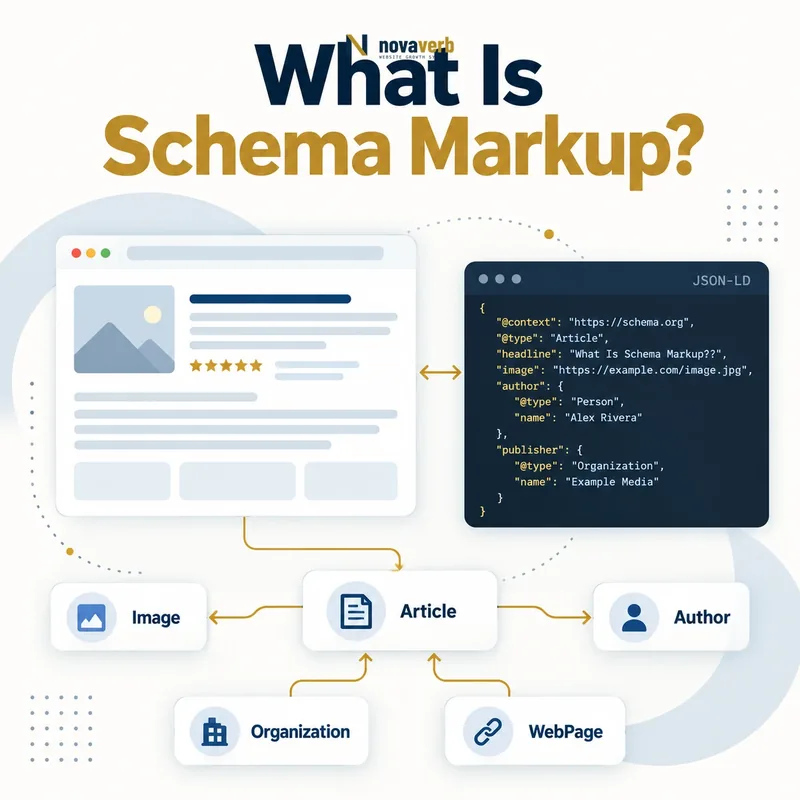
What Is Schema Markup?
Normal HTML explains how content is displayed, while structured data can state that a block describes a Product, Article, Organization, Person, Event, VideoObject or another defined type. Properties identify facts such as a name, image, author, date, offer or address. Connected items can form a graph rather than isolated labels.
Schema markup does not change the visible page by itself and does not guarantee rankings or enhanced search presentation. Its job is clarity. The markup must describe content people can actually verify on the page and should use the most specific accurate type supported by the vocabulary and intended consumer.
- Frame the decision raised by What Is Schema Markup.
- Confirm its value type and the object it describes.
- Compare the markup with visible page information.
- Correct the source data or template without inventing values.
- Validate the rendered result and monitor future changes.
| Concept | Meaning | Example |
|---|---|---|
| Vocabulary | Shared definitions of types and properties | Schema.org |
| Type | Kind of entity or creative work | Product |
| Property | Attribute or relationship | name or offers |
| Value | Text, number, URL or nested item | InStock or an Offer object |
| Syntax | How data is embedded or expressed | JSON-LD |
| Graph | Connected set of entities | Article linked to author and publisher |
- Describe facts that are visible and true.
- Use specific types only when they fit.
- Model relationships consistently across pages.
Schema markup turns visible page facts into an explicit entity-and-property model without replacing the underlying content.
The decision for What Is Schema Markup should rest on live, traceable evidence and a verified follow-up check.
How Does Schema Markup Work?
A parser reads the page and finds JSON-LD scripts, Microdata attributes or RDFa attributes. It resolves each item’s type, properties, identifiers and nested relationships. A product record might connect the page’s product to its brand, image and offer, while an article record might connect the work to its author and publisher.
Different consumers decide independently which types and fields they use. A syntactically valid graph can still be ineligible for a particular presentation, and an eligible graph may not be displayed every time. Validation should therefore cover both vocabulary correctness and consumer-specific requirements without conflating either with guaranteed outcomes.
- Evidence for How Does Schema Markup Work: the live structured-data entity and property relationship
- The expected value type and any nested object
- Visible page information that supports the structured value
- Related offer or catalog fields needed for interpretation
- A fresh validation result after the page changes
| Stage | System action | Failure example |
|---|---|---|
| Render | Page outputs structured data | Script missing on one template |
| Parse | Syntax is decoded | Malformed JSON or attributes |
| Resolve | Types and properties are recognized | Misspelled property |
| Connect | Entity relationships form a graph | Duplicate organizations with no shared ID |
| Compare | Markup is checked against page | Offer price differs visibly |
| Evaluate | Consumer applies feature rules | Required field absent |
| Present | Eligible result may be enhanced | Presentation still not guaranteed |
- Choose the entity represented by the page.
- Map visible facts to properties.
- Connect related entities with stable identifiers.
- Validate syntax, parity and eligibility.
The workflow is encode, parse, connect and evaluate - with visible-data parity required from end to end.
The decision for How Does Schema Markup Work should rest on live, traceable evidence and a verified follow-up check.
Schema Markup vs Structured Data vs Rich Results
These terms are related but not interchangeable. JSON-LD can carry Schema.org structured data, but JSON-LD can also represent other vocabularies. Schema.org defines far more types and properties than any one search feature uses. A valid type is not automatically an eligible rich-result type.
Rich-result requirements can change, and each consumer has its own field and policy rules. Build the core graph around durable business facts, then add the fields required by a current presentation only when the page supports them honestly. This separation makes the data useful beyond one transient feature.
- Frame the decision raised by Schema Markup vs Structured Data vs Rich Results.
- Confirm its value type and the object it describes.
- Compare the markup with visible page information.
- Correct the source data or template without inventing values.
- Validate the rendered result and monitor future changes.
| Term | Scope | Key question |
|---|---|---|
| Structured data | Any machine-readable facts | Can a parser extract the meaning? |
| Schema.org | Shared vocabulary | Are the type and properties defined? |
| Schema markup | Vocabulary implemented on page | Does markup describe visible content? |
| JSON-LD | Serialization syntax | Is the graph valid JSON-LD? |
| Rich result | Enhanced search presentation | Does the page meet current feature rules? |
| Knowledge graph | Connected entity model | Are identities and relationships stable? |
- Do not equate validity with rich eligibility.
- Do not equate eligibility with display.
- Model durable facts before feature-specific fields.
Use durable structured facts as the foundation and treat rich-result eligibility as a separate, current validation layer.
The decision for Schema Markup vs Structured Data vs Rich Results should rest on live, traceable evidence and a verified follow-up check.
JSON-LD vs Microdata and RDFa
JSON-LD is often easier to generate from a clean data object and can connect entities with identifiers without wrapping visible markup. Microdata keeps properties close to rendered elements but can become difficult to maintain across nested templates. RDFa offers a flexible attribute-based model and can express multiple vocabularies.
The best syntax is the one the publishing system can render consistently and test against visible data. Avoid outputting two conflicting versions merely because different plugins use different formats. If multiple blocks are necessary, connect or reconcile their entities rather than creating ambiguous duplicates.
- Evidence for JSON-LD vs Microdata and RDFa: the live structured-data entity and property relationship
- The expected value type and any nested object
- Visible page information that supports the structured value
- Related offer or catalog fields needed for interpretation
- A fresh validation result after the page changes
| Format | Where data lives | Strength | Watch for |
|---|---|---|---|
| JSON-LD | Script block | Clean graph generation | Can drift from visible HTML |
| Microdata | HTML element attributes | Close to visible values | Nested templates become complex |
| RDFa | HTML element attributes | Flexible linked-data expression | Team familiarity and consistency |
| Multiple formats | Several page locations | Supports existing integrations | Conflicting duplicate entities |
| Server-rendered output | Initial HTML response | Reliable early availability | Backend-template contract |
| Client-rendered output | Added by JavaScript | Flexible application state | Timing, errors and crawl parity |
- Choose one canonical data source.
- Generate one coherent entity graph.
- Render it reliably on every template state.
- Test production output after changes.
Choose a syntax for maintainability and data parity, not because one format can compensate for incorrect facts.
The decision for JSON-LD vs Microdata and RDFa should rest on live, traceable evidence and a verified follow-up check.
Which Schema Types Should You Use?
Start from the page’s purpose. A product detail page can describe one Product and its current Offers. An editorial article can describe the Article, author Person and publisher Organization. A company site can establish its Organization entity, while a genuine local location may use a suitable LocalBusiness subtype.
More types are not automatically better. Do not mark a service page as a Product simply to obtain commercial fields, or turn ordinary mentions into separate entities without value. Use the type hierarchy to select the most specific truthful class, and nest or reference related items where their relationship matters.
- Frame the decision raised by Which Schema Types Should You Use.
- Confirm its value type and the object it describes.
- Compare the markup with visible page information.
- Correct the source data or template without inventing values.
- Validate the rendered result and monitor future changes.
| Page or entity | Possible type | Critical parity |
|---|---|---|
| Product detail | Product plus Offer | Name, image, price and availability |
| Editorial article | Article or subtype | Headline, author and dates |
| Company identity | Organization | Name, URL and identity links |
| Physical business | LocalBusiness subtype | Real location and contact details |
| Event page | Event | Time, location and status |
| Recipe page | Recipe | Ingredients, steps and timing |
| Video page | VideoObject | Title, thumbnail and playback data |
| Person profile | Person | Identity and role shown on page |
- Begin with the page’s primary entity.
- Add supporting entities only when useful.
- Keep the same real entity consistently identified.
The correct schema type is the narrowest truthful description of the entity the page actually presents.
The decision for Which Schema Types Should You Use should rest on live, traceable evidence and a verified follow-up check.
How Can Schema Markup Improve SEO and CTR?
An enhanced result may show useful attributes such as availability, dates, breadcrumbs or other feature-specific information, helping a searcher assess relevance before clicking. Better qualification can raise CTR for the right query or reduce unqualified clicks. Both outcomes can be valuable when they match business intent.
The markup itself does not create authority, satisfy a query or fix a poor title. Connect schema work with accurate SEO titles, page answers, breadcrumb navigation, internal links and commercial evidence. Track impressions, CTR and conversions by page and result type rather than claiming a universal uplift.
- Evidence for How Can Schema Markup Improve SEO and CTR: the live structured-data entity and property relationship
- The expected value type and any nested object
- Visible page information that supports the structured value
- Related offer or catalog fields needed for interpretation
- A fresh validation result after the page changes
| Possible outcome | How markup contributes | What remains separate |
|---|---|---|
| Entity clarity | Explicit type and relationships | Useful page content |
| Enhanced presentation | Eligible fields become available | Consumer display decision |
| Qualified clicks | Searcher sees relevant facts | Title and intent match |
| Lower poor-fit clicks | Constraints become visible | Business funnel measurement |
| Site identity consistency | Shared Organization or Person IDs | Real-world evidence |
| Ranking | No guaranteed improvement | Relevance, quality and authority |
| Conversion | Better expectation setting | Offer and page experience |
- Choose pages with meaningful supported facts.
- Implement accurate markup.
- Validate live output.
- Measure qualified traffic and conversions.
Schema markup supports CTR when accurate enhanced information helps the right searcher choose the right page.
The decision for How Can Schema Markup Improve SEO and CTR should rest on live, traceable evidence and a verified follow-up check.
What Schema Markup Mistakes Are Common?
A Product graph may show a price that no longer matches the visible offer. An AggregateRating may appear without a genuine visible rating source. An Article may identify the organization as the author when a named person wrote it. These are data-integrity failures even when syntax is valid.
Plugins can create multiple Organization, WebSite or BreadcrumbList items with different URLs and names. Client JavaScript may omit markup on error states. Dates can use ambiguous formats, and URLs can point to staging or tracking variants. Fix the content model and generator rather than manually patching one page.
- Frame the decision raised by What Schema Markup Mistakes Are Common.
- Confirm its value type and the object it describes.
- Compare the markup with visible page information.
- Correct the source data or template without inventing values.
- Validate the rendered result and monitor future changes.
| Mistake | Symptom | Control |
|---|---|---|
| Hidden unsupported content | Markup has facts users cannot verify | Render facts visibly or remove |
| Wrong type | Properties forced onto unrelated entity | Choose truthful type |
| Invented rating | No visible settled review evidence | Use real source or omit |
| Stale price or stock | Offer differs from page | Generate from current commerce state |
| Duplicate entity IDs | Same company appears as several things | Use stable @id strategy |
| Wrong canonical URL | Graph points to variant or staging | Use preferred public URL |
| Client-only failure | Markup disappears on some states | Test rendered production templates |
| Validator-only QA | Syntax passes but facts are wrong | Add human parity review |
- Verify facts against the rendered page.
- Never invent ratings or availability.
- Fix shared data sources and templates.
The most dangerous schema defect is valid-looking structured data that contradicts the page or invents evidence.
The decision for What Schema Markup Mistakes Are Common should rest on live, traceable evidence and a verified follow-up check.
How Do You Audit Schema Markup?
Start with important templates and states: available and unavailable products, published and updated articles, events, locations, videos and error cases. Parse JSON-LD, Microdata and RDFa together. Record types, properties, identifiers, URLs, warnings, duplicate entities and consumer-specific eligibility.
Then perform parity checks. Compare price, availability, rating, author, dates, images, breadcrumbs and canonical URLs with the visible page and backend source. Test desktop and mobile output, server and client rendering, authenticated and anonymous states where relevant. Recheck after a controlled content update.
- Evidence for How Do You Audit Schema Markup: the live structured-data entity and property relationship
- The expected value type and any nested object
- Visible page information that supports the structured value
- Related offer or catalog fields needed for interpretation
- A fresh validation result after the page changes
| Audit check | Evidence | Pass condition |
|---|---|---|
| Extraction | All page syntaxes | Complete graph captured |
| Syntax | Parser and vocabulary validator | No malformed data |
| Entity identity | @id and URL graph | Same entities connect consistently |
| Visible parity | Rendered page comparison | Material facts match |
| Source parity | CMS or commerce record | Current authoritative values |
| Eligibility | Current feature validator | Required fields present where intended |
| Template states | Variants and error cases | No stale or missing output |
| Lifecycle | Publish and update test | Markup changes with real data |
- Select important templates and states.
- Extract and normalize all structured data.
- Validate syntax and eligibility.
- Compare facts with page and source.
- Fix the generator and retest lifecycle changes.
A schema audit passes only when one coherent graph is technically valid, factually true and reliably rendered across every important page state.
Start with a relevant free SEO check, continue the evidence workflow in Site Health Audit, and review pricing when comparing continuous monitoring with a one-time manual review.
The decision for How Do You Audit Schema Markup should rest on live, traceable evidence and a verified follow-up check.