
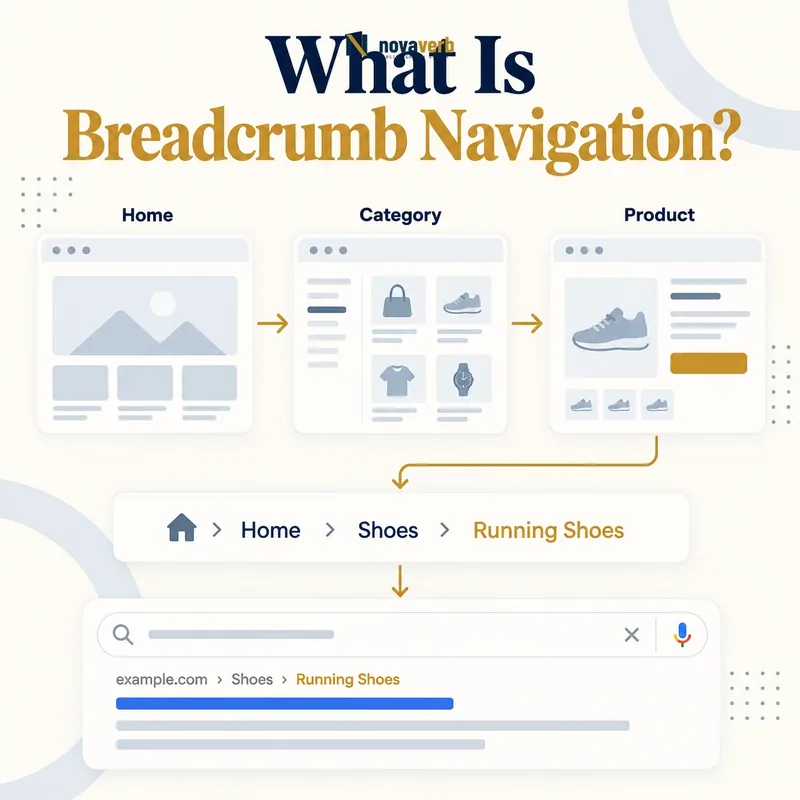
What Is Breadcrumb Navigation?
A common hierarchy trail looks like Home › Products › SEO Tools › Backlinks Explorer. The current page can appear as plain text or an identified final item, while earlier items provide crawlable internal links.
Breadcrumbs should reflect a defensible information architecture or user state. They are not simply a row of keywords, and structured data without a useful visible trail does not provide the same navigation experience.
- Compact ordered path
- Broader levels before current page
- Crawlable internal links
- Clear current-page context
- Consistent hierarchy or state model
- Accessible separators and labels
- Responsive mobile presentation
- Frame the decision raised by What Is Breadcrumb Navigation.
- Crawl representative clean and parameterized URLs.
- Record links, responses, canonicals and robots behavior.
- Choose one consistent policy for duplicate or sequential states.
- Implement the policy and verify it with a fresh crawl.
| Breadcrumb element | Purpose | Example |
|---|---|---|
| Root | Broad starting level | Home |
| Parent | Immediate broader category | SEO Tools |
| Ancestor | Higher hierarchy | Products |
| Current item | Identifies present page | Backlinks Explorer |
| Separator | Visually separates levels | Chevron or slash |
| Link | Moves to broader destination | Category URL |
Breadcrumbs provide compact context and upward navigation when every label and destination represents a real useful relationship.
What Types of Breadcrumbs Exist?
Hierarchy breadcrumbs are common for content hubs, product catalogs and documentation because they provide a stable parent chain. Path breadcrumbs can vary by entry route and may reproduce browser-history behavior. Attribute breadcrumbs are useful in faceted commerce but require careful URL and state management.
A site can combine models, but the visible trail should remain predictable. Choose the type based on the user’s need, not on which format produces the most internal links.
- Hierarchy or location breadcrumbs
- Path or history breadcrumbs
- Attribute or facet breadcrumbs
- Hybrid hierarchy and attribute trails
- Single-parent and multi-parent content
- Stable versus session-dependent paths
- Frame the decision raised by What Types of Breadcrumbs Exist.
- Crawl representative clean and parameterized URLs.
- Record links, responses, canonicals and robots behavior.
- Choose one consistent policy for duplicate or sequential states.
- Implement the policy and verify it with a fresh crawl.
| Breadcrumb type | Represents | Best fit |
|---|---|---|
| Hierarchy | Stable parent structure | Content and documentation |
| Path | Route the user followed | Session-specific workflows |
| Attribute | Selected product facets | Filtered catalogs |
| Hybrid | Hierarchy plus selected attributes | Complex commerce |
| Multi-parent | One chosen canonical path | Cross-category content |
| Utility | Account or process stages | Application workflows |
Select a breadcrumb model that accurately describes either site hierarchy, user path or selected attributes without mixing those concepts ambiguously.
Visible Breadcrumbs vs Structured Data
A page can display a useful visible trail without structured data, or include machine-readable breadcrumb fields without providing users a visible navigation path. Audits should test each layer separately.
Ensure names, positions and destinations map consistently. Structured data should describe the page users can access and the hierarchy the site actually maintains, rather than inventing a separate keyword-rich trail.
- Rendered HTML navigation
- Machine-readable ordered items
- Matching labels and URLs
- Consistent current-page identity
- Independent validation checks
- No hidden alternate hierarchy
- Production output verification
- Frame the decision raised by Visible Breadcrumbs vs Structured Data.
- Crawl representative clean and parameterized URLs.
- Record links, responses, canonicals and robots behavior.
- Choose one consistent policy for duplicate or sequential states.
- Implement the policy and verify it with a fresh crawl.
| Layer | Primary consumer | Audit check |
|---|---|---|
| Visible trail | Users and crawlers | Links render and work |
| HTML semantics | Assistive technology and parsers | Navigation is labeled |
| Structured data | Machine processing | Items and positions validate |
| Canonical URL | Index and duplicate logic | Destinations align |
| Template data | Rendering system | Same hierarchy source |
| Analytics | Product and UX teams | Clicks and journeys |
Implement and validate visible navigation and structured data as separate outputs driven by the same truthful hierarchy.
How Do Breadcrumbs Help Users?
A visitor landing from search can immediately see the topic, product family or documentation section around the current page. In a catalog, attribute breadcrumbs can also reveal which filters created the current result set.
Breadcrumbs should complement, not replace, primary navigation and clear page titles. On simple shallow sites, a long trail can add clutter without improving orientation.
- Immediate location context
- Fast access to parent pages
- Discovery of broader categories
- Support for search landing users
- Reduced navigation restarts
- Visible filter or attribute state
- Orientation on mobile layouts
- Frame the decision raised by How Do Breadcrumbs Help Users.
- Crawl representative clean and parameterized URLs.
- Record links, responses, canonicals and robots behavior.
- Choose one consistent policy for duplicate or sequential states.
- Implement the policy and verify it with a fresh crawl.
| User need | Breadcrumb support | Measure |
|---|---|---|
| Understand location | Shows parent chain | Task comprehension |
| Move upward | Links to broader level | Breadcrumb clicks |
| Explore category | Exposes relevant hub | Next-page behavior |
| Recover from narrow page | Offers safe exit | Journey continuation |
| Review filters | Shows selected attributes | Facet changes |
| Use mobile | Compact context | Mobile interaction success |
Breadcrumbs improve UX when they answer where am I and where can I go up without competing with the page’s primary task.
How Do Breadcrumbs Support SEO?
A stable hierarchy trail can connect deep pages with topic or product hubs. This helps crawling and creates repeatable anchor context, but template-wide repetition should not be mistaken for independent editorial support.
Use internal link audits and crawl depth analysis to verify graph effects. Compare search performance before and after changes with consistent scope and dates.
- Consistent parent-page inlinks
- Clear category relationships
- Fewer dead-end journeys
- Shorter useful upward paths
- Predictable template anchors
- Improved architecture maintenance
- First-party search verification
- Frame the decision raised by How Do Breadcrumbs Support SEO.
- Crawl representative clean and parameterized URLs.
- Record links, responses, canonicals and robots behavior.
- Choose one consistent policy for duplicate or sequential states.
- Implement the policy and verify it with a fresh crawl.
| SEO function | Evidence | Caution |
|---|---|---|
| Internal discovery | Crawl graph and logs | Not an indexing guarantee |
| Parent support | Repeated template inlinks | Not editorial votes |
| Architecture | Stable hierarchy mapping | Multi-parent content needs choice |
| User journey | Breadcrumb interactions | Clicks vary by page type |
| Structured data | Validated markup | Not a ranking promise |
| Search outcome | First-party query data | Many factors change together |
Breadcrumbs strengthen a coherent site graph, while their search impact must be measured rather than assumed from implementation alone.
How Should Breadcrumbs Be Designed?
Avoid truncating every item into ambiguous fragments. On narrow screens, preserve the nearest useful parent or allow controlled horizontal behavior without hiding the entire hierarchy from assistive technology.
Use text that matches the destination’s real purpose. Keyword repetition, misleading category names and links to empty archive pages weaken both orientation and architecture.
- Choose the truthful breadcrumb model
- Use concise destination labels
- Place broader levels before the current page
- Make ancestor links clearly interactive
- Use accessible separators
- Label the navigation region
- Preserve focus and keyboard behavior
- Test contrast and text wrapping
- Define mobile truncation rules
- Verify every destination remains useful
- Evidence for How Should Breadcrumbs Be Designed: the clean path and every parameter or pagination state
- Crawlable links entering and leaving the page set
- Canonical, robots and response behavior for each variant
- Duplicate or near-duplicate destinations created by the pattern
- A fresh crawl proving the chosen policy works
| Design decision | Good outcome | Failure to avoid |
|---|---|---|
| Labels | Clear category names | Keyword stuffing |
| Separators | Visual distinction without noise | Screen-reader confusion |
| Current item | Location is obvious | Looks clickable when not |
| Contrast | Readable in all themes | Text matching background |
| Mobile | Context remains understandable | Entire path hidden |
| Wrapping | Stable readable layout | Overlapping controls |
| Destinations | Useful live parents | Empty or redirected hubs |
A good breadcrumb remains readable, accessible and truthful across devices while preserving the most useful path to broader pages.
How Do You Implement Breadcrumb Navigation?
Do not derive every trail blindly from URL folders. URLs can be flat, translated or shaped by technical constraints, while content and product relationships belong in taxonomy or routing data.
Handle multi-parent pages with an explicit canonical path or a stable rule. Test translated labels, alternate locales, redirects and pages whose parent is retired or unpublished.
- Define hierarchy ownership and data source
- Map page types to parent entities
- Choose canonical paths for multi-parent pages
- Render ordered ancestor links
- Mark the current item
- Add accessible navigation labeling
- Generate matching structured data
- Use canonical destination URLs
- Handle locale and mobile variants
- Test production rendering with real data
- Evidence for How Do You Implement Breadcrumb Navigation: the clean path and every parameter or pagination state
- Crawlable links entering and leaving the page set
- Canonical, robots and response behavior for each variant
- Duplicate or near-duplicate destinations created by the pattern
- A fresh crawl proving the chosen policy works
| Implementation layer | Source of truth | Verification |
|---|---|---|
| Hierarchy | Taxonomy or routing model | Parent chain is correct |
| Labels | Page and category data | Locale output is accurate |
| URLs | Canonical routes | No unnecessary redirects |
| HTML | Server or rendered component | Links are crawlable |
| Accessibility | Navigation semantics | Keyboard and screen reader |
| Structured data | Same breadcrumb model | Items match visible trail |
| Monitoring | Template tests | Regressions detected |
Breadcrumb implementation is reliable when one maintained hierarchy drives visible links, accessible labels and machine-readable output consistently.
How Do You Audit Breadcrumbs?
Use the SEO tools system to connect crawl findings with component owners. Review dead-end pages and orphan pages to find places where breadcrumbs are missing or cannot substitute for a proper entry path.
A breadcrumb can be technically present but wrong: stale labels, redirected parents, duplicate levels or a trail that conflicts with the page’s canonical category. Verify representative pages from every template.
- Inventory page templates with breadcrumbs
- Render desktop and mobile trails
- Compare labels and parents with hierarchy data
- Test every ancestor destination
- Resolve redirects and canonical targets
- Validate structured data separately
- Check accessibility semantics
- Test locale and user-state variants
- Group defects by shared component
- Fix and recrawl the regression radius
- Evidence for How Do You Audit Breadcrumbs: the clean path and every parameter or pagination state
- Crawlable links entering and leaving the page set
- Canonical, robots and response behavior for each variant
- Duplicate or near-duplicate destinations created by the pattern
- A fresh crawl proving the chosen policy works
| Audit finding | Action | Completion evidence |
|---|---|---|
| Missing trail on deep template | Restore component | Rendered links present |
| Wrong parent | Correct hierarchy mapping | User path matches taxonomy |
| Redirecting ancestor | Link to canonical URL | Direct response |
| Visible/schema mismatch | Unify source data | Both outputs agree |
| Low-contrast text | Fix scoped styles | Readable in themes |
| Mobile path disappears | Revise responsive rule | Useful context retained |
| Stale locale label | Update translation source | Correct localized trail |
Start with a relevant free SEO check, continue the evidence workflow in Crawl Explorer, and review pricing when comparing continuous monitoring with a one-time manual review.
A breadcrumb audit succeeds when hierarchy, links, semantics, structured data and responsive rendering agree across every affected template.