
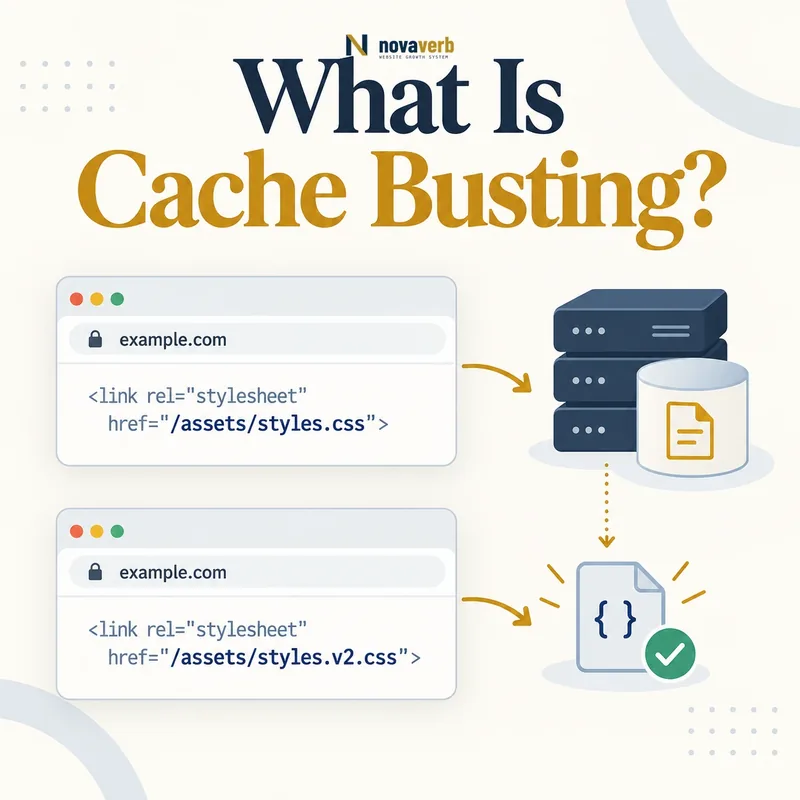
What Is Cache Busting?
A website may tell browsers to keep a stylesheet or script for months. That policy improves repeat-load efficiency, but overwriting the bytes at the same URL can leave returning visitors with the old file until its freshness period ends. Cache busting solves the conflict by publishing changed bytes at a different address.
The change may be a content hash in the filename, a build version or a query parameter. HTML then references the new URL. The old object can remain safely cached because pages no longer request it. Cache busting is most reliable for deployable static assets; applying it carelessly to HTML or indexable content can create duplicate URLs and crawl waste.
- Identify the exact page, asset, entity or relationship described in this section.
- Inspect the live implementation and retain the observed evidence.
- Compare the observation with the intended meaning and its primary specification.
- Correct any mismatch, then retest the live result.
- Record the accountable owner and review date.
| Term | Meaning | Example |
|---|---|---|
| Stable URL | Address remains unchanged | /assets/app.js |
| Versioned URL | Address identifies a release | /assets/app.v42.js |
| Content hash | Filename derived from bytes | /assets/app.a91fd2.js |
| Cache bust | New URL forces a fetch | HTML references new asset |
| Invalidation | Stored object becomes unusable | Purge or expiration |
- Use it primarily for static resources.
- Change the URL only when the bytes change.
- Keep HTML able to discover the newest asset URLs.
Primary specification: MDN HTTP caching reference.
Cache busting works by changing the address of changed content, not by hoping every cache notices an overwritten file.
How Does Cache Busting Work?
During a deployment, the build system calculates a fingerprint or assigns a release identifier. It writes files under versioned names and rewrites references in HTML, CSS, JavaScript or an asset manifest. A browser that visits the updated page has no cached entry for the new URL, so it downloads the new response.
Unchanged assets should keep their existing URLs so they remain reusable. Changed files receive new URLs, while old files stay available long enough for cached HTML, delayed sessions and rollbacks. Once no active document references an old asset, retention rules can remove it safely. This sequence prevents mixed releases and unnecessary downloads.
- The exact page, asset, entity or relationship covered by this section
- The live implementation rather than an editor-only preview
- The primary specification or first-party record defining the expected behavior
- The validation result, accountable owner and review date
| Deployment step | Action | Expected outcome |
|---|---|---|
| Build | Hash or version each asset | Unique identity for changed bytes |
| Publish | Upload new files first | References never point to missing assets |
| Reference update | Deploy HTML or manifest | Browsers discover new URLs |
| Transition | Keep prior assets available | Old HTML still works |
| Cleanup | Remove unreferenced versions later | Storage stays controlled |
- Generate production assets.
- Assign deterministic versioned names.
- Publish assets before updated HTML.
- Verify new references and retain rollback files.
A dependable cache-busting pipeline versions changed assets, updates references atomically and retains old versions through the transition.
Filename Hashing vs Query String Versioning
A filename such as app.8d73c1.js directly identifies a particular representation. CDNs and browsers naturally treat it as a new resource, and the origin can map it to an immutable file. A human release number can work too, but it may invalidate unchanged files if every asset receives the same version.
Query strings such as app.js?v=42 are easy to add, yet the cache key must include the parameter and the origin must return the intended version. Some configurations ignore selected parameters, normalize their order or bypass caching for query URLs. Test the public delivery layer rather than assuming the parameter changes the object.
- Identify the exact page, asset, entity or relationship described in this section.
- Inspect the live implementation and retain the observed evidence.
- Compare the observation with the intended meaning and its primary specification.
- Correct any mismatch, then retest the live result.
- Record the accountable owner and review date.
| Method | Strength | Weakness | Best fit |
|---|---|---|---|
| Content hash filename | Changes only with bytes | Requires build integration | Modern static assets |
| Release filename | Easy to connect to deploy | May churn unchanged files | Simple release pipeline |
| Query version | Minimal path changes | Cache key may ignore parameter | Legacy integration |
| Timestamp | Always unique | Destroys reuse on every build | Temporary debugging only |
| Manual rename | No tooling required | Error-prone references | Small static sites |
- Avoid random values on every request.
- Confirm parameters participate in the cache key.
- Use one canonical versioning convention.
Prefer content-derived filenames when the build system supports them, and validate query-string behavior end to end when it does not.
Cache Busting vs Cache Invalidation
Versioned static assets are well suited to cache busting because the same URL can truthfully remain immutable. HTML usually keeps a stable public address, so it relies on short freshness, validation or a CDN purge after publishing. Purging the old asset URL is not always necessary and can harm sessions still using older HTML.
Invalidation is operationally useful when a stable URL must change immediately, but it depends on every relevant edge and cache honoring the action. Cache busting avoids that dependency for new references. Neither technique clears a fresh browser object at an old URL unless the browser requests a different address or the policy requires revalidation.
- The exact page, asset, entity or relationship covered by this section
- The live implementation rather than an editor-only preview
- The primary specification or first-party record defining the expected behavior
- The validation result, accountable owner and review date
| Technique | Changes URL | Touches stored object | Typical use |
|---|---|---|---|
| Cache busting | Yes | Old object can remain | CSS, JavaScript, fonts, images |
| CDN purge | No | Removes edge object | Updated public HTML |
| Expiration | No | Waits for lifetime | Predictable low-risk updates |
| Revalidation | No | Checks origin after staleness | Stable changing resources |
| Browser clear | No | Removes local entries | Individual troubleshooting |
- Classify the resource as stable or immutable.
- Define acceptable update delay.
- Select versioning, purge or validation.
- Test the behavior across browser and CDN layers.
Choose cache busting for immutable asset versions and invalidation for stable URLs whose current representation must change.
Why Does Cache Busting Matter for SEO?
An old stylesheet can hide content, disrupt responsive layouts or create layout shifts. An old script can fail against new markup, block navigation or prevent a conversion event. A stale image may preserve an outdated offer or mismatched dimensions. These failures affect visitors even when the HTML and origin appear current.
Versioned assets can support repeat-load performance and stable delivery, which may help the page experience measured around Largest Contentful Paint, Cumulative Layout Shift and Interaction to Next Paint. The SEO benefit remains indirect: correct content, accessibility and search signals still determine whether a page deserves visibility.
- Identify the exact page, asset, entity or relationship described in this section.
- Inspect the live implementation and retain the observed evidence.
- Compare the observation with the intended meaning and its primary specification.
- Correct any mismatch, then retest the live result.
- Record the accountable owner and review date.
| Stale asset | Possible symptom | Business or SEO effect |
|---|---|---|
| CSS | Broken layout or hidden content | Poor usability and interpretation |
| JavaScript | Navigation or forms fail | Lost engagement and conversions |
| Hero image | Old creative or dimensions | Weaker message and slower rendering |
| Font | Fallback or visual shift | Readability and layout instability |
| Manifest | Wrong asset mapping | Mixed or incomplete release |
- Measure real pages after a release.
- Test repeat visitors, not only empty-cache sessions.
- Connect asset failures to affected templates.
Cache busting protects release consistency while allowing long-lived asset caching to support efficient page delivery.
What SEO Risks Can Cache Busting Create?
Adding timestamps to HTML page URLs can create duplicate crawl paths and unstable canonicals. Changing every filename during every build forces visitors and crawlers to redownload unchanged resources. Removing old assets immediately can break cached documents, open tabs, service workers or rollbacks that still reference them.
Incorrect rewrites may point production HTML to missing assets or development hosts. Source maps and manifests can leak implementation details if published without intent. Query parameters can multiply through internal links, analytics tags and crawled asset references. The remedy is scoped versioning: fingerprint static bytes, keep document URLs stable and control parameter behavior.
- The exact page, asset, entity or relationship covered by this section
- The live implementation rather than an editor-only preview
- The primary specification or first-party record defining the expected behavior
- The validation result, accountable owner and review date
| Risk | Symptom | Control |
|---|---|---|
| Versioned HTML pages | Duplicate or unstable URLs | Keep canonical page paths stable |
| Global build token | Every asset redownloads | Use per-file content hashes |
| Early deletion | Older page loses assets | Retain previous releases |
| Bad rewrite | 404 CSS or JavaScript | Verify manifest and public files |
| Parameter explosion | Crawl space expands | Normalize links and cache keys |
| Secret source map | Internal code exposed | Publish only intentional artifacts |
- Separate documents from deployable assets.
- Inspect generated URLs before release.
- Keep required previous versions.
- Monitor 404s and crawlable parameters.
The safest strategy versions only changed static content and never turns release identifiers into uncontrolled indexable page variants.
How Should HTML, Images and Assets Be Versioned?
HTML is the discovery layer for current assets and typically should remain easy to refresh or revalidate. CSS and JavaScript bundles benefit most from automatic hashes because the build already knows their dependency graph. Fonts can use long caching when their filenames change with the files.
Editorial images require a workflow decision. A new filename is reliable when the image meaningfully changes, but it also changes image URLs and may discard accumulated discovery signals. If the image identity should remain stable, use a conservative lifetime plus validators or a purge. Responsive image variants should be generated and referenced as one coordinated set.
- Identify the exact page, asset, entity or relationship described in this section.
- Inspect the live implementation and retain the observed evidence.
- Compare the observation with the intended meaning and its primary specification.
- Correct any mismatch, then retest the live result.
- Record the accountable owner and review date.
| Resource | Recommended identity | Freshness approach |
|---|---|---|
| Indexable HTML | Stable canonical URL | Short freshness or validation |
| Built CSS/JS | Content-hash filename | Long lifetime and immutable |
| Font file | Hash or version filename | Long lifetime |
| Decorative image | Version when bytes change | Long cache if fingerprinted |
| Editorial image | Stable or deliberate new URL | Validate or migrate intentionally |
| API schema file | Versioned contract path | Policy tied to client support |
- Do not add build tokens to canonical page links.
- Generate responsive variants in one release.
- Preserve important image redirects when URLs move.
Version each resource according to how it changes, how it is discovered and whether its public URL carries lasting value.
How Do You Audit Cache Busting?
Start with the build manifest. Unchanged source files should generally retain the same output URLs, while changed bytes should receive different ones. Scan rendered HTML and CSS for unhashed production assets, missing files, mixed hosts and accidental query tokens. Request each critical asset from the public CDN rather than only from local storage.
Open a page before deployment, leave the session active, deploy the new version and continue navigating. Then load with a fresh browser and compare. Test a rollback and verify that its referenced files still exist. Review asset 404 logs, cache-status headers, transferred bytes and the number of unique versions retained.
- The exact page, asset, entity or relationship covered by this section
- The live implementation rather than an editor-only preview
- The primary specification or first-party record defining the expected behavior
- The validation result, accountable owner and review date
| Audit check | Evidence | Pass condition |
|---|---|---|
| Manifest diff | Two build outputs | Only changed assets gain new hashes |
| Reference scan | Rendered HTML and CSS | Every URL resolves publicly |
| Warm session | Page opened before deploy | Old references continue working |
| Fresh session | Page opened after deploy | New references load correctly |
| Rollback | Prior release restored | Required old assets remain |
| Cache behavior | Headers and transfer data | Versioned files receive intended lifetime |
| Logs | Asset 404 and error counts | No release-related spike |
- Capture the current manifest and public headers.
- Create one controlled asset change.
- Deploy with old assets retained.
- Test warm, fresh and rollback sessions.
- Review errors before cleanup.
A cache-busting audit passes when changed bytes get new URLs, unchanged bytes remain reusable and both upgrade and rollback paths keep working.