
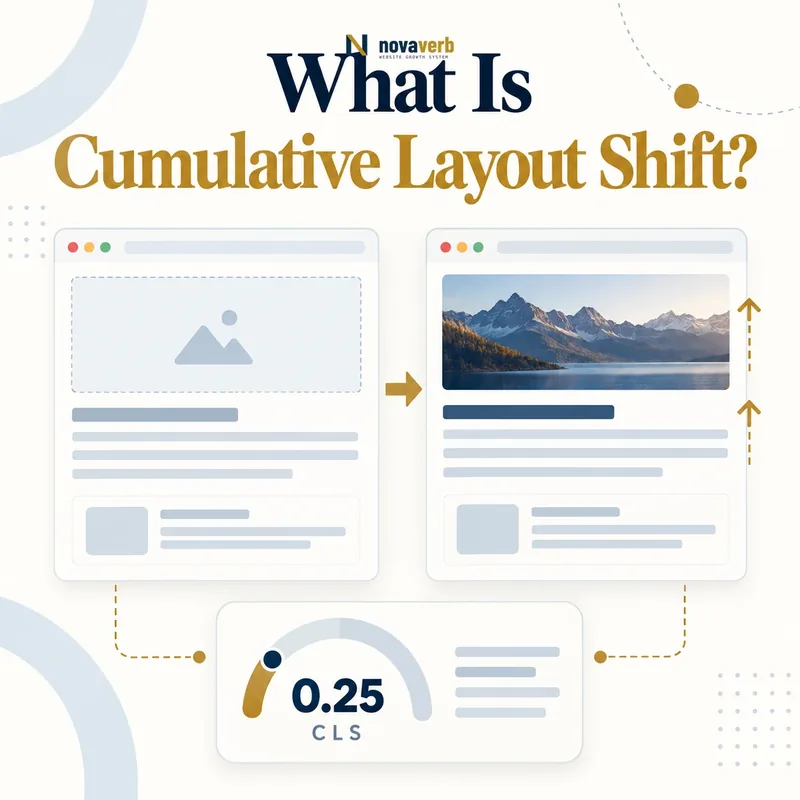
What Is Cumulative Layout Shift?
A layout shift occurs when a visible element changes position between rendered frames without an expected user-driven reason. The experience can be minor, such as a paragraph moving a few pixels when a font swaps, or severe, such as a button moving just before a visitor taps it. CLS is unitless; it is not measured in seconds. Each qualifying shift combines the portion of the viewport affected with the distance elements move. The metric groups rapid shifts into session windows and keeps the window with the highest total. That approach prevents very long sessions from accumulating every small movement indefinitely while still capturing disruptive bursts.
- Measures unexpected visible movement
- Uses a unitless score
- Combines affected area and movement distance
- Groups shifts into session windows
- Excludes certain recent-input shifts
- Varies by device, viewport and page state
- Frame the decision raised by What Is Cumulative Layout Shift.
- Render the page with its required scripts and resources.
- Compare content, links, metadata and canonical signals.
- Trace each difference to the responsible template or script.
- Apply the fix and repeat both observations.
| Question | Answer | Why it matters |
|---|---|---|
| What is measured? | Unexpected visual movement | Represents stability |
| Unit | Unitless score | Not a duration |
| Scope | Visible viewport content | Device dependent |
| Aggregation | Largest session window | Captures worst burst |
| Input handling | Some expected shifts excluded | Separates intent |
| Primary use | Field and lab diagnosis | Needs attribution |
CLS is useful when its score is connected to the actual shifted elements and the component that introduced their movement.
What Is a Good CLS Score?
Percentile evaluation keeps a fast majority from hiding a meaningful slow or unstable group. Device separation matters because narrower viewports, responsive ads and mobile font behavior can produce different shifts. The boundary should guide prioritization, not encourage score manipulation. A template at 0.09 can still regress when a new banner or experiment ships. A sitewide 0.08 can conceal a product template at 0.30. Segment by route, template, device and relevant state, then investigate the largest shift clusters. Monitor the distribution after changes because visual instability may occur after the initial load, during consent, personalization or long-lived application activity.
- Good: 0.1 or less
- Needs improvement: above 0.1 through 0.25
- Poor: above 0.25
- Evaluate the 75th percentile
- Separate mobile and desktop traffic
- Segment important route families
- Frame the decision raised by What Is a Good CLS Score.
- Render the page with its required scripts and resources.
- Compare content, links, metadata and canonical signals.
- Trace each difference to the responsible template or script.
- Apply the fix and repeat both observations.
| Score | Classification | Action |
|---|---|---|
| ≤ 0.1 | Good | Protect against regression |
| > 0.1–0.25 | Needs improvement | Find dominant shift clusters |
| > 0.25 | Poor | Prioritize shared causes |
| Good sitewide, poor template | Hidden segment issue | Fix affected template |
| Lab good, field poor | Missing real state | Inspect field attribution |
| Post-release increase | Regression | Review component changes |
Use the CLS threshold to identify affected populations, then repair the specific shift source rather than optimizing an aggregate in isolation.
How Is CLS Calculated?
The impact fraction describes how much of the viewport is affected by unstable elements across their old and new positions. The distance fraction reflects the largest movement relative to the viewport dimension. A large element moving slightly and a small element moving far can therefore produce different scores. Shifts are grouped when they occur close together: successive shifts less than one second apart belong to the same window, capped at five seconds in duration. The window with the largest sum becomes the reported CLS. Field instrumentation should capture attribution promptly so teams can identify sources, not merely store a number.
- Observe visible elements between rendered frames.
- Identify elements whose positions changed.
- Calculate the affected viewport fraction.
- Calculate the relative movement distance.
- Multiply the fractions for each shift.
- Group rapid shifts into session windows.
- Keep the window with the highest total.
- Evidence for How Is CLS Calculated: the raw html returned by the server
- The rendered DOM after required scripts run
- Content, links and metadata that differ between those states
- Network, console and hydration failures tied to the page
- A repeatable test at the exact URL and device context
| Concept | Meaning | Diagnostic use |
|---|---|---|
| Unstable element | Node that moved | Find component owner |
| Impact fraction | Affected viewport area | Shows shift footprint |
| Distance fraction | Relative movement distance | Shows severity |
| Shift score | Impact × distance | Scores one event |
| Session window | Burst of shifts | Groups related behavior |
| Largest window | Reported CLS | Prioritizes worst burst |
CLS calculation becomes actionable when each shift event is attributed to an unstable element and the component that changed available space.
What Causes Poor CLS?
The element that moves is not always the element that caused the movement. A paragraph may shift because an image above it lacked dimensions. A product grid may move when a promotion banner is inserted at the top. Ads can collapse, expand or return creative sizes different from their slots. A web font can change line wrapping. Client-rendered account, consent or personalization components may appear after the base page. Animation of top, left, width or height can trigger layout repeatedly, while transform-based movement may avoid reflow for appropriate effects. Diagnose the initiating component and space reservation rather than patching margins on every displaced element.
- Images missing width, height or aspect ratio
- Ads and embeds without stable slots
- Banners inserted above existing content
- Font swaps changing text metrics
- Late or conflicting stylesheets
- Client components rendered after data arrives
- Animations that change layout geometry
- Frame the decision raised by What Causes Poor CLS.
- Render the page with its required scripts and resources.
- Compare content, links, metadata and canonical signals.
- Trace each difference to the responsible template or script.
- Apply the fix and repeat both observations.
| Cause | Visible symptom | Owner |
|---|---|---|
| Undimensioned image | Content jumps on image load | Media component |
| Flexible ad slot | Large block expands or collapses | Ad layout |
| Injected banner | Whole page moves downward | Campaign or consent |
| Font swap | Lines rewrap | Typography system |
| Late CSS | Component changes size | Style delivery |
| Async widget | Placeholder replaced poorly | Application component |
The correct CLS fix belongs to the component that failed to reserve or preserve space, not to the content displaced beneath it.
How Do Images, Video and Embeds Affect CLS?
Responsive media can still reserve space. Intrinsic width and height establish an aspect ratio that CSS can scale while maintaining predictable geometry. Art-directed sources with different ratios require breakpoint-aware containers. Video posters and players should agree on dimensions. Iframes for maps, social content and forms need stable placeholders even when their final content comes from another origin. Lazy-loaded media particularly needs reserved space because its request intentionally begins later. Avoid arbitrary fixed heights that crop or create excessive blank areas; use the actual design ratio and test translated, mobile and error states.
- Declare intrinsic width and height for images.
- Use stable aspect-ratio containers.
- Match responsive sources to designed ratios.
- Reserve video and iframe player space.
- Keep placeholders the same final geometry.
- Test missing, slow and blocked media states.
- Evidence for How Do Images, Video and Embeds Affect CLS: the raw html returned by the server
- The rendered DOM after required scripts run
- Content, links and metadata that differ between those states
- Network, console and hydration failures tied to the page
- A repeatable test at the exact URL and device context
| Media | Reservation method | Failure |
|---|---|---|
| Responsive image | Intrinsic dimensions | Unknown initial height |
| Art-directed picture | Breakpoint ratio container | Ratio changes unexpectedly |
| Video | Poster and player ratio | Control load expands box |
| Iframe | Fixed or responsive slot | Third-party resize |
| Lazy image | Reserved final geometry | Blank zero-height placeholder |
| Embed failure | Stable fallback | Container collapses |
Media remains visually stable when the browser knows its final geometry before the resource or third-party content arrives.
How Do Fonts and Text Cause Layout Shifts?
Text stability begins with a deliberate fallback stack whose proportions resemble the final face. Reduce unnecessary families, weights and subsets so critical font files arrive efficiently. The font-display policy controls whether text waits, swaps or keeps a fallback, but no single value suits every brand and language. Metric overrides and size adjustment can bring fallback geometry closer to the final font when supported. Preload only the critical font file actually used in the initial view, with matching type and cross-origin behavior, because excessive font preloads compete with primary media. Test long headings, navigation, localized copy and bold variants; a short English sample can hide the worst wrapping shift.
- Choose metrically compatible fallback fonts
- Reduce unused families and weights
- Subset characters without breaking language coverage
- Set an intentional font-display policy
- Use metric adjustment where appropriate
- Preload only proven critical font files
- Test long and localized text
- Frame the decision raised by How Do Fonts and Text Cause Layout Shifts.
- Render the page with its required scripts and resources.
- Compare content, links, metadata and canonical signals.
- Trace each difference to the responsible template or script.
- Apply the fix and repeat both observations.
| Control | Purpose | Risk |
|---|---|---|
| Fallback stack | Stable early text | Metric mismatch |
| font-display | Defines swap behavior | Late reflow or invisible text |
| Subsetting | Reduces transfer | Missing characters |
| Metric overrides | Align fallback geometry | Incorrect tuning |
| Preload | Early critical font | Bandwidth competition |
| Weight reduction | Fewer resources | Synthetic styling |
Font optimization should protect readable early text while keeping fallback and final typography close enough to avoid disruptive reflow.
How Do You Fix Cumulative Layout Shift?
Begin with evidence rather than a generic checklist. Record the unstable elements and time of the largest session window. Watch a filmstrip or trace to find what loaded or changed immediately before movement. Add intrinsic dimensions to media, stabilize ad and embed slots, align placeholders with final components and adjust font delivery. Deliver critical layout styles early through the rendering path. For intentional animation, prefer transform and opacity when they match the design because they do not move surrounding layout in the same way. Retest across viewport sizes and real content, then monitor field percentiles after deployment.
- Find the largest CLS session window.
- Identify unstable and initiating elements.
- Reserve accurate media and component geometry.
- Stabilize fonts, ads and asynchronous states.
- Deliver layout-critical styles before paint.
- Use non-layout animation where appropriate.
- Regression-test all affected templates.
- Confirm field improvement after release.
- Evidence for How Do You Fix Cumulative Layout Shift: the raw html returned by the server
- The rendered DOM after required scripts run
- Content, links and metadata that differ between those states
- Network, console and hydration failures tied to the page
- A repeatable test at the exact URL and device context
| Finding | Fix direction | Regression check |
|---|---|---|
| Image shift | Intrinsic dimensions | Responsive crop and ratio |
| Ad expansion | Stable slot contract | Empty and creative states |
| Font reflow | Compatible fallback and delivery | Language coverage |
| Injected banner | Reserve or overlay safely | Accessibility and mobile |
| Async component | Matched skeleton | Variable real content |
| Layout animation | Transform where suitable | Focus and reduced motion |
The strongest CLS fix removes the initiating geometry change while preserving responsive design, accessibility and real content variation.
How Do You Audit CLS?
Use field data to locate affected devices, templates and states, then reproduce with realistic content and viewport sizes. Capture layout-shift attribution, screenshots or filmstrips, network timing and DOM mutations. Interact with consent, menus, tabs, forms and account state because shifts after load still matter. Test slow images, failed embeds, empty ad auctions, font cache states and client-rendered data. Compare lab and field results instead of expecting a single synthetic run to match a population percentile. Pair the audit with LCP so image prioritization does not create stability regressions, and inspect hydration when server and client geometry differs.
- Segment field CLS by device and template.
- Select representative routes and states.
- Capture shift entries and visual timelines.
- Find the largest session window.
- Trace movement to its initiating component.
- Test media, fonts, ads and client states.
- Verify fixes across responsive breakpoints.
- Monitor production percentiles after release.
- Evidence for How Do You Audit CLS: the raw html returned by the server
- The rendered DOM after required scripts run
- Content, links and metadata that differ between those states
- Network, console and hydration failures tied to the page
- A repeatable test at the exact URL and device context
| Check | Evidence | Pass condition |
|---|---|---|
| Population | 75th-percentile segments | Affected routes identified |
| Session window | Shift entries | Worst burst isolated |
| Attribution | Unstable nodes | Component owner known |
| Media | Dimensions and trace | Space reserved |
| Fonts | Cache-state comparison | Minimal reflow |
| Dynamic UI | State transitions | Stable geometry |
| Regression | Breakpoint suite | No new movement |
| Release | Field trend | Sustained reduction |
Start with a relevant free SEO check, continue the evidence workflow in Crawl Explorer, and review pricing when comparing continuous monitoring with a one-time manual review.
A complete CLS audit connects a real-user instability score to one shift cluster, one initiating component and one verified fix.