
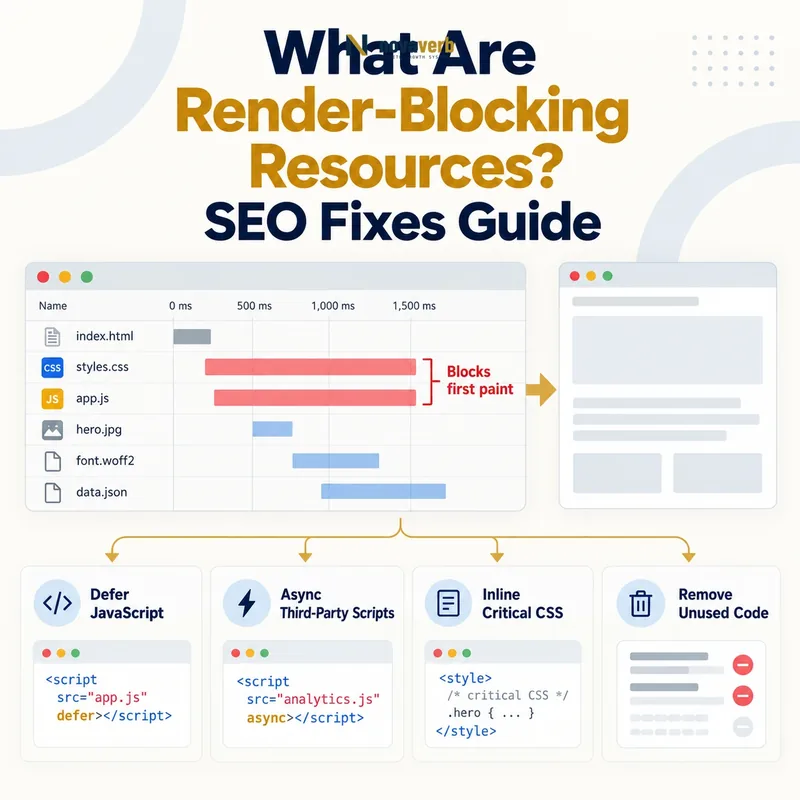
What Are Render-Blocking Resources?
When a browser receives HTML, it parses the document, discovers styles, scripts, fonts and media, and builds the structures required to paint pixels. CSS affects how elements should look, so the browser may wait for relevant styles before drawing the page. A classic script encountered during parsing can pause the parser until the file downloads and executes because the script may change the document. Not every early resource is wasteful: critical styles and essential application setup may be necessary. The objective is to minimize unnecessary work on the path to useful content without causing unstyled flashes, broken behavior or incorrect loading order.
- HTML document discovery order
- External and inline stylesheets
- Classic synchronous scripts
- Font and CSS dependency chains
- Critical visual content
- Preload and priority hints
- Deferred noncritical work
| Resource | Typical behavior | Optimization question |
|---|---|---|
| HTML | Starts discovery | Is response timely? |
| CSS | Can block first paint | Is it needed for initial view? |
| Classic script | Can pause parsing | Can it defer? |
| Font | May delay text style | Is subset and policy appropriate? |
| Hero image | Often primary visual | Is discovery early? |
| Third party | Adds new chains | Is it needed before content? |
A render-blocking resource is a problem only when its position, size or necessity delays useful display more than the page’s design requires.
How Does the Critical Rendering Path Work?
The browser does not wait for every page file before displaying anything. It prioritizes what is discovered and what the current document requires. HTML parsing builds the document tree. CSS builds style rules that combine with the document for layout and paint. Scripts may inspect or modify both, so execution order matters. Network connection setup, redirects and server response time occur before many of these steps and can dominate the result. A waterfall reveals request discovery and timing, while a performance trace shows main-thread parsing, style, layout and script work. Both are needed: a fast download can still execute heavily, and a small file discovered late can still delay a key element.
- Request and receive the HTML document.
- Parse markup and discover referenced resources.
- Download required styles and scripts.
- Build document and style information.
- Calculate layout for visible elements.
- Paint and composite useful content.
- Continue noncritical loading and interaction work.
| Stage | Evidence | Common delay |
|---|---|---|
| Response | Server timing | Slow origin or redirects |
| Discovery | Waterfall order | Late references |
| Download | Transfer timing | Large or uncached files |
| Execution | Main-thread trace | Heavy script |
| Style | Recalculation events | Oversized CSS |
| Paint | Visual timeline | Missing critical asset |
Optimize the critical path as a dependency sequence rather than assuming the largest file is always the most important delay.
Why Does CSS Block Rendering?
A stylesheet referenced in the document head is usually discovered early, which is useful when it contains critical page styles. Problems arise when one global bundle includes code for dashboards, modals, account pages and components absent from the current route. Chained imports add discovery steps. Slow third-party font stylesheets introduce additional origins and font requests. Critical CSS can be inlined for the initial view while route-specific or below-the-fold styles load separately, but maintaining two competing style sources can create drift. Media attributes can make truly conditional styles nonblocking for irrelevant environments. Test full template coverage because aggressive splitting may produce flashes, layout changes or components that become styled only after interaction.
- Remove rules unused across the route
- Split styles by public template or feature
- Avoid long CSS import chains
- Inline only stable critical styles
- Load conditional styles with accurate media conditions
- Preserve one design system and cascade contract
| Pattern | Potential effect | Safer response |
|---|---|---|
| One global bundle | Unused blocking bytes | Route-aware delivery |
| Nested imports | Late discovery chain | Direct references or bundling |
| Critical inline CSS | Earlier initial styling | Automated parity checks |
| Conditional stylesheet | Blocks only matching media | Accurate media query |
| Third-party fonts | Extra origin chain | Self-host or reduce variants |
| Duplicate framework CSS | Repeated parsing and conflicts | Consolidate ownership |
CSS optimization should shorten initial styling work while preserving semantic design, responsive behavior and consistent component ownership.
How Does JavaScript Block Rendering?
A classic script without scheduling attributes encountered during parsing can block later markup discovery. Defer allows parsing to continue and preserves document order before the document-ready phase. Async executes when downloaded and does not guarantee relative order, which suits independent scripts but can break dependent sequences. Module scripts defer by default and follow module dependency graphs. Moving a script later in the document may help but does not reduce its execution cost. Third-party tags can create additional work after their initial loader arrives. Primary content should not depend on a large application bundle when stable HTML can deliver it. Verify functionality before changing attributes because implicit order dependencies often hide in older templates.
- Inventory scripts in document discovery order.
- Identify code required before initial content.
- Mark independent scripts for asynchronous scheduling.
- Defer ordered application code where safe.
- Split route and interaction code from global bundles.
- Delay nonessential third parties.
- Test errors, ordering and primary actions after changes.
| Method | Ordering | Best fit |
|---|---|---|
| Classic blocking | Executes at parser position | Rare essential setup |
| defer | Document order preserved | Route application code |
| async | Download completion order | Independent analytics or utility |
| module | Deferred dependency graph | Modern application code |
| dynamic import | Loaded on demand | Feature interaction |
| late third party | After core experience | Nonessential vendor code |
Choose script scheduling from real dependency and user-action requirements rather than applying defer or async indiscriminately.
Defer vs Async vs Preload
These controls solve different problems. Defer changes script execution timing while retaining order. Async decouples an independent script from parser order. Preload tells the browser to fetch a known critical resource early but does not execute or apply it by itself. A preload with the wrong as value, credentials mode or destination can be downloaded twice or remain unused. Preloading too many files competes with the resources that actually matter. Preconnect can reduce connection setup to an essential origin, but excessive early connections waste resources. The correct choice comes from a waterfall and dependency model, followed by verification that the hinted file is consumed promptly.
- Use defer for ordered scripts that can wait for parsing
- Use async only for independent scripts
- Preload a proven critical resource discovered too late
- Match type, as and credential behavior
- Keep the number of priority hints small
- Confirm every preload is consumed promptly
| Control | Changes | Risk |
|---|---|---|
| defer | Script execution timing and order | Late required initialization |
| async | Independent execution timing | Race with dependencies |
| preload | Fetch discovery and priority | Unused or duplicate transfer |
| preconnect | Origin connection setup | Too many idle connections |
| modulepreload | Module graph discovery | Over-prioritized code |
| prefetch | Likely future navigation | Competition if misused |
Loading hints improve a measured dependency chain only when the browser can consume the prioritized resource exactly as declared.
Which Resources Should Load First?
Priority should follow the actual initial view across mobile and desktop templates. A product hero image may be critical, while secondary gallery images can use lazy loading. On an article, the lead text and styles may matter before an embedded player. A web font can support branding but may not justify several weights before readable fallback text appears. Personalized recommendations below the fold rarely belong on the initial dependency path. Browser heuristics already prioritize resources, so manual hints should correct specific discovery defects rather than attempt to micromanage every request. Compare cold-cache and return visits because caching changes which dependency matters.
- Protect the document and critical route styles
- Discover the primary visual early
- Keep readable fallback typography
- Defer secondary media and below-fold widgets
- Delay third parties outside the main task
- Review mobile and desktop views separately
| Resource role | Typical priority | Validation |
|---|---|---|
| HTML document | Highest starting point | Response and redirect timing |
| Critical route CSS | Early | Initial-view styling |
| Primary image | Early when visible | Request discovery and display |
| Application interaction | After base content when possible | Action readiness |
| Below-fold media | Deferred | Scroll test |
| Optional vendor widget | Late | Business need and failure test |
Prioritize the smallest resource set that creates a correct useful initial view, then let remaining features arrive according to real user need.
Can Render-Blocking Fixes Harm SEO or UX?
A performance change is not successful merely because one warning disappears. Inlining too much CSS increases every HTML response and complicates caching. Loading styles asynchronously can create a flash of unstyled content and layout movement. Applying async to dependent scripts can break navigation or forms intermittently. Deferring server-rendered content behind JavaScript changes the problem from blocking resources to missing content. Overusing preload can slow the primary image by competing with fonts or code. Test representative routes, breakpoints, logged-out states and slow devices. Confirm that headings, navigation, forms and semantic colors remain correct before and after delayed resources arrive.
- Unstyled or incorrectly styled initial content
- Layout shifts when deferred CSS or fonts apply
- Broken script order and intermittent actions
- Content moved behind client execution
- Priority hints competing with primary media
- Template-specific styles omitted from a split bundle
| Change | Possible regression | Required check |
|---|---|---|
| Inline critical CSS | HTML bloat or drift | Cross-template parity |
| Async stylesheet | Unstyled flash | Visual recording |
| Defer script | Late primary action | Immediate interaction |
| Async script | Dependency race | Repeated cold loads |
| Preload fonts | Image competition | Waterfall comparison |
| Bundle split | Missing component styles | Route coverage |
Every render-blocking optimization needs a regression check that protects content, layout, actions and the other resources sharing the same critical path.
How Do You Audit Render-Blocking Resources?
Start with high-value route families rather than one fast landing page. Record redirects, server response timing, HTML discovery, CSS and script requests, fonts, primary media and third parties. Mark which resources genuinely affect the initial view. Inspect initiator chains to find imported CSS, script-injected styles and late-discovered assets. Compare cold and warm cache behavior. Then test one change at a time and verify visual stability, content completeness and primary actions. Pair the work with JavaScript SEO and hydration evidence when application bundles dominate. Use an internal link audit if deferred navigation components change link output.
- Select representative public templates and devices.
- Capture cold-cache waterfalls and performance traces.
- Label resources needed for the initial useful view.
- Map initiators and dependency chains.
- Separate transfer delay from execution cost.
- Test scheduling or delivery changes individually.
- Verify content, layout and primary interactions.
- Repeat on every shared-template route affected.
| Check | Evidence | Pass condition |
|---|---|---|
| Document | Redirect and response trace | Prompt HTML delivery |
| Critical CSS | Coverage and waterfall | Only needed early styles |
| Scripts | Attributes and trace | Safe scheduling |
| Fonts | Request chain and display | Readable stable text |
| Primary media | Discovery timing | Starts early enough |
| Third parties | Initiator tree | No unnecessary critical chain |
| Execution | Main-thread profile | Limited blocking work |
| Regression | Template test set | Correct content and actions |
A complete audit explains why each early resource is necessary and proves that every optimization improves the full initial experience rather than one isolated metric.
Render-Blocking Resources FAQ
Use measured dependency evidence instead of chasing a generic warning without understanding the page’s actual initial view.
- Protect critical styles and primary content
- Schedule scripts according to real dependencies
- Verify changes across all affected templates
What is a render-blocking resource?
Is all CSS render blocking?
Does defer fix render-blocking JavaScript?
What is the difference between async and defer?
Should I preload every important file?
Can fonts block rendering?
Can removing blocking CSS break a page?
How often should blocking resources be audited?
Render-blocking work stays controlled when every early dependency has a documented visual or functional purpose.
Shorten the Path to Useful Content
Use Novaverb’s SEO tools to inspect public pages, internal links and rendering behavior across shared templates. Before changing externally referenced assets or routes, review evidence with the Free Backlink Checker and explore wider patterns in Backlinks Explorer. Coordinate resource changes with server-side rendering and client-side rendering architecture.
- Inventory critical route resources
- Map discovery and execution chains
- Prioritize the initial useful view
- Reschedule noncritical work safely
- Verify every affected template
- Monitor after bundle releases
The strongest critical path delivers accurate content and styling early while preserving the links, actions and stability visitors need.