
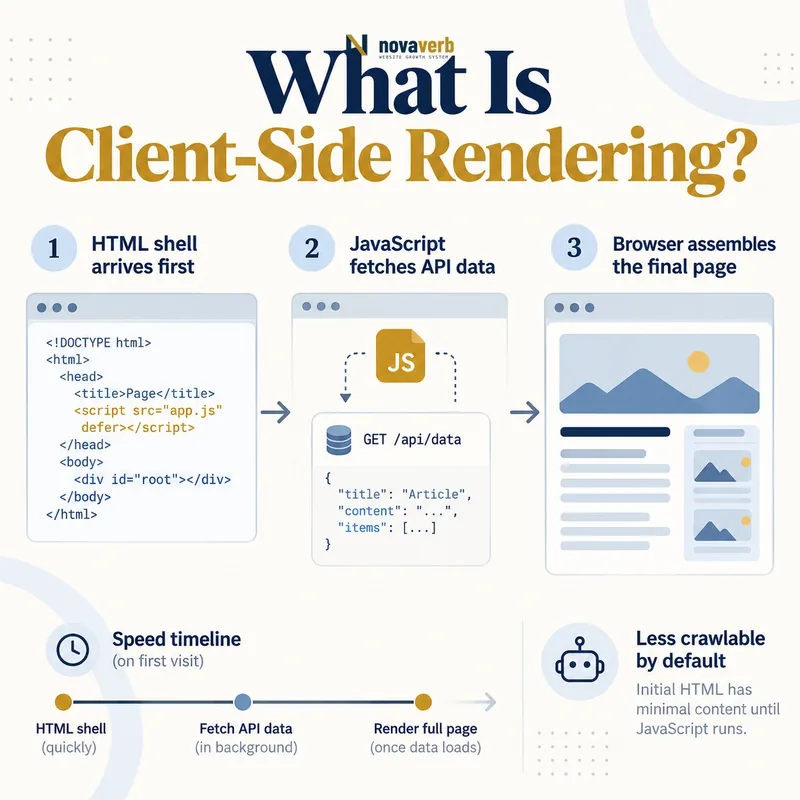
What Is Client-Side Rendering?
A CSR application commonly returns a root element, script references and limited fallback text. Once scripts execute, the router identifies the current view, data requests retrieve content and components create the rendered DOM. Later navigation may update the screen without a full document request. This model suits interactive products, but public pages can become dependent on successful bundle downloads, API access and browser execution. The question is not whether a framework uses CSR. The question is what a direct URL returns, which steps create its content and links, and how the page behaves when one dependency is slow or unavailable. A screenshot of a successful session does not prove that all routes are consistently crawlable.
- Initial HTML application shell
- JavaScript bundle and route initialization
- Client-side data requests
- DOM creation or replacement
- Head metadata updates
- History and navigation state
- Loading, empty and failure views
- Frame the decision raised by What Is Client-Side Rendering.
- Render the page with its required scripts and resources.
- Compare content, links, metadata and canonical signals.
- Trace each difference to the responsible template or script.
- Apply the fix and repeat both observations.
| Stage | Browser action | SEO question |
|---|---|---|
| HTML | Parses app shell | Is core meaning present? |
| Scripts | Downloads and executes bundles | Can dependencies load? |
| Router | Resolves current view | Does direct entry work? |
| Data | Requests API content | Is access reliable? |
| Render | Builds the DOM | Are content and links complete? |
| History | Updates route state | Are URLs durable? |
CSR becomes search-ready when every public route retains a stable identity and reliable content path beyond one successful browser session.
How Does Client-Side Rendering Work?
The server may return the same shell for many paths, leaving the router to decide which page exists. That makes server and client route behavior equally important. A missing product should not receive a generic 200 shell that later displays an error without honest HTTP meaning. Data may be embedded, cached locally or requested from an API. Loading sequences need bounded timeouts and useful error handling so permanent skeletons do not replace content. The head manager must set the current title, canonical and robots policy, then remove values from the prior route during navigation. Each public destination needs a real URL and anchor route even if the application intercepts navigation for speed.
- Request a public application route directly.
- Load the shell and required route bundle.
- Resolve the route against public content.
- Retrieve the correct data with failure handling.
- Render content, links and current metadata.
- Update history during later navigation.
- Clean up state from the previous route.
- Evidence for How Does Client-Side Rendering Work: the raw html returned by the server
- The rendered DOM after required scripts run
- Content, links and metadata that differ between those states
- Network, console and hydration failures tied to the page
- A repeatable test at the exact URL and device context
| Checkpoint | Pass condition | Failure |
|---|---|---|
| Direct route | View initializes independently | Requires prior session |
| Bundle | Needed code loads | Chunk error |
| API | Current data returns | Permanent skeleton |
| DOM | Semantic content appears | Empty root |
| Head | Current route signals | Stale metadata |
| History | Navigation is recoverable | Back-button reset |
A reliable CSR lifecycle preserves route identity through initialization, data loading, rendering and every subsequent navigation state.
Client-Side Rendering vs Server-Side Rendering
CSR can reduce server template work and support rich application state, but it shifts execution and data dependencies to the visitor’s device. SSR provides earlier inspectable HTML but introduces origin rendering, caching and hydration decisions. Static generation is another option for stable pages, while incremental regeneration combines prebuilt output with controlled updates. Choose per route rather than forcing one application-wide mode. Marketing pages, product pages, public profiles and editorial content usually need dependable direct delivery. Authenticated dashboards, editors and calculators may reasonably emphasize private interaction. The dedicated server-side rendering guide covers server HTML and cache risks; this article focuses on browser-built routes.
- Classify public and authenticated routes
- Measure content volatility and personalization
- Compare server capacity with device execution cost
- Define direct-entry and failure requirements
- Keep public route URLs independent of session state
- Test mixed rendering boundaries
- Frame the decision raised by Client-Side Rendering vs Server-Side Rendering.
- Render the page with its required scripts and resources.
- Compare content, links, metadata and canonical signals.
- Trace each difference to the responsible template or script.
- Apply the fix and repeat both observations.
| Model | Primary work location | Main risk |
|---|---|---|
| CSR | Visitor browser | Execution and API dependency |
| SSR | Request-time server | Latency and caching |
| Static generation | Build pipeline | Stale content |
| Incremental generation | Build plus refresh | Invalidation complexity |
| Hybrid | Varies by route or component | Boundary inconsistency |
| Streaming server output | Server and browser | Partial-state complexity |
The best rendering model follows each route’s public purpose, not a blanket preference for one framework capability.
What SEO Problems Can CSR Create?
A client-rendered view may look correct during development while production visitors encounter expired chunks after a release, blocked API calls, consent conflicts or device timeouts. Button-based cards can eliminate ordinary internal link edges. The same server shell may return 200 for nonexistent routes, making status evidence misleading. Metadata can lag behind client navigation or retain a canonical from the previous page. Rendering systems may process the first application state but not trigger tabs, scrolling or additional filters. Query and hash states can multiply addresses when the router does not normalize equivalent views. Because these defects often live in shared components, a single issue can affect every product, category or profile route.
- Core content absent from raw HTML
- Route bundle fails after a deployment
- API error leaves only a loading state
- Cards navigate without anchor hrefs
- Missing resources return a shell with status 200
- Prior-route metadata remains in the document head
- Equivalent client states create duplicate URLs
- Frame the decision raised by What SEO Problems Can CSR Create.
- Render the page with its required scripts and resources.
- Compare content, links, metadata and canonical signals.
- Trace each difference to the responsible template or script.
- Apply the fix and repeat both observations.
| Defect | Evidence | Shared fix |
|---|---|---|
| Empty shell | Raw HTML | Rendering strategy |
| Chunk failure | Network and console | Asset deployment |
| API dependency | Failure simulation | Data fallback |
| Button navigation | Anchor extraction | Link component |
| Soft error | Missing-route request | Server/router contract |
| Stale head | Route-transition test | Metadata manager |
CSR defects should be grouped by router, renderer, data layer and shared component so fixes address their full URL footprint.
How Should CSR Links and Routes Work?
An onClick handler is not an adequate substitute for a link to another public document. The destination should open in a new tab, resolve after refresh and work without prior in-memory state. Buttons remain appropriate for actions such as expanding a panel, applying a local control or submitting a form. Route parameters need one normalized order and clear defaults. Hash fragments should identify sections within a page rather than silently representing unrelated indexable views. The server must recognize public routes enough to return an honest redirect, success or missing response even if the browser creates most content. Test menus, breadcrumbs, cards, pagination and faceted controls because link abstractions are frequently reused across all of them.
- Assign one public URL to every meaningful destination.
- Render public destinations as anchors with href values.
- Enhance navigation through the router after base links work.
- Test direct open, refresh, share and new-tab behavior.
- Preserve back and forward navigation state.
- Normalize parameters, hashes and trailing forms.
- Return honest server behavior for invalid routes.
- Evidence for How Should CSR Links and Routes Work: the raw html returned by the server
- The rendered DOM after required scripts run
- Content, links and metadata that differ between those states
- Network, console and hydration failures tied to the page
- A repeatable test at the exact URL and device context
| Behavior | Pass condition | Failure |
|---|---|---|
| Direct entry | Correct view loads | Home or blank shell |
| Card link | Anchor destination exists | Clickable div |
| Refresh | Same route recovers | Application 404 |
| Share | Recipient sees same state | Session-only view |
| Back button | Previous state restores | Reset or loop |
| Missing route | Honest response | Generic status 200 |
Client routing supports SEO when it accelerates durable web routes instead of creating a separate navigation system that exists only in memory.
How Should CSR Metadata and Content Render?
A head-management component often updates title and meta elements after the router resolves data. That update must remove old values, normalize the canonical and handle loading and missing states deliberately. A generic title that changes several seconds later weakens clarity and can produce inconsistent observations. The visible main heading, body copy, internal links and media alternatives need to exist in the settled DOM without requiring unrelated interaction. Core content should not hide behind tabs, scrolling or consent when it defines the route’s subject. Structured information, if used, must describe current visible facts rather than an entity left from the prior view. Capture the document head and content after multiple route transitions, not only a fresh page load.
- Set current title and description after route resolution
- Emit one normalized canonical
- Preserve the intended robots policy
- Remove prior-route head elements
- Render the primary heading and body reliably
- Keep item links as ordinary anchors
- Test repeated transitions between template types
- Frame the decision raised by How Should CSR Metadata and Content Render.
- Render the page with its required scripts and resources.
- Compare content, links, metadata and canonical signals.
- Trace each difference to the responsible template or script.
- Apply the fix and repeat both observations.
| Element | Expected result | Common failure |
|---|---|---|
| Title | Current unique route | Generic application name |
| Canonical | One normalized URL | Prior route retained |
| Robots | Intentional current policy | Missing during load |
| Heading | Current page subject | Skeleton or hidden tab |
| Body | Complete meaningful content | API-dependent blank |
| Links | Stable href targets | Event-only navigation |
A CSR route is complete only when its settled content and head describe the same current, normalized public page.
How Do Performance and API Failures Affect CSR?
The application shell can arrive quickly while the actual route remains blank. Measure time to meaningful content rather than server response alone. Route-based code splitting reduces unnecessary code, but a long chain of dependent chunks creates new failure points. APIs need stable public access, bounded retries and clear empty-versus-error states. A valid collection with zero items is different from a failed request, and the interface should not confidently present one as the other. Cached API data may improve resilience but requires freshness and route identity rules. Third-party scripts should not block core route initialization. Test mid-range mobile devices, slow networks and expired chunks after deployment because these conditions reveal problems that a warm local session hides.
- Measure shell arrival and meaningful content separately
- Inspect route chunk request chains
- Distinguish empty data from request failure
- Bound retries and show honest fallback states
- Keep third-party code outside the critical route path
- Test release transitions with old cached documents
- Frame the decision raised by How Do Performance and API Failures Affect CSR.
- Render the page with its required scripts and resources.
- Compare content, links, metadata and canonical signals.
- Trace each difference to the responsible template or script.
- Apply the fix and repeat both observations.
| Symptom | Likely cause | Evidence |
|---|---|---|
| Fast shell, blank page | Bundle or API delay | Timeline |
| Route fails after release | Expired chunk | Network error |
| Permanent skeleton | Unhandled request failure | DOM and console |
| Wrong empty state | Error treated as zero results | API response |
| Slow interaction | Main-thread bundle cost | Device profile |
| Stale content | Cache identity problem | Repeated route comparison |
CSR is operationally sound when failures remain honest and the path from shell to meaningful content stays short, observable and recoverable.
How Do You Audit Client-Side Rendering?
Map route families, public content types, routers, head managers, API sources and shared link components. Select successful, redirected, missing, parameterized and recently changed URLs. Record status, headers and raw HTML, then render until the application settles and capture the DOM, head, network and console. Navigate between route types to expose stale state. Test refresh, new tab, back and forward behavior. Fail a route chunk and data request deliberately to confirm that useful meaning or an honest error remains. Reconcile discovered content with authoritative inventory. Pair the process with the broader JavaScript SEO guide, an internal link audit, and focused checks for infinite scroll or lazy loading.
- Inventory public CSR routes and dependencies.
- Capture status, headers and raw HTML.
- Render representative pages to settled state.
- Diff content, links and head elements.
- Exercise direct entry and browser history.
- Fail bundles and APIs deliberately.
- Reconcile discovered routes with inventory.
- Prioritize shared component defects and retest.
- Evidence for How Do You Audit Client-Side Rendering: the raw html returned by the server
- The rendered DOM after required scripts run
- Content, links and metadata that differ between those states
- Network, console and hydration failures tied to the page
- A repeatable test at the exact URL and device context
| Check | Evidence | Pass condition |
|---|---|---|
| Raw response | HTML capture | Useful fallback or known shell |
| Rendered content | DOM snapshot | Expected meaning present |
| Links | Anchor extraction | Valid public destinations |
| Head | Repeated route transitions | Current consistent metadata |
| Routes | Direct and missing requests | Accurate recovery and status |
| Dependencies | Failure simulation | Honest resilient state |
| Performance | Real-device trace | Timely meaningful content |
| Coverage | Inventory reconciliation | No hidden important routes |
Start with a relevant free SEO check, continue the evidence workflow in Crawl Explorer, and review pricing when comparing continuous monitoring with a one-time manual review.
A complete CSR audit proves that every important route can move from direct request to accurate rendered content without hidden assumptions.