
What Is Hydration in SEO?
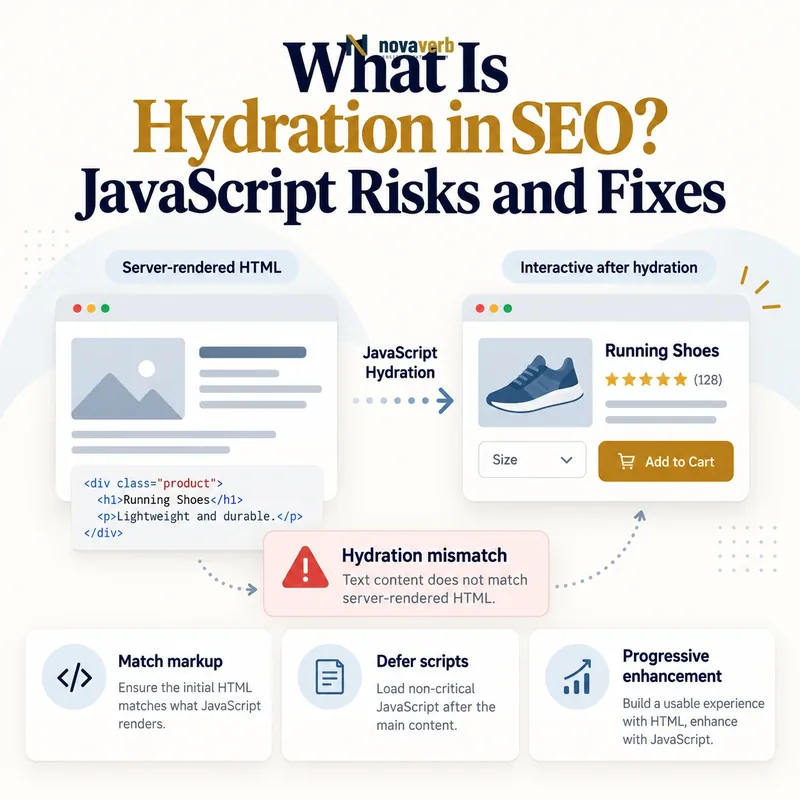
A server-rendered document can display headings, copy, images and anchor links before the application code finishes. Hydration loads the relevant component logic, reconstructs the expected component tree and connects event handlers to that existing markup. If the server and browser agree, the transition may be nearly invisible. If they disagree, the browser can warn, replace nodes, duplicate content or rebuild parts of the page. That can affect what visitors see, when controls work and which content a rendered audit captures. Hydration is therefore not merely a framework implementation detail. It is a production boundary where route data, locale, user state, experiments and component assumptions must remain consistent.
- Server or build process creates HTML
- Browser parses and displays the document
- JavaScript bundle loads component logic
- Client reconstructs expected application state
- Framework compares or claims existing nodes
- Event handlers attach to interactive elements
- Later updates follow client application rules
| Stage | Expected behavior | SEO concern |
|---|---|---|
| HTML delivery | Core meaning present | Accurate raw content |
| Initial display | Markup appears | Visual stability |
| Bundle load | Required code arrives | Execution delay |
| State restore | Same route data used | Server/client parity |
| Node attachment | Existing DOM retained | Replacement risk |
| Interaction | Controls become active | Usability timing |
Hydration is successful when JavaScript adds behavior without renegotiating the page’s public identity or replacing dependable server content.
How Does JavaScript Hydration Work?
Frameworks implement the process differently, but the contract is similar. The server chooses a route, fetches data and produces deterministic markup. It often serializes a safe subset of initial state so the browser can begin from the same entity and version. The client loads code, recreates component expectations and connects handlers. Any value generated independently in both environments can diverge: timestamps, random IDs, browser dimensions, locale formatting and experiment assignment are frequent sources. Some systems hydrate the whole application at once, while others activate islands, visible components or interactions on demand. Regardless of strategy, core public content should remain stable before, during and after activation.
- Resolve one normalized public route.
- Render deterministic server or build-time HTML.
- Serialize only safe initial state.
- Load the client code required by the route.
- Recreate matching component expectations.
- Attach events to stable existing nodes.
- Handle later updates without stale route state.
| Input | Must remain consistent | Mismatch outcome |
|---|---|---|
| Route | Same page identity | Wrong component tree |
| Content data | Same entity version | Text replacement |
| Locale | Same formatting rules | Date or number change |
| User state | Correct public boundary | Personalized flash |
| Experiment | Stable assignment | Copy and layout swap |
| Identifiers | Deterministic values | Duplicate or discarded nodes |
Hydration depends on deterministic inputs, so every value that shapes initial markup needs an explicit shared source or a stable client-only boundary.
Hydration vs Rendering and Rehydration
These terms are easily blurred in audits. A server-side render may produce the initial document. Hydration then connects the interactive application. Client-side navigation can later render new route components without a full server document. Static pages can use selective islands where only a form or menu hydrates. A mismatch may force the framework to abandon reuse and perform a client render, which changes both cost and visible behavior. When teams say a page is rendered, ask which stage they measured. Raw HTML proves server or build output. A settled DOM proves a successful browser state. Neither alone proves that hydration retained the original nodes or that interactions became ready promptly.
- Separate HTML generation from behavior attachment
- Name initial and later navigation states
- Distinguish full, partial and island hydration
- Record whether nodes are reused or replaced
- Measure content display and interaction readiness separately
- Use consistent terminology in defect reports
| Term | Meaning | Audit evidence |
|---|---|---|
| Server render | HTML created per request | Raw response |
| Static render | HTML created ahead of request | Built output |
| Client render | Browser creates DOM | Rendered snapshot |
| Hydration | Behavior attaches to HTML | DOM and console |
| Partial hydration | Selected regions activate | Component trace |
| Client navigation | Browser renders later route | History test |
Clear terminology prevents teams from treating a complete screenshot as proof that every delivery and hydration stage worked correctly.
What Causes Hydration Mismatches?
A server might render a timestamp in one timezone while the browser formats it locally. Random identifiers can change element relationships. A shared cache may return anonymous HTML to a signed-in browser, whose client immediately expects personalized controls. Experiments assigned independently can alter headings or component order. Code that branches on window size cannot make the same decision on a server without an agreed default. Invalid nesting may be repaired by the browser parser before the framework sees the DOM. Data fetched twice can change between requests. The right fix is to identify the divergent input, not suppress the warning or force a blanket client render that hides the symptom while increasing dependency.
- Time, timezone or locale formatting differs
- Random IDs are generated in both environments
- Client state differs from shared cached HTML
- Experiments receive inconsistent assignments
- Browser-only checks alter initial markup
- Invalid HTML is normalized by the parser
- Server and client fetch different data versions
| Cause | Visible symptom | Preferred direction |
|---|---|---|
| Time formatting | Text changes | Serialize stable value |
| Random IDs | Association warnings | Deterministic identifiers |
| User state | Personalized flash | Separate cache and boundary |
| Experiment drift | Copy or layout swap | Stable assignment |
| Viewport branch | Component replacement | Stable initial structure |
| Data race | Price or status changes | Reuse initial version |
Fix hydration mismatches by reconciling the input contract that produced the two trees rather than masking the framework’s evidence.
How Can Hydration Affect SEO?
The server HTML may already contain crawlable content, which reduces one risk, but hydration can still modify the settled state that rendering systems inspect. A client head manager might replace a correct canonical with a default. Navigation links can become buttons or lose destinations after a component remount. A price, availability label or product description may flash between values. A fatal error can stop forms, filters and menus even while copy remains visible. Large hydration work can occupy the main thread, separating content display from interaction readiness. Evaluate both search access and user consequences. The most serious defects change route identity, remove meaningful content or affect a shared component across many URLs.
- Server content disappears after client activation
- Head elements change to stale or generic values
- Anchor destinations are replaced or removed
- Structured information no longer matches visible content
- Large hydration tasks delay primary actions
- Errors leave the interface visually present but inert
| Effect | Evidence | Priority signal |
|---|---|---|
| Content replacement | Pre/post DOM diff | Main content affected |
| Metadata change | Head timeline | Canonical or robots conflict |
| Link loss | Anchor comparison | Sitewide component |
| Visual shift | Layout trace | Large visible movement |
| Delayed interaction | Main-thread profile | Primary action blocked |
| Fatal error | Console and action test | Broad route failure |
Hydration risk is highest when activation changes the page’s identity, discovery paths or primary user outcome across a shared route family.
Full, Partial and Selective Hydration Compared
Reducing hydrated scope can lower bundle and execution cost, but it introduces component-boundary decisions. A static article may need JavaScript only for navigation, a calculator and a signup form. A product page may need gallery, variant and cart behavior while its description and specifications remain stable HTML. Lazy or visibility-based hydration defers low-priority components, but primary controls should not wait for an interaction that users cannot perform. Component islands need predictable state communication so one region does not silently rewrite another’s metadata or route. The architecture should be judged by delivered content, shipped code, interaction readiness and failure isolation rather than by fashionable terminology.
- Hydrate only components that require browser behavior
- Keep public copy and links as stable HTML
- Prioritize primary controls before distant widgets
- Define state communication across islands
- Prevent component-local code from rewriting route identity
- Measure shipped code and interaction timing
| Strategy | Strength | Risk |
|---|---|---|
| Full hydration | Simple application model | High bundle and execution cost |
| Partial hydration | Reduced active scope | Boundary complexity |
| Islands | Strong static-content baseline | Cross-island coordination |
| Visibility hydration | Defers distant widgets | Late controls during fast scroll |
| Interaction hydration | Loads on intent | First action delay |
| No hydration | Minimal client cost | No application behavior |
Choose hydration scope according to actual interactive needs while keeping route content and search signals outside fragile activation paths.
How Do Performance and Accessibility Change?
This interval is sometimes called an interaction gap. A visitor sees a menu or button, tries it and receives no response because the bundle is still loading or the main thread is busy. Hydration can also replace nodes and lose keyboard focus, expanded state or screen-reader context. Event replay systems may capture early actions, but they require careful testing. Measure on realistic mobile devices rather than a warm desktop. Track bundle transfers, long tasks, interaction readiness and layout movement. Ensure anchors retain native behavior before hydration, forms have understandable fallback behavior where appropriate, and critical controls do not depend on a distant component’s code chunk.
- Measure visible content and usable controls separately
- Test an immediate click before hydration completes
- Preserve native anchor and form behavior
- Track keyboard focus across activation
- Review screen-reader context after DOM changes
- Keep critical component code out of long request chains
| Area | Pass condition | Test |
|---|---|---|
| Early click | Action works or degrades honestly | Slow-network interaction |
| Keyboard focus | Remains predictable | Tab during hydration |
| Anchors | Native destination works | Disable scripts |
| Forms | State is not lost | Submit before activation |
| Main thread | No excessive blocking | Device profile |
| Layout | Nodes remain stable | Visual recording |
Hydration quality includes the period between visible HTML and usable interaction, not only the final settled page.
How Do You Audit Hydration?
Start with representative server-rendered or statically generated templates and identify which components hydrate. Record raw HTML, serialized state and route-specific head elements. In the browser, capture an early DOM before activation settles and another after completion. Diff headings, body text, links, form controls, canonicals and structured information. Review console warnings instead of suppressing them. Throttle network and CPU, interact immediately, fail a route chunk and repeat client navigation between template types. Reconcile values with authoritative content. Connect findings to server-side rendering, client-side rendering and the broader JavaScript SEO architecture.
- Inventory templates and hydrated component boundaries.
- Capture raw HTML and serialized initial state.
- Record the DOM before and after activation.
- Diff content, links, controls and head elements.
- Review console warnings and network failures.
- Throttle execution and test immediate actions.
- Navigate between routes to expose stale state.
- Fix shared input contracts and retest.
| Check | Evidence | Pass condition |
|---|---|---|
| Initial HTML | Raw response | Accurate route content |
| Initial state | Serialized payload | Safe and matching data |
| DOM parity | Pre/post diff | No harmful replacement |
| Head parity | Metadata timeline | Stable current route |
| Links | Anchor comparison | Destinations preserved |
| Console | Warnings and errors | No unexplained mismatch |
| Interaction | Slow-device test | Primary controls usable |
| Failure | Chunk simulation | Core meaning remains |
A complete hydration audit proves that activation preserves page identity and usability under both ideal and degraded conditions.
Hydration SEO FAQ
A clean final screenshot is not enough. Compare states and test the activation interval on real route data.
- Inspect server and client inputs together
- Fix mismatches instead of hiding warnings
- Hydrate only the behavior the page needs
What is hydration in JavaScript?
What is a hydration mismatch?
Can hydration hurt SEO?
Is hydration the same as client rendering?
Does every page need hydration?
Why does content flash during hydration?
How are hydration errors tested?
When should hydration be audited?
Hydration remains reliable when deterministic inputs and measurable component boundaries replace implicit server-versus-browser assumptions.
Keep Server HTML Stable After JavaScript Loads
Use Novaverb’s SEO tools to inspect raw and rendered content, internal links, metadata and route behavior. Before changing URLs affected by a rendering migration, review external evidence with the Free Backlink Checker and explore broader patterns in Backlinks Explorer. Use an internal link audit to confirm that activation does not remove destinations.
- Map hydrated component boundaries
- Diff server and client output
- Repair shared state mismatches
- Protect route metadata and links
- Test slow and failed activation
- Recrawl representative production pages
The strongest hydration system turns stable HTML into a responsive application without changing what the page means or where its links lead.