
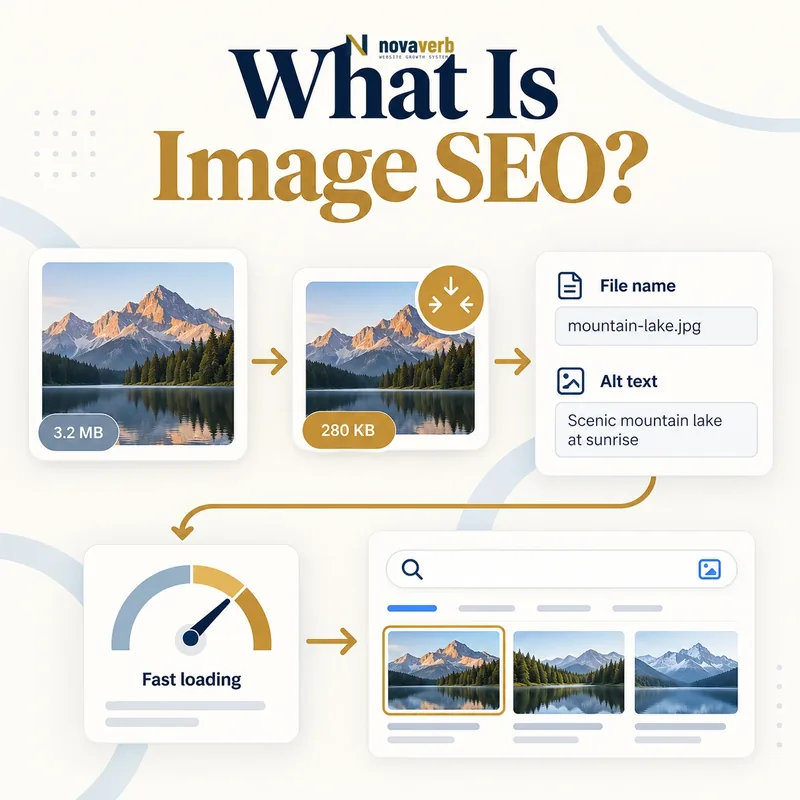
What Is Image SEO?
It combines content decisions with technical delivery. Descriptive context helps a search system and an assistive technology understand what an image contributes. Appropriate dimensions, formats, compression and responsive variants reduce unnecessary bytes. Crawlable URLs and stable page references make important visuals easier to discover.
Image SEO is not the act of inserting keywords into every filename or alt attribute. The image should serve the page’s intent, and its text alternatives should describe function or meaning honestly. Decorative assets, product photography, diagrams, screenshots and editorial photos require different treatment.
- Frame the decision raised by What Is Image SEO.
- Render the page with its required scripts and resources.
- Compare content, links, metadata and canonical signals.
- Trace each difference to the responsible template or script.
- Apply the fix and repeat both observations.
| Image SEO element | Primary purpose | Common evidence |
|---|---|---|
| Image choice | Support page intent | Visual relevance to nearby content |
| Alt text | Provide meaningful alternative | Accurate description or function |
| Filename | Create readable asset identity | Stable descriptive URL |
| Dimensions | Reserve correct layout space | Width and height attributes |
| Responsive delivery | Match device needs | srcset and sizes selection |
| Context | Explain why image matters | Caption, heading and surrounding copy |
- Use images that add information or trust.
- Keep text alternatives accurate.
- Deliver only the bytes each device needs.
Strong image SEO aligns visual meaning, accessibility, discovery and delivery instead of optimizing any one field in isolation.
The decision for What Is Image SEO should rest on live, traceable evidence and a verified follow-up check.
How Does Image SEO Work?
A crawler or browser discovers an image through HTML, CSS, structured data, a sitemap or another page reference. The surrounding document supplies topic and relationship signals. The asset response supplies status, content type, cache behavior and bytes. Rendering then determines whether the visual appears, how large it is and whether it shifts the layout.
Search visibility is therefore page-and-asset dependent. A perfect filename cannot rescue a blocked image URL. A small file cannot explain an ambiguous decorative graphic. A useful diagram can still fail users when its alt text repeats the caption without conveying the essential information.
- Evidence for How Does Image SEO Work: the raw html returned by the server
- The rendered DOM after required scripts run
- Content, links and metadata that differ between those states
- Network, console and hydration failures tied to the page
- A repeatable test at the exact URL and device context
| Stage | Required condition | Failure example |
|---|---|---|
| Discovery | Crawlable reference exists | Image injected only after failed script |
| Understanding | Page and text provide context | Generic filename and unrelated copy |
| Fetch | Image returns correct public response | Blocked, redirected repeatedly or 404 |
| Selection | Browser chooses suitable candidate | Oversized desktop image on mobile |
| Rendering | Dimensions and styling are stable | Layout shifts when image arrives |
| Reuse | Caching and URL remain intentional | Every deploy creates needless new URL |
- Select a visual that serves the page.
- Provide accurate textual context.
- Expose a stable crawlable URL.
- Deliver and render the right-sized asset.
The working chain is discover the asset, understand its role, fetch it reliably and render it efficiently in a relevant page.
The decision for How Does Image SEO Work should rest on live, traceable evidence and a verified follow-up check.
How Should You Write Image Alt Text?
Useful alt text lets someone understand what the image contributes when they cannot see it. For a product photo, identify the relevant product and visible distinguishing feature. For a chart, summarize the conclusion that the visual supports. For a linked icon, describe the destination or action rather than its shape.
Avoid starting every description with “image of,” repeating a nearby caption word for word or forcing keyword variations. Do not omit the attribute on decorative images; alt="" signals that assistive technology can skip them. Complex diagrams may need a concise alt attribute plus a longer explanation in surrounding content.
- Frame the decision raised by How Should You Write Image Alt Text.
- Render the page with its required scripts and resources.
- Compare content, links, metadata and canonical signals.
- Trace each difference to the responsible template or script.
- Apply the fix and repeat both observations.
| Image role | Alt approach | Example direction |
|---|---|---|
| Product photo | Name item and visible attribute | Blue trail shoe, side profile |
| Data chart | State key conclusion | Organic visits rose after migration |
| Linked logo | Describe destination or brand home | Novaverb home |
| Functional icon | Describe action | Download report |
| Decorative flourish | Empty alt attribute | alt="" |
| Complex diagram | Short summary plus nearby detail | Describe flow, then explain steps |
- Write for the image’s role on the page.
- Keep decorative assets silent.
- Use nearby copy for complex explanations.
The best alt text replaces the image’s meaning in that exact context without adding promotional or irrelevant language.
The decision for How Should You Write Image Alt Text should rest on live, traceable evidence and a verified follow-up check.
Do Image Filenames and Captions Matter?
A filename such as technical-seo-audit-dashboard.webp is easier to manage and interpret than IMG_0048.webp. Use lowercase words, readable separators and a description tied to the actual visual. Avoid long lists of city, product and service terms that do not match the image.
Captions are visible content and deserve editorial value. They can identify a person, explain a data point, name a product variation or connect a screenshot to the surrounding argument. Not every image needs a caption. When one adds no information, nearby body copy and an accurate alt attribute may be enough.
- Evidence for Do Image Filenames and Captions Matter: the raw html returned by the server
- The rendered DOM after required scripts run
- Content, links and metadata that differ between those states
- Network, console and hydration failures tied to the page
- A repeatable test at the exact URL and device context
| Field | Good use | Poor use |
|---|---|---|
| Filename | Describe the visual clearly | camera-generated number only |
| Caption | Add identity, finding or context | Repeat the heading mechanically |
| Title attribute | Optional supplemental text | Depend on hover for essential meaning |
| Nearby paragraph | Explain relationship to topic | Place unrelated image beside keyword copy |
| Asset folder | Maintain organized stable URLs | Expose temporary build paths |
| Credit line | Record source or creator when needed | Mix licensing notes into alt text |
- Name the asset before publishing.
- Keep the URL stable when identity remains the same.
- Add a caption only when it helps readers.
- Confirm licensing and credit requirements.
Use filenames for durable asset identity and captions for useful visible context, not as containers for extra keyword repetitions.
The decision for Do Image Filenames and Captions Matter should rest on live, traceable evidence and a verified follow-up check.
Which Image Format Should You Use?
JPEG remains practical for photographs where lossy compression is acceptable. PNG suits transparency and sharp graphics but can be large for photos. WebP and AVIF can provide efficient photographic or graphic delivery, with AVIF often achieving strong compression at the cost of more encoding work. SVG is ideal for scalable vector artwork and icons when the source is safe and clean.
Format conversion should preserve sufficient detail for the page’s purpose. Product imagery may need texture and color fidelity, while a decorative background can tolerate stronger compression. Use <picture> when format or art-direction fallbacks are needed, and verify that every source returns a correct content type.
- Frame the decision raised by Which Image Format Should You Use.
- Render the page with its required scripts and resources.
- Compare content, links, metadata and canonical signals.
- Trace each difference to the responsible template or script.
- Apply the fix and repeat both observations.
| Format | Strong fit | Watch for |
|---|---|---|
| JPEG | Photographs and broad compatibility | No transparency and lossy artifacts |
| PNG | Transparency and sharp raster graphics | Large photographic files |
| WebP | Modern photos and graphics | Fallback needs on older environments |
| AVIF | High-efficiency modern imagery | Encoding cost and quality tuning |
| SVG | Logos, icons and diagrams | Unsafe or bloated markup |
| GIF | Simple legacy animation | Large files and limited color |
| Animated WebP/AVIF/video | Efficient motion alternatives | Autoplay, accessibility and support |
- Encode from a high-quality source.
- Compare quality at target display size.
- Keep fallbacks only where real support requires them.
The right format is the smallest reliably supported file that preserves the visual information the page needs.
The decision for Which Image Format Should You Use should rest on live, traceable evidence and a verified follow-up check.
How Do Responsive Images Improve SEO?
The srcset attribute lists candidates, while sizes describes the expected rendered width under layout conditions. The browser combines that information with viewport and device characteristics. Width descriptors work well when one image appears at different layout widths; density descriptors suit a fixed rendered size with higher-resolution displays.
The <picture> element supports art direction when a mobile composition should differ from desktop, and it can offer format alternatives. Incorrect sizes can cause an oversized candidate to download. Audit the selected current source across breakpoints rather than checking markup alone.
- Evidence for How Do Responsive Images Improve SEO: the raw html returned by the server
- The rendered DOM after required scripts run
- Content, links and metadata that differ between those states
- Network, console and hydration failures tied to the page
- A repeatable test at the exact URL and device context
| Responsive tool | Purpose | Audit focus |
|---|---|---|
| srcset with widths | Offer multiple intrinsic widths | Candidate range and actual selection |
| sizes | Describe layout width | Matches rendered CSS width |
| Density descriptors | Offer 1x/2x variants | Fixed display size use case |
| picture source | Art direction or format choice | Media and type order |
| src fallback | Baseline source | Valid and appropriately sized |
| CSS object-fit | Control crop in container | Does not replace source sizing |
- Measure rendered widths at key breakpoints.
- Generate a sensible candidate set.
- Write sizes from the real layout.
- Inspect selected files on actual devices.
Responsive image markup succeeds when each device receives a visually sufficient candidate close to its rendered dimensions.
The decision for How Do Responsive Images Improve SEO should rest on live, traceable evidence and a verified follow-up check.
How Do Images Affect Core Web Vitals?
A primary image is a common Largest Contentful Paint candidate. Its discovery, priority, transfer size and decode time all matter. Do not lazy-load an above-fold hero by default. A late-discovered CSS background may benefit from a carefully matched preload, as explained in Preload vs Prefetch.
Explicit width and height or a stable aspect ratio reserve space before bytes arrive, helping Cumulative Layout Shift. Large carousels, client-side transformations and excessive animation can add main-thread or GPU work that affects responsiveness. Image optimization must therefore cover both network and layout behavior.
- Frame the decision raised by How Do Images Affect Core Web Vitals.
- Render the page with its required scripts and resources.
- Compare content, links, metadata and canonical signals.
- Trace each difference to the responsible template or script.
- Apply the fix and repeat both observations.
| Image issue | Likely metric effect | Control |
|---|---|---|
| Late hero discovery | LCP delay | Early HTML reference or measured preload |
| Oversized hero | LCP transfer delay | Responsive size and efficient format |
| Missing dimensions | CLS movement | Width, height or aspect ratio |
| Above-fold lazy loading | LCP start delay | Load critical image eagerly |
| Below-fold eager gallery | Bandwidth competition | Use appropriate lazy loading |
| Heavy carousel | Interaction and rendering cost | Reduce scripts, layers and motion |
- Identify the actual LCP element per template.
- Reserve layout space before loading.
- Test mobile network and CPU conditions.
For Core Web Vitals, prioritize the real hero, reserve its space and defer only images that are genuinely outside the initial viewport.
The decision for How Do Images Affect Core Web Vitals should rest on live, traceable evidence and a verified follow-up check.
How Do You Audit Image SEO?
Start with high-traffic and conversion templates rather than every asset at once. Inventory hero images, product photos, diagrams, editorial visuals and linked icons. Record their URL, status, MIME type, filename, alt text, caption, intrinsic dimensions, rendered size, selected responsive candidate, bytes and loading behavior.
Then inspect page discovery and context. Confirm important visuals appear in crawlable markup or a dependable rendered path, and that blocked or expired assets do not return placeholders. Compare mobile and desktop candidates. Review image URLs in XML sitemaps only when that mechanism fits the site. Prioritize broken responses, missing meaning and oversized critical assets before minor filename cleanup.
- Evidence for How Do You Audit Image SEO: the raw html returned by the server
- The rendered DOM after required scripts run
- Content, links and metadata that differ between those states
- Network, console and hydration failures tied to the page
- A repeatable test at the exact URL and device context
| Audit check | Evidence | Pass condition |
|---|---|---|
| Purpose | Page review | Image supports user intent |
| Alt text | Rendered HTML and context | Meaning or function conveyed accurately |
| Fetch | Status and content type | Stable successful image response |
| Sizing | Intrinsic vs rendered dimensions | No large avoidable oversupply |
| Responsive choice | currentSrc across breakpoints | Appropriate candidate selected |
| Layout | Reserved dimensions and CLS | No unexpected movement |
| Loading | Priority and lazy behavior | Critical early, offscreen deferred |
| Context | Heading, caption and copy | Image relationship is clear |
- Select important templates and visuals.
- Capture content and delivery evidence.
- Test responsive selection and layout.
- Rank defects by user and traffic impact.
- Retest changed assets on public pages.
An image SEO audit is complete when every high-value visual is useful, understandable, fetchable and delivered efficiently on its actual template.
Start with a relevant free SEO check, continue the evidence workflow in Crawl Explorer, and review pricing when comparing continuous monitoring with a one-time manual review.
The decision for How Do You Audit Image SEO should rest on live, traceable evidence and a verified follow-up check.