
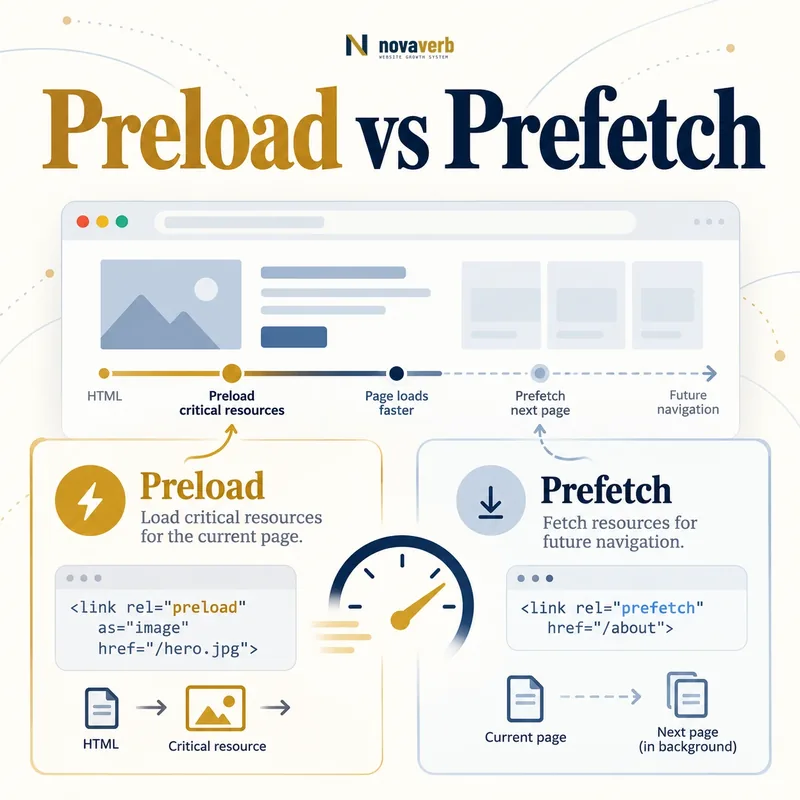
What Is the Difference Between Preload and Prefetch?
Both are resource hints written with a <link> element or an equivalent response header, but they express different urgency and time horizons. Preload belongs to the current document’s critical delivery plan. Prefetch is speculative and should compete only for spare capacity after current-page needs are protected.
A hint does not replace the real stylesheet, script, image or font reference. The browser must still encounter or execute the consuming element. A correct preload can make discovery earlier; an incorrect one can duplicate a download or take bandwidth from something more important. A prefetch may never be used if the visitor chooses another path.
- Frame the decision raised by What Is the Difference Between Preload and Prefetch.
- Render the page with its required scripts and resources.
- Compare content, links, metadata and canonical signals.
- Trace each difference to the responsible template or script.
- Apply the fix and repeat both observations.
| Hint | Time horizon | Typical priority | Primary purpose |
|---|---|---|---|
| preload | Current navigation | High or type-dependent | Discover important resource earlier |
| prefetch | Possible future navigation | Low | Warm a likely next resource |
| preconnect | Current or near-future origin | Connection setup | Prepare DNS, TCP/QUIC and TLS |
| dns-prefetch | Possible external origin | Low | Resolve hostname early |
| modulepreload | Current module graph | Module-aware | Fetch and prepare JavaScript modules |
- Hints are scheduling signals, not guarantees.
- Every hinted resource needs a real consumer.
- Bandwidth is finite, so hints create tradeoffs.
Use preload for a verified current-page dependency and prefetch only for a likely next-page resource with low opportunity cost.
The decision for What Is the Difference Between Preload and Prefetch should rest on live, traceable evidence and a verified follow-up check.
How Does Preload Work?
as, type and crossorigin to match the later request correctly.The browser normally discovers resources while parsing HTML, CSS or JavaScript. A font hidden inside a stylesheet or a hero image inserted late may be found after other work has begun. A preload placed early can expose that URL sooner and assign a destination-specific request context through the as attribute.
The later consumer must request the same URL with compatible credentials, CORS mode and destination. If not, the browser may fetch the file again. A preload should be close to the start of the document or delivered through a response header. Hints added late by client JavaScript often arrive too late to improve discovery.
- Evidence for How Does Preload Work: the raw html returned by the server
- The rendered DOM after required scripts run
- Content, links and metadata that differ between those states
- Network, console and hydration failures tied to the page
- A repeatable test at the exact URL and device context
| Attribute | Purpose | Failure if wrong |
|---|---|---|
| href | Exact resource URL | Different file is fetched |
| as | Resource destination and scheduling | Reuse or priority can fail |
| type | MIME support signal | Unsupported resource may be skipped |
| crossorigin | CORS and credentials mode | Font or cross-origin request duplicates |
| media | Conditional applicability | Unneeded variant may download |
| imagesrcset/imagesizes | Responsive image selection | Wrong image candidate is fetched |
- Identify a late-discovered critical resource.
- Copy its exact public request properties.
- Place the hint early.
- Verify one request and earlier timing.
A preload works only when it is early, accurately described and identical to the request the page later consumes.
The decision for How Does Preload Work should rest on live, traceable evidence and a verified follow-up check.
How Does Prefetch Work?
The browser schedules prefetch work according to its own resource policy, network conditions and user settings. It may delay or skip a hint. If the visitor later requests the same eligible URL while the stored response remains reusable, the navigation can avoid or shorten a network transfer.
Prefetch value depends on prediction quality. A checkout confirmation asset may be highly likely after a completed checkout, while prefetching every product page from a category creates waste. Cache headers, credentials and URL identity must allow the future request to reuse the result. Cross-site privacy controls may also limit behavior.
- Frame the decision raised by How Does Prefetch Work.
- Render the page with its required scripts and resources.
- Compare content, links, metadata and canonical signals.
- Trace each difference to the responsible template or script.
- Apply the fix and repeat both observations.
| Decision factor | Good signal | Warning signal |
|---|---|---|
| Navigation probability | One dominant next step | Many equally likely destinations |
| Resource size | Small reusable dependency | Large media or application bundle |
| Cache lifetime | Valid through next navigation | Expires before likely use |
| Network cost | Spare capacity available | Constrained mobile connection |
| User state | Same credentials and context | Personalized response mismatch |
| Business value | Important next journey | Speculative low-value page |
- Start with one high-confidence journey.
- Never assume every browser executes the hint.
- Measure unused prefetched bytes.
Prefetch is worthwhile when the next action is probable, the resource is reusable and current-page performance remains protected.
The decision for How Does Prefetch Work should rest on live, traceable evidence and a verified follow-up check.
When Should You Preload Fonts and Images?
A primary web font may be discovered only after CSS is fetched and parsed. A matching font preload can shorten that chain, but preloading every family, weight and style wastes bandwidth. Font requests commonly need crossorigin even when the file shares the site’s origin because of the font fetch mode.
A hero image can benefit when it is the likely Largest Contentful Paint element and CSS or client rendering hides its URL. Responsive images require imagesrcset and imagesizes so the browser does not preload one candidate and later choose another. Images already discovered early in HTML may need priority tuning rather than an extra hint.
- Evidence for When Should You Preload Fonts and Images: the raw html returned by the server
- The rendered DOM after required scripts run
- Content, links and metadata that differ between those states
- Network, console and hydration failures tied to the page
- A repeatable test at the exact URL and device context
| Resource case | Preload? | Reason |
|---|---|---|
| Primary above-fold font | Maybe | Late CSS discovery can delay text |
| Unused font weight | No | No current-page consumer |
| Hero image in HTML | Maybe not | Parser may already find it early |
| CSS background hero | Often worth testing | URL can be discovered late |
| Responsive hero | Only with matching image attributes | Avoid wrong candidate download |
| Below-fold gallery | No | Competes with critical resources |
- Confirm the real LCP or critical text element.
- Trace when its resource is discovered.
- Add one accurately matched hint.
- Compare timing and transferred bytes.
Preload the exact font or image that blocks visible content, not every asset that appears above the fold.
The decision for When Should You Preload Fonts and Images should rest on live, traceable evidence and a verified follow-up check.
When Should You Preload CSS and JavaScript?
A normal stylesheet link is already discovered early when it appears in the document head, so an additional preload may not help. A stylesheet loaded through a late dependency or application route can be a candidate. Remember that rel=preload as=style fetches the file but does not apply it without a stylesheet consumer.
For classic scripts, preload can improve discovery but does not execute code. JavaScript modules have dependency graphs and may benefit from modulepreload, which is designed for module fetching and preparation. Avoid preloading large noncritical bundles; use code splitting to keep the initial route focused.
- Frame the decision raised by When Should You Preload CSS and JavaScript.
- Render the page with its required scripts and resources.
- Compare content, links, metadata and canonical signals.
- Trace each difference to the responsible template or script.
- Apply the fix and repeat both observations.
| Resource | Likely mechanism | Important check |
|---|---|---|
| Head stylesheet | Direct rel=stylesheet | Already discovered early |
| Late stylesheet dependency | Preload plus actual stylesheet consumer | One matching request |
| Classic critical script | Preload plus script element | Execution order remains correct |
| JavaScript module | modulepreload | Module graph and CORS match |
| Route-specific bundle | Load on route or measured prefetch | Do not crowd initial page |
| Third-party script | Usually cautious loading | Privacy, cost and connection overhead |
- Keep render-critical CSS small.
- Use module-aware hints for modules.
- Measure parse and execution after download.
Use the hint that matches the resource’s real loading model, and never mistake an early fetch for application or execution.
The decision for When Should You Preload CSS and JavaScript should rest on live, traceable evidence and a verified follow-up check.
How Do Preload and Prefetch Affect SEO?
A well-targeted hero image or font preload may improve Largest Contentful Paint or visual stability. A high-confidence prefetch may make a valuable second page feel faster. Neither hint changes content quality, crawl eligibility or relevance, and neither guarantees a ranking improvement.
Poor hinting can make performance worse. Preloading too many files promotes low-value work, while unused prefetches consume mobile data. An incorrect responsive-image hint can download two images. Evaluate hints with First Contentful Paint, Cumulative Layout Shift and real-user journeys rather than a count of hints.
- Evidence for How Do Preload and Prefetch Affect SEO: the raw html returned by the server
- The rendered DOM after required scripts run
- Content, links and metadata that differ between those states
- Network, console and hydration failures tied to the page
- A repeatable test at the exact URL and device context
| SEO-related outcome | Possible contribution | Failure mode |
|---|---|---|
| Faster LCP | Earlier hero or font discovery | Wrong resource steals bandwidth |
| Stable text rendering | Critical font arrives sooner | Too many font files preload |
| Faster second page | Likely resource prefetched | Visitor never uses it |
| Mobile efficiency | Correct critical prioritization | Speculation wastes data |
| Crawl rendering | Essential asset available sooner | Broken attributes duplicate requests |
- Define the page or journey outcome.
- Identify the delayed resource.
- Add one targeted hint.
- Compare field and waterfall evidence.
Resource hints help SEO only when measured user outcomes improve and the browser does less - not merely earlier - unnecessary work.
The decision for How Do Preload and Prefetch Affect SEO should rest on live, traceable evidence and a verified follow-up check.
What Preload and Prefetch Mistakes Are Common?
as or crossorigin, hinting the wrong responsive image, duplicating normal discovery and prefetching too many unlikely destinations.Browsers may warn that a preloaded resource was not used shortly after the load event. The resource might truly be unnecessary, its consumer may request a different URL, or its attributes may create a different request context. Fix the underlying mismatch instead of hiding the warning.
Hints generated on every template can promote assets that only one route needs. A relative URL can resolve differently under another base path. Query tokens, CDN rewrites and cache keys can stop reuse. Preloading a large video or below-fold image can delay the hero resource. Prefetch should not become an uncontrolled crawler-like downloader inside the visitor’s browser.
- Frame the decision raised by What Preload and Prefetch Mistakes Are Common.
- Render the page with its required scripts and resources.
- Compare content, links, metadata and canonical signals.
- Trace each difference to the responsible template or script.
- Apply the fix and repeat both observations.
| Mistake | Symptom | Fix |
|---|---|---|
| Wrong as value | Duplicate fetch or wrong priority | Match the final destination |
| Missing crossorigin | Font fetched twice | Match CORS mode |
| Unused preload | Browser warning and wasted bytes | Remove or fix consumer |
| Wrong image candidate | Two hero images transfer | Use imagesrcset and imagesizes |
| Too many hints | Critical requests start later | Limit to verified bottlenecks |
| Low-probability prefetch | High unused byte rate | Target dominant next journeys |
| Late injected hint | No timing improvement | Place early or use response header |
- Audit warnings and actual requests together.
- Check every template variation.
- Remove hints that cannot prove value.
The most damaging hint is one that looks intentional in markup but creates a second request or delays a more valuable resource.
The decision for What Preload and Prefetch Mistakes Are Common should rest on live, traceable evidence and a verified follow-up check.
How Do You Audit Preload and Prefetch?
Inventory hints on representative templates. For each preload, record the exact URL, destination, CORS mode, media condition, discovery time, request priority and final consumer. Confirm the network panel shows one request and that it begins meaningfully earlier. Review console warnings but validate them against the timeline.
For prefetch, define the predicted navigation and measure how often it occurs before the cached response expires. Record bytes fetched, bytes reused and impact on current-page requests. Test mobile constraints, save-data behavior, empty and warm cache, responsive variants and CDN caching. Compare against a no-hint baseline.
- Evidence for How Do You Audit Preload and Prefetch: the raw html returned by the server
- The rendered DOM after required scripts run
- Content, links and metadata that differ between those states
- Network, console and hydration failures tied to the page
- A repeatable test at the exact URL and device context
| Audit check | Evidence | Pass condition |
|---|---|---|
| Consumer match | Markup and network request | Same URL and request context |
| Timing | Waterfall before and after | Critical resource starts earlier |
| Duplication | Request count and transfer | Only one intended download |
| Page outcome | LCP/FCP or interaction timing | Relevant milestone improves |
| Prefetch use | Navigation and cache reuse | High enough utilization |
| Bandwidth cost | Unused transferred bytes | No material current-page harm |
| Template coverage | Multiple routes and devices | Hint appears only where relevant |
- Inventory all hints by template.
- Map each hint to its final consumer.
- Test with and without the hint.
- Measure utilization and page outcomes.
- Keep only hints with proven net value.
A resource-hint audit passes only when each hint has a matching consumer and a measured benefit larger than its bandwidth and scheduling cost.
Start with a relevant free SEO check, continue the evidence workflow in Crawl Explorer, and review pricing when comparing continuous monitoring with a one-time manual review.
The decision for How Do You Audit Preload and Prefetch should rest on live, traceable evidence and a verified follow-up check.