
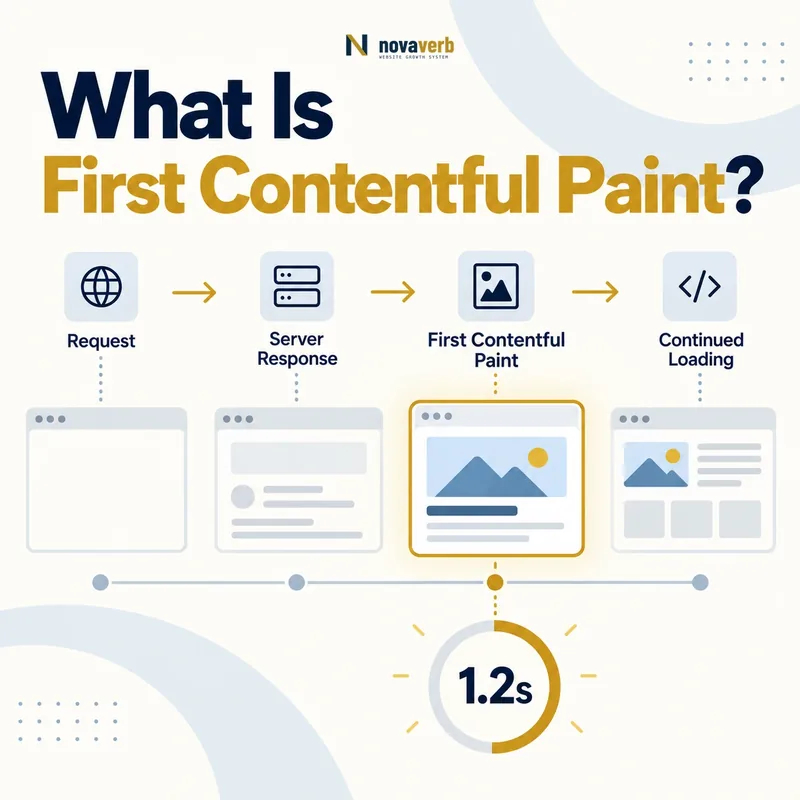
What Is First Contentful Paint?
FCP answers an early loading question: has the page begun to show meaningful document content rather than only a blank screen or default background? It does not indicate that the main content is complete, that the largest element is visible or that controls are interactive. A small heading can trigger FCP while a product image and body copy remain delayed. The metric depends on every step before the first eligible paint, including redirects, server response, HTML discovery, blocking styles, fonts, scripts and browser rendering. A fast FCP should represent useful and stable content, not a decorative dot added merely to move the timestamp.
- Starts at navigation
- Ends at the first contentful document paint
- Can be triggered by text or visual content
- Occurs before or at later paint milestones
- Varies by route, device and cache state
- Does not prove page completion
- Frame the decision raised by What Is First Contentful Paint.
- Render the page with its required scripts and resources.
- Compare content, links, metadata and canonical signals.
- Trace each difference to the responsible template or script.
- Apply the fix and repeat both observations.
| Question | Answer | Why it matters |
|---|---|---|
| What is timed? | Navigation to first contentful paint | Early visual feedback |
| What can count? | Text, image, canvas or SVG content | Candidate type varies |
| Is the page complete? | No | Later content may remain |
| Is FCP a Core Web Vital? | No | Useful diagnostic metric |
| What precedes it? | Network and rendering path | Multiple causes |
| Can it be gamed? | Superficially | Content usefulness still matters |
FCP is valuable when the first painted content is both timely and representative of a page that is genuinely progressing.
What Is a Good FCP Score?
Percentile monitoring matters because averages hide users on slower devices, distant networks and cold caches. Separate device populations and route families so a fast home page does not conceal weak article or product templates. FCP is not a Core Web Vital, so the threshold is diagnostic rather than a complete search or experience verdict. A page can meet 1.8 seconds yet delay its primary content much longer. Conversely, a slightly slower first paint can accompany a coherent server-rendered page that quickly completes. Use the range to find templates with avoidable blank-screen time and verify changes through downstream LCP, CLS and interaction evidence.
- Good: 1.8 seconds or less
- Needs improvement: above 1.8 through 3.0 seconds
- Poor: above 3.0 seconds
- Evaluate the 75th percentile
- Separate mobile and desktop populations
- Review route families, not only sitewide data
- Frame the decision raised by What Is a Good FCP Score.
- Render the page with its required scripts and resources.
- Compare content, links, metadata and canonical signals.
- Trace each difference to the responsible template or script.
- Apply the fix and repeat both observations.
| Range | Classification | Action |
|---|---|---|
| ≤ 1.8 s | Good | Protect against regression |
| > 1.8–3.0 s | Needs improvement | Trace critical path |
| > 3.0 s | Poor | Prioritize shared blockers |
| Fast FCP, slow LCP | Small early content only | Trace main content |
| Slow one template | Template dependency issue | Fix shared route |
| Field slow, lab fast | Population mismatch | Inspect real conditions |
Use the FCP threshold to locate avoidable blank-screen delay while judging the full page through later content and interaction outcomes.
What Counts as Contentful Paint?
The first qualifying candidate differs by template. An article may render a headline first. A product page may show a logo or product image. An application shell may remain blank until JavaScript inserts text. Web fonts can delay visible text depending on style and display behavior. CSS background images and generated visual content require attention to the browser’s paint rules and discovery chain. Cross-origin frames may have reporting limitations. Identify the actual first content in a visual timeline rather than assuming it is the hero. If the candidate is a tiny navigation label while the body remains blank, the metric can be numerically good but experientially incomplete.
- Capture a visual loading timeline.
- Find the first frame with document content.
- Identify the text or visual candidate.
- Trace its styles and resource dependencies.
- Compare mobile and desktop layouts.
- Confirm the content is useful and stable.
- Evidence for What Counts as Contentful Paint: the raw html returned by the server
- The rendered DOM after required scripts run
- Content, links and metadata that differ between those states
- Network, console and hydration failures tied to the page
- A repeatable test at the exact URL and device context
| Candidate | Typical route | Dependency |
|---|---|---|
| Headline text | Article | HTML, CSS and font |
| Navigation label | Site shell | Header styles |
| Logo image | Landing page | Image discovery |
| Product image | Product page | Responsive media |
| Canvas output | Interactive page | JavaScript execution |
| SVG content | Illustrated page | Markup and style |
The first contentful candidate should be identified from evidence because its type determines which request or rendering phase needs improvement.
FCP vs First Paint and Largest Contentful Paint
These metrics describe different moments. First Paint can occur before visible text or imagery. FCP shows that document content has begun to appear. LCP aims to represent the main visible content later in the load. A page can have closely grouped values when complete server HTML and critical assets render together. It can also show a wide FCP-to-LCP gap when a small heading appears quickly but a hero image is discovered late. Diagnose each gap rather than choosing one metric as the entire loading experience. FCP improvements that delay LCP through bandwidth competition are not successful.
- First Paint: first non-default rendered output
- FCP: first text or visual document content
- LCP: largest eligible visible content paint
- TTFB: first response byte before paint
- CLS: visual stability during the visit
- INP: responsiveness to interaction
- Frame the decision raised by FCP vs First Paint and Largest Contentful Paint.
- Render the page with its required scripts and resources.
- Compare content, links, metadata and canonical signals.
- Trace each difference to the responsible template or script.
- Apply the fix and repeat both observations.
| Metric | Moment | Diagnostic question |
|---|---|---|
| TTFB | First response byte | When does delivery begin? |
| First Paint | First browser render | Has any visual output started? |
| FCP | First document content | Is content appearing? |
| LCP | Largest visible candidate | Is main content visible? |
| CLS | Unexpected movement | Is layout stable? |
| INP | Interaction-to-frame latency | Does input respond promptly? |
FCP should be interpreted as one milestone in a sequence from response start to complete, stable and responsive content.
What Causes Slow First Contentful Paint?
Every delay before eligible content paint can contribute. Multiple redirects postpone the document request. A slow origin delays HTML. Stylesheets can block text and layout, while chained imports add discovery rounds. Font behavior can keep text invisible or cause fallback changes. Synchronous scripts pause parsing, and large JavaScript bundles may build all visible content only after execution and API calls. Third-party tags can compete for network and main-thread time. Even after resources arrive, expensive style calculation or script execution can postpone rendering. Break the timeline into response, discovery, transfer and render phases before optimizing.
- Canonical or tracking redirect chains
- Slow Time to First Byte
- Large or chained blocking stylesheets
- Font files delaying visible text
- Synchronous JavaScript during parsing
- Client-side route and API dependencies
- Main-thread work before first paint
- Frame the decision raised by What Causes Slow First Contentful Paint.
- Render the page with its required scripts and resources.
- Compare content, links, metadata and canonical signals.
- Trace each difference to the responsible template or script.
- Apply the fix and repeat both observations.
| Phase | Cause | Evidence |
|---|---|---|
| Navigation | Redirect chain | Request trace |
| Response | High TTFB | Navigation timing |
| Discovery | Late stylesheet or font | Waterfall initiator |
| Transfer | Large critical files | Resource timing |
| Execution | Blocking JavaScript | Main-thread trace |
| Render | Style or layout work | Performance timeline |
Slow FCP is best addressed by locating the earliest dominant delay in the page’s actual critical path.
How Do CSS, Fonts and JavaScript Affect FCP?
The browser needs applicable CSS to lay out and paint document content. One global stylesheet may include far more than the current route requires. Critical CSS can shorten the path when it stays synchronized with the design system, while aggressive asynchronous loading can create unstyled content. Fonts require a deliberate fallback and display policy so text can appear without disruptive reflow. JavaScript scheduling should reflect real dependencies: deferred code can wait until parsing completes, independent code may load asynchronously, and primary public content should not require a large client bundle when stable HTML can deliver it. The render-blocking resources guide covers these scheduling choices in depth.
- Identify styles required for the initial route.
- Remove unrelated CSS from the critical path.
- Provide readable fallback typography.
- Load only proven critical font files early.
- Defer nonessential ordered scripts.
- Delay independent third-party work.
- Verify visual and functional regressions.
- Evidence for How Do CSS, Fonts and JavaScript Affect FCP: the raw html returned by the server
- The rendered DOM after required scripts run
- Content, links and metadata that differ between those states
- Network, console and hydration failures tied to the page
- A repeatable test at the exact URL and device context
| Resource | Helpful behavior | Risk |
|---|---|---|
| Critical CSS | Early route styling | Inline drift or excess |
| Route CSS | Direct early discovery | Large unused bundle |
| Fallback font | Visible early text | Metric mismatch |
| Font preload | Earlier critical face | Bandwidth competition |
| Deferred script | Parsing continues | Late required behavior |
| Async third party | Independent scheduling | Main-thread contention |
The fastest sustainable FCP delivers enough CSS and typography for useful content while keeping optional scripts and styles outside the first-paint path.
How Do You Improve First Contentful Paint?
Start with the largest measured phase. Fix Time to First Byte when the document itself begins late. Ensure public page meaning exists in the initial response instead of waiting for client-side rendering. Split or reduce blocking CSS while protecting required layout. Use a readable fallback and avoid preloading every font weight. Defer optional scripts and third parties. Prioritize the smallest useful first view, but do not insert meaningless content just to trigger FCP. Retest LCP and CLS so faster first content does not delay the main element or destabilize the page.
- Identify the actual first content candidate.
- Decompose navigation, response and render delay.
- Remove avoidable redirects.
- Deliver useful route HTML early.
- Reduce blocking CSS and font dependencies.
- Reschedule noncritical JavaScript.
- Limit early main-thread work.
- Verify downstream metrics and content quality.
- Evidence for How Do You Improve First Contentful Paint: the raw html returned by the server
- The rendered DOM after required scripts run
- Content, links and metadata that differ between those states
- Network, console and hydration failures tied to the page
- A repeatable test at the exact URL and device context
| Finding | Candidate fix | Regression check |
|---|---|---|
| High TTFB | Cache or origin improvement | Freshness and status |
| Empty shell | Server or static content | Data accuracy |
| Blocking CSS | Route-aware critical delivery | Design consistency |
| Font delay | Fallback and subset strategy | Text stability |
| Parser-blocking script | Defer or remove | Primary actions |
| Main-thread delay | Reduce early execution | Interaction readiness |
The strongest FCP improvement makes genuinely useful content appear earlier without stealing priority from the page’s main content or stability.
How Do You Audit First Contentful Paint?
Begin with mobile and desktop field distributions by route family. Select representative fast and slow URLs, including cold and warm cache states. Capture navigation timing, waterfall, paint entries, main-thread trace and visual filmstrip. Identify what triggered FCP and whether it is useful. Compare FCP with TTFB and LCP to isolate the blank-screen phase and the later main-content gap. Test consent, fonts, client rendering and third parties. Group defects by shared template or dependency, then verify each change across affected routes. Monitor production percentiles after release instead of relying only on a passing lab run.
- Segment field FCP by device and route.
- Select representative and slow URLs.
- Capture navigation, waterfall and paint timing.
- Identify the first contentful element.
- Trace every dependency before its paint.
- Compare TTFB, FCP and LCP gaps.
- Test shared fixes across templates.
- Monitor production after deployment.
- Evidence for How Do You Audit First Contentful Paint: the raw html returned by the server
- The rendered DOM after required scripts run
- Content, links and metadata that differ between those states
- Network, console and hydration failures tied to the page
- A repeatable test at the exact URL and device context
| Check | Evidence | Pass condition |
|---|---|---|
| Population | 75th-percentile segments | Affected routes known |
| Candidate | Visual timeline | Useful first content |
| Response | Navigation timing | No avoidable initial delay |
| CSS/fonts | Dependency waterfall | Efficient paint path |
| Scripts | Execution trace | No unnecessary blocking |
| Rendering | Main-thread timeline | Prompt first frame |
| Regression | Template suite | Stable complete content |
| Release | Field trend | Sustained improvement |
Start with a relevant free SEO check, continue the evidence workflow in Crawl Explorer, and review pricing when comparing continuous monitoring with a one-time manual review.
A complete FCP audit connects a real-user blank-screen delay to the first painted content and the dependency that held it back.