
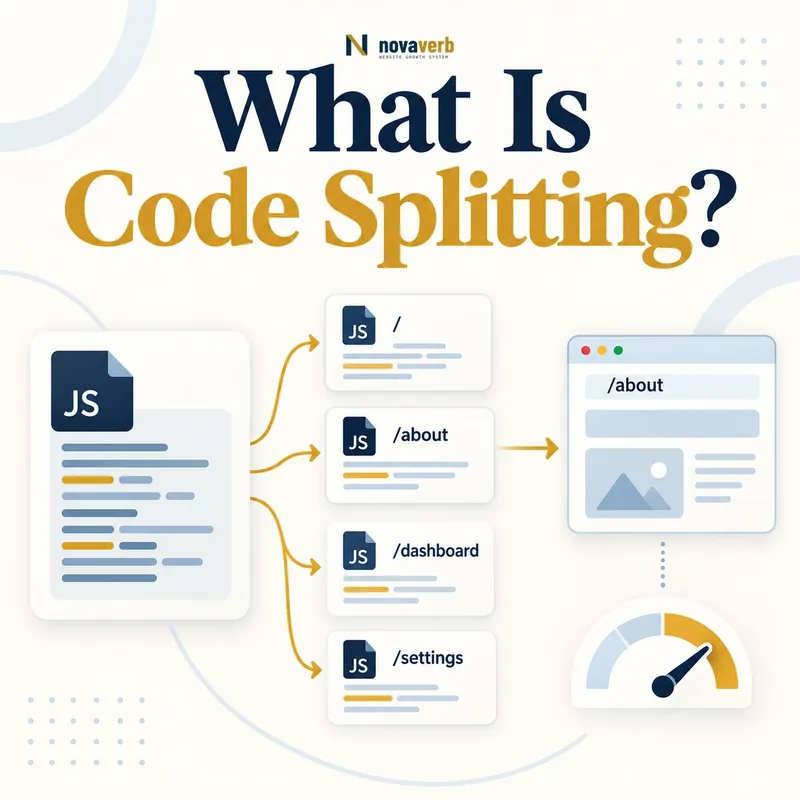
What Is Code Splitting?
A monolithic bundle often contains account tools, editors, charts, checkout logic and components that a visitor never uses on the current route. Splitting lets the build system create separate dependency graphs and lets the application request only what is required now. Later code can load when a route changes, a component approaches the viewport or a person expresses intent. The technique can reduce initial transfer, parsing and execution, but too many tiny chunks create connection, discovery and coordination overhead. A public page can also fail if core content depends on a late chunk. The correct split follows real route and interaction boundaries, not an arbitrary file-size target.
- Entry chunk for application startup
- Route-level chunks
- Component or feature chunks
- Shared vendor dependencies
- Dynamic import boundaries
- Chunk naming and versioning
- Loading, error and retry states
- Frame the decision raised by What Is Code Splitting.
- Render the page with its required scripts and resources.
- Compare content, links, metadata and canonical signals.
- Trace each difference to the responsible template or script.
- Apply the fix and repeat both observations.
| Component | Role | Risk |
|---|---|---|
| Entry chunk | Starts current route | Too much global code |
| Route chunk | Loads page-specific logic | Late direct-entry dependency |
| Feature chunk | Loads optional behavior | First-action delay |
| Shared chunk | Deduplicates dependencies | Broad invalidation |
| Runtime manifest | Maps chunk files | Stale reference |
| Fallback UI | Handles loading/errors | Permanent skeleton |
Code splitting works when each chunk boundary reduces unnecessary startup work without hiding core page content or delaying primary actions.
How Does JavaScript Code Splitting Work?
Static imports usually belong to the current dependency graph, while dynamic imports create asynchronous boundaries. Framework routers can associate route components with chunks automatically. A shared dependency may be extracted so several routes reuse one cached file. The runtime needs a manifest that maps logical modules to fingerprinted filenames. During deployment, old HTML can remain in a cache while new chunk names replace prior assets, which causes failures unless the release keeps compatible files or provides recovery. Source maps, monitoring and chunk ownership should survive optimization so a failed request can be traced back to the feature and build that produced it.
- Map route and feature dependency graphs.
- Choose meaningful asynchronous boundaries.
- Generate content-hashed chunk files.
- Create a runtime mapping for those files.
- Load current-route chunks at the right priority.
- Handle request and execution failure.
- Retain compatible assets across deployments.
- Evidence for How Does JavaScript Code Splitting Work: the raw html returned by the server
- The rendered DOM after required scripts run
- Content, links and metadata that differ between those states
- Network, console and hydration failures tied to the page
- A repeatable test at the exact URL and device context
| Stage | Expected result | Failure |
|---|---|---|
| Graph analysis | Correct dependencies | Hidden runtime import |
| Chunk creation | Meaningful boundaries | Tiny fragmented files |
| Naming | Immutable content hash | Cache collision |
| Runtime mapping | Correct build manifest | Stale chunk URL |
| Loading | Right priority | Request waterfall |
| Execution | Feature initializes | Unhandled chunk error |
A dependable splitting pipeline combines build output, runtime loading and deployment compatibility as one versioned contract.
Route Splitting vs Component Splitting
Route boundaries are usually the safest starting point because visitors commonly need one page type at a time. A public product route can avoid downloading account and editor code. Component splitting helps when a heavy chart, player or configurator sits below the fold. Interaction splitting can delay a modal editor until intent, but the first click may feel slow if code starts only after input. Shared navigation, search and primary conversion controls should not sit behind fragile cold chunks without preparation. Keep public copy and internal links in stable HTML so deferred behavior does not become deferred meaning. Use field interaction data to decide which features deserve early preparation.
- Route split: page-level dependency boundary
- Component split: region-level boundary
- Viewport split: loads near likely visibility
- Interaction split: loads on intent or action
- Shared split: reusable vendor or design code
- Server boundary: avoids client dependency for content
- Frame the decision raised by Route Splitting vs Component Splitting.
- Render the page with its required scripts and resources.
- Compare content, links, metadata and canonical signals.
- Trace each difference to the responsible template or script.
- Apply the fix and repeat both observations.
| Boundary | Best fit | Primary risk |
|---|---|---|
| Route | Distinct page types | Slow direct entry |
| Component | Heavy optional region | Layout and loading state |
| Viewport | Below-fold widget | Fast-scroll delay |
| Interaction | Rare modal or editor | First-action latency |
| Shared vendor | Stable reused library | Cache invalidation |
| No split | Tiny essential module | Unnecessary complexity |
Choose the coarsest meaningful boundary that removes unused work while keeping the route’s main content and actions dependable.
What Are the SEO Benefits of Code Splitting?
Smaller current-route bundles can improve controlled Total Blocking Time and support stronger field INP when they remove real work from important interactions. They can also reduce competition with styles, fonts and primary media. Benefits depend on what remains: moving code into a chunk that loads immediately through a longer waterfall may worsen the path. Search accessibility improves only if main content, metadata and links remain reliable. Code splitting does not compensate for an empty client-rendered shell whose route still waits on several chunks and an API.
- Less initial JavaScript transfer
- Reduced parsing and compilation
- Lower route startup execution
- Fewer long main-thread tasks
- Better cache reuse for stable shared code
- More explicit feature ownership
- Frame the decision raised by What Are the SEO Benefits of Code Splitting.
- Render the page with its required scripts and resources.
- Compare content, links, metadata and canonical signals.
- Trace each difference to the responsible template or script.
- Apply the fix and repeat both observations.
| Benefit | Evidence | Limit |
|---|---|---|
| Lower transfer | Route byte comparison | More requests may offset |
| Less execution | Main-thread trace | Chunk may load immediately |
| Lower TBT | Stable lab profile | Not field interaction proof |
| Better INP | Field attribution | Later cold feature can regress |
| Cache reuse | Repeat-route trace | Shared chunk invalidation |
| Route focus | Bundle graph | Core content still matters |
Code-splitting benefits should be claimed from route bytes, execution traces and real interaction outcomes rather than chunk counts.
What SEO Risks Can Code Splitting Create?
A dynamically imported component can request its own library, which requests another shared chunk, creating serial discovery. A visitor clicking a primary control may wait for network, parse and execution before feedback. After a deployment, cached HTML or an open tab can reference files no longer present. If retry logic reloads the whole page without preserving state, forms and transactions can be lost. Poor split configuration can duplicate the same library in several route files. Search risk becomes direct when headings, copy, canonical metadata or internal links exist only inside a failed chunk. Error boundaries should distinguish transient chunk failures from valid empty content.
- Serial chunk discovery waterfalls
- Cold delay on the first primary interaction
- Stale chunk URLs after deployment
- Duplicate vendor code across bundles
- Loading skeleton that never resolves
- Full reload losing user state
- Core public content hidden behind a chunk
- Frame the decision raised by What SEO Risks Can Code Splitting Create.
- Render the page with its required scripts and resources.
- Compare content, links, metadata and canonical signals.
- Trace each difference to the responsible template or script.
- Apply the fix and repeat both observations.
| Risk | Symptom | Control |
|---|---|---|
| Waterfall | Serial chunk requests | Flatten dependencies |
| Cold action | First click feels inert | Prepare likely feature |
| Stale chunk | 404 after release | Retain compatible assets |
| Duplication | Same library in bundles | Analyze graph |
| Failed import | Permanent skeleton | Retry and error state |
| Hidden content | Blank rendered route | Stable server/public HTML |
Code splitting is safe only when chunk failure remains recoverable and core route meaning does not depend on an optional loading chain.
How Do Chunk Waterfalls and Preloading Work?
Inspect the initiator chain to see whether the current route waits on serial discoveries. A route manifest can declare its immediate dependency set so the browser begins those requests together. Module preloading can warm the dependency graph, but the URL, credentials and module identity must match actual consumption. Do not preload every route or feature; that recreates the monolithic transfer problem and competes with hero images, fonts and CSS. Prefetch can prepare a likely future navigation at lower priority when the browser has capacity, but user intent and data cost matter. Measure on slow mobile connections and cold cache, not only a warm developer session.
- Capture the current-route request initiator tree.
- Find serial dependencies on the critical path.
- Flatten or declare immediate route dependencies.
- Preload only proven critical chunks.
- Prefetch likely future routes carefully.
- Protect media, CSS and font priority.
- Verify each hinted file is consumed.
- Evidence for How Do Chunk Waterfalls and Preloading Work: the raw html returned by the server
- The rendered DOM after required scripts run
- Content, links and metadata that differ between those states
- Network, console and hydration failures tied to the page
- A repeatable test at the exact URL and device context
| Control | Purpose | Risk |
|---|---|---|
| Dynamic import | Creates async boundary | Late discovery |
| modulepreload | Starts module graph earlier | Bandwidth competition |
| preload | Raises known resource priority | Wrong identity or unused |
| prefetch | Warms likely future route | Data waste |
| Intent loading | Prepares on hover/focus | Not available on every device |
| Server manifest | Declares route dependencies | Build mismatch |
Loading hints improve code splitting only when they shorten a measured critical chain without rebuilding the original all-code-upfront bundle.
How Should Chunk Caching and Deployments Work?
Stable vendor chunks can remain cached across releases when their bytes do not change. Application chunks should change names only when content changes. A runtime manifest or HTML document must correspond to the available asset set. Atomic deployment prevents a page from receiving a new manifest while some chunks are missing. Keeping prior build assets for a compatibility window protects open tabs and cached HTML. A service worker introduces another version layer and needs a deliberate update strategy. Error monitoring should capture requested chunk URL, route, build and recovery outcome. Avoid infinite reload loops when a file is genuinely unavailable.
- Use immutable content-hashed filenames
- Keep stable dependencies in reusable chunks
- Deploy manifest and assets atomically
- Retain recent build assets temporarily
- Coordinate service-worker updates
- Capture build-aware chunk errors
- Provide bounded recovery without reload loops
- Frame the decision raised by How Should Chunk Caching and Deployments Work.
- Render the page with its required scripts and resources.
- Compare content, links, metadata and canonical signals.
- Trace each difference to the responsible template or script.
- Apply the fix and repeat both observations.
| Decision | Pass condition | Failure |
|---|---|---|
| Filename | Content hash | Mutable cached asset |
| Manifest | Matches asset set | Missing chunk URL |
| Release | Atomic availability | Partial deployment |
| Retention | Open tabs remain valid | Immediate old-asset deletion |
| Service worker | Coordinated version | Mixed build |
| Recovery | Bounded retry and message | Infinite reload |
A splitting strategy is production-ready only when old sessions and cached documents can survive normal releases without losing route or user state.
How Do You Improve and Audit Code Splitting?
Start with route-level bundles and identify code never executed on each public page. Record transfer, parse, compile and execution costs. Inspect duplicate modules and shared chunks whose frequent invalidation weakens caching. Use network initiators to locate serial discoveries. Exercise primary actions on cold cache and mid-range devices; compare early loading with later interaction latency. Block or return errors for selected chunks and verify loading, retry and state preservation. Test deployment compatibility with old HTML against the new asset set. Pair the audit with JavaScript SEO, hydration and internal-link evidence.
- Map entry, route, feature and shared chunks.
- Measure route bytes and execution cost.
- Find duplicate and unused modules.
- Trace serial chunk discoveries.
- Test primary actions on cold cache.
- Simulate chunk errors and stale builds.
- Verify content, metadata and links.
- Monitor field INP and chunk failures after release.
- Evidence for How Do You Improve and Audit Code Splitting: the raw html returned by the server
- The rendered DOM after required scripts run
- Content, links and metadata that differ between those states
- Network, console and hydration failures tied to the page
- A repeatable test at the exact URL and device context
| Check | Evidence | Pass condition |
|---|---|---|
| Bundle graph | Build analyzer | Meaningful boundaries |
| Initial route | Bytes and trace | Only needed startup code |
| Waterfalls | Initiator chain | Limited serial discovery |
| First action | Cold interaction trace | Prompt feedback |
| Duplication | Module report | Shared code reused |
| Deployment | Old/new build test | No stale-chunk failure |
| Content | Rendered route | Core meaning survives |
| Field | INP and error telemetry | Sustained outcome |
Start with a relevant free SEO check, continue the evidence workflow in Crawl Explorer, and review pricing when comparing continuous monitoring with a one-time manual review.
A complete code-splitting audit proves smaller necessary startup work, dependable primary actions and resilient releases across the full route set.