
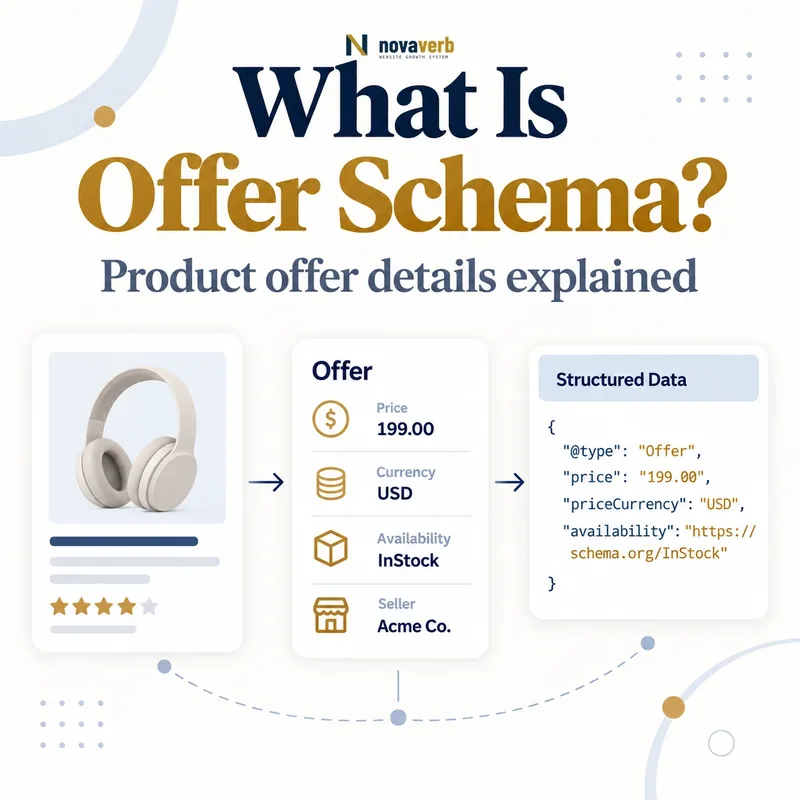
What Is Offer Schema?
Offer Schema is structured data that describes the commercial terms under which a seller makes a product or service available to a buyer.
Within ecommerce SEO, Offer usually nests under Product and identifies an active price, currency, availability, condition, destination URL and seller context. It can also connect shipping, returns, sale periods, unit pricing and loyalty benefits. The Offer is not the product itself: a shoe model can remain the same entity while price, stock and seller terms change. Search experiences may use accurate offers to enrich product results, but a valid object does not guarantee display, ranking or CTR improvement. The practical purpose is to publish a machine-readable transaction that matches what a shopper can actually complete. Every field should come from live commerce evidence rather than an SEO-only copy of catalog data.
- Frame the decision raised by What Is Offer Schema.
- Confirm its value type and the object it describes.
- Compare the markup with visible page information.
- Correct the source data or template without inventing values.
- Validate the rendered result and monitor future changes.
| Entity | Meaning | Example |
|---|---|---|
| Product | Item being offered | Trail shoe model |
| Offer | One seller transaction | $129 USD |
| price | Active amount | 129.00 |
| priceCurrency | Currency code | USD |
| availability | Stock state | InStock |
| seller | Party making offer | Example Store |
- Separate product from transaction.
- Use live commerce facts.
- Publish one clear seller offer.
- Avoid visibility guarantees.
Offer Schema is trustworthy when it represents one real transaction for a known item, seller, price, currency and purchase state.
The decision for What Is Offer Schema should rest on live, traceable evidence and a verified follow-up check.
Where Does Offer Schema Belong?
Offer Schema belongs on a page that visibly presents the same product or service, commercial terms and destination represented by the offer.
For product rich results, the common pattern nests Offer inside a product-focused page. A merchant page uses it for the seller’s own purchasable item; a review or aggregator may describe a visible external offer under product-snippet rules. The page should focus on one product or variants of it rather than a grid of unrelated items. Currency-specific pages need stable URLs, and the offer URL should identify the purchase context without unnecessary tracking parameters. A service can also use Offer in the broader Schema.org vocabulary, although eligibility for a particular search feature depends on that feature’s own supported types. Never add a price to a generic brand page, category or article when users cannot inspect the same commercial proposition.
- Evidence for Where Does Offer Schema Belong: the live structured-data entity and property relationship
- The expected value type and any nested object
- Visible page information that supports the structured value
- Related offer or catalog fields needed for interpretation
- A fresh validation result after the page changes
| Placement | Fit? | Reason |
|---|---|---|
| Merchant product detail | Yes | Direct purchase |
| Single-product aggregator | Yes, feature-dependent | Visible seller offers |
| Service pricing page | Schema.org use | Not automatically a Product feature |
| Category grid | No for product rich result | Many unrelated products |
| Brand home page | No | No exact transaction |
| Hidden feed-only offer | No | Not visible to users |
- Identify the offered item.
- Confirm visible terms.
- Check page-level eligibility.
- Use a stable destination.
Place an Offer only where the page’s primary content makes its item, seller and terms clear to the same user who sees the markup.
The decision for Where Does Offer Schema Belong should rest on live, traceable evidence and a verified follow-up check.
Which Offer Properties Matter Most?
The core Offer properties are price, priceCurrency, availability, itemCondition, url and seller, with feature-specific requirements determining which are mandatory.
For merchant listings, an active price above zero and currency are essential, and the publishing merchant must be the seller. Product snippets can use Offer under a broader page model. Use a plain numeric price and a three-letter ISO 4217 code such as USD. Availability and condition use schema.org enumeration URLs, not promotional prose. The offer URL points to one preferred product purchase page and should not be repeated with several destinations. Seller identifies the party responsible for the transaction. Additional fields can explain validity dates, shipping, returns and membership pricing, but optional richness cannot repair a missing or false active price. Consult Merchant Listing Schema and Product Snippet Schema for their distinct eligibility paths.
- Frame the decision raised by Which Offer Properties Matter Most.
- Confirm its value type and the object it describes.
- Compare the markup with visible page information.
- Correct the source data or template without inventing values.
- Validate the rendered result and monitor future changes.
| Property | Value type | Example |
|---|---|---|
| price | Number | 89.95 |
| priceCurrency | ISO 4217 Text | USD |
| availability | ItemAvailability | InStock |
| itemCondition | OfferItemCondition | NewCondition |
| url | URL | Canonical product URL |
| seller | Organization or Person | Example Store |
- Use numeric price values.
- Use valid enumerations.
- Name the actual seller.
- Provide one purchase URL.
A strong Offer starts with one current price-and-currency pair, then adds stock, condition, seller and destination facts that agree with checkout.
The decision for Which Offer Properties Matter Most should rest on live, traceable evidence and a verified follow-up check.
How Should Price and Currency Be Marked Up?
Price should be a numeric active amount paired with a three-letter currency code that matches the visible page and checkout context.
Write 129.00, not “$129,” “from $129” or “129 dollars,” in the price property. Use USD for US dollars. Merchant listing offers require an active price greater than zero. The active price may live directly on Offer or inside a UnitPriceSpecification; when both are present, Offer-level price takes precedence in the current merchant implementation, so conflicting numbers are dangerous. Do not use lowPrice and highPrice on Offer - those belong to AggregateOffer. Currency conversion should not silently change one URL’s meaning; provide a stable URL per currency. Compare markup with the displayed subtotal and initial checkout price, excluding taxes or shipping only according to the visible business convention. Refresh sale transitions atomically.
- Evidence for How Should Price and Currency Be Marked Up: the live structured-data entity and property relationship
- The expected value type and any nested object
- Visible page information that supports the structured value
- Related offer or catalog fields needed for interpretation
- A fresh validation result after the page changes
| Price pattern | Valid? | Reason |
|---|---|---|
| 129.00 + USD | Yes | Numeric and explicit currency |
| $129 | No | Symbol embedded |
| From 129 | No | Not a numeric active offer |
| 0.00 merchant price | No | Merchant price must exceed zero |
| Offer price + conflicting specification | No | Precedence creates mismatch |
| Separate USD URL | Yes | Stable currency context |
- Read active catalog price.
- Attach ISO currency.
- Resolve specification precedence.
- Compare with checkout.
Price markup is correct only when a shopper at that URL can see and proceed with the same active amount in the same currency.
The decision for How Should Price and Currency Be Marked Up should rest on live, traceable evidence and a verified follow-up check.
How Do Availability and Item Condition Work?
Availability and itemCondition use standardized schema.org values to describe whether the item can be purchased and the state in which it is sold.
Common availability values include InStock, OutOfStock, PreOrder, BackOrder, LimitedAvailability and Discontinued. Condition values include NewCondition, UsedCondition, RefurbishedCondition and DamagedCondition. Use the full schema.org URL or a correctly interpreted JSON-LD term, and map each state from authoritative inventory and catalog data. “Ships soon,” “popular” and “only three left” are merchandising messages, not substitutes for the enumeration. An OutOfStock offer can remain informative, but do not claim InStock when add-to-cart fails or the selected variant is unavailable. Variant switches must update visible state and structured data consistently, or each variant should have its own stable URL and object.
- Frame the decision raised by How Do Availability and Item Condition Work.
- Confirm its value type and the object it describes.
- Compare the markup with visible page information.
- Correct the source data or template without inventing values.
- Validate the rendered result and monitor future changes.
| Commerce state | Schema value | Trigger |
|---|---|---|
| Available now | InStock | Can complete purchase |
| Temporarily unavailable | OutOfStock | Cannot purchase now |
| Future release | PreOrder | Preorders accepted |
| Delayed fulfillment | BackOrder | Orders accepted for later |
| Previously owned | UsedCondition | Used item |
| Restored item | RefurbishedCondition | Refurbished condition |
- Map authoritative states.
- Check selected variants.
- Avoid free-form status text.
- Update failed purchase states quickly.
Stock and condition markup should be a direct mapping from the selected sellable unit, not a broad status inherited from its product family.
The decision for How Do Availability and Item Condition Work should rest on live, traceable evidence and a verified follow-up check.
How Do Sale Prices and Validity Dates Work?
Sale pricing uses an active Offer price plus date-bounded price specifications that distinguish the current sale from the original strikethrough price.
The current sale amount remains the active price on Offer or its active specification. A UnitPriceSpecification can identify the original list price with priceType set to the supported StrikethroughPrice value. Do not mark the sale amount itself as strikethrough. Use validFrom and validThrough in ISO 8601 format to define when a price applies, including timezone where timing matters. Expired specifications should not continue appearing after the visible sale ends. If a member price uses validForMemberTier, also provide the regular price; avoid combining incompatible pricing semantics that cause one specification to be ignored. Build price output from the same promotion engine that controls storefront display and checkout.
- Evidence for How Do Sale Prices and Validity Dates Work: the live structured-data entity and property relationship
- The expected value type and any nested object
- Visible page information that supports the structured value
- Related offer or catalog fields needed for interpretation
- A fresh validation result after the page changes
| Pricing element | Purpose | Control |
|---|---|---|
| Offer.price | Current active price | Matches checkout |
| StrikethroughPrice | Original list price | Not current sale |
| validFrom | Sale start | ISO 8601 |
| validThrough | Sale end | ISO 8601 |
| validForMemberTier | Member eligibility | Reference real tier |
| Regular price | Baseline | Required with member price |
- Identify the active price.
- Model original price separately.
- Add exact validity dates.
- Test transition boundaries.
Sale markup should switch at the same instant as storefront and checkout pricing, with clear roles for active, original and member amounts.
The decision for How Do Sale Prices and Validity Dates Work should rest on live, traceable evidence and a verified follow-up check.
How Do Shipping and Returns Connect to Offer?
Offer can nest product-specific shipping and return terms or reference centrally defined merchant policies when those policies govern the transaction.
Use shippingDetails for an OfferShippingDetails object that states destination, rate and delivery time. Use hasMerchantReturnPolicy for product-level return exceptions. Business-wide policies are better maintained under Organization through Merchant Shipping Policy Schema and Merchant Return Policy Schema, then referenced where supported. Product-level terms can override broader policies, so duplicate definitions can create unintended precedence. Shipping currency should match the offer, delivery ranges need complete minimum and maximum values, and return windows must match customer-facing policy plus checkout. Maintain one policy source and generate references or exceptions from it instead of copying text across every offer.
- Frame the decision raised by How Do Shipping and Returns Connect to Offer.
- Confirm its value type and the object it describes.
- Compare the markup with visible page information.
- Correct the source data or template without inventing values.
- Validate the rendered result and monitor future changes.
| Policy layer | Best use | Risk |
|---|---|---|
| Organization shipping | Business-wide service | Central default |
| Offer shippingDetails | Product exception | Repeated stale terms |
| Organization returns | Business-wide policy | Central default |
| Offer return policy | Item exception | Overrides global policy |
| Merchant Center/feed | Commerce configuration | Precedence conflicts |
| Visible checkout | Customer contract | Must match all sources |
- Centralize default policies.
- Use offer exceptions sparingly.
- Check precedence.
- Compare with checkout.
Offer-level policies should express genuine exceptions or precise transaction terms without contradicting the merchant’s central customer policy.
The decision for How Do Shipping and Returns Connect to Offer should rest on live, traceable evidence and a verified follow-up check.
What Offer Schema Mistakes Are Common?
Common Offer Schema mistakes include currency symbols in price, stale availability, wrong sellers, duplicate active prices and offers that users cannot actually purchase.
Other errors include placing AggregateOffer properties on Offer, marking category pages, using several URLs, omitting currency, leaving sale dates expired and assigning one parent offer to every variant. Plugins may generate a second Offer with conflicting values, while cached JSON-LD can lag behind a live inventory widget. A validator checks shape but cannot prove transaction truth. Crawl rendered HTML, identify all Offer nodes and compare each with product identity, selected variant, cart and checkout. If the publisher is an affiliate rather than the seller, do not claim merchant-listing eligibility. Remove invented identifiers, ratings or policies rather than filling warnings with unsupported data. Repair the commerce adapter or template shared by affected products.
- Evidence for What Offer Schema Mistakes Are Common: the live structured-data entity and property relationship
- The expected value type and any nested object
- Visible page information that supports the structured value
- Related offer or catalog fields needed for interpretation
- A fresh validation result after the page changes
| Mistake | Evidence | Fix |
|---|---|---|
| Price contains $ | Non-numeric value | Publish number only |
| Stale InStock | Checkout disabled | Sync inventory |
| Wrong seller | Transaction belongs elsewhere | Correct relationship |
| Two active prices | Conflicting nodes | Consolidate source |
| Expired sale | Past validThrough | Remove or update |
| Variant mismatch | Offer belongs to sibling | Map selected SKU |
- Inventory all Offer nodes.
- Reconcile transaction facts.
- Fix source mappings.
- Retest variant states.
The most serious Offer defects misstate whether, where and for how much a shopper can buy, so transaction truth outranks optional completeness.
Start with a relevant free SEO check, continue the evidence workflow in Site Health, and review pricing when comparing continuous monitoring with a one-time manual review.
The decision for What Offer Schema Mistakes Are Common should rest on live, traceable evidence and a verified follow-up check.