
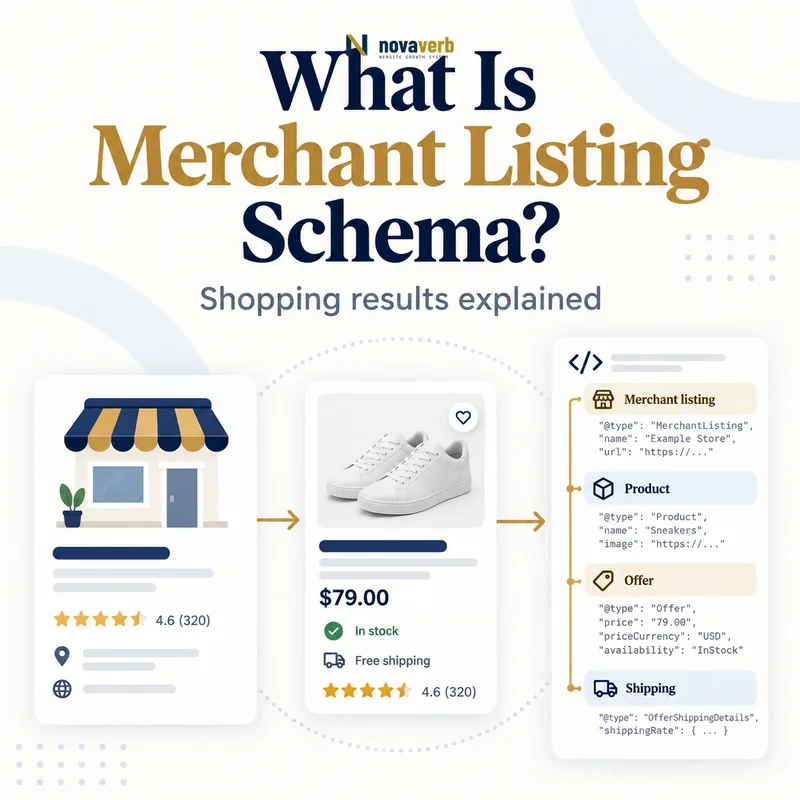
What Is Merchant Listing Schema?
Merchant Listing Schema is Product structured data for pages where shoppers can directly purchase the product from the merchant publishing the markup.
The model combines a specific Product with a seller-owned Offer containing active price, currency and purchase information. It can also describe availability, condition, identifiers, variants, shipping, returns and loyalty benefits. This richer data may support shopping presentations across search surfaces, images and product experiences, but valid markup does not guarantee an enhancement, impression or CTR increase. Merchant listing eligibility is narrower than general product information: the page must focus on one product or variants of that product, and the merchant must sell it on the site. A review article or affiliate page that sends shoppers elsewhere belongs to a different content and markup model. The schema should mirror live commerce facts at crawl time.
- Frame the decision raised by What Is Merchant Listing Schema.
- Confirm its value type and the object it describes.
- Compare the markup with visible page information.
- Correct the source data or template without inventing values.
- Validate the rendered result and monitor future changes.
| Entity | Purpose | Example |
|---|---|---|
| Product | Identifies item sold | Trail running shoe |
| Offer | Describes merchant sale | $129.00 USD |
| availability | States inventory status | InStock |
| itemCondition | Describes condition | NewCondition |
| shippingDetails | Provides delivery terms | US standard shipping |
| hasMerchantReturnPolicy | Provides return terms | 30-day returns |
- Mark up products sold on-site.
- Use live commerce data.
- Describe one product or its variants.
- Avoid promising search visibility.
Merchant Listing Schema is an exact commercial inventory statement for a purchasable product, not generic product copy decorated for search.
The decision for What Is Merchant Listing Schema should rest on live, traceable evidence and a verified follow-up check.
Which Pages Are Eligible for Merchant Listings?
Eligible pages let a shopper purchase one specific product - or variants of that product - directly from the merchant that publishes the structured data.
A product detail page with an active add-to-cart or checkout path fits the intent. Category grids such as “all running shoes,” editorial reviews, marketplace comparison pages and affiliate pages that link to another seller do not. Variants can live on separate URLs or a supported single-page group, but every represented item needs consistent identity and purchase data. When a store sells in several currencies, use a distinct URL for each currency context rather than changing the price silently by location on one URL. Pages must be crawlable and indexable, and the offer shown in structured data must be visible to shoppers. Regulated or prohibited product categories also face content restrictions beyond syntax. Eligibility starts with the real transaction, not the presence of a Product type.
- Evidence for Which Pages Are Eligible for Merchant Listings: the live structured-data entity and property relationship
- The expected value type and any nested object
- Visible page information that supports the structured value
- Related offer or catalog fields needed for interpretation
- A fresh validation result after the page changes
| Page pattern | Eligible? | Reason |
|---|---|---|
| Single product sold directly | Yes | Merchant is seller |
| Variants of one product | Yes | Supported product family |
| Category listing | No | Multiple unrelated products |
| Editorial review | No | Not direct merchant sale |
| Affiliate comparison | No | Purchase occurs elsewhere |
| Currency-specific product URL | Yes | One stable currency context |
- Confirm the merchant is seller.
- Check single-product focus.
- Verify an active purchase path.
- Separate currency URLs.
Apply merchant listing markup only where the indexed URL represents a stable, direct purchase opportunity for a specific product.
The decision for Which Pages Are Eligible for Merchant Listings should rest on live, traceable evidence and a verified follow-up check.
How Is a Merchant Listing Different From a Product Snippet?
Merchant listings serve directly purchasable product pages, while product snippets also cover reviews and other pages that describe products without selling them directly.
Both features use Product vocabulary and can overlap, but their eligibility and property requirements differ. A merchant listing requires an Offer because the publisher is the seller; a product snippet may use Offer or AggregateOffer and can focus more heavily on ratings, reviews and editorial pros and cons. Merchant listings expose additional commerce dimensions such as apparel size, shipping details and return policies. A seller page meeting merchant-listing requirements can also become eligible for product snippets, but teams should validate against the merchant report rather than assuming one green Product object clears both systems. Read Product Schema for the broader entity model and Pros and Cons Schema for editorial review intent.
- Frame the decision raised by How Is a Merchant Listing Different From a Product Snippet.
- Confirm its value type and the object it describes.
- Compare the markup with visible page information.
- Correct the source data or template without inventing values.
- Validate the rendered result and monitor future changes.
| Dimension | Merchant listing | Product snippet |
|---|---|---|
| Purchase on page | Required | Not required |
| Seller relationship | Publisher is merchant | May be reviewer/aggregator |
| Offer model | Offer required | Offer or AggregateOffer |
| Price | Active price above zero | Broader snippet rules |
| Commerce enhancements | Shipping, returns, sizes | Reviews and pros/cons |
| Primary report | Merchant listings | Product snippets |
- Identify who sells the item.
- Choose the correct report.
- Avoid AggregateOffer for merchant eligibility.
- Keep editorial markup on review pages.
Choose merchant listing requirements for seller pages and product-snippet requirements for nonmerchant product content instead of blending incompatible intents.
The decision for How Is a Merchant Listing Different From a Product Snippet should rest on live, traceable evidence and a verified follow-up check.
Which Product and Offer Properties Are Required?
A merchant listing needs a Product with identifying information and a nested seller Offer containing an active price above zero plus its ISO currency.
The exact Product requirement can be satisfied through identity paths defined for the feature, while a robust implementation includes name, image, description, brand and global identifiers when available. Merchant listings specifically require Offer, not AggregateOffer. The active price can appear as offers.price with priceCurrency or inside a UnitPriceSpecification. If both locations specify the active price, the Offer-level price takes precedence, so conflicting values create a serious trust defect. The price must be greater than zero for this experience, and currency uses a three-letter ISO 4217 value such as USD. Availability, URL and condition provide critical purchase context even when classified as recommended properties. Never invent GTIN, SKU, brand or ratings to fill fields.
- Evidence for Which Product and Offer Properties Are Required: the live structured-data entity and property relationship
- The expected value type and any nested object
- Visible page information that supports the structured value
- Related offer or catalog fields needed for interpretation
- A fresh validation result after the page changes
| Property | Object | Implementation note |
|---|---|---|
| name | Product | Exact product name |
| image | Product | Representative crawlable image |
| offers | Product | Nested Offer required |
| price | Offer | Active numeric price above zero |
| priceCurrency | Offer | Three-letter code such as USD |
| availability | Offer | Current schema.org status |
| url | Offer | Canonical purchase URL |
- Resolve product identity.
- Nest a seller Offer.
- Publish active price and currency.
- Verify visible parity.
A trustworthy merchant object uses a real Product identity and one current seller Offer whose active price and currency match the visible checkout context.
The decision for Which Product and Offer Properties Are Required should rest on live, traceable evidence and a verified follow-up check.
How Should Price, Currency and Availability Be Marked Up?
Price, currency and availability should reflect the exact purchasable offer visible on the currency-specific page at the time it is crawled.
Use a plain numeric value without currency symbols, grouping separators or marketing text. Pair it with priceCurrency such as USD. Sale pricing can use effective dates and UnitPriceSpecification where supported, but the active price shown to shoppers must remain unambiguous. If both Offer price and priceSpecification contain active prices, maintain equality or use one authoritative pattern to avoid precedence surprises. Map stock state to a valid schema.org enumeration such as InStock, OutOfStock, PreOrder or BackOrder. Do not leave InStock markup live after checkout disables purchase. Fast-moving stores should generate commerce facts server-side or ensure dynamic rendering remains timely, because stale structured data can be checked against the page and merchant feed.
- Frame the decision raised by How Should Price, Currency and Availability Be Marked Up.
- Confirm its value type and the object it describes.
- Compare the markup with visible page information.
- Correct the source data or template without inventing values.
- Validate the rendered result and monitor future changes.
| Commerce fact | Valid pattern | Common error |
|---|---|---|
| Price | 129.00 | Dollar sign in value |
| Currency | USD | US Dollars text |
| Availability | https://schema.org/InStock | Free-form available |
| Sale dates | validFrom/validThrough | Expired sale remains active |
| Currency page | Distinct USD URL | One URL changes silently |
| Data timing | Current inventory source | Cached stale offer |
- Use numeric active prices.
- Use ISO currency codes.
- Map inventory to valid values.
- Invalidate stale caches quickly.
Price markup passes the commercial truth test only when a shopper can see and purchase the same offer in the stated currency and stock condition.
The decision for How Should Price, Currency and Availability Be Marked Up should rest on live, traceable evidence and a verified follow-up check.
How Do Shipping Details Work in Merchant Listings?
Shipping details nest under an Offer and define destination, cost and delivery timing for a specific shipping service and currency context.
An OfferShippingDetails object identifies shippingDestination, one shippingRate and one deliveryTime. Destination uses a two-letter country code such as US and may narrow supported regions. Shipping cost needs a numeric value or maximum value plus the same currency as the product offer; free shipping is represented by zero. Delivery time separates handling and transit intervals, with minimum and maximum nonnegative whole days and unit code DAY or d. When rates differ by destination or service, publish separate shipping-detail objects rather than compressing incompatible ranges into one estimate. The structured data must match policies shown to users and checkout logic. Organization-level shipping policy can reduce repetition when it accurately represents the business-wide rule.
- Evidence for How Do Shipping Details Work in Merchant Listings: the live structured-data entity and property relationship
- The expected value type and any nested object
- Visible page information that supports the structured value
- Related offer or catalog fields needed for interpretation
- A fresh validation result after the page changes
| Shipping field | Required detail | US example |
|---|---|---|
| shippingDestination | DefinedRegion | US |
| shippingRate | MonetaryAmount | 0 USD |
| deliveryTime | ShippingDeliveryTime | Handling + transit |
| handlingTime | QuantitativeValue | 0–1 DAY |
| transitTime | QuantitativeValue | 2–5 DAY |
| Multiple rates | Separate objects | Standard and expedited |
- Define destination coverage.
- Add one rate per object.
- Separate handling and transit.
- Compare against checkout.
Shipping markup should reproduce an actual destination-specific checkout promise, including its cost currency and complete delivery interval.
The decision for How Do Shipping Details Work in Merchant Listings should rest on live, traceable evidence and a verified follow-up check.
How Do Return Policies and Loyalty Benefits Connect?
Return policies and loyalty benefits connect commerce terms to Product offers or the merchant Organization using dedicated structured-data entities.
A product-level hasMerchantReturnPolicy can override an organization-level policy for that item, so teams must understand precedence before adding exceptions. A return object describes applicable country, return method, fees, window and category according to the relevant requirements. General merchant policies can live under Organization Schema on an administrative policy page, while Merchant Return Policy Schema explains detailed modeling. Loyalty programs are defined through Merchant Center or Member Program Schema under Organization; offer-level benefits then reference real tiers rather than inventing an isolated discount. Shipping policy is covered separately in Merchant Shipping Policy Schema. All terms must match customer-facing policies.
- Frame the decision raised by How Do Return Policies and Loyalty Benefits Connect.
- Confirm its value type and the object it describes.
- Compare the markup with visible page information.
- Correct the source data or template without inventing values.
- Validate the rendered result and monitor future changes.
| Commerce policy | Typical scope | Key rule |
|---|---|---|
| Return policy | Organization or Product | Product policy can override |
| Shipping policy | Organization or Offer | Match destination terms |
| Member program | Organization | Define program and tiers |
| Loyalty benefit | Offer context | Reference real tier |
| Product exception | Product level | Use only when applicable |
| Policy URL | Public page | Keep crawlable and current |
- Centralize business-wide policies.
- Document override precedence.
- Reference genuine member tiers.
- Keep policy pages current.
Connect products to centrally managed merchant policies, using product-level exceptions only when the visible customer terms truly differ.
The decision for How Do Return Policies and Loyalty Benefits Connect should rest on live, traceable evidence and a verified follow-up check.
What Merchant Listing Schema Mistakes Are Common?
Common mistakes include marking affiliate pages, using AggregateOffer, publishing zero or stale prices, mismatching currency and leaving unavailable products marked InStock.
Other frequent defects include category-page markup, missing purchase paths, invented identifiers, multiple conflicting active prices and product variants that share no stable group identity. Shipping costs may use a different currency from the offer or omit required delivery intervals. Return windows can disagree with checkout terms, and JavaScript output may lag behind inventory changes. A validator catches missing properties but cannot prove that a shopper can buy at the stated price. Compare markup with visible product content, cart behavior, checkout totals, inventory source and any Merchant Center feed. Fix shared data pipelines rather than editing generated JSON-LD manually, and remove merchant markup from pages whose business model does not meet direct-sale eligibility.
- Evidence for What Merchant Listing Schema Mistakes Are Common: the live structured-data entity and property relationship
- The expected value type and any nested object
- Visible page information that supports the structured value
- Related offer or catalog fields needed for interpretation
- A fresh validation result after the page changes
| Mistake | Risk | Fix |
|---|---|---|
| Affiliate product page | Merchant not seller | Use nonmerchant model |
| AggregateOffer | Wrong offer type | Publish seller Offer |
| Zero price | Not eligible | Use valid active price |
| Currency mismatch | Misleading offer | Align page and checkout |
| Stale InStock | Failed purchase | Sync inventory |
| Invented GTIN | False identity | Omit unavailable identifiers |
- Confirm direct-sale eligibility.
- Compare price and stock.
- Check offer type and identity.
- Repair the shared source.
The most serious merchant-listing defects are false purchase claims and stale commercial facts because they break trust beyond structured-data eligibility.
Start with a relevant free SEO check, continue the evidence workflow in Site Health, and review pricing when comparing continuous monitoring with a one-time manual review.
The decision for What Merchant Listing Schema Mistakes Are Common should rest on live, traceable evidence and a verified follow-up check.