
What Is Pros and Cons Schema?
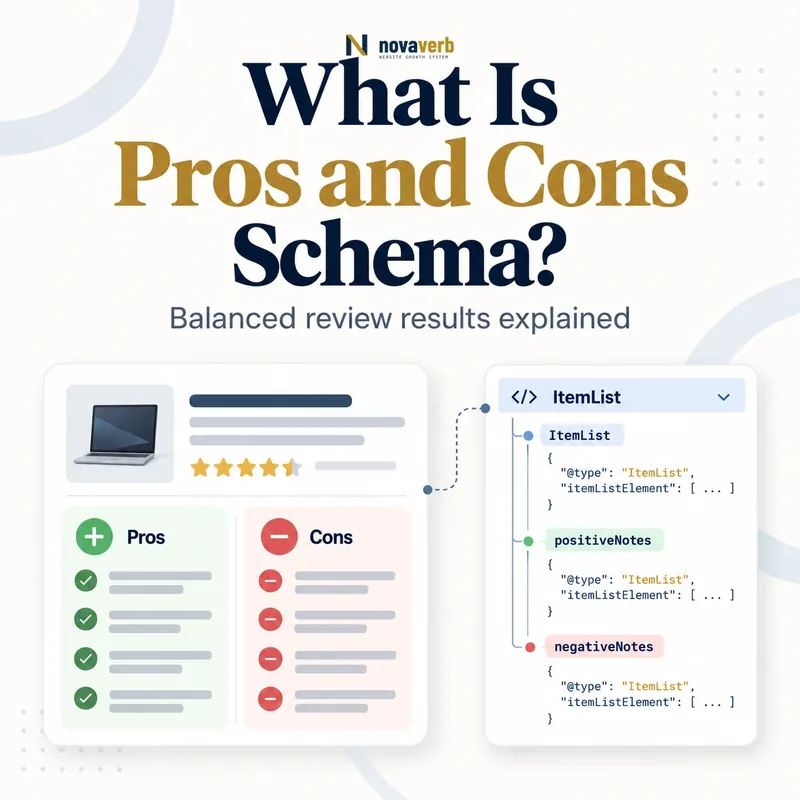
Pros and Cons Schema is structured data that identifies concise positive and negative findings inside an editorial product review.
The implementation uses positiveNotes and negativeNotes on a nested Review within a Product. Each notes property contains an ItemList, and every statement is represented as a ListItem. This gives machines an explicit map of the review’s main advantages and drawbacks instead of requiring them to infer those findings from paragraphs. The visible pros and cons must match the structured statements. Eligible implementations may support pros-and-cons information in product snippets, but markup does not guarantee a special display. The feature is designed for independent editorial product review pages, not for a merchant describing its own product page or for customer-review submissions.
- Frame the decision raised by What Is Pros and Cons Schema.
- Confirm its value type and the object it describes.
- Compare the markup with visible page information.
- Correct the source data or template without inventing values.
- Validate the rendered result and monitor future changes.
| Layer | Type | Purpose |
|---|---|---|
| Reviewed item | Product | Identifies the product |
| Editorial assessment | Review | Contains the reviewer’s analysis |
| Advantages | positiveNotes | Lists supported strengths |
| Drawbacks | negativeNotes | Lists supported weaknesses |
| Statement | ListItem | One ordered finding |
- Review one identifiable product.
- Publish visible evidence-based findings.
- Keep markup aligned with the article.
Pros and cons markup is useful only when it summarizes a genuine editorial evaluation visible on the page.
The decision for What Is Pros and Cons Schema should rest on live, traceable evidence and a verified follow-up check.
Which Pages Are Eligible for Pros and Cons Markup?
Only editorial product review pages are eligible for the pros-and-cons search treatment; merchant product pages and customer product reviews are not.
An editorial review evaluates a product from a publisher or reviewer perspective and explains evidence behind a verdict. A merchant detail page primarily sells the item, even if it contains a marketing comparison table or customer-review widget. A customer review is an individual user submission, not the publisher’s structured editorial assessment. Affiliate links do not automatically disqualify an editorial page, but commercial relationships should not replace independent analysis or clear disclosure. The page must focus on a specific Product and contain the stated pros and cons in human-readable content. Use Product Schema for product identity and Review Schema for the underlying evaluation.
- Evidence for Which Pages Are Eligible for Pros and Cons Markup: the live structured-data entity and property relationship
- The expected value type and any nested object
- Visible page information that supports the structured value
- Related offer or catalog fields needed for interpretation
- A fresh validation result after the page changes
| Page type | Eligible posture | Reason |
|---|---|---|
| Independent product review | Yes, when requirements are met | Editorial assessment |
| Merchant product page | No | Sales page |
| Customer review submission | No | User-generated review |
| Category roundup | Only carefully scoped items | Each product needs its own review context |
| Brand homepage | No | Not one editorial product review |
- Classify the page purpose.
- Identify the editorial reviewer.
- Confirm one specific product.
- Separate sales and user-review contexts.
Eligibility depends on page purpose and authorship, not merely the presence of a heading labeled “Pros.”
The decision for Which Pages Are Eligible for Pros and Cons Markup should rest on live, traceable evidence and a verified follow-up check.
How Do positiveNotes and negativeNotes Work?
positiveNotes holds product strengths and negativeNotes holds product drawbacks, with each property containing an ordered ItemList of concise statements.
Both properties belong inside the editorial Review. You may provide positives, negatives or both, but the eligible implementation needs at least two statements in any combination. A single positive and a single negative can meet that statement count, as can two positives. Balanced coverage is still better for readers when the testing uncovered meaningful tradeoffs. Do not put paragraphs, scores, feature specifications or promotional slogans into these fields. Each item should express one clear judgment that a reader can locate and understand on the page, such as “Accurate color reproduction” or “Limited port selection.”
- Frame the decision raised by How Do positiveNotes and negativeNotes Work.
- Confirm its value type and the object it describes.
- Compare the markup with visible page information.
- Correct the source data or template without inventing values.
- Validate the rendered result and monitor future changes.
| Property | Content | Example |
|---|---|---|
| positiveNotes | Strengths | Accurate color reproduction |
| negativeNotes | Weaknesses | Limited port selection |
| itemListElement | Array of findings | Two or more total statements |
| name | Statement text | Quiet under normal load |
| position | Display order | 1, 2, 3 |
- Write one finding per item.
- Provide at least two total statements.
- Match the visible wording and meaning.
Use notes as an editorial summary, not as a container for every product specification.
The decision for How Do positiveNotes and negativeNotes Work should rest on live, traceable evidence and a verified follow-up check.
How Should ItemList and ListItem Be Structured?
Structure each notes group as ItemList and encode every pro or con as a ListItem with a name and preferably a sequential position.
The itemListElement array holds the statements. Each object needs @type: ListItem and a name containing the core finding. position is recommended so the order remains explicit; start at one and avoid duplicates or gaps generated by filtering logic. Do not use a plain array of strings when the intended search implementation expects list items. If a CMS lets editors reorder visible bullets, the JSON-LD order should update from the same source. This prevents a high-priority concern from appearing first on the page but last in the graph.
- Evidence for How Should ItemList and ListItem Be Structured: the live structured-data entity and property relationship
- The expected value type and any nested object
- Visible page information that supports the structured value
- Related offer or catalog fields needed for interpretation
- A fresh validation result after the page changes
| Field | Required? | Validation |
|---|---|---|
| @type ItemList | Yes for each notes list | Correct container |
| itemListElement | Yes | Contains ListItem objects |
| ListItem name | Yes | Concise statement |
| position | Recommended | Sequential integer |
| Visible bullet | Operationally necessary | Same finding on page |
- Build each notes container.
- Create one ListItem per finding.
- Assign sequential positions.
- Sync reorder and deletion events.
A good ItemList preserves the same statements and priority order readers see in the review.
The decision for How Should ItemList and ListItem Be Structured should rest on live, traceable evidence and a verified follow-up check.
What Makes a Good Pro or Con Statement?
A good pro or con is specific, testable, product-focused and understandable without surrounding promotional language.
“Great product” is too vague because it gives no reason. “Battery lasted 14 hours in our video test” is concrete, but the exact measurement belongs in the review body while a note might say “Long battery life in video testing.” A con should describe a real tradeoff rather than a disguised compliment such as “Too powerful for beginners.” Keep competitor comparisons grounded in disclosed testing and avoid claims you cannot support. The structured statement must not be more favorable than the visible conclusion. Strong notes help readers decide whether a product fits their needs; they are not ad headlines designed solely to attract a click.
- Frame the decision raised by What Makes a Good Pro or Con Statement.
- Confirm its value type and the object it describes.
- Compare the markup with visible page information.
- Correct the source data or template without inventing values.
- Validate the rendered result and monitor future changes.
| Weak statement | Improved statement | Why |
|---|---|---|
| Amazing quality | Sharp display at native resolution | Specific outcome |
| Bad battery | Short battery life under load | Names condition |
| Best on market | Fastest in our disclosed test set | Bounded evidence |
| Affordable | Lower price than tested peers | Comparison basis |
| No issues | Omit | Not a useful finding |
- Name the product outcome.
- Preserve important test conditions.
- Avoid absolute unsupported claims.
- Write for buyer decisions.
The best statement compresses verified evidence without removing the condition that makes the finding true.
The decision for What Makes a Good Pro or Con Statement should rest on live, traceable evidence and a verified follow-up check.
How Do Pros and Cons Affect CTR?
Pros and cons can improve a result’s decision value by previewing meaningful tradeoffs, but higher CTR is an outcome to measure rather than a guaranteed effect.
Searchers comparing products often want a rapid answer to “why buy” and “why avoid.” A concise advantage or drawback can make a snippet more relevant to that need and discourage mismatched clicks. That can improve traffic quality even when total clicks do not rise. The result presentation remains outside the publisher’s control and can change by query, device, language and market. Measure impressions, clicks, CTR and downstream engagement by review template and query group. Do not rewrite findings into sensational claims merely to chase clicks; a misleading preview can raise bounces and weaken trust.
- Evidence for How Do Pros and Cons Affect CTR: the live structured-data entity and property relationship
- The expected value type and any nested object
- Visible page information that supports the structured value
- Related offer or catalog fields needed for interpretation
- A fresh validation result after the page changes
| Metric | What it shows | Caution |
|---|---|---|
| Impressions | Eligible search exposure | Not proof of enhancement |
| CTR | Click response | Affected by rank and query mix |
| Engaged sessions | Traffic quality | Needs analytics evidence |
| Affiliate conversion | Commercial fit | Disclose relationships |
| Return to SERP | Possible mismatch | Interpret carefully |
- Establish a pre-change baseline.
- Track review-page query groups.
- Compare CTR and engagement.
- Retain only truthful improvements.
Optimize the usefulness of the preview first, then measure whether qualified searchers respond.
The decision for How Do Pros and Cons Affect CTR should rest on live, traceable evidence and a verified follow-up check.
Can SaaS Review Pages Use Pros and Cons Schema?
An independent editorial review of a software product can use pros and cons markup when the software is represented as Product and the page meets editorial-review requirements.
Software may be described with SoftwareApplication, which is a product-oriented entity, while the pros-and-cons implementation needs a compatible product review structure. The page should test a named application, identify an author and disclose methodology, access level and commercial relationships. A SaaS vendor’s own feature page is not an independent editorial review of itself. Novaverb can be reviewed by an outside publisher, but Novaverb should not convert its own pricing or product page into an editorial pros-and-cons result. Connect software identity through SoftwareApplication Schema and avoid turning plan comparisons into fabricated review findings.
- Frame the decision raised by Can SaaS Review Pages Use Pros and Cons Schema.
- Confirm its value type and the object it describes.
- Compare the markup with visible page information.
- Correct the source data or template without inventing values.
- Validate the rendered result and monitor future changes.
| Software page | Pros/cons posture | Reason |
|---|---|---|
| Independent SaaS review | Potentially eligible | Editorial product evaluation |
| Vendor feature page | Not eligible | Merchant-controlled sales content |
| Customer testimonial | Not eligible | User review |
| Best-tools roundup | Requires product-specific nesting | Multiple reviewed items |
| Pricing comparison | Not by itself | Commercial plan content |
- Identify an independent reviewer.
- Disclose testing and relationships.
- Keep vendor pages out of editorial markup.
Software qualifies through a real editorial product review, not merely because the page contains a comparison list.
The decision for Can SaaS Review Pages Use Pros and Cons Schema should rest on live, traceable evidence and a verified follow-up check.
What Pros and Cons Schema Mistakes Are Common?
Common mistakes include marking merchant pages, hiding statements, using vague slogans, omitting ListItem structure and publishing notes that contradict the review.
A store may add positiveNotes to its own product description, or a template may copy the same “Easy to use” pro across hundreds of unrelated items. Some graphs contain strings instead of ItemList objects, duplicate positions or only one total statement. Others add a dramatic con in JSON-LD that never appears on the page, hoping to attract clicks, or soften a visible drawback into a different structured claim. Roundup articles can accidentally attach all products’ notes to the first Product entity. These are intent and data-quality failures that a basic JSON parser may not catch.
- Evidence for What Pros and Cons Schema Mistakes Are Common: the live structured-data entity and property relationship
- The expected value type and any nested object
- Visible page information that supports the structured value
- Related offer or catalog fields needed for interpretation
- A fresh validation result after the page changes
| Mistake | Impact | Correction |
|---|---|---|
| Merchant-page markup | Ineligible context | Remove pros/cons feature markup |
| One statement only | Insufficient notes | Add supported second finding |
| Generic copied slogan | Low information value | Use product evidence |
| Hidden JSON-LD note | Content mismatch | Render the finding |
| Wrong product nesting | Misattribution | Scope each Review correctly |
- Validate page eligibility.
- Compare every visible statement.
- Check list structure and order.
- Resolve each Product–Review relationship.
The most serious mistake is attributing an editorial judgment to the wrong product or an ineligible publisher context.
Start with a relevant free SEO check, continue the evidence workflow in Site Health, and review pricing when comparing continuous monitoring with a one-time manual review.
The decision for What Pros and Cons Schema Mistakes Are Common should rest on live, traceable evidence and a verified follow-up check.