
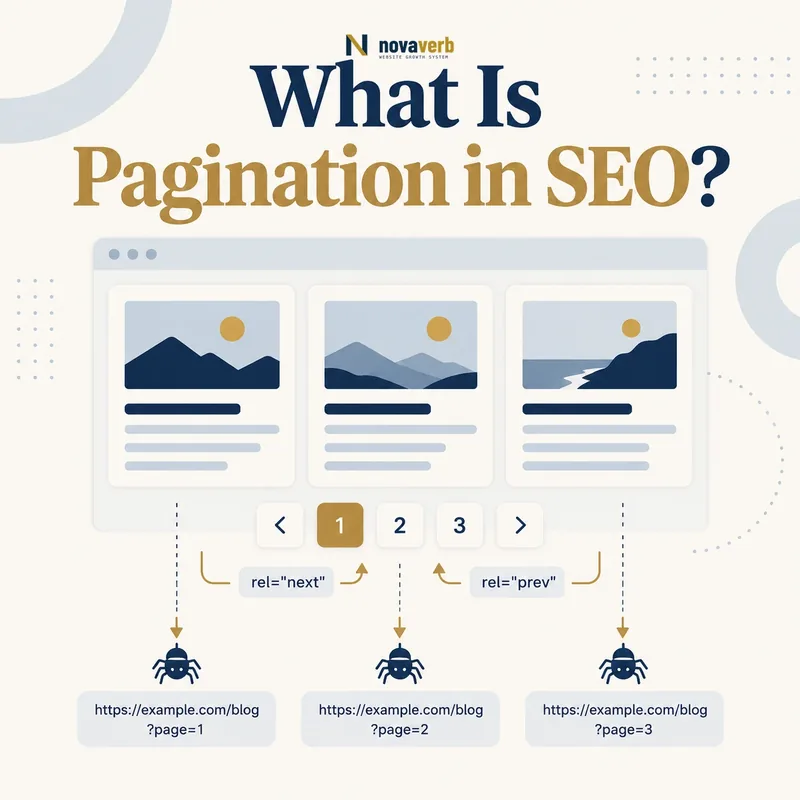
What Is Pagination in SEO?
A category with 240 products might show 24 products per page and expose ten URLs. Page one introduces the collection; later pages reveal the remaining inventory. The same pattern appears in article archives, marketplace results, forum threads and resource libraries. Pagination is therefore both an interface decision and an architecture decision. It changes which URLs exist, how far items sit from entry pages and how discovery paths behave as inventory changes. A sound series does not depend on a crawler guessing hidden application state. Each useful page has a stable address, returns its own content and connects to neighboring or strategically important pages. Teams should document page size, ordering, URL format and edge behavior before launch.
- One collection divided into manageable result sets
- A stable URL for each accessible set
- Visible navigation between parts of the series
- Consistent ordering when inventory changes
- Distinct content items rather than repeated page-one results
- Clear behavior for empty and out-of-range pages
- Frame the decision raised by What Is Pagination in SEO.
- Crawl representative clean and parameterized URLs.
- Record links, responses, canonicals and robots behavior.
- Choose one consistent policy for duplicate or sequential states.
- Implement the policy and verify it with a fresh crawl.
| Element | Example | SEO purpose |
|---|---|---|
| Collection | Running shoes | Defines the complete set |
| Page size | 24 products | Controls series length |
| Page URL | ?page=3 | Addresses one result set |
| Pager link | Next or 4 | Creates a crawl path |
| Ordering | Best selling | Keeps partition logic stable |
| Boundary | Last page | Prevents invalid continuation |
Pagination succeeds when a complete collection becomes a predictable sequence of accessible URLs rather than a set of hidden interface states.
Pagination vs Infinite Scroll and Load More
A browser can provide a smooth continuous experience while the server still exposes paginated URLs underneath. That progressive enhancement pattern gives people an app-like interface without making discovery depend entirely on scrolling, clicking or client-side history changes. Infinite scroll becomes risky when additional items exist only after JavaScript events and have no independent URLs or links. Load more has the same limitation when the button is the only path. Conversely, numbered pagination can frustrate users when controls are tiny, page state is lost on back navigation or ordering changes between requests. The best choice follows the collection size, user task and technical platform. Treat interface behavior and crawl access as related but separate layers.
- Decide how visitors prefer to browse the collection
- Define a crawlable fallback for every important item
- Keep URLs synchronized with meaningful visible state
- Preserve back-button and sharing behavior
- Test without relying only on an interactive browser
- Frame the decision raised by Pagination vs Infinite Scroll and Load More.
- Crawl representative clean and parameterized URLs.
- Record links, responses, canonicals and robots behavior.
- Choose one consistent policy for duplicate or sequential states.
- Implement the policy and verify it with a fresh crawl.
| Pattern | Visitor behavior | Crawl requirement |
|---|---|---|
| Numbered pages | Selects a page | Direct links to result pages |
| Previous and next | Moves sequentially | Linked series path |
| Infinite scroll | Content appends on scroll | Accessible paginated fallback |
| Load more | Content appends on click | Addressable linked batches |
| Hybrid | Scroll plus URL updates | Stable URLs matching state |
| View all | Loads full collection | Only when performance remains sound |
Choose the browsing experience independently, but keep an addressable linked series underneath whenever important content spans multiple batches.
How Do Paginated URLs Work?
Common patterns include /category/page/2/, ?page=2 and cursor-based application URLs. Human-readable numbering is usually easier to inspect than opaque cursors for durable public archives, although the correct choice depends on the platform. Whatever format is chosen, page one needs one canonical public form rather than several equivalent addresses such as ?page=1, /page/1/ and the clean category URL. Parameters should be normalized in a consistent order, and tracking values should not multiply the series. A request beyond the last valid page should not quietly return page one, because that creates many apparently valid duplicates. Stable ordering also matters: if products move constantly, items can repeat or disappear as a crawler traverses the series.
- Choose one URL format for numbered states.
- Map page one to a single preferred address.
- Return the correct unique result subset on each page.
- Handle invalid, negative and out-of-range values deliberately.
- Keep tracking and sort parameters out of the canonical series.
- Test URL behavior before and after inventory changes.
- Evidence for How Do Paginated URLs Work: the clean path and every parameter or pagination state
- Crawlable links entering and leaving the page set
- Canonical, robots and response behavior for each variant
- Duplicate or near-duplicate destinations created by the pattern
- A fresh crawl proving the chosen policy works
| Decision | Preferred behavior | Failure to avoid |
|---|---|---|
| Page one | Clean collection URL | Duplicate ?page=1 |
| Later pages | Stable numbered URL | JavaScript-only state |
| Invalid number | Clear 404 or valid boundary policy | Soft duplicate of page one |
| Parameter order | Normalized | Multiple equivalent URLs |
| Tracking values | Excluded from preferred URL | Indexable campaign variants |
| Ordering | Deterministic enough to traverse | Items skipped or repeated |
A paginated URL works well when one address maps to one reproducible collection slice and equivalent address variants are eliminated.
What SEO Problems Can Pagination Create?
The largest issue is often not the number of pages itself but the way the series interacts with other controls. Sorting, filters, session values and tracking parameters can turn ten useful pages into thousands of variants. Later inventory may also become difficult to discover if every page links only to the next one. Very large page sizes can solve depth superficially while causing slow responses and poor usability. Very small sizes create unnecessarily long series. Canonicalizing every later page to page one can hide the fact that each page contains different items and can weaken the discovery path those items rely on. Blanket noindex decisions can also be counterproductive when later pages are the only stable route to products or articles.
- Unbounded combinations of page, sort and filter parameters
- Multiple URLs for the first or same result set
- Items reachable only after many sequential clicks
- Empty pages remaining valid after inventory shrinks
- Repeated items caused by unstable ordering
- Client-rendered batches absent from server responses
- Internal links pointing to redirected or invalid page states
- Frame the decision raised by What SEO Problems Can Pagination Create.
- Crawl representative clean and parameterized URLs.
- Record links, responses, canonicals and robots behavior.
- Choose one consistent policy for duplicate or sequential states.
- Implement the policy and verify it with a fresh crawl.
| Risk | Evidence to inspect | Likely response |
|---|---|---|
| Excess variants | Crawl URL samples | Normalize URL rules |
| Deep items | Click-depth distribution | Improve pager and category links |
| Duplicate page one | Canonical and redirects | Consolidate one address |
| Missing batches | Rendered and raw HTML | Expose linked fallback |
| Empty pages | Status and template output | Retire invalid boundaries |
| Unstable coverage | Repeated crawl comparison | Stabilize ordering |
Pagination problems become manageable once the audit separates legitimate result pages from accidental variants and verifies item discovery end to end.
Should Paginated Pages Be Indexable?
For many collections, later pages are functional discovery nodes rather than search landing pages. They still need to be crawlable so their item links can be found, while their index treatment depends on the site’s architecture and evidence. A page with distinct editorial copy and stable demand may justify a stronger landing role. A thin utility page may not. Do not confuse index eligibility with crawl access: noindex can remove a URL from results, but the system may still need to request it to see that directive and follow links. Canonical tags are also not crawl blockers. Each later page usually describes different items, so a self-referencing canonical may better represent the actual content than pointing every page to page one.
- Identify whether the page serves a distinct search or navigation need.
- Confirm that its result set differs materially from other pages.
- Check whether important items depend on it for discovery.
- Review canonical, robots and status signals together.
- Measure actual search and crawl behavior before changing policy.
- Recrawl after deployment to confirm the intended outcome.
- Evidence for Should Paginated Pages Be Indexable: the clean path and every parameter or pagination state
- Crawlable links entering and leaving the page set
- Canonical, robots and response behavior for each variant
- Duplicate or near-duplicate destinations created by the pattern
- A fresh crawl proving the chosen policy works
| Page condition | Possible treatment | Reason to verify |
|---|---|---|
| Stable unique slice | Indexable and self-canonical | Represents distinct items |
| Search-focused landing | Indexable with tailored value | Serves proven intent |
| Utility-only slice | Context-dependent index policy | May lack landing value |
| Duplicate first page URL | Redirect or consolidate | Same visible set |
| Empty page | Retire appropriately | No useful result set |
| Parameter variant | Normalize or consolidate | Avoids duplicate state |
Index policy should reflect what each page is and does, while preserving the crawl paths required to reach the collection’s actual content.
How Should Pagination Be Implemented?
Start with a simple series that works through ordinary links. Enhance it with scrolling or asynchronous loading only after the underlying pages are complete. Every link should use a real href rather than a click handler alone. Previous and next controls help sequential movement, while selected nearby numbers, first and last links, or grouped jumps can reduce excessive depth in a long archive. The exact pager does not need to link to every page, but it should avoid trapping distant items behind hundreds of clicks. Titles and headings may clarify the current page without becoming awkward or repetitive. Page responses must remain cacheable where appropriate, and template components should avoid producing links to page zero, duplicate page one or nonexistent final pages.
- Render the initial batch and navigation on the server.
- Give every valid batch one stable URL.
- Use standard anchor links with descriptive accessible labels.
- Add nearby or strategic page jumps for long series.
- Preserve URL and history state during enhancements.
- Return deliberate responses for empty and invalid pages.
- Test keyboard, mobile, raw HTML and rendered behavior.
- Evidence for How Should Pagination Be Implemented: the clean path and every parameter or pagination state
- Crawlable links entering and leaving the page set
- Canonical, robots and response behavior for each variant
- Duplicate or near-duplicate destinations created by the pattern
- A fresh crawl proving the chosen policy works
| Layer | Requirement | Test |
|---|---|---|
| Routing | Stable page URLs | Request directly |
| HTML | Real anchor hrefs | Inspect source |
| Results | Unique correct slice | Compare adjacent pages |
| Navigation | No broken boundaries | Test first and last |
| JavaScript | Progressive enhancement | Disable scripts |
| Accessibility | Named usable controls | Keyboard test |
| Performance | Responsive page batches | Measure representative pages |
A robust implementation exposes a complete linked series first and treats richer interaction as an enhancement rather than the only route to content.
How Do Internal Links Work Across a Page Series?
A strict next-only chain increases click depth with every page. Adding previous links, a window of page numbers and occasional first, last or grouped jumps creates more resilient paths. However, pagination should not carry the entire architecture. High-value or evergreen items deserve direct links from categories, curated collections, guides and other relevant pages. That reduces dependence on an item’s temporary position in an ordered list. Breadcrumbs should normally describe the collection hierarchy rather than treating every page number as a new category level. When a result is removed, the series should close ranks predictably and avoid retaining links to empty trailing pages. Use an path for discovery rather than assuming a form control or API request provides an internal link.
- Link previous and next valid pages
- Expose a useful window of nearby page numbers
- Add strategic jumps when the series is very long
- Keep collection breadcrumbs structurally accurate
- Link important items from curated hubs
- Update final-page boundaries as inventory changes
- Review anchor destinations for redirects and errors
- Frame the decision raised by How Do Internal Links Work Across a Page Series.
- Crawl representative clean and parameterized URLs.
- Record links, responses, canonicals and robots behavior.
- Choose one consistent policy for duplicate or sequential states.
- Implement the policy and verify it with a fresh crawl.
| Link type | Primary role | Watch for |
|---|---|---|
| Previous and next | Sequential traversal | Missing boundary link |
| Nearby numbers | Shorter local paths | Huge cluttered pager |
| First or last | Series orientation | Invalid final page |
| Grouped jump | Reduces long depth | Opaque labels |
| Item link | Content discovery | Client-only target |
| Curated hub link | Priority and stability | Orphaned valuable item |
| Breadcrumb | Collection hierarchy | Page number as false category |
How Do You Audit Pagination?
Begin with representative collections of different sizes, templates and traffic value. Record page-one forms, URL patterns, page counts, navigation links, robots directives, canonicals and status codes. Then crawl the full series and reconcile discovered items against inventory or the application’s source of truth. A visual spot check alone will miss items that repeat, vanish or appear only after interaction. Compare crawl results across releases because inventory changes can reveal boundary defects that a static test set hides. Use an internal link audit to find broken or redirected pager links, review crawl depth, and investigate any orphan pages that should appear in the collection.
- Inventory every collection template and pagination pattern.
- Crawl raw HTML with query parameters retained.
- Render samples that use JavaScript enhancements.
- Compare adjacent result sets for repeats and gaps.
- Test page one, final page and out-of-range requests.
- Group canonical, robots, status and redirect outcomes.
- Reconcile discovered item URLs with known inventory.
- Prioritize defects by affected content and shared template.
- Evidence for How Do You Audit Pagination: the clean path and every parameter or pagination state
- Crawlable links entering and leaving the page set
- Canonical, robots and response behavior for each variant
- Duplicate or near-duplicate destinations created by the pattern
- A fresh crawl proving the chosen policy works
| Check | Pass condition | Priority signal |
|---|---|---|
| URL inventory | One form per valid page | Variant volume |
| Pager links | Crawlable valid hrefs | Affected collections |
| Item coverage | Known items discovered | Missing valuable URLs |
| Adjacent slices | No unexplained gaps | Repeated or skipped items |
| Signals | Policy aligns by page | Conflicting directives |
| Boundaries | No empty valid tails | Inventory volatility |
| Rendering | Fallback matches experience | JavaScript dependency |
| Depth | Important items reachable | Business importance |
Start with a relevant free SEO check, continue the evidence workflow in Crawl Explorer, and review pricing when comparing continuous monitoring with a one-time manual review.
A complete pagination audit proves both sides of the system: valid series pages behave consistently and the content they partition remains discoverable.