
The 5-Minute Takeaway: Check the Full Path, Not Just the Final URL
A redirect audit must inspect the original URL, every intermediate HTTP response, and the final destination. Seeing a final URL return a 200 status code does not prove that the redirect path is short, stable, relevant, or technically correct.
A URL can eventually load the correct page while still passing through unnecessary redirects, outdated hostnames, temporary responses, tracking URLs, or conflicting normalization rules. These extra hops can increase latency, complicate migrations, hide configuration mistakes, and make the redirect system harder to maintain.
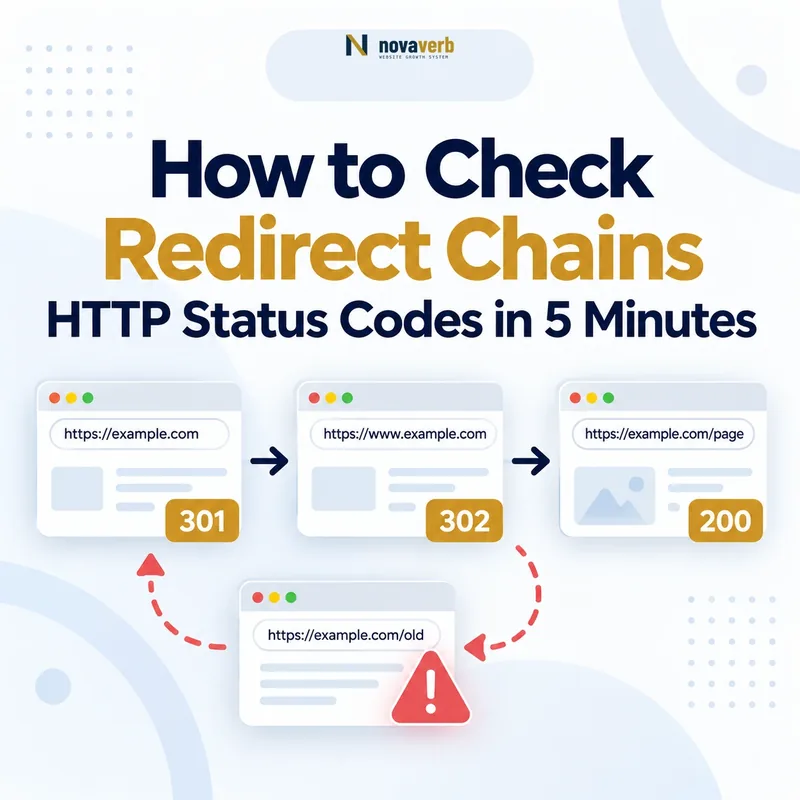
In this example, the visitor reaches the final page, but the path contains two redirects. The audit should determine whether both hops are required or whether the source URL can redirect directly to the final canonical destination.
The original URL sends users and crawlers directly to the closest relevant canonical replacement, and the final destination responds successfully without unnecessary intermediate URLs.
The URL moves through several hops, alternates between HTTP and HTTPS, changes between www and non-www, returns a temporary redirect for a permanent move, enters a loop, or ends on an unrelated page.
The goal is not to remove every redirect. Redirects are necessary when URLs move, protocols change, hostnames are standardized, pages are consolidated, or old content receives a relevant replacement. The goal is to ensure that each redirect has a valid purpose and leads to the correct destination through the simplest reliable path.
Start with the Novaverb Redirect Checker and save the full redirect path before changing server rules, plugins, CDN settings, or application routing.
What Is a Redirect Chain?
A redirect chain occurs when an original URL passes through one or more intermediate URLs before reaching its final destination. Each intermediate response is called a redirect hop.
A single redirect is not automatically a problem. Redirects are often required when a page moves, a protocol changes, a hostname is standardized, or old content is consolidated. The technical risk increases when the path contains unnecessary hops, conflicting rules, loops, slow responses, or an irrelevant destination.
What Can a Five-Minute Redirect Check Actually Prove?
A five-minute redirect check can prove the HTTP response path observed for one exact URL at the time of the test. It cannot reveal every historical response or prove how a search engine has already processed the redirect.
It can prove
- The submitted source URL.
- Every observed response code.
- The order of redirect hops.
- The final destination and status.
- Whether the tested path loops or fails.
It can suggest
- A redirect rule may be unnecessary.
- The destination may not match the original content.
- Multiple systems may be applying redirects.
- A migration map may require correction.
- Latency may be concentrated in one hop.
It cannot prove
- That Google has recrawled the URL.
- That ranking signals were consolidated.
- That the final URL is indexed.
- That the selected canonical matches the redirect.
- That every user agent receives the same path.
For a broader crawl and indexability review, use the Website SEO Checker after verifying the redirect path.
Minute 0–1: Submit the Original URL
Test the exact URL that users, backlinks, internal links, sitemaps, or legacy systems still request. Starting with the final URL hides the redirect path you need to diagnose.
http:// and https:// when protocol normalization is relevant.
/page and /page/ when the site normalizes one form.
Submit the source URL to the Redirect Checker and preserve the exact input in your audit record.
Minute 1–2: Read Every HTTP Status Code
Each status code describes what happened at one step in the request path. Read the codes in order rather than focusing only on the first or final response.
| Status | Practical meaning | Audit question |
|---|---|---|
| 200 | The URL returned a successful response. | Is this the correct final page and canonical destination? |
| 301 | The resource is presented as permanently moved. | Is the move genuinely long-term and is the destination correct? |
| 302 | The resource is presented as temporarily redirected. | Is the temporary behavior intentional and still necessary? |
| 307 | A temporary redirect that preserves the request method. | Is application or security behavior causing the redirect? |
| 308 | A permanent redirect that preserves the request method. | Is this the intended permanent normalization or migration rule? |
| 404 | The requested resource was not found. | Should the page remain unavailable, be restored, or receive a relevant redirect? |
| 410 | The resource is intentionally gone. | Was permanent removal intentional and documented? |
| 5xx | The server failed to complete the request. | Is the failure temporary, configuration-related, or recurring? |
Minute 2–3: Confirm the Final Destination
The correct final destination should be the closest relevant replacement for the original URL and should return the expected successful response. Reaching any live page is not enough.
Minute 3–4: Count Redirect Hops and Check Latency
Count every redirect between the source and final URL, then identify which hop contributes unnecessary delay or complexity. The goal is not an arbitrary zero-redirect rule; it is a correct and efficient path.
A shorter path is usually easier to maintain, but one direct redirect to an irrelevant page is still worse than a temporary two-step path that preserves the correct user destination during a controlled migration.
Minute 4–5: Keep, Shorten, Replace, or Investigate
The final step is to convert the observed redirect path into one clear technical decision. Do not leave the audit at “redirect found.”
| Finding | Recommended action | Verification |
|---|---|---|
| One intentional hop to the correct final URL | Keep | Confirm the rule remains stable and internal links use the final URL. |
| Multiple hops reaching the same correct destination | Shorten | Point the original source directly to the final canonical URL. |
| Redirect ends on an unrelated page | Replace | Map the source to the closest relevant equivalent or allow an honest unavailable response. |
| Redirect loop | Fix immediately | Remove the conflicting rule and confirm a finite path. |
| Redirect ends in 404 or 5xx | Correct | Restore the destination or point to a valid relevant page. |
| Behavior changes by crawler, country, or device | Investigate | Test controlled variants and identify the system applying the conditional redirect. |
A Final 200 Response Does Not Mean the Redirect Is Clean
A redirect chain can end successfully while still containing unnecessary, outdated, slow, or misleading steps. The final 200 response confirms only that the last page loaded.
Audit the path as a sequence. The final response is one data point, not the complete technical result.
301 vs 302: Which Redirect Should You Expect?
The expected redirect code should match whether the move is intended to be permanent or temporary. A 302 is not automatically an SEO error, and a 301 is not automatically correct.
- A URL has permanently changed.
- A hostname or protocol is permanently standardized.
- Two pages are permanently consolidated.
- An old product is permanently replaced by a close equivalent.
- A temporary campaign route is active.
- A page is temporarily unavailable.
- A short-lived experiment requires controlled routing.
- A user session or application flow needs temporary redirection.
How to Detect a Redirect Loop
A redirect loop occurs when a request repeatedly returns to a URL already visited or never reaches a final non-redirecting destination.
Browser messages such as “too many redirects” are a user-facing symptom. The redirect trace is the evidence needed to locate the loop.
How to Find HTTP-to-HTTPS and www Redirect Problems
Test all common protocol and hostname variants to confirm that they converge on one stable preferred URL without looping or creating avoidable hops.
http://example.com
Non-secure, non-www variant.
http://www.example.com
Non-secure, www variant.
https://example.com
Secure, non-www variant.
https://www.example.com
Secure, www variant.
All variants should resolve consistently to the intended canonical hostname and protocol. The preferred choice may be www or non-www; the technical requirement is consistency, not a universal hostname rule.
How Trailing Slashes and URL Case Create Extra Hops
Trailing-slash, capitalization, and parameter rules can create repeated normalization redirects when different systems disagree about the preferred URL format.
/technical-seo → /technical-seo/
/Technical-SEO/ → /technical-seo/
/page/?utm_source=email → /page/
Select one preferred format, update internal links to use it directly, and ensure server, CMS, CDN, and application rules agree.
How to Audit Redirects After a Website Migration
After a migration, every important old URL should redirect directly to the most relevant final URL in the new architecture. Migration redirects should preserve content relationships, not merely keep visitors away from error pages.
How to Fix Internal Links That Point Through Redirects
Internal links controlled by your website should normally point directly to the final canonical destination instead of relying on redirects.
Review internal-link quality principles in The Truth About Internal Linking: Quality Over Quantity .
When Is a Redirect to the Homepage the Wrong Fix?
A homepage redirect is usually the wrong choice when the original URL represented a specific page and the homepage does not satisfy the same user need.
- A product has a direct successor.
- A guide has been consolidated into a stronger equivalent.
- A category moved to a new canonical structure.
- A service page has a current replacement.
- No equivalent content exists.
- The original offer was permanently withdrawn.
- The topic no longer belongs on the site.
- A redirect would mislead users.
Redirect Chains vs Canonical Tags
A redirect moves the request to another URL, while a canonical tag identifies a preferred URL among accessible alternatives. They serve different technical purposes.
| Dimension | Redirect | Canonical tag |
|---|---|---|
| User behavior | Sends the user to another URL. | Usually leaves the current URL accessible. |
| Server response | Returns a 3xx response. | Usually appears in HTML or an HTTP header. |
| Primary use | Move, normalize, or consolidate URLs. | Declare a preferred version among similar or duplicate URLs. |
| Content state | The source URL no longer serves its own normal page content. | The alternate URL may continue serving content. |
| Common mistake | Redirecting to an irrelevant page. | Using canonical instead of redirect after a permanent move. |
Five-Minute Redirect Audit Checklist
Use this checklist to document one exact redirect path and produce one prioritized technical action.
Run the free Redirect Checker to capture the complete path.
Frequently Asked Questions About Redirect Chains
Redirect decisions should be based on the full response path, destination relevance, and intended permanence of the move.
What is a redirect chain?
A redirect chain occurs when an original URL passes through one or more intermediate redirects before reaching its final destination.
How many redirect hops are too many?
There is no universal number that makes a path automatically invalid. Remove avoidable hops while preserving the correct and stable destination.
Is one 301 redirect bad for SEO?
No. One direct 301 can be appropriate when a URL has permanently moved to a relevant replacement.
Is a 302 redirect always temporary?
A 302 communicates temporary redirection intent, but the correct choice depends on how the system is actually using the route.
Does a final 200 response mean the redirect is correct?
No. The chain may still contain unnecessary hops, a wrong destination, slow responses, or conflicting normalization rules.
What causes a redirect loop?
Loops commonly result from conflicting protocol, hostname, slash, plugin, CDN, proxy, or application rules.
Should HTTP redirect to HTTPS?
Sites using HTTPS should normally route HTTP requests consistently to the secure preferred URL.
Should www redirect to non-www?
Either hostname can be preferred. The important requirement is consistent use and direct convergence to one canonical host.
Can I redirect an old page to the homepage?
Only when the homepage genuinely satisfies the original need. Otherwise, use a relevant replacement or an honest unavailable response.
Should internal links point through redirects?
Controlled internal links should normally point directly to the final canonical URL.
Does a canonical tag replace a redirect?
No. A canonical identifies a preferred URL, while a redirect moves the request to another URL.
How do I check multiple URLs?
Export the source URLs from a crawl, migration map, sitemap, or backlink report, then trace them in batches with a tool that preserves each full path.
Check the Path, Fix One Redirect, and Verify the Final URL
Finish the audit by correcting one verified redirect issue and retesting the exact original URL. The objective is a relevant, stable, maintainable path - not the removal of every redirect.
Use Novaverb to connect redirect evidence, crawl diagnostics, URL architecture, internal links, and technical SEO decisions in one workflow.