
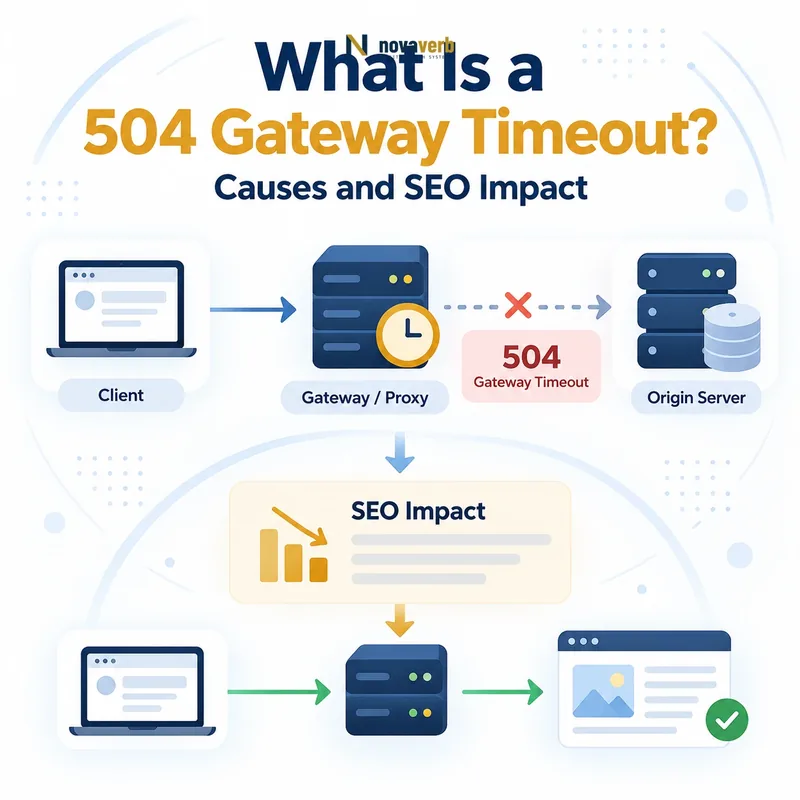
What Does 504 Gateway Timeout Mean?
A 504 Gateway Timeout means that a server acting as a gateway or proxy did not receive the response it needed from an upstream server within the allowed time.
A 504 response establishes several facts:
- An intermediary handled the request: A CDN, reverse proxy, gateway or load balancer was involved.
- The intermediary contacted an upstream system: It depended on another server or service to complete the request.
- The upstream response was too late: The configured waiting period expired before the required response arrived.
- The requested resource was not delivered: The client received the timeout response instead of the intended content.
- The root cause remains unknown: The status does not identify which upstream component became slow or stalled.
The upstream service may still be running. It can return too slowly because of load, blocked execution, database latency, network delay or another dependency.
How Does an HTTP 504 Response Work?
An HTTP 504 response occurs when a gateway forwards a request upstream, waits for the required response and reaches its timeout before the upstream operation finishes.
- A browser or crawler requests a URL.
- The request reaches a CDN, proxy or load balancer.
- The intermediary forwards the request to an upstream server.
- The upstream begins processing or waits on another dependency.
- The configured gateway timeout expires.
- The intermediary returns
504 Gateway Timeout.
Client
→ CDN or reverse proxy
→ Application server
→ Database or external API
→ Response does not arrive in time
→ Gateway returns HTTP 504
The upstream operation may continue after the gateway has stopped waiting. This matters for non-idempotent actions such as payments, imports or form submissions, where automatic retries can create duplicate work.
What Is an Upstream Server?
An upstream server is a server or service that a gateway, proxy or application depends on to complete the current request.
Depending on the architecture, an upstream system may be:
- An origin web server behind a CDN
- An application server behind Nginx
- A PHP-FPM process behind a web server
- A container behind a load balancer
- A database used by an application
- An internal microservice
- A third-party payment, search or authentication API
- A queue, cache or storage service
Browser
→ CDN
→ Load balancer
→ Application
→ Database

Each system to the right can be upstream
relative to the system immediately before it.
“Upstream” is relational. The application is upstream from the reverse proxy, while the database is upstream from the application.
What Causes a 504 Gateway Timeout?
A 504 can be caused by slow application execution, long database queries, overloaded workers, stalled dependencies, network latency or timeout settings that expire before valid processing finishes.
| Cause | Example | Evidence to inspect |
|---|---|---|
| Slow application code | A report builds synchronously for longer than the proxy permits. | Application traces, profiling and route latency |
| Slow database query | An unindexed query scans a large table. | Query plan, slow-query log and lock metrics |
| Worker exhaustion | Requests wait in a queue because all workers are busy. | Worker utilization, queue time and concurrency |
| External API delay | A third-party service does not respond before the gateway timeout. | Dependency traces and provider status |
| Deadlock or blocking lock | A transaction waits indefinitely for another transaction. | Database locks, deadlock events and transaction logs |
| Network latency | Packets between gateway and upstream are delayed or lost. | Network metrics, retransmissions and regional tests |
| Autoscaling delay | New application instances are not ready before queues grow. | Scaling events, readiness time and request backlog |
| Timeout mismatch | A gateway times out before the application’s own timeout. | Timeout configuration across every serving layer |
| Resource saturation | CPU, memory, disk or connection pools reach capacity. | Infrastructure metrics and saturation alerts |
Several delays can accumulate. DNS, connection setup, queueing, application execution and database work may each be acceptable alone but exceed the total gateway limit together.
504 Error vs 502 Bad Gateway
A 504 means the gateway did not receive an upstream response in time. A 502 means the gateway received an invalid or unusable upstream response.
| Dimension | 504 Gateway Timeout | 502 Bad Gateway |
|---|---|---|
| Gateway observation | No required response arrived before timeout. | The response or upstream exchange was invalid. |
| Typical example | A database query runs longer than the proxy allows. | The application closes the connection prematurely. |
| Primary evidence | Latency traces and timeout logs | Protocol, header and connection errors |
| Corrective focus | Reduce upstream response time or align justified limits. | Restore a valid upstream connection and response. |
| Common wrong fix | Increasing every timeout without finding the delay | Increasing timeouts when the response is malformed |
Both codes require a gateway or proxy relationship, but they describe different failures in the upstream exchange.
504 Error vs 503 Service Unavailable
A 504 means a gateway waited too long for an upstream response. A 503 means a service is temporarily unable to handle the request.
| Dimension | 504 Gateway Timeout | 503 Service Unavailable |
|---|---|---|
| Primary condition | Upstream response exceeded the gateway deadline. | Service temporarily lacks availability or capacity. |
| Request behavior | The gateway normally waits before failing. | The request may be rejected immediately. |
| Typical cause | Slow application, database or API | Maintenance, overload or no healthy instances |
| Retry-After | Not central to the defined meaning | Can communicate a recovery estimate |
| Corrective focus | Repair the slow dependency path. | Restore service readiness or capacity. |
A heavily overloaded service may produce either status at different layers. Use logs to determine whether the request was rejected or timed out while waiting.
504 Error vs 500 Internal Server Error
A 504 identifies an upstream timeout observed by a gateway. A 500 identifies an unexpected internal failure in the server processing the request.
| Dimension | 504 Gateway Timeout | 500 Internal Server Error |
|---|---|---|
| Architecture | Requires a gateway or proxy relationship. | Can occur within a single application or server. |
| Failure meaning | The upstream response arrived too late or not at all. | An unexpected internal condition prevented completion. |
| Typical evidence | Gateway timing and distributed traces | Application exceptions and server logs |
| Primary question | Which upstream step exceeded its deadline? | Which internal component failed? |
| Common example | Slow database query | Unhandled application exception |
An internal application error may indirectly stall a request and eventually cause a gateway timeout. The public status and the underlying root cause can therefore differ.
504 Error vs Browser Timeout
A 504 is an HTTP response generated by a gateway. A browser timeout occurs when the client stops waiting and may happen without receiving any HTTP response.
| Dimension | 504 Gateway Timeout | Browser or client timeout |
|---|---|---|
| Who ends the wait? | The gateway or proxy | The browser, crawler or API client |
| HTTP response received? | Yes, status 504 | Not necessarily |
| Failure path | Gateway-to-upstream | Client-to-server or full request path |
| Diagnostic evidence | Gateway logs and upstream timing | Client error, network trace and server access logs |
| Possible relationship | A slow upstream triggers the gateway deadline. | A shorter client deadline may expire before the gateway does. |
Timeout values can differ at every layer. The component with the shortest deadline often determines which error the user sees first.
Which Server Returns the 504 Error?
The gateway or proxy whose upstream waiting period expires normally returns the public 504 response.
Identify the responding layer by checking:
- Response headers: Look for CDN, server, proxy, request ID and trace headers.
- Error-page branding: Some gateways identify the platform that generated the response.
- Gateway access and error logs: These show the request, upstream and timeout message.
- Upstream logs: These reveal whether the request arrived and how long it ran.
- Distributed traces: A trace can show which span consumed the time budget.
- Regional tests: Different edge locations may use different gateways or upstream routes.
The upstream server may never return a 504 itself. It may continue processing while the gateway has already ended the public request.
Can a CDN Cause a 504 Gateway Timeout?
Yes. A CDN can return 504 when its edge server does not receive a response from the configured origin within the CDN’s upstream timeout.
CDN-related scenarios include:
- The origin application responds too slowly.
- The CDN-to-origin network path has high latency or packet loss.
- The origin accepts the connection but stalls during processing.
- A regional origin is overloaded.
- An edge function waits on a slow service.
- The origin’s connection pool or worker pool is exhausted.
- The CDN’s timeout is shorter than the origin’s processing deadline.
- Large uncached requests repeatedly reach the origin.
Compare cached and uncached URLs, edge regions, request identifiers and direct-origin response time. A CDN timeout can expose an origin problem without being its root cause.
Can Nginx Cause a 504 Gateway Timeout?
Nginx can return 504 when it acts as a reverse proxy or FastCGI gateway and the configured upstream response timeout expires.
Common Nginx timeout paths include:
proxy_read_timeoutexpires while waiting for an upstream response.fastcgi_read_timeoutexpires while waiting for PHP-FPM.- The application waits on a slow database query.
- A PHP worker is blocked or saturated.
- The upstream sends no data for longer than the permitted interval.
- A container or service stalls without closing the connection.
- A large report or export runs synchronously.
- Different Nginx layers use inconsistent timeout values.
Review the Nginx error log for messages such as “upstream timed out while reading response header.” Then correlate the request with upstream execution time.
Can Apache Cause a 504 Gateway Timeout?
Apache can return 504 when it proxies a request to a backend that does not respond within the configured proxy timeout.
Potential causes include:
- A proxied application takes too long to respond.
ProxyTimeoutexpires before backend processing finishes.- A FastCGI process waits on database or file operations.
- The backend worker pool is saturated.
- The request remains queued behind other long-running work.
- A proxy chain contains multiple, inconsistent timeout values.
- The backend network path is slow or unstable.
- A deployment causes one backend to respond much more slowly.
Review Apache’s proxy error, access logs and backend response time. Determine whether the timeout applies globally or only to one route.
Can PHP-FPM Cause a 504 Error?
Yes. A web server can return 504 when PHP-FPM accepts a request but does not produce the required response before the FastCGI waiting period expires.
PHP-FPM-related causes include:
- All PHP workers are busy.
- A request waits in the PHP-FPM listen queue.
- A PHP script runs a slow database query.
- A plugin calls a slow external API.
- A PHP process is blocked on file or network I/O.
- An import, export or image task runs synchronously.
- A lock prevents another process from continuing.
- The PHP execution limit and proxy timeout are misaligned.
Inspect the PHP-FPM slow log, process status, queue size, worker saturation and the exact application trace for the timed-out route.
Can a Database Cause a 504 Gateway Timeout?
Yes. A database can indirectly cause 504 when an application waits on a query, connection or lock for longer than the gateway permits.
Database-related causes include:
- A missing index causes a large table scan.
- A query returns or sorts an excessive data set.
- Transactions block one another.
- A deadlock is not resolved promptly.
- The connection pool is exhausted.
- The database CPU, memory or disk is saturated.
- A replica is lagging or unavailable.
- Network latency separates the application and database.
Capture the SQL statement, execution plan, lock state, rows examined, connection wait and application span. A high total request time does not prove the database consumed all of it.
Can an External API Cause a 504 Error?
Yes. An external API can cause a 504 when the application waits synchronously for that dependency and the full request exceeds the gateway deadline.
Risk increases when the application:
- Uses no explicit API timeout.
- Retries repeatedly inside the same user request.
- Calls several external services sequentially.
- Waits for nonessential enrichment before rendering.
- Has no cached or degraded fallback.
- Uses an API endpoint with unstable latency.
- Performs slow authentication or token refreshes.
- Does not implement circuit breaking.
Separate essential dependencies from optional ones. Where business rules permit, use caching, asynchronous processing, bounded retries and controlled degradation.
Can DNS Cause a 504 Gateway Timeout?
DNS can contribute to a 504 when delayed, stale or incorrect upstream resolution sends a gateway toward an unreachable or slow destination.
Possible DNS-related paths include:
- The gateway resolves an outdated origin address.
- A service name points to an unhealthy instance.
- Resolver latency consumes part of the request budget.
- Split DNS returns a route that is unreachable internally.
- Regional DNS sends traffic to a distant upstream.
- IPv6 resolution selects a broken network path.
- A migration leaves inconsistent records across environments.
DNS failures often produce resolution or connection errors rather than 504 directly. The final status depends on how the gateway handles the delayed or unreachable destination.
Can a Load Balancer Cause a 504 Error?
Yes. A load balancer can return 504 when a selected backend does not produce the required response before the load balancer’s idle or request timeout expires.
Common conditions include:
- One backend instance is substantially slower than others.
- The application remains technically healthy but cannot complete real requests.
- Connection draining interrupts long-running work.
- The load balancer’s timeout is shorter than backend processing time.
- A target’s worker or database pool is saturated.
- Cross-zone or cross-region latency increases.
- A deployment creates inconsistent performance between versions.
- Health checks do not test critical dependencies.
Compare timeout rates by backend target, zone, release and route. Intermittent 504 errors often indicate one slow target inside an otherwise healthy group.
Are 504 Errors Bad for SEO?
An isolated short-lived 504 does not automatically cause a ranking loss, but repeated or prolonged timeouts can block content retrieval, reduce crawling and eventually affect indexing.
SEO risk increases when 504 errors affect:
- The homepage or primary category pages
- Large groups of canonical URLs
- New content awaiting discovery
- XML sitemap URLs
- Rendering APIs, JavaScript or CSS resources
- Important product and conversion routes
- Specific regions or mobile traffic
- Googlebot repeatedly during crawl attempts
The risk depends on recurrence, duration, affected coverage and whether successful responses return promptly.
How Does Google Handle 504 Responses?
Googlebot treats HTTP 504 as a server error, cannot retrieve the intended page from that request and may return later to try the URL again.
- Googlebot requests the URL.
- A gateway returns HTTP 504.
- Google receives no normal page content.
- The timeout contributes to observed server health.
- Googlebot may retry the URL later.
- Significant or persistent failures can reduce crawling.
- Long-term unavailability can eventually affect indexing.
Google does not publish a universal number of 504 responses or a fixed outage duration that guarantees a particular indexing result.
See Google Search Central’s crawling-error guidance.
Can 504 Errors Reduce Googlebot Crawling?
Yes. A significant number of 504 responses and connection timeouts can signal serving problems, causing Googlebot to reduce crawl activity.
Crawl reduction becomes more likely when:
- Many URLs time out during the same crawl period.
- The same routes fail repeatedly.
- Response times deteriorate before requests fail.
- Robots.txt or XML sitemaps also time out.
- The entire hostname or region becomes slow.
- Successful responses do not return between visits.
- Timeouts affect assets required for rendering.
Crawl backoff protects struggling infrastructure from additional demand. Crawl activity can recover after the server consistently responds successfully again.
Can a Long 504 Outage Remove Pages From Google?
Yes. If Google repeatedly cannot retrieve a URL because of prolonged 504 responses, the page can eventually lose indexing and Search visibility.
The risk depends on:
- How long the timeout condition continues
- How frequently Googlebot requests the page
- Whether the error is constant or intermittent
- The percentage of the site affected
- Whether the URL was previously indexed
- Whether successful responses return after recovery
- Whether the same infrastructure serves the entire hostname
A correct 504 is better than returning a false success response, but it does not preserve inaccessible pages indefinitely.
Should a 504 Error Page Return 200?
No. A page displayed because a gateway timed out should return an accurate server-error response rather than 200 OK.
| Response | What it communicates | Result |
|---|---|---|
504 Gateway Timeout |
The gateway did not receive a timely upstream response. | Accurate for a genuine gateway timeout |
200 OK |
The requested resource was served successfully. | Misleading when only an error message appears |
503 Service Unavailable |
The service is temporarily unavailable. | Use only when that is the actual operational state |
A useful error page can offer navigation and support information, but the status must continue to describe the failed request accurately.
Should You Increase the Gateway Timeout?
Increase a gateway timeout only when measured evidence shows that the request is legitimately long, safely bounded and expected to complete within the revised service contract.
Increasing the timeout may be justified when:
- A controlled export has an intentionally longer processing time.
- The route has a documented maximum duration.
- Resource use remains safe throughout the request.
- The user experience clearly communicates the wait.
- All upstream and client timeouts are aligned.
- Asynchronous processing is not practical for the workflow.
It is usually the wrong first action when the delay comes from an unindexed query, dependency outage, worker saturation, lock contention or performance regression.
How Do You Find 504 Errors?
Find 504 errors by combining live HTTP checks, uptime monitoring, crawl data, gateway logs, distributed traces and upstream latency metrics.
| Evidence source | What it reveals | Limitation |
|---|---|---|
| HTTP status checker | The current public response and headers | May miss intermittent timeouts |
| Website crawl | URLs returning 504 during the crawl window | Depends on timing and URL discovery |
| Uptime monitoring | Availability history and regional differences | Usually checks selected endpoints |
| Gateway logs | The selected upstream and exact timeout event | Requires usable request identifiers |
| Distributed traces | Time consumed by each service and dependency | Requires end-to-end instrumentation |
| Database monitoring | Slow queries, locks and connection waits | Covers only one possible dependency |
| Search Console | Server errors encountered during Google crawling | Not a real-time incident system |
Group errors by route, gateway, upstream target, region, release and duration. This separates one slow endpoint from a sitewide serving-capacity problem.
Check one URL with the HTTP Status & Redirect Chain Tracer.
How Do You Diagnose a 504 Gateway Timeout?
Diagnose a 504 by identifying the gateway deadline, tracing the complete upstream request path and measuring which component consumed the available time.
- Capture the exact URL, method, timestamp and headers.
- Determine whether the timeout is constant or intermittent.
- Identify the gateway that returned 504.
- Record the request ID or trace ID.
- Document the configured timeout at each layer.
- Identify the selected upstream server.
- Measure connection, queue and processing time separately.
- Review application, database and dependency traces.
- Check worker, connection and resource saturation.
- Compare recent deployments and traffic changes.
- Reproduce the request safely under controlled conditions.
- Verify the fix across repeated and representative requests.
The public 504 identifies where the waiting stopped, not where the delay began. A complete trace is more useful than increasing one visible timeout.
How Do You Fix a 504 Gateway Timeout?
Fix a 504 by reducing the upstream operation below the required deadline or, when justified, aligning the timeout contract across the request path.
| Verified cause | Possible correction | Required verification |
|---|---|---|
| Slow database query | Optimize the query, index or data-access pattern | Query and page meet latency targets |
| Worker saturation | Reduce workload, fix queueing or add justified capacity | Queue time remains within limits under load |
| Slow external API | Add bounded timeouts, caching, fallback or asynchronous work | The route remains available during dependency delay |
| Blocking lock | Correct transaction scope and lock contention | Requests no longer wait on the same lock path |
| One slow backend | Repair or remove the target and improve health checks | All active targets meet latency objectives |
| Legitimate long task | Move work to a queue or set a justified bounded timeout | The user receives reliable progress or completion |
| Timeout mismatch | Align gateway, application and dependency deadlines | The intended layer terminates failures predictably |
| Infrastructure saturation | Optimize demand and restore adequate capacity | Error rate and latency stay within targets |
After recovery, recrawl important URLs, compare regional responses, review latency percentiles and monitor the next deployment or traffic peak.
Common 504 Gateway Timeout Mistakes
Common mistakes increase every timeout, hide the error, ignore asynchronous alternatives or investigate only the gateway instead of tracing the complete upstream delay.
| Mistake | Why it fails | Preferred correction |
|---|---|---|
| Increasing all timeouts | The slow operation remains and occupies resources longer. | Measure and fix the bottleneck first. |
| Returning 200 for the error page | The response falsely reports successful delivery. | Return the accurate 5xx status. |
| Redirecting to the homepage | The infrastructure problem is hidden and the URL changes. | Keep the requested URL and repair the request path. |
| Restarting services without evidence | Useful failure state and logs may be lost. | Capture traces and metrics before recovery. |
| Blaming the CDN automatically | The origin application or database may be slow. | Inspect both edge and upstream timing. |
| Running long work synchronously | The user request remains tied to expensive processing. | Use queues and progress states where appropriate. |
| Retrying dependencies without limits | Retries can consume the entire request budget. | Use bounded retries and circuit breaking. |
| Testing only the homepage | The timeout may affect one template or dependency. | Test representative route patterns. |
| Ignoring intermittent failures | One slow target may fail only part of the traffic. | Compare target-level and regional results. |
| Closing after one healthy request | The problem may recur under realistic load. | Monitor through a defined observation window. |
504 Gateway Timeout Checklist
A 504 task passes QA when the gateway deadline, slow upstream component, verified correction and stable recovery are documented with evidence.
- The exact failed URL is recorded.
- The request method is recorded.
- The failure timestamp is recorded.
- The public 504 response is captured.
- Response headers are preserved.
- The responding gateway is identified.
- The request or trace ID is recorded.
- The selected upstream is identified.
- The gateway timeout is documented.
- The application timeout is documented.
- Dependency timeouts are documented.
- Gateway logs are reviewed.
- Application traces are reviewed.
- Queue time is measured.
- Application execution time is measured.
- Database time is measured.
- External API time is measured.
- Worker saturation is reviewed.
- Connection-pool saturation is reviewed.
- CPU and memory are reviewed.
- Database locks are reviewed.
- Recent deployments are compared.
- Regional differences are tested.
- Backend targets are compared.
- The root cause is documented.
- The correction is deployed safely.
- Representative routes are retested.
- Important URLs are recrawled.
- Latency remains within targets.
- Monitoring confirms no recurrence.
Frequently Asked Questions About 504 Errors
What does 504 Gateway Timeout mean?
Is a 504 error a browser problem?
What causes a 504 Gateway Timeout?
What is the difference between 504 and 502?
What is the difference between 504 and 503?
Can a database cause a 504 error?
Can an external API cause a 504?
Can Nginx return a 504?
Should I increase the gateway timeout?
Are 504 errors bad for SEO?
Should a 504 page return 200 OK?
How can I check whether a URL returns 504?
Trace Slow Requests From Gateway to Dependency
Start with the exact URL and capture the 504 status, response headers, timestamp and gateway request ID. Then trace queue time, application execution, database work and external dependencies until the component consuming the deadline is identified.
Use the free HTTP checker for one URL, measure the public connection path with the Server Response Time Test and use Crawl Explorer or Site Health Audit when the timeout affects a wider URL set.
Novaverb connects live HTTP responses, crawl evidence, URL coverage and server timing so teams can distinguish one slow request from a systemic gateway-to-dependency problem.
Use the Decision Ladder to determine whether the next action should be query optimization, asynchronous processing, capacity recovery, dependency fallback or infrastructure escalation.