
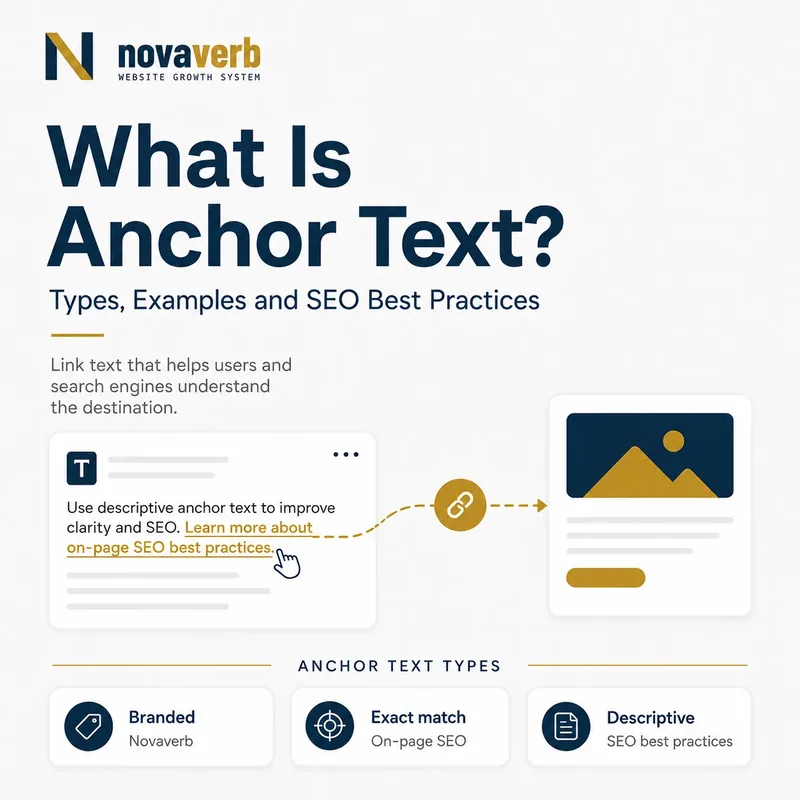
What Is Anchor Text?
Anchor text is the visible, clickable wording inside a link. It tells a reader what to expect after selecting the link and gives search systems context about the destination when the link is crawlable.
In HTML, anchor text normally appears between the opening and closing anchor tags. For example, the words “free backlink checker” are the anchor text in a link pointing to Novaverb’s backlink tool. The destination URL and the visible wording work together, but they are not the same field.
A useful anchor makes sense before the click. It should describe the destination precisely enough to set an expectation without turning the whole surrounding sentence into a link. Anchor text is therefore both a navigation label and a contextual connection between two documents.
- Visible to readers
- Placed inside a crawlable link
- Describes the destination
- Provides context within the source page
| Element | Example | Purpose |
|---|---|---|
| Destination URL | /free-tools/backlink-checker | Identifies where the link goes |
| Anchor text | free backlink checker | Sets the reader’s expectation |
| Surrounding sentence | Check links before prioritizing outreach. | Explains why the destination matters |
The core rule is simple: anchor text should name the destination clearly enough that the click is unsurprising.
Why Does Anchor Text Matter for SEO?
Anchor text matters because descriptive links help people navigate, help crawlers discover URLs and provide contextual information about how one page relates to another. It is a supporting signal, not a ranking guarantee.
Search systems can use links to discover pages and interpret relationships across a site. The wording of a link adds meaning that a bare URL or generic phrase does not. Internal anchors also help readers move from a broad explanation to a detailed tool, definition or commercial workflow.
Anchor text cannot compensate for a weak destination, blocked URL or misleading page. Relevance depends on the source passage, the link wording and the content at the destination agreeing with one another. Treat the anchor as evidence of a relationship, not as a lever that independently creates rankings.
- Improves navigation clarity
- Supports URL discovery
- Connects related topics
- Sets expectations before a click
| Outcome | What the anchor contributes | What it cannot prove |
|---|---|---|
| Discovery | A crawlable route to a URL | That the URL will be indexed |
| Understanding | Context about the destination | That the page is authoritative |
| Engagement | A clearer reason to click | That every reader will click |
Anchor text earns its value by making a real relationship clearer, not by repeating a target phrase as often as possible.
What Are the Main Types of Anchor Text?
Common anchor text types include exact-match, partial-match, branded, naked URL, generic and image anchors. These labels describe wording patterns; they do not assign a universal quality score to a link.
Exact-match text uses the destination’s primary topic verbatim, while partial-match text combines that topic with natural qualifiers. Branded anchors use a company or product name. Naked anchors display the URL itself, and generic anchors use phrases such as “learn more.” An image link derives its descriptive text from the image alt attribute when no visible text is present.
A healthy document may contain several types because writers link for different reasons. Navigation often uses branded or product anchors, definitions use descriptive phrases, and citations may use the source title. Classification helps an audit describe what exists; context determines whether the wording is useful.
- Exact-match
- Partial-match
- Branded
- Naked URL
- Generic
- Image alt text
| Type | Example | Best-fit use |
|---|---|---|
| Exact-match | anchor text | A direct definition when the phrase reads naturally |
| Partial-match | anchor text examples | A specific supporting resource |
| Branded | Novaverb | A brand or product destination |
| Naked URL | novaverb.com | A citation where the address itself matters |
| Generic | read the guide | Only when nearby context names the destination |
Choose an anchor type because it fits the sentence and destination, not because a formula demands a particular distribution.
What Is Exact-Match Anchor Text?
Exact-match anchor text uses the destination’s target topic as the complete clickable phrase. It can be clear and appropriate when it fits the sentence, but repeated or forced exact-match wording can look unnatural and reduce readability.
If a page explains backlink analysis, a link labeled “backlink checker” is exact-match text for a checker page. The wording is useful when the surrounding passage genuinely recommends that tool. The same phrase inserted repeatedly across unrelated pages would add repetition without adding meaning.
Do not evaluate exact-match anchors in isolation. Review where the link appears, whether the destination satisfies the label, and whether writers had a natural editorial reason to choose the phrase. A single relevant anchor and a site-wide templated pattern are different situations.
- Use when the phrase reads naturally
- Keep the destination aligned
- Avoid forced repetition
- Review templates separately from editorial links
Exact-match anchor text is acceptable when it is the clearest label, but clarity should remain the reason for using it.
How Should Internal Link Anchor Text Be Written?
Internal link anchor text should be concise, descriptive and relevant to both the current passage and the destination page. Readers should understand the next page without needing to inspect the URL.
Write the sentence first, then link the smallest phrase that accurately names the next resource. For example, an article discussing link evidence can point readers to a “free backlink checker,” while a workflow article can link to Novaverb’s “internal link architecture solution.” These anchors serve different intents even when both concern links.
Avoid using the same vague label for every destination. “Learn more” does not distinguish a tool from a definition, a product or a solution page. If a generic call to action is required by the interface, add visible context immediately before it so the combined label remains understandable.
- Name the destination topic
- Keep the clickable phrase concise
- Match the surrounding intent
- Use different anchors for different destinations
| Destination | Useful anchor | Weak anchor |
|---|---|---|
| Definition | what is a referring domain | click here |
| Free tool | check backlinks free | tool |
| Product | Novaverb SEO tools | website |
| Solution | internal link architecture workflow | read more |
A strong internal anchor lets the reader predict both the subject and the type of page that will open.
How Should External Link Anchor Text Be Written?
External link anchor text should identify the cited source or the specific resource being referenced. It should not exaggerate what the source proves or imply an endorsement that the source does not make.
For standards and documentation, the document title or a concise description is usually clearer than a bare domain. This article uses Google Search Central’s link best-practices documentation as a primary source for crawlable-link and anchor-text behavior. That source supports those statements; it does not validate unrelated claims about a particular website.
When the destination is sponsored, user-generated or otherwise requires qualification, apply the appropriate link relationship separately from the visible anchor. The rel attribute describes the relationship; the anchor describes the destination. One should not be used as a substitute for the other.
- Name the source or resource
- Keep claims within the source boundary
- Use link attributes for relationship qualification
- Avoid implying unsupported endorsement
External anchors work best when they make the source and the limits of its evidence easy to understand.
How Do Image Links Use Anchor Text?
When an image is the clickable element, its alt attribute can provide anchor-text context. A linked image therefore needs alt text that describes the image’s function or destination rather than decorative filler.
A logo linked to the homepage may use the brand name as alt text. A product screenshot linked to a detailed report may describe the report or action. Empty alt text on a meaningful linked image removes useful context for assistive technology and search crawlers.
Do not stuff keywords into image alt text. Write for the person who cannot see the image and needs to know what selecting it will do. If visible text already accompanies the linked image, avoid duplicating a long description unless that detail is necessary for accessibility.
- Describe the linked image’s function
- State the destination when useful
- Avoid decorative keyword lists
- Test the link without visual context
| Linked image | Useful alt text | Reason |
|---|---|---|
| Brand logo | Novaverb home | Names the brand destination |
| Backlink report screenshot | Open the backlink report example | Explains the action |
| Decorative arrow beside visible text | Empty alt text | Avoids repeating an existing label |
For image links, useful alt text supplies the same destination clarity that visible anchor text provides for text links.
Which Anchor Text Mistakes Should You Avoid?
Avoid vague anchors, misleading labels, excessively long linked passages, empty links, repeated exact-match patterns and anchors that point to redirects or broken pages. Each mistake weakens either clarity, crawlability or destination trust.
The most common defect is a label that cannot stand on its own. A page full of “here,” “this” and “read more” links forces readers to reconstruct destinations from surrounding copy. Another defect is mismatch: the anchor promises a checklist but opens a sales page with no checklist.
Technical integrity matters as much as wording. A descriptive anchor that points into a redirect chain, 404 or blocked URL still creates a poor route. Audit the rendered HTML and final response together so editorial and technical problems are not separated into competing backlogs.
- Generic or empty wording
- Destination mismatch
- Overlong linked text
- Forced exact-match repetition
- Redirected or broken targets
| Finding | Why it matters | Practical fix |
|---|---|---|
| Generic anchor | Destination is unclear | Replace it with a concise topic label |
| Misleading anchor | Expectation and page differ | Rewrite the anchor or change the target |
| Broken target | The route fails | Repair or remove the link |
| Site-wide repetition | Template wording adds little context | Use a functional label and review placement |
Fix anchor text and destination integrity together because a clear label is only useful when the route delivers what it promises.
How Do You Audit Anchor Text Step by Step?
Audit anchor text by inventorying crawlable links, grouping them by destination, reviewing wording in context, checking each final URL and prioritizing mismatches that affect important pages. The process should produce a page-level action list.
Use a crawler or link report for coverage, then verify representative links in rendered pages. Counts help locate patterns, but the source sentence and live destination determine whether a specific anchor is appropriate.
- Export internal and external links with source URL, destination URL and anchor text.
- Resolve redirects and record each final HTTP response.
- Group repeated anchors by destination and template location.
- Review vague, empty, misleading and unusually repetitive wording in page context.
- Assign an exact edit to the source page and recheck the rendered link after publishing.
An anchor audit is complete when every prioritized finding names the source page, destination, observed wording and exact replacement action.
How Can Novaverb Help You Review Anchor Text?
Novaverb connects live page evidence, internal-link paths, backlink data and destination health so teams can move from a vague anchor-text concern to a verified source-page action. Unavailable evidence remains unavailable rather than estimated.
Start with the free tools when you need a focused check, then use the SEO software system for recurring audits, prioritization and verification. The backlink checker covers external link evidence from the configured index, while the site audit and internal-link workflow use observations from crawled pages.
Choose the surface that matches the question. Backlink data cannot prove what is currently rendered on your page, and a crawl cannot speak for an external backlink index. Keeping those evidence boundaries separate prevents a plausible-looking link report from becoming a false verdict.
- Check a domain with the free backlink checker
- Explore all free SEO tools
- Review the Novaverb SEO tools system
- Build an internal link architecture workflow
Use the smallest evidence source that answers the question, then verify the final link on the live page before closing the task.
Frequently Asked Questions About Anchor Text
Anchor text questions usually concern length, exact-match wording, generic links, image links and internal-link variation. The concise answers below preserve the same rule: make the destination clear without forcing repetitive phrases.
Is anchor text the same as a URL?
No. The URL is the destination address, while anchor text is the visible clickable wording associated with that address.
How long should anchor text be?
There is no universal character limit. Use the shortest phrase that accurately describes the destination and reads naturally in its sentence.
Is exact-match anchor text bad?
No. It is useful when exact wording is the clearest label. Forced repetition across unrelated pages is the problem to investigate.
Can two links use the same anchor text?
Yes, especially when they share a destination or function. Review whether readers can still distinguish where each link goes.
Does an image link have anchor text?
Its alt attribute can provide anchor-text context when the image is the linked element.
Should internal links use keywords?
They should use descriptive language people understand. A relevant keyword may appear naturally, but clarity should drive the wording.
Are generic anchors always wrong?
No, but they depend heavily on surrounding context. A descriptive standalone label is usually easier to understand and audit.
Can anchor text guarantee rankings?
No. It supplies context within a broader set of page, link and search signals and cannot guarantee crawling, indexing or rankings.
If an anchor remains ambiguous after reading it with one surrounding sentence, rewrite it before adding more links.
What Is the Anchor Text Checklist?
A practical anchor text checklist confirms that every important link is crawlable, descriptive, contextually relevant, technically healthy and honest about its destination. It also records a verification step after changes go live.
Apply the checklist to important templates and pages first. A small verified set is more useful than a large export with no source-page action or owner.
- Uses a standard anchor element with an href
- Names the destination clearly
- Fits the surrounding sentence
- Points directly to a healthy final URL
- Uses image alt text when the image is the link
- Avoids unsupported claims and forced repetition
- Has an owner and post-change verification
Primary source: Google Search Central link best practices.
The checklist passes only when the wording and live destination both match the reader’s expectation.