
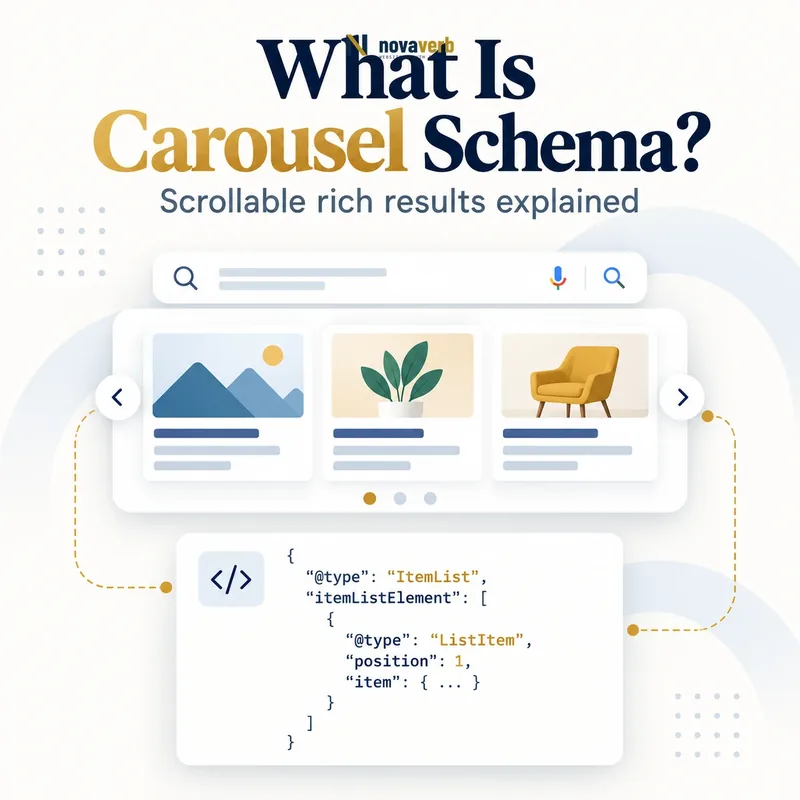
What Is Carousel Schema?
Carousel Schema is ItemList structured data that organizes multiple entities from one site into an explicit ordered collection for eligible host-carousel search experiences.
The container is ItemList, each entry is a ListItem, and position states the intended order. The standard host-carousel documentation combines ItemList with supported content types such as Recipe, Movie, Course and Restaurant. A carousel is not a universal layout instruction: adding ItemList does not force search results to become swipeable cards, and it does not control unrelated multi-site features such as Top stories. The visible page must contain the same collection, item type, order and destinations described by the markup. Eligibility and actual presentation remain separate outcomes.
- Identify the exact page, asset, entity or relationship described in this section.
- Inspect the live implementation and retain the observed evidence.
- Compare the observation with the intended meaning and its primary specification.
- Correct any mismatch, then retest the live result.
- Record the accountable owner and review date.
| Layer | Type/property | Purpose |
|---|---|---|
| Collection | ItemList | Holds the ordered set |
| Entry | ListItem | Wraps one entity or destination |
| Order | position | Defines card sequence |
| Entity | Supported content type | Supplies card facts |
| Destination | url | Connects visible detail |
- Build a visible collection.
- Use a supported entity type.
- Keep markup and order synchronized.
Primary specification: Google Search carousel structured data documentation.
Carousel markup is valuable when it describes a real list, not when it is added merely to request a visual treatment.
Which Content Types Support Standard Carousels?
The standard host carousel supports collections of Recipe, Course, Movie and Restaurant content when the applicable type-specific rules are also met.
ItemList provides list structure, but each entity still needs valid structured data for its own feature. A movie requires an accurate name and poster image; a recipe needs its dish name and completed-dish image; a course has provider and course requirements; a restaurant needs the applicable local-business facts. Do not assume that any arbitrary Article, Person, software tool or blog post becomes carousel-eligible because it appears in an ItemList. Keep every item in a standard collection the same supported type. Separate editorial lists when a page mixes recipes, products, places and videos.
- The exact page, asset, entity or relationship covered by this section
- The live implementation rather than an editor-only preview
- The primary specification or first-party record defining the expected behavior
- The validation result, accountable owner and review date
| Content type | Detail requirement | Related intent |
|---|---|---|
| Recipe | Valid Recipe entity | Cooking collection |
| Movie | Valid Movie entity | Film list |
| Course | Valid Course entity | Education list |
| Restaurant | Valid Restaurant entity | Dining list |
| Generic blog post | Not a standard supported type | Use normal listing |
| Mixed content | Split into homogeneous lists | Avoid type conflict |
- Classify every visible item.
- Choose one supported type.
- Validate its detail requirements.
- Remove unsupported entries.
Start with a supported content feature and then add ItemList; ItemList alone does not create eligibility.
Summary Page vs All-in-One Carousel
A standard carousel can use a summary page linking to separate detail pages or an all-in-one page containing full entities at visible anchors.
In the summary model, the collection page displays short descriptions and each ListItem contains a one-based position plus a unique canonical URL for a detail page on the same domain. Each destination must contain valid structured data for that item type. In the all-in-one model, the page contains full information for every entity; each ListItem nests an item and the item URL points to an anchor near its visible section on the current page. Do not combine these models accidentally by nesting incomplete items while linking to absent anchors.
- Identify the exact page, asset, entity or relationship described in this section.
- Inspect the live implementation and retain the observed evidence.
- Compare the observation with the intended meaning and its primary specification.
- Correct any mismatch, then retest the live result.
- Record the accountable owner and review date.
| Model | ListItem needs | Destination |
|---|---|---|
| Summary | position + url | Separate same-domain page |
| All-in-one | position + item | Current-page anchor |
| Detail markup | Required on summary destinations | Valid entity |
| Anchor | Required for all-in-one URL | Visible item section |
| Hybrid ambiguity | Avoid | Choose explicit model |
- Map content locations.
- Use unique canonical destinations.
- Create real visible anchors.
Choose the page model that matches where users can find the complete information for each item.
How Should ItemList and ListItem Be Structured?
ItemList must contain at least two ListItem entries for the standard carousel, with unique one-based positions that match the visible list order.
The itemListElement array is the ordered collection. Each entry uses @type: ListItem and a position integer beginning at one. Array order by itself is not a sufficient statement of semantic order; position is the durable signal. Summary entries add url, while all-in-one entries add a complete supported item. Do not reuse position values, leave gaps after filtering or retain entries deleted from the page. A CMS should generate both visible cards and JSON-LD from the same collection record to prevent drift.
- The exact page, asset, entity or relationship covered by this section
- The live implementation rather than an editor-only preview
- The primary specification or first-party record defining the expected behavior
- The validation result, accountable owner and review date
| Field | Rule | Failure |
|---|---|---|
| itemListElement | At least two standard entries | One-item collection |
| @type | ListItem | Plain strings |
| position | 1-based unique integer | Duplicate 1 |
| url | Architecture-specific destination | External or duplicate URL |
| item | Complete all-in-one entity | Partial unsupported object |
- Count visible items.
- Assign sequential positions.
- Add the correct destination model.
- Regenerate after list edits.
A correct ItemList preserves membership, identity and order after every editorial change.
What URL Rules Apply to Carousel Items?
Summary-page carousel URLs must be unique same-domain canonical detail pages, while all-in-one URLs must target visible anchors on the current page.
For a standard summary page, a recipe collection cannot send one card to a social profile and another to an external marketplace. Each destination should focus on that item and expose valid type-specific markup. Canonical redirects, tracking parameters and locale alternates need consistent handling so two cards do not collapse to one final page. In the all-in-one model, the fully qualified URL includes a fragment that matches an actual HTML id or named anchor near the entity. Test links without relying on client state. Broken or duplicate destinations undermine both discovery and user trust.
- Identify the exact page, asset, entity or relationship described in this section.
- Inspect the live implementation and retain the observed evidence.
- Compare the observation with the intended meaning and its primary specification.
- Correct any mismatch, then retest the live result.
- Record the accountable owner and review date.
| URL case | Pass condition | Risk |
|---|---|---|
| Summary detail URL | Unique same-domain canonical | External destination |
| Redirecting URL | Ends at intended item | Wrong final entity |
| Tracking URL | Canonical remains clear | Duplicate destinations |
| All-in-one fragment | Visible matching anchor | Missing id |
| Locale URL | Correct localized item | Cross-language mismatch |
- Resolve redirects.
- Check canonical uniqueness.
- Test fragments and locale paths.
- Remove broken items.
Every carousel destination should open the exact visible item promised by its card.
Standard Carousel vs Carousel Beta
The standard carousel and carousel beta are separate features with different content types, page models, item minimums and geographic availability.
The standard host carousel covers Recipe, Movie, Course and Restaurant, and supports summary or all-in-one architectures. The beta carousel covers Product, Event and LocalBusiness subtypes, requires a summary page plus standalone detail pages and at least three marked entities. The beta feature currently has limited availability in the EEA, Turkey and South Africa under documented query categories and participation routes; it is not a US carousel opportunity. For a US traffic strategy, do not cite the beta feature as available merely because Product appears in its documentation. Build for the standard feature where relevant and treat beta rules as region-specific, changeable requirements.
- The exact page, asset, entity or relationship covered by this section
- The live implementation rather than an editor-only preview
- The primary specification or first-party record defining the expected behavior
- The validation result, accountable owner and review date
| Dimension | Standard carousel | Beta carousel |
|---|---|---|
| Types | Recipe, Movie, Course, Restaurant | Product, Event, LocalBusiness |
| Minimum | At least 2 items | At least 3 items |
| Page models | Summary or all-in-one | Summary + detail only |
| US availability | Standard feature context | Beta not currently listed |
| Stability | Established guide | Requirements may change |
- Identify the exact feature.
- Check supported type and region.
- Apply the correct page model.
- Monitor beta requirement changes.
Keep standard and beta implementations separate so geography and eligibility claims remain truthful.
How Can Carousel Markup Affect CTR?
Carousel markup can increase a list’s visual and decision value when an eligible result appears, but CTR impact must be measured rather than promised.
A host carousel can expose several relevant options from one publisher, giving searchers more paths into a site. That can improve qualified clicks for query families matching the collection, but it may also distribute clicks across detail pages or satisfy some comparisons before a visit. Rank, device, query mix, title quality and image quality all influence observed CTR. Use Search Console page and query evidence, compare mobile and desktop separately, and track engagement on destination pages. Avoid manipulating positions solely to promote the highest-margin item when the visible list claims an editorial ranking based on another criterion.
- Identify the exact page, asset, entity or relationship described in this section.
- Inspect the live implementation and retain the observed evidence.
- Compare the observation with the intended meaning and its primary specification.
- Correct any mismatch, then retest the live result.
- Record the accountable owner and review date.
| Metric | Question | Caution |
|---|---|---|
| Impressions | Was collection exposed? | Not proof of carousel display |
| CTR | Did users choose the site? | Rank and query mix matter |
| Destination clicks | Which item won attention? | Cards distribute traffic |
| Engagement | Was the destination relevant? | Needs analytics data |
| Device | Where did behavior change? | Movie carousel is mobile |
- Establish a baseline.
- Segment query and device.
- Measure detail-page engagement.
- Keep editorial ordering honest.
Optimize list usefulness and destination quality first, then assess CTR with segmented evidence.
What Carousel Schema Mistakes Are Common?
Common mistakes include unsupported item types, too few entries, mixed standard types, duplicate positions, external URLs, missing anchors and structured lists that differ from visible content.
A plugin may wrap every archive in ItemList and call it a carousel even when the content type is unsupported. Summary pages sometimes link to retailer or social URLs, while all-in-one pages use fragments that do not exist. Client-side filtering can leave ten structured items when only six cards render, or lazy loading can expose more markup than the initially accessible list. Teams also apply beta Product rules to US pages, assume a mobile Movie carousel appears on desktop, or include genuine ratings from one entity on another card. Validators can catch syntax, but architecture and geographic claims need human review.
- The exact page, asset, entity or relationship covered by this section
- The live implementation rather than an editor-only preview
- The primary specification or first-party record defining the expected behavior
- The validation result, accountable owner and review date
| Mistake | Impact | Correction |
|---|---|---|
| Unsupported Article list | No documented feature fit | Use eligible content type |
| One standard item | Not a carousel | Add genuine collection items |
| Mixed Recipe and Movie | Type inconsistency | Split lists |
| Duplicate position | Ambiguous order | Regenerate sequence |
| External summary URL | Destination violation | Use same-domain detail page |
| US beta claim | Wrong availability | Remove claim |
- Identify feature and region.
- Validate type and item count.
- Open every URL or anchor.
- Compare markup with rendered list.
The highest-risk mistake is applying rules from the wrong carousel feature or sending a card to the wrong entity.