
What Is Critical CSS?
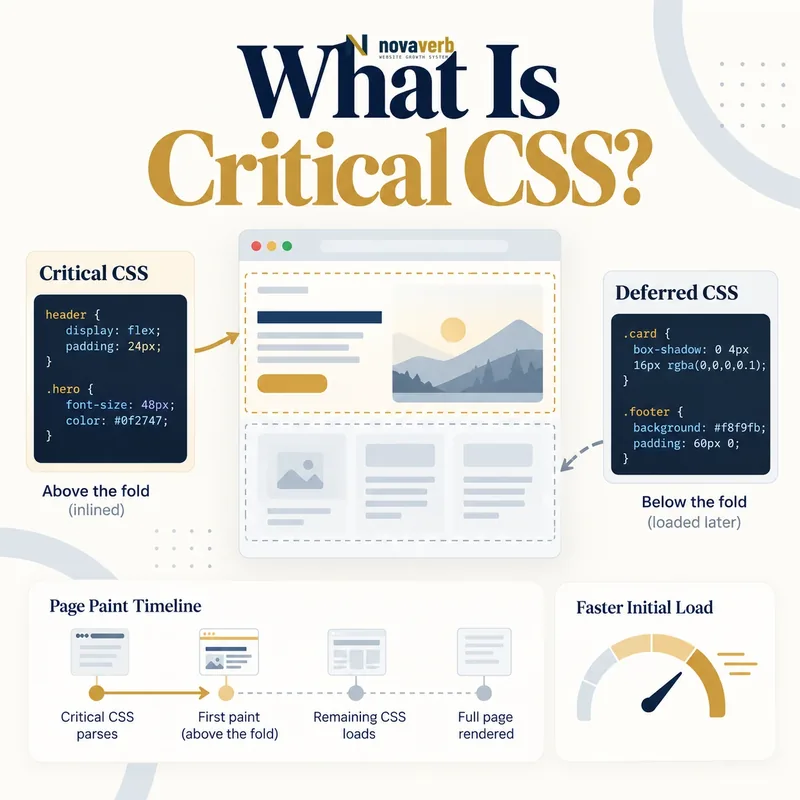
The initial viewport depends on structure, typography, spacing, colors, responsive rules and component states. If all of those rules live in a large external bundle, the browser may wait for unrelated styles before displaying content. Critical CSS extracts only the rules needed for the first view and places them where they are immediately available. The remaining stylesheet still loads for the complete page. This technique can shorten the rendering path, but it is not automatically appropriate for every site. Incorrect extraction can omit mobile rules, duplicate large amounts of CSS, create cascade conflicts or cause a flash when the full bundle arrives.
- Targets the initial visible viewport
- Contains only required early style rules
- Is commonly inlined in the document
- Works with a deferred complete stylesheet
- Varies by route and responsive breakpoint
- Requires automated parity and regression checks
- Identify the exact page, asset, entity or relationship described in this section.
- Inspect the live implementation and retain the observed evidence.
- Compare the observation with the intended meaning and its primary specification.
- Correct any mismatch, then retest the live result.
- Record the accountable owner and review date.
| Component | Role | Risk |
|---|---|---|
| Initial HTML | Carries inline rules | Response bloat |
| Critical selector set | Styles first view | Missing state |
| Full stylesheet | Completes page styling | Duplicate bytes |
| Load strategy | Applies remaining CSS | Unstyled flash |
| Extractor | Builds route styles | False coverage |
| Regression suite | Checks visual parity | Incomplete routes |
Primary specification: web.dev critical CSS implementation reference.
Critical CSS works when it accelerates a correct first view without creating a second competing design system.
How Does Critical CSS Work?
An extractor renders or analyzes a route at selected viewport sizes, collects used rules and generates an inline block. The application places that block in the response while preserving the canonical stylesheet for full coverage. The browser can style early content without waiting for the entire file, then applies the complete cascade when it arrives. The method must account for media queries, pseudo-elements, fonts, state classes and components inserted during startup. Static analysis alone may miss runtime-generated class names, while one visual crawl may miss authenticated, localized or experiment states. Build-time generation is easier to reproduce than request-time extraction, but both need explicit cache and invalidation behavior.
- Select representative route templates.
- Render realistic initial viewports.
- Collect selectors required before first paint.
- Preserve relevant media and cascade order.
- Inline the minimal stable rule set.
- Load the complete stylesheet reliably.
- Compare initial and final visual states.
- The exact page, asset, entity or relationship covered by this section
- The live implementation rather than an editor-only preview
- The primary specification or first-party record defining the expected behavior
- The validation result, accountable owner and review date
| Stage | Expected result | Failure |
|---|---|---|
| Route selection | Representative template | One-page bias |
| Extraction | Needed selectors retained | Missing dynamic class |
| Inline output | Small stable rules | Large duplicated block |
| HTML response | Early styling available | Cache fragmentation |
| Full CSS load | All states covered | Late broken component |
| Parity test | No visual change | Cascade mismatch |
A dependable implementation treats extraction, delivery and final-style parity as one repeatable build contract.
Critical CSS vs Render-Blocking CSS
Not every blocking stylesheet is unnecessary. The browser needs layout and style information to display a correct page. Removing the link or forcing asynchronous loading without an early rule set can create blank, unstyled or unstable content. Critical CSS is one response to a measured blocking path, alongside reducing unused CSS, splitting bundles by route, shortening import chains and improving caching. For small well-cached stylesheets, extraction overhead and HTML duplication may outweigh savings. The broader render-blocking resources guide explains scheduling; Critical CSS focuses specifically on the early style subset and parity challenge.
- Blocking CSS may contain necessary early rules
- Critical CSS preserves those rules before paint
- Noncritical CSS still needs reliable delivery
- Route splitting can reduce extraction needs
- Small cached bundles may already be efficient
- Measurement decides whether the technique helps
- Identify the exact page, asset, entity or relationship described in this section.
- Inspect the live implementation and retain the observed evidence.
- Compare the observation with the intended meaning and its primary specification.
- Correct any mismatch, then retest the live result.
- Record the accountable owner and review date.
| Approach | Strength | Tradeoff |
|---|---|---|
| One blocking bundle | Simple complete cascade | Waits for all rules |
| Route CSS | Less unused code | Bundle coordination |
| Critical inline CSS | Fast initial styling | Duplication and parity |
| Conditional media CSS | Avoids irrelevant blocking | Breakpoint complexity |
| Component-on-demand CSS | Loads with feature | Late first use |
| Small cached stylesheet | Strong repeat visits | Cold-path dependency |
Critical CSS is one delivery option, not a universal replacement for reducing and organizing the underlying stylesheet system.
What Are the SEO and UX Benefits of Critical CSS?
The clearest benefits appear on cold mobile visits where route styles are small relative to a large global bundle. Early headings, navigation and content can render while the complete CSS transfers. This may improve First Contentful Paint, Speed Index and sometimes Largest Contentful Paint when the selected element depends on CSS. It also gives visitors visible progress sooner. However, benefits should be claimed from actual traces. If server response grows or the primary image competes with deferred CSS, another phase may worsen. The page still needs accurate HTML, media priority and JavaScript behavior.
- Earlier correct first-view styling
- Reduced dependence on a large global stylesheet
- Shorter blank-screen or unstyled interval
- Potential improvement to early paint metrics
- Useful progressive visual feedback
- Clearer route-level CSS ownership
- Identify the exact page, asset, entity or relationship described in this section.
- Inspect the live implementation and retain the observed evidence.
- Compare the observation with the intended meaning and its primary specification.
- Correct any mismatch, then retest the live result.
- Record the accountable owner and review date.
| Benefit | Evidence | Limit |
|---|---|---|
| Earlier FCP | Paint timing | Candidate must be useful |
| Better Speed Index | Filmstrip and curve | Dynamic regions can vary |
| Earlier LCP | Candidate trace | Only if CSS was delay |
| Less blocking transfer | Waterfall | Inline HTML still transfers |
| Route focus | Coverage report | States can be missed |
| Progressive view | Visual recording | Must remain stable |
Critical CSS delivers value only when earlier style availability creates useful, stable content on real route and device conditions.
What Risks Can Critical CSS Create?
Inline CSS travels with every HTML response instead of benefiting from a separately cached file. Excessive extraction can therefore worsen repeat visits and response delivery. If the full stylesheet repeats the same rules, the browser parses them twice. Build and deploy ordering matters: HTML from one version paired with a stylesheet from another can shift layout or change colors. Extractors may miss menus, consent banners, error messages or localized copy not present in the sampled state. Broad specificity changes can make the final cascade override the initial view unexpectedly. Content Security Policy may require a nonce or hash strategy for inline styles.
- Repeated inline bytes in every HTML response
- Duplicate parsing with the full stylesheet
- Version mismatch between HTML and CSS
- Missing responsive or interactive states
- Specificity and cascade changes after load
- Content Security Policy complications
- Visual regressions hidden outside sampled routes
- Identify the exact page, asset, entity or relationship described in this section.
- Inspect the live implementation and retain the observed evidence.
- Compare the observation with the intended meaning and its primary specification.
- Correct any mismatch, then retest the live result.
- Record the accountable owner and review date.
| Risk | Symptom | Control |
|---|---|---|
| HTML bloat | Slower response transfer | Strict inline budget |
| Duplication | Repeated parse work | Measure full cost |
| Stale rules | Initial/final mismatch | Versioned atomic deploy |
| Missed state | Broken menu or banner | State coverage suite |
| Cascade conflict | Flash or layout shift | Order and parity checks |
| CSP issue | Inline styles blocked | Nonce or hash policy |
Critical CSS is safe only when inline size, version parity, state coverage and security policy are enforced as build invariants.
How Do You Extract Critical CSS Safely?
Build a route matrix that includes home, category, product, article, search and campaign templates where applicable. Use realistic long titles, missing images, banners and localization. Capture mobile and desktop viewports plus breakpoint edges. Safelist classes created dynamically or by external component libraries, but keep the list reviewed so it does not become a second global bundle. Preserve font-face and custom-property dependencies only when required for early content. Generate output deterministically and tie it to the same build identifier as the full CSS. Compare screenshots before and after the complete stylesheet applies and test with a cold cache.
- Inventory public templates and component states.
- Use realistic content and localized variations.
- Capture mobile, desktop and breakpoint-edge views.
- Safelist proven dynamic selectors.
- Apply a strict inline size budget.
- Version inline and full CSS together.
- Diff initial and final screenshots.
- Fail deployment on parity regressions.
- The exact page, asset, entity or relationship covered by this section
- The live implementation rather than an editor-only preview
- The primary specification or first-party record defining the expected behavior
- The validation result, accountable owner and review date
| Check | Evidence | Pass condition |
|---|---|---|
| Route coverage | Template matrix | All public shells sampled |
| State coverage | Menus, errors and banners | No hidden omission |
| Responsive coverage | Breakpoint screenshots | Stable layouts |
| Dynamic classes | Reviewed safelist | Only required selectors |
| Size budget | Generated byte count | Bounded inline output |
| Version parity | Build identifier | Atomic matching styles |
Safe extraction is a coverage and release-discipline problem as much as it is a CSS-generation task.
How Should the Full Stylesheet Load?
A common pattern preloads or asynchronously activates the stylesheet with an explicit fallback, but each technique must be tested for duplicate requests, correct credentials and actual consumption. A normal stylesheet can remain blocking if route splitting already makes it small enough. JavaScript-only injection is fragile because a script error can leave the page permanently incomplete. The inline rules and full bundle should use deliberate layering or order so the later file does not alter the initial view. Fonts and component assets referenced by the stylesheet need their own discovery behavior. Test immediate scrolling and interaction because visitors may reach content before the deferred CSS arrives.
- Choose a standards-based full-CSS loading path.
- Preserve a non-JavaScript fallback.
- Match credentials and resource identity.
- Avoid duplicate stylesheet downloads.
- Maintain deterministic cascade order.
- Test immediate scroll and interaction.
- Verify font and component asset discovery.
- The exact page, asset, entity or relationship covered by this section
- The live implementation rather than an editor-only preview
- The primary specification or first-party record defining the expected behavior
- The validation result, accountable owner and review date
| Behavior | Pass condition | Failure |
|---|---|---|
| Request | One complete CSS download | Duplicate transfer |
| Fallback | Works without scripts | Permanent partial styling |
| Cascade | Initial view unchanged | Flash or reflow |
| Timing | Styles arrive before use | Unstyled component |
| Credentials | Matches resource policy | Rejected or duplicate request |
| Cache | Reusable full bundle | Unnecessary retransfers |
The complete stylesheet remains the source of full-page truth, so its loading path must be as reliable as the critical inline subset.
How Do You Audit Critical CSS?
Start with a representative route suite and record HTML size, TTFB, stylesheet timing, paint metrics and filmstrips. Identify which inline rules are used in the initial viewport and whether the full CSS duplicates them. Disable or delay the full stylesheet to expose missing states, then allow it to apply and watch for visual changes. Test viewport edges, menus, forms, consent, errors and localized content. Compare repeat visits because inline duplication may harm cached scenarios. Inspect CLS and primary actions to ensure an earlier paint did not destabilize or disable the page. Retain visual baselines by template and build.
- Capture cold and warm route traces.
- Measure inline, HTML and duplicate bytes.
- Identify unused critical selectors.
- Delay full CSS to expose missing rules.
- Diff initial and final screenshots.
- Test interactive and localized states.
- Compare FCP, LCP, Speed Index and CLS.
- Verify parity after every CSS release.
- The exact page, asset, entity or relationship covered by this section
- The live implementation rather than an editor-only preview
- The primary specification or first-party record defining the expected behavior
- The validation result, accountable owner and review date
| Check | Evidence | Pass condition |
|---|---|---|
| Inline size | HTML byte count | Within budget |
| Selector use | Coverage trace | Initial rules used |
| Duplication | Inline/full comparison | Measured acceptable cost |
| State coverage | Interaction suite | No missing styles |
| Parity | Screenshot diff | No final-view change |
| Cold load | Waterfall and filmstrip | Earlier useful paint |
| Warm load | Cached comparison | No net regression |
| Release | Version check | Atomic CSS pair |
A complete Critical CSS audit proves a net improvement across delivery, visual progress, stability and every state the shared styles reach.