
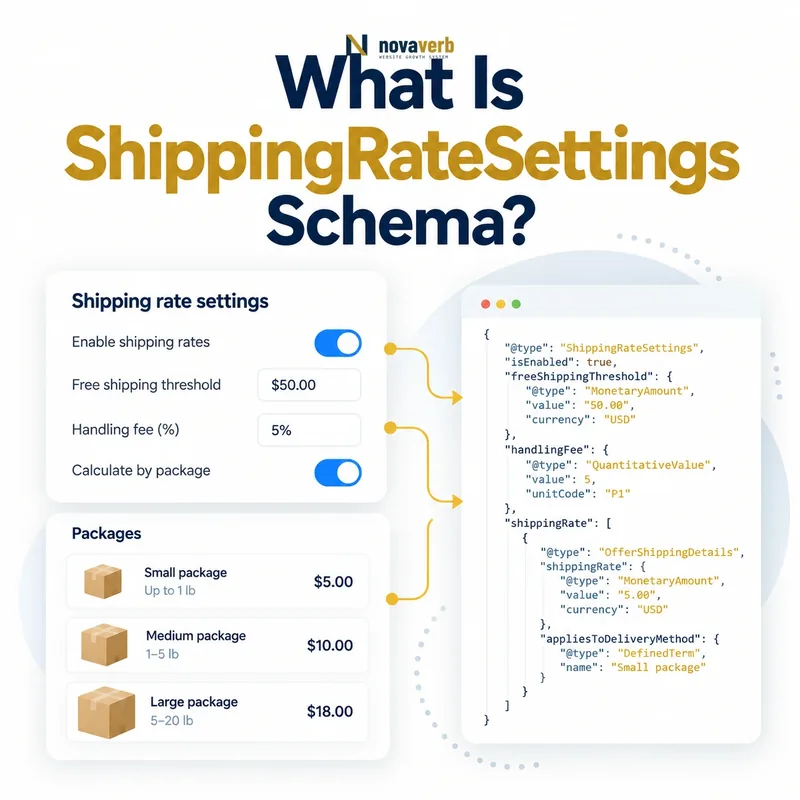
What Is ShippingRateSettings Schema?
ShippingRateSettings is a structured-data type for shipping costs calculated as a fraction of order value or shipment weight within a defined shipping condition.
It is designed for variable formulas rather than a simple fixed charge. The rate belongs inside shippingRate and should be evaluated with the related destination, origin, order value, weight, item count, and service conditions. A percentage alone is not a complete shipping policy.
- Identify the exact page, asset, entity or relationship described in this section.
- Inspect the live implementation and retain the observed evidence.
- Compare the observation with the intended meaning and its primary specification.
- Correct any mismatch, then retest the live result.
- Record the accountable owner and review date.
| Property | Meaning | Example |
|---|---|---|
| orderPercentage | Fraction of order value | 0.05 means 5% |
| weightPercentage | Fraction tied to shipment weight | 0.10 means 10% |
| shippingRate | Connects formula to condition | ShippingRateSettings object |
| MonetaryAmount | Alternative for fixed or maximum cost | 8.95 USD |
- Use a fraction between zero and one.
- Choose orderPercentage or weightPercentage.
- Keep the formula attached to its full shipping condition.
Use the free backlink checker while reviewing important commerce pages.
Primary specification: Schema.org definition for ShippingRateSettings.
ShippingRateSettings is useful when a verified variable formula, not a flat amount, determines shipping cost.
When Should You Use ShippingRateSettings?
Use ShippingRateSettings when the shipping charge is genuinely calculated as a percentage of order value or shipment weight and the same formula reaches checkout.
Do not use it for flat-rate shipping, a simple maximum charge, or free delivery. Those cases are more clearly represented by MonetaryAmount. Likewise, a tiered rate table with several fixed bands may require separate shipping conditions instead of pretending one percentage reproduces it.
- The exact page, asset, entity or relationship covered by this section
- The live implementation rather than an editor-only preview
- The primary specification or first-party record defining the expected behavior
- The validation result, accountable owner and review date
| Business rule | Best model | Reason |
|---|---|---|
| 5% of order subtotal | orderPercentage 0.05 | True percentage formula |
| $7.95 flat shipping | MonetaryAmount value | Fixed cost |
| Shipping costs at most $20 | MonetaryAmount maxValue | Maximum amount |
| Free shipping | MonetaryAmount value 0 | Zero cost |
| Tiered fixed bands | Separate conditions | No single percentage |
- Write the checkout formula in plain language.
- Determine whether it is percentage-based.
- Select ShippingRateSettings or MonetaryAmount.
- Attach the correct conditions.
- Test representative carts.
The structured model should reproduce the pricing rule, not merely approximate its average outcome. When checkout enforces a minimum charge or maximum cap, preserve that boundary in the surrounding condition model and verify carts on both sides. Publishing only the percentage can understate or overstate the final shipping cost.
Choose ShippingRateSettings only when a percentage formula is the actual source of the shipping charge.
How Does orderPercentage Work?
orderPercentage expresses shipping as a fraction of order value, so 0.05 means 5 percent and 1 means 100 percent.
A value of 5 would mean five times the order value, not five percent. The order-value basis must also be defined operationally: merchandise subtotal, discounted subtotal, pre-tax amount, or another governed base. Structured data cannot repair an ambiguous checkout calculation.
- Identify the exact page, asset, entity or relationship described in this section.
- Inspect the live implementation and retain the observed evidence.
- Compare the observation with the intended meaning and its primary specification.
- Correct any mismatch, then retest the live result.
- Record the accountable owner and review date.
| Fraction | Percentage | Shipping on $100 base |
|---|---|---|
| 0 | 0% | $0 |
| 0.05 | 5% | $5 |
| 0.10 | 10% | $10 |
| 0.25 | 25% | $25 |
| 1 | 100% | $100 |
- Keep values between zero and one.
- Store them as numeric fractions.
- Document the order-value basis.
- Test discounts, taxes, and promotions.
If the checkout applies a minimum or maximum charge in addition to the percentage, the full policy needs a model that preserves those boundaries rather than publishing only the percentage.
OrderPercentage is accurate only when its fraction and calculation base reproduce the payable shipping charge.
How Does weightPercentage Work?
WeightPercentage expresses a shipping-rate fraction based on shipment weight and should be used only when the logistics price truly follows that proportional formula.
Weight-based shipping often uses carrier zones, dimensional weight, minimum charges, and tiered brackets rather than one percentage. In those cases, weightPercentage alone is misleading. The catalog must also provide accurate product and packaging weights in a consistent unit before a weight-derived rule can be trusted.
- The exact page, asset, entity or relationship covered by this section
- The live implementation rather than an editor-only preview
- The primary specification or first-party record defining the expected behavior
- The validation result, accountable owner and review date
| Weight rule | Suitable? | Reason |
|---|---|---|
| Pure proportional weight formula | Yes | Matches percentage model |
| $5 for first pound, $2 after | No | Tiered fixed formula |
| Dimensional weight | Usually not alone | Dimensions affect billable weight |
| Carrier live quote | Not a simple percentage | Zone and service matter |
| Free shipping under one pound | Needs conditions | Threshold changes formula |
- Verify product and package weights.
- Define the billable-weight calculation.
- Check for minimums, tiers, and dimensional rules.
- Use the percentage only if proportional.
- Compare with checkout across weights.
Do not convert a complex carrier table into a percentage merely to fill the property.
WeightPercentage is appropriate only for a genuine proportional rule backed by accurate shipment weight.
How Is ShippingRateSettings Different From MonetaryAmount?
ShippingRateSettings models a percentage formula, while MonetaryAmount models a fixed shipping cost or a maximum charge in a specific currency.
MonetaryAmount is the simpler and more common choice for product-level delivery. It uses value for a fixed charge or maxValue for a ceiling, together with currency. ShippingRateSettings uses orderPercentage or weightPercentage and does not turn a fraction into a currency amount until evaluated against its base.
- Identify the exact page, asset, entity or relationship described in this section.
- Inspect the live implementation and retain the observed evidence.
- Compare the observation with the intended meaning and its primary specification.
- Correct any mismatch, then retest the live result.
- Record the accountable owner and review date.
| Need | Type | Key field |
|---|---|---|
| Fixed $9.95 | MonetaryAmount | value |
| Maximum $20 | MonetaryAmount | maxValue |
| Free shipping | MonetaryAmount | value 0 |
| 5% of order | ShippingRateSettings | orderPercentage |
| Proportional weight rate | ShippingRateSettings | weightPercentage |
- Do not provide value and maxValue together.
- Pair MonetaryAmount with ISO 4217 currency.
- Do not attach currency symbols to numeric values.
- Use the simplest truthful type.
Review priceCurrency for consistent monetary context.
The correct rate type follows the checkout formula: fixed money uses MonetaryAmount, proportional formulas use ShippingRateSettings.
How Do Order Value, Weight, and Item Count Conditions Interact?
Order value, weight, and item count determine when a shipping condition applies, while ShippingRateSettings determines the percentage rate within that matched condition.
These are separate responsibilities. A free-shipping threshold is not itself orderPercentage. It is an eligibility boundary that selects a zero-cost condition. Similarly, a heavy-order surcharge may activate only above a weight boundary, then use a fixed or proportional rate.
- The exact page, asset, entity or relationship covered by this section
- The live implementation rather than an editor-only preview
- The primary specification or first-party record defining the expected behavior
- The validation result, accountable owner and review date
| Rule layer | Question | Example |
|---|---|---|
| orderValue | Which cart-value band applies? | At least $75 |
| weight | Which shipment-weight band applies? | 10–25 lb |
| numItems | Which quantity band applies? | 1–3 items |
| shippingRate | What cost formula applies? | 5% or fixed $8 |
- List each condition boundary.
- Check that bands cover intended carts.
- Detect overlap and gaps.
- Attach one rate formula to each condition.
- Test values immediately below and above boundaries.
A threshold needs its own condition logic; placing 0.75 into orderPercentage would mean 75 percent, not free shipping over $75.
Conditions select the eligible cart, while rate settings calculate the shipping charge after that selection.
How Should Regions and Currencies Work With Rate Settings?
Each rate setting should remain inside a shipping condition with a clear origin, destination, service, and market currency so the formula is evaluated in the correct geographic context.
A five-percent rule in the contiguous United States may not apply to Alaska, Hawaii, Canada, or international destinations. Order-value thresholds also require currency context: 75 USD and 75 CAD are not interchangeable. The structured policy should match the same market segmentation used by checkout.
- Identify the exact page, asset, entity or relationship described in this section.
- Inspect the live implementation and retain the observed evidence.
- Compare the observation with the intended meaning and its primary specification.
- Correct any mismatch, then retest the live result.
- Record the accountable owner and review date.
| Context | Required alignment | Risk |
|---|---|---|
| Destination | DefinedRegion membership | Formula reaches excluded address |
| Origin | Warehouse or dispatch zone | Wrong route cost |
| Currency | Offer and threshold market | Value boundary changes meaning |
| Service | Economy, standard, expedited | One percentage applied to all |
- Use DefinedRegion for geography.
- Keep thresholds in the correct currency.
- Separate services with different formulas.
- Test cross-border and excluded destinations.
Rate calculations are only meaningful after the matching market and shipping route have been established.
A percentage shipping rule must stay bound to the exact region, currency, and service where checkout applies it.
What ShippingRateSettings Mistakes Are Common?
Common mistakes include entering 5 instead of 0.05, using percentage settings for fixed rates, confusing free-shipping thresholds with orderPercentage, and omitting the conditions that make the formula valid.
Another error is describing a complex carrier quote as one simple percentage. Minimums, maximums, dimensional weight, zones, and service levels can all change the payable amount. Syntax validation cannot prove that the formula reproduces checkout.
- The exact page, asset, entity or relationship covered by this section
- The live implementation rather than an editor-only preview
- The primary specification or first-party record defining the expected behavior
- The validation result, accountable owner and review date
| Mistake | Consequence | Fix |
|---|---|---|
| 5 for five percent | Represents 500% | Use 0.05 |
| Fixed $8 as percentage | Cost varies incorrectly | Use MonetaryAmount |
| $75 threshold as 0.75 | Becomes 75% rate | Use order-value condition |
| No region | Rule appears universal | Add destination scope |
| Carrier table simplified | Checkout mismatch | Model actual bands or omit |
- Translate the rule into plain language.
- Recalculate sample carts manually.
- Compare with checkout output.
- Repair the authoritative policy mapping.
- Retest boundaries and markets.
A clean fraction can still be commercially false when its base or eligibility is wrong.
Rate-setting defects are resolved by reproducing the full checkout formula, not merely correcting numeric syntax.