
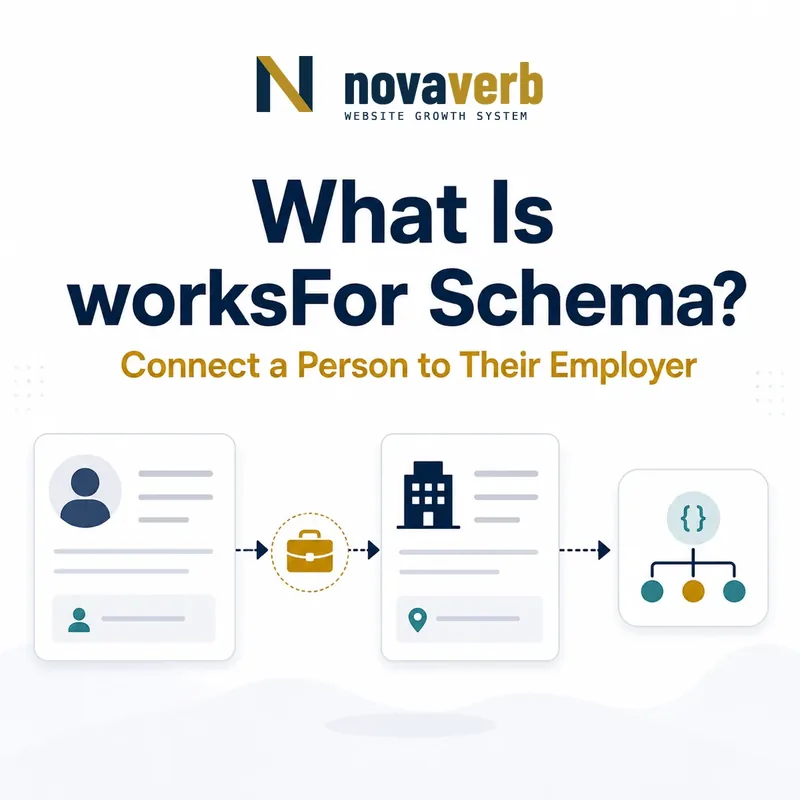
What Is worksFor Schema?
worksFor is the Schema.org property that connects a Person to an Organization the person works for.
It expresses an employment relationship from the worker’s profile toward the employer. The subject must be Person and the value must be Organization. The property can strengthen consistency across team pages, author profiles, expert biographies, company leadership pages, and content bylines when the employment claim is current and visible. It does not by itself describe a job title, employment dates, founder status, ownership, affiliation, alumni relationship, or membership.
- Place worksFor on Person.
- Use Organization as the value.
- Publish only a current, supported employment relationship.
- Identify the exact page, asset, entity or relationship described in this section.
- Inspect the live implementation and retain the observed evidence.
- Compare the observation with the intended meaning and its primary specification.
- Correct any mismatch, then retest the live result.
- Record the accountable owner and review date.
| Role | Expected type | Meaning |
|---|---|---|
| Subject | Person | The worker |
| Property | worksFor | Connects employment |
| Value | Organization | The employer |
| Separate fact | jobTitle or role | Describes position |
Primary specification: Schema.org definition for worksFor.
worksFor identifies the employer; other properties and role structures explain what the person does and when.
Where Can worksFor Be Used?
worksFor is used on Person and expects an Organization value.
It should not be placed on Organization to list employees, on JobPosting to name the hiring company, or on CreativeWork to identify an author. Organization can use employee, JobPosting can use hiringOrganization, and CreativeWork can use author. A shared Person entity may appear inside many page types, but the worksFor property still belongs inside that Person node. Correct placement keeps employment, hiring, authorship, and organizational rosters from collapsing into one relationship.
- Identify or reference the Person node.
- Create or reference the employer Organization.
- Add worksFor inside the Person entity.
- Use the page-specific property for author, employee, or hiring relationships.
- The exact page, asset, entity or relationship covered by this section
- The live implementation rather than an editor-only preview
- The primary specification or first-party record defining the expected behavior
- The validation result, accountable owner and review date
| Context | Correct property | Direction |
|---|---|---|
| Person profile | worksFor | Person → Organization |
| Company team page | employee | Organization → Person |
| Job listing | hiringOrganization | JobPosting → Organization |
| Article byline | author | CreativeWork → Person |
Use worksFor from Person to employer and preserve the distinct relationships surrounding that person.
How Is worksFor Different From affiliation?
worksFor identifies an employment relationship, while affiliation describes a broader Person-to-Organization connection that may not be employment.
A staff member, executive, or employee profile generally fits worksFor. A visiting scholar, advisory participant, external fellow, clinical affiliate, club member, or institute-associated expert may fit affiliation if the source uses that relationship. Contractors require careful judgment: working on a project for a client does not always mean the person works for the client. Model the actual public relationship rather than stretching one property to cover every professional association.
- Use worksFor when employment is explicit.
- Use affiliation for a genuine non-employment institutional link.
- Do not mark every client as an employer.
- Model both only when two distinct relationships truly exist.
- Identify the exact page, asset, entity or relationship described in this section.
- Inspect the live implementation and retain the observed evidence.
- Compare the observation with the intended meaning and its primary specification.
- Correct any mismatch, then retest the live result.
- Record the accountable owner and review date.
| Relationship | Likely property | Evidence |
|---|---|---|
| Current employee | worksFor | Staff or employment profile |
| Visiting fellow | affiliation | Institutional association |
| Independent consultant client | Usually omit worksFor | Service contract differs |
| Employee with external institute role | worksFor plus affiliation | Two supported relationships |
| Conference speaker | Neither by default | One event is not ongoing relation |
Employment belongs in worksFor; broader associations need affiliation or another more accurate property.
How Is worksFor Different From employee?
worksFor and employee describe employment from opposite directions: Person points to Organization with worksFor, while Organization points to Person with employee.
A team member’s profile can identify the employer with worksFor, and the company’s team page can identify that person through employee. Reciprocal output is optional, but when both exist, canonical ids, current status, role, and visibility must agree. Do not use reciprocity to publish a private workforce directory or imply employment after someone leaves. Shared profile data should drive both directions so one template cannot retain stale information independently.
- Choose canonical Person and Organization ids.
- Generate worksFor from the current profile record.
- Generate employee from an authorized public roster.
- Compare both directions across rendered pages.
- Remove or update edges when employment ends.
- The exact page, asset, entity or relationship covered by this section
- The live implementation rather than an editor-only preview
- The primary specification or first-party record defining the expected behavior
- The validation result, accountable owner and review date
| Direction | Subject | Value |
|---|---|---|
| worksFor | Person | Organization |
| employee | Organization | Person |
| Consistency test | Both | Same ids and current status |
| Privacy test | Roster | Only intentionally public people |
The reciprocal graph is useful when one governed employment record keeps both directions current and public by design.
How Should Multiple Employers Be Modeled?
A Person can have multiple worksFor values when the person genuinely works for multiple Organizations and each relationship is current and public.
Portfolio careers, joint appointments, medical practices, academic roles, and part-time employment may support several employers. Do not combine organization names into one Text string or create one synthetic employer entity. Keep each Organization distinct with a stable @id. If a role is historical, use dated role modeling or remove it from a current profile rather than mixing past and present employers. A client list for a freelancer is not automatically an employer list.
- Create one Organization entity per employer.
- Reuse stable ids across pages and locales.
- Separate current and historical roles.
- Keep clients, partners, and affiliations out of worksFor.
- Use role data when title or dates materially matter.
- Identify the exact page, asset, entity or relationship described in this section.
- Inspect the live implementation and retain the observed evidence.
- Compare the observation with the intended meaning and its primary specification.
- Correct any mismatch, then retest the live result.
- Record the accountable owner and review date.
| Pattern | Recommended model | Avoid |
|---|---|---|
| Two current jobs | Two worksFor values | Comma-separated text |
| Joint appointment | Two Organization ids | One invented umbrella employer |
| Former employer | Historical role or removal | Current worksFor edge |
| Freelance clients | Usually not worksFor | Treating clients as employers |
| Localized profiles | Same employer ids | Locale-specific duplicates |
Multiple employers are valid, but every worksFor edge must independently describe a real current employment relationship.
How Do Founders, Owners, and Contractors Use worksFor?
Founders, owners, and contractors should use worksFor only when they also work for the Organization; founding, ownership, and contracting are separate facts.
A founder may actively serve as CEO and therefore work for the company, or may have left operations while retaining founder status. An investor may own part of a company without employment. An independent contractor may provide services without becoming an employee. Use founder or owns relationships where supported, jobTitle or role data for active positions, and worksFor only when the person’s public profile and organization evidence establish employment.
- Identify founding, ownership, employment, and service roles separately.
- Check the person’s current operating role.
- Use founder or owns for those distinct facts.
- Use worksFor only for actual employment.
- Review status after leadership transitions.
- The exact page, asset, entity or relationship covered by this section
- The live implementation rather than an editor-only preview
- The primary specification or first-party record defining the expected behavior
- The validation result, accountable owner and review date
| Person relationship | worksFor? | Other modeling |
|---|---|---|
| Founder and active CEO | Often yes | founder plus job title |
| Former founder, no role | No current edge | founder remains historical fact |
| Passive owner | No | owns where appropriate |
| Independent contractor | Depends on real relationship | affiliation or omit |
| Board advisor | Usually not employment | role or affiliation |
Job, founding, ownership, and contracting should remain separate so worksFor never overstates the current relationship.
How Should Author and Team Profiles Use worksFor?
Author and team profiles should use worksFor from a centralized Person record that is verified against a current employer profile and reused across every publishing template.
An author may appear on articles, category pages, profile pages, structured data, feeds, and localized sites. Copying employer text into each article creates stale and conflicting claims after a role change. Establish one Person @id and one Organization @id, maintain employment in a governed profile system, and let templates reference those identities. Do not infer an employer from an email domain, author topic, third-party bio, or old event program.
- Resolve the canonical Person identity.
- Resolve the canonical employer identity.
- Verify current employment from first-party profiles.
- Update one governed author record.
- Render the same ids across articles and profile pages.
- Retest after role changes.
- The exact page, asset, entity or relationship covered by this section
- The live implementation rather than an editor-only preview
- The primary specification or first-party record defining the expected behavior
- The validation result, accountable owner and review date
| Source | Evidence strength | Use |
|---|---|---|
| Current employer team page | Strong | Employment evidence |
| Current person profile | Strong | Person-stated role |
| Email domain | Weak | May be old or incidental |
| Old article bio | Weak | Can preserve former role |
| Third-party directory | Insufficient alone | May be copied or stale |
Centralized first-party profile evidence keeps employment claims consistent across every page that reuses the author.
What worksFor Schema Mistakes Are Common?
Common mistakes include using the wrong subject or value type, confusing clients or affiliations with employers, keeping former roles current, and duplicating Person or Organization identities.
Teams may put worksFor on Organization, use plain Text instead of Organization, or infer employment from a byline. Shared author templates can retain a former employer for years. Founders, investors, advisors, contractors, and partners are often marked as employees without evidence. Locales and microsites can create separate employer ids that fragment the graph. Validation catches type errors but cannot prove employment currency.
- worksFor placed on Organization or CreativeWork.
- Text used instead of an Organization entity.
- Client, partner, advisor, or investor treated as employer.
- Former employer left as current.
- One Person duplicated across author templates.
- One Organization duplicated by locale or subdomain.
- Identify the exact page, asset, entity or relationship described in this section.
- Inspect the live implementation and retain the observed evidence.
- Compare the observation with the intended meaning and its primary specification.
- Correct any mismatch, then retest the live result.
- Record the accountable owner and review date.
| Error | Impact | Fix |
|---|---|---|
| Wrong subject | Invalid placement | Move to Person |
| Text value | Weak identity | Reference Organization |
| Stale employer | Outdated claim | Update governed profile |
| False employment | Trust risk | Use accurate property or omit |
| Duplicate ids | Fragmented graph | Adopt canonical identities |
A technically valid worksFor edge still needs current employment evidence and stable entity identity.