
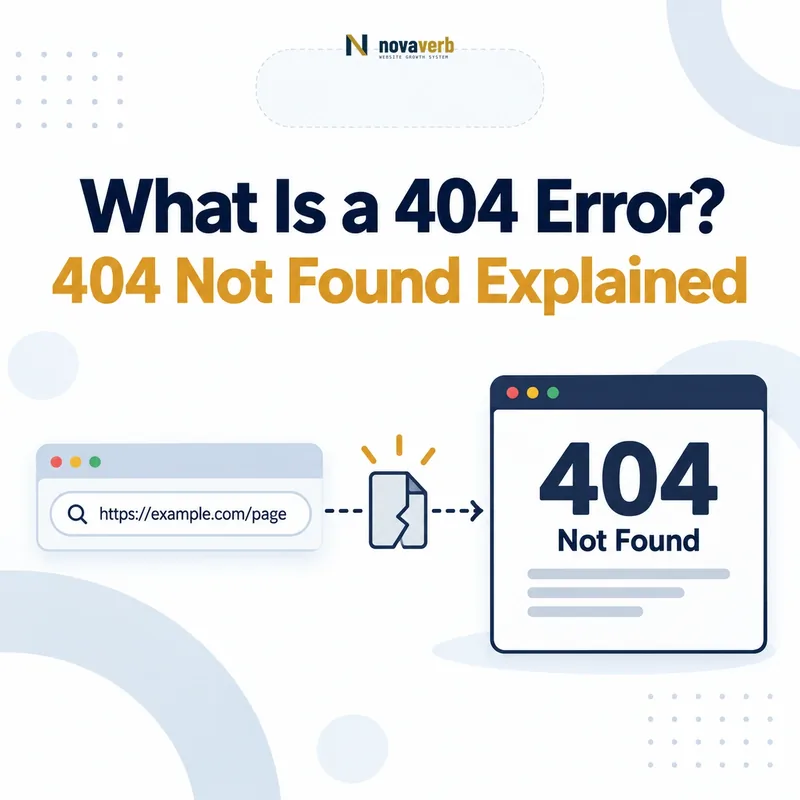
What Does a 404 Error Mean?
A 404 error means that the server was reached successfully but could not find a current resource at the requested URL. The server returns the HTTP status code 404 Not Found instead of the page, file or endpoint the browser or crawler requested.
A valid 404 response does not necessarily mean that the entire website is unavailable. It describes the state of one specific requested address. Other pages on the same website may continue working normally.
A 404 response normally involves four distinct parts:
- Requested URL: The exact address entered, linked or requested by a crawler.
- Reachable server: The domain and server respond to the request.
- Missing resource: The server cannot locate a matching page, file or route.
- HTTP response: The server returns
404 Not Foundto describe that condition.
The missing resource may never have existed, may have been deleted, may have moved without a redirect or may be requested through an incorrect URL. The status code alone identifies the result, not the original cause.
How Does an HTTP 404 Response Work?
An HTTP 404 response is returned after the server receives a valid request but cannot map the requested URL to an available resource. The browser can then display the response body supplied by the server, such as a customized error page.
- A browser or crawler requests a URL. The request contains a protocol, hostname, path and possibly query parameters.
- The request reaches the website. DNS, network and server routing function well enough for the request to be processed.
- The server evaluates the route. It looks for a matching page, file, application endpoint or redirect rule.
- No matching resource is available. The server determines that the requested URL cannot be served.
- The server returns
404 Not Found. It may also return a useful HTML error page for the visitor.
Request:
GET /missing-page/ HTTP/1.1
Host: example.com

Response:
HTTP/1.1 404 Not Found
Content-Type: text/html
The visible design of the error page does not determine the HTTP status. A polished error template can still return the correct 404 response, while an error-looking page can incorrectly return 200 OK.
What Causes a 404 Error?
A 404 can be caused by a mistyped URL, a deleted resource, an unredirected URL change, an incorrect internal link or a routing configuration that does not recognize the requested path.
| Cause | Example | Likely action |
|---|---|---|
| Mistyped URL | A visitor enters /prodcut/ instead of /product/. |
Improve navigation or redirect only when the incorrect variant receives meaningful traffic. |
| Deleted page | A discontinued page is removed from the CMS. | Return 404 or 410 when no equivalent replacement exists. |
| Changed slug | /old-guide/ becomes /new-guide/. |
Add a permanent redirect when the move is intentional. |
| Broken internal link | A navigation or article link contains an outdated path. | Update the link to the current destination. |
| Broken external link | Another website links to an obsolete URL. | Restore or redirect the URL when a relevant destination exists. |
| Case mismatch | /Page/ and /page/ are treated differently. |
Standardize case behavior and links. |
| Missing file | An image, script, stylesheet or PDF was removed. | Restore the asset or update references. |
| Routing configuration | The application does not recognize a valid route after deployment. | Repair the router, rewrite rule or server configuration. |
The same status can represent an intentional removal or an accidental failure. Diagnosis therefore requires evidence about the requested URL, previous content, links, traffic and intended website architecture.
Are 404 Errors Bad for SEO?
A valid 404 response is not inherently bad for SEO. It is the correct response when a resource does not exist and has no relevant replacement. Problems arise when valuable URLs break accidentally, internal links lead users to missing pages or the server returns the wrong status.
A 404 becomes operationally important when it affects:
- Internal navigation: Users and crawlers encounter broken links inside the website.
- Backlinked URLs: External links point to a missing resource that has a valid successor.
- Traffic-generating pages: A previously useful search landing page disappears unintentionally.
- Conversion paths: Product, pricing, account or checkout links fail.
- Sitemap quality: The XML sitemap continues listing URLs that no longer exist.
- Assets and rendering: Missing CSS, JavaScript, images or fonts impair the live page.
- Template behavior: A deployment creates 404s across an entire URL group.
Search engines expect websites to remove resources over time. The correct task is not to eliminate every 404, but to distinguish intentional removals from broken routes that should be restored or redirected.
What Is a Soft 404?
A soft 404 is a URL that appears to contain no valid resource but returns a successful response such as 200 OK instead of a proper 404 or 410 status. Search engines may classify the URL as missing even though the server reports success.
Typical soft 404 patterns include:
- A page displays “not found” while returning
200 OK. - A missing product URL displays an empty product template.
- An unavailable profile page contains only navigation and no main content.
- A deleted URL redirects to an unrelated homepage.
- A single-page application renders an error message without changing the HTTP status.
- A URL returns a placeholder page with no meaningful information.
A soft 404 creates ambiguity because the page body suggests failure while the HTTP response suggests success. Crawlers must infer the actual resource state instead of receiving a clear server response.
404 Error vs Soft 404
A real 404 returns the correct 404 Not Found status, while a soft 404 returns a successful or misleading response even though the resource is effectively missing.
| Dimension | Real 404 | Soft 404 |
|---|---|---|
| HTTP response | 404 Not Found |
Often 200 OK or an irrelevant redirect |
| Visible message | May display a customized not-found page | May also display a not-found or empty page |
| Server meaning | The resource was not found | The server reports success despite missing content |
| Crawler interpretation | The resource state is explicit | The crawler must infer that the page is effectively missing |
| Preferred correction | Keep when the resource is genuinely absent | Return 404/410, restore content or redirect appropriately |
The visible error page may look identical in both cases. The decisive difference is the HTTP response returned by the server.
404 Error vs 410 Gone
A 404 says the resource cannot be found, while a 410 says the resource has intentionally been removed and is not expected to return. Both are valid when no relevant replacement exists.
| Dimension | 404 Not Found | 410 Gone |
|---|---|---|
| Meaning | The requested resource was not found. | The resource was intentionally removed and is gone. |
| Permanence | Does not explicitly state whether the absence is temporary or permanent. | Explicitly indicates permanent removal. |
| Typical use | Unknown URL, accidental request or removed page. | Deliberately retired resource with no replacement. |
| Replacement required | No | No |
| User page | Can use the same helpful error template. | Can use the same helpful error template. |
Using 404 is acceptable for most missing resources. Use 410 when the website can confidently state that the removal is intentional and permanent.
404 Error vs 301 Redirect
Return 404 when the resource does not exist and has no relevant replacement. Return a 301 redirect when the old URL has permanently moved to a destination that satisfies substantially the same user need.
| Question | Return 404 | Return 301 |
|---|---|---|
| Does the old resource exist? | No | No, but it has a permanent replacement |
| Is there a relevant destination? | No | Yes |
| Does the user remain on the requested URL? | Yes, with an error response | No, the user is forwarded |
| Typical example | An expired campaign with no successor | An article moved to a new permanent slug |
| Correct sitemap state | Exclude the missing URL | List the final destination |
Do not redirect a missing URL solely to eliminate the visible 404. The destination must be useful and relevant enough to function as the real replacement.
Review the permanent-move workflow in What Is a 301 Redirect?.
When Should You Keep a 404 Response?
Keep a 404 response when the requested resource does not exist, has no equivalent replacement and should not be restored. The error response accurately communicates the URL’s current state.
A 404 is generally appropriate when:
- The URL was never valid.
- A visitor mistyped the path.
- A deleted page has no meaningful successor.
- An expired campaign has no continuing equivalent.
- A discontinued product has no comparable replacement.
- A generated parameter creates a nonsensical URL.
- An old attachment or file no longer exists.
- A malicious or automated request targets an invented path.
The error page can still provide navigation, search and contextual help without changing the response status.
404 Not Found status.
When Should You Redirect a 404 Page?
Redirect a 404 URL when evidence shows that the old resource has a genuine permanent replacement that satisfies the same or a closely equivalent user intent.
Before adding a redirect, verify:
- The old URL previously served a valid resource.
- The destination is the real continuation or replacement.
- The destination returns a successful final response.
- The destination is indexable where appropriate.
- The destination does not canonicalize elsewhere unexpectedly.
- The route does not create a redirect chain or loop.
- Internal links can be updated directly to the destination.
Strong candidates include changed slugs, merged articles, migrated categories and products with a clearly equivalent successor.
Should Every 404 Redirect to the Homepage?
No. Missing URLs should not automatically redirect to the homepage because the homepage rarely satisfies the specific intent of the requested page. An irrelevant redirect can confuse users and create soft-404-like behavior.
Automatic homepage redirects can:
- Hide broken internal links from routine testing.
- Send visitors to a page unrelated to their original task.
- Make missing-resource reporting less accurate.
- Create misleading analytics sessions.
- Encourage search engines to disregard the redirect.
- Prevent teams from distinguishing deleted pages from moved pages.
The homepage is an appropriate redirect destination only when it genuinely replaces the old resource, which is uncommon for specific products, articles, categories or files.
Do 404 Errors Waste Crawl Budget?
An occasional valid 404 is normal and is not automatically a crawl-budget problem. Waste becomes more likely when the website continually generates, links to or submits large numbers of missing URLs.
Patterns worth investigating include:
- Navigation repeatedly links to 404 URLs.
- Faceted navigation generates unlimited missing combinations.
- Calendars produce invalid date URLs.
- Sitemaps contain thousands of deleted pages.
- JavaScript creates malformed paths.
- Broken pagination generates nonexistent page numbers.
- Internal search produces crawlable empty-result URLs.
- Old templates reference missing assets on every page view.
The issue is not the existence of a correct error response. The issue is an architecture that keeps inviting crawlers to request URLs known to be invalid.
Should 404 URLs Stay in the XML Sitemap?
No. A current XML sitemap should not normally contain URLs that return 404. Sitemaps should list canonical URLs the website presently intends search engines to crawl and consider for indexing.
When a sitemap URL returns 404:
- Remove it if the resource is intentionally gone.
- Replace it with the final destination if the page moved permanently.
- Restore the page if its removal was accidental.
- Repair the sitemap generator if stale URLs continue returning.
- Update the modification date only when the destination content meaningfully changes.
Removing the URL from the sitemap does not require redirecting it. Sitemap membership and HTTP response behavior are separate decisions.
Validate the file with the XML Sitemap Generator & Validator.
How Should Internal Links Handle 404 URLs?
Internal links should not intentionally send users or crawlers to missing resources. Update, remove or replace every controlled link that points to a 404 URL.
Use this sequence:
- Identify every source page linking to the 404.
- Determine whether the destination moved, disappeared or was mistyped.
- Update the link directly when a valid replacement exists.
- Remove the link when no useful destination exists.
- Restore the destination when its removal was accidental.
- Add a redirect only when the old URL has a legitimate permanent replacement.
- Recrawl the affected pages to verify the correction.
Fix links in navigation, breadcrumbs, article bodies, product modules, footer templates, structured data and generated archives.
How Do You Find 404 Errors?
Find 404 errors by combining a website crawl, Search Console reports, server logs, sitemap validation, analytics and backlink data. No single source captures every invalid URL that users and crawlers may request.
| Source | What it reveals | Limitation |
|---|---|---|
| Website crawler | 404 URLs linked from crawlable pages | May miss unlinked or externally linked URLs |
| Google Search Console | URLs Google has encountered and classified as not found | Not a complete real-time inventory |
| Server logs | Actual requests from users and bots | Requires log access and analysis |
| Analytics | Visitors who reached the error template | Depends on tracking execution |
| XML sitemap validation | Submitted URLs returning 404 | Covers only URLs included in sitemaps |
| Backlink data | Missing URLs receiving external links | Coverage varies by provider |
Record the source URL, status, referring page, request frequency, backlinks, previous content and available replacement before assigning an action.
Inspect one URL with the HTTP Status & Redirect Checker, or use Crawl Explorer for a sitewide inventory.
How Do You Fix a 404 Error?
Fix a 404 by first determining whether the URL should exist, has moved or is intentionally gone. The correct action may be restoration, link repair, a permanent redirect, removal from discovery sources or no change at all.
| Resource state | Correct action | Verification |
|---|---|---|
| The page should still exist | Restore the page, route, file or CMS record | URL returns the expected successful response |
| The page moved permanently | Add a relevant 301 redirect | Source redirects directly to the final destination |
| The internal link is wrong | Correct or remove the link | Source page no longer links to a missing URL |
| The page is intentionally gone | Keep 404 or return 410 | URL is removed from internal links and sitemaps |
| The URL is invalid or invented | Keep 404 | No unnecessary redirect is introduced |
| The page is a soft 404 | Return 404/410, restore content or redirect appropriately | HTTP response matches the visible resource state |
After implementation, recrawl the source URLs, referring pages, sitemap and destination URLs. Save before-and-after evidence rather than closing the task based only on a CMS setting.
Common 404 Error Mistakes
The most common 404 mistakes hide valid errors, redirect unrelated pages, preserve broken internal links or report success for missing resources.
| Mistake | Why it causes problems | Preferred correction |
|---|---|---|
| Redirecting every 404 to the homepage | The destination is usually unrelated to the missing resource. | Keep 404 unless a genuine replacement exists. |
| Returning 200 for an error page | The server reports success for missing content. | Return an actual 404 or 410 response. |
| Leaving broken internal links | Users and crawlers repeatedly encounter the missing URL. | Update or remove the source links. |
| Keeping 404 URLs in sitemaps | The sitemap continues submitting invalid resources. | Remove the URLs or replace them with final destinations. |
| Redirecting to an unrelated category | The user’s original intent is not preserved. | Use a close replacement or retain the 404. |
| Ignoring missing assets | Pages may render incorrectly or lose functionality. | Restore assets or correct their references. |
| Fixing only high-count errors | A single missing revenue page can matter more than many bot-generated URLs. | Prioritize by impact and demand. |
| Removing all historical redirects | Old backlinks and bookmarks can begin returning 404. | Retain valuable permanent routes. |
| Blocking 404 URLs in robots.txt | Crawlers may be unable to confirm that the resources are gone. | Allow the correct error response to be retrieved. |
| Using JavaScript-only error handling | The server may still return an inaccurate successful response. | Set the correct server response or route to a true error URL. |
404 Error Checklist
A 404 passes QA when the HTTP response accurately reflects the resource state, discovery sources are cleaned up and valid replacement decisions are supported by evidence.
- The exact requested URL is recorded.
- The final HTTP status is verified.
- The visible template matches the resource state.
- The page does not return a soft 404.
- The previous resource is identified where possible.
- The reason for disappearance is documented.
- Internal referring pages are identified.
- External backlinks are reviewed.
- Organic traffic history is reviewed.
- Conversion or revenue value is reviewed.
- A relevant replacement is evaluated.
- Irrelevant homepage redirects are avoided.
- Moved pages receive a direct permanent redirect.
- Intentionally removed pages retain 404 or 410.
- Broken internal links are corrected.
- Missing assets are restored or references removed.
- 404 URLs are removed from current sitemaps.
- Canonical tags do not point to missing URLs.
- Hreflang does not reference missing URLs.
- Structured data does not reference missing URLs.
- Robots.txt does not hide required status verification.
- The custom error page offers useful recovery options.
- The custom error page still returns 404.
- A fresh crawl verifies the correction.
- The decision owner and completion evidence are recorded.
Frequently Asked Questions About 404 Errors
What is a 404 error?
Are 404 errors bad for SEO?
What is a soft 404?
Should every 404 redirect to the homepage?
When should a 404 redirect?
What is the difference between 404 and 410?
Can a custom error page still return 404?
Should 404 URLs remain in the XML sitemap?
Should 404 pages be blocked in robots.txt?
Do 404 errors waste crawl budget?
How can I find broken 404 links?
How can I check a URL’s HTTP status?
Find Broken URLs Before Users Do
Start with the exact URL and verify the response instead of relying on the visible error message. Then trace internal links, sitemap entries, backlinks and historical content to decide whether the resource should be restored, redirected or remain missing.
Use the free HTTP checker for one URL. Move to Crawl Explorer for a complete broken-link inventory, or use Site Health Audit to prioritize missing pages by internal-link exposure and affected templates.
Novaverb connects HTTP responses, internal links, redirect paths and canonical evidence so teams can separate valid removals from broken URLs that are costing traffic and conversions.
Use the Decision Ladder to determine whether a missing page should be restored, replaced, redirected or retired according to the user’s next required decision.