
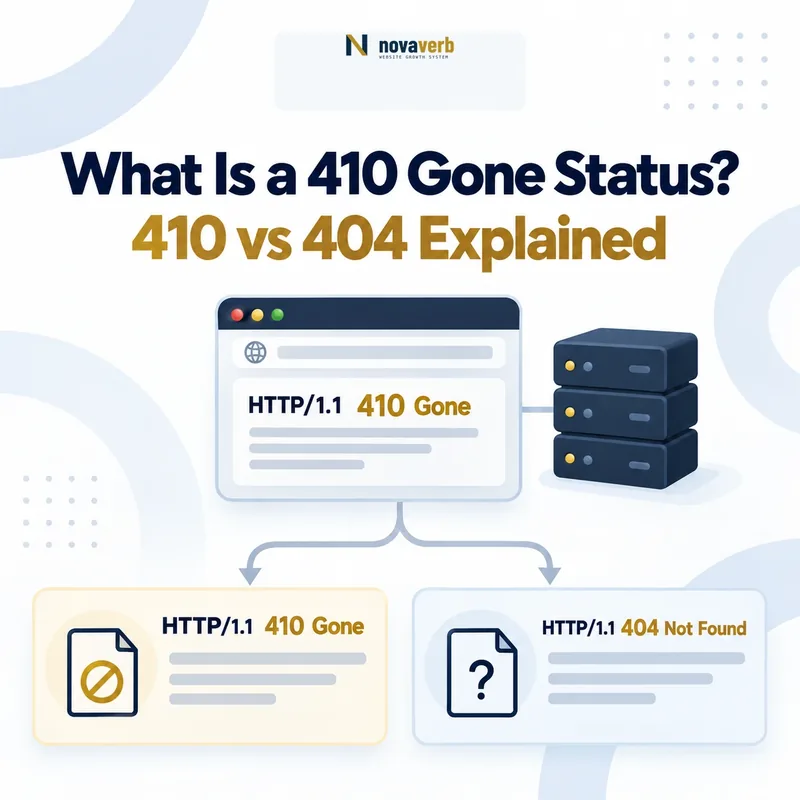
A 410 Gone response means that the requested resource is no longer available at the origin server and that the condition is expected to be permanent. It is appropriate when a website intentionally retires a known URL and no relevant replacement should receive the request.
Request:
https://example.com/retired-page/

Response:
HTTP/1.1 410 Gone
Content-Type: text/html
A 410 response is not a redirect. The browser remains on the requested URL, and the server communicates that the resource has been intentionally removed rather than sending the user to another location.
Check the live response with the HTTP Status & Redirect Checker. Use Site Health Audit to find missing, redirected and permanently removed URLs across a complete website.
What Does 410 Gone Mean?
The HTTP status code 410 Gone means that the requested resource is no longer available and that its absence is expected to be permanent. It communicates a more definite removal state than a general not-found response.
A complete 410 decision normally contains four elements:
- Known source URL: The website recognizes the address as a resource that previously existed.
- Intentional removal: The publisher deliberately retired the resource.
- Permanent condition: The resource is not expected to return at that address.
- No equivalent replacement: There is no relevant destination that should receive a permanent redirect.
The status describes the requested resource, not the availability of the whole website. Other pages on the domain can continue returning successful responses.
How Does an HTTP 410 Response Work?
A 410 response is returned after the server receives a valid request and determines that the requested resource was intentionally removed and should no longer be available.
- A browser or crawler requests the retired URL.
- The request reaches the server or application.
- A removal rule or route identifies the URL as permanently gone.
- The server returns
410 Gone. - The client can display the response body without being redirected.
Request:
GET /retired-resource/ HTTP/1.1
Host: example.com

Response:
HTTP/1.1 410 Gone
Content-Type: text/html
The response body may provide navigation, an explanation or related resources, but the HTTP status must remain 410. The visual page does not determine the actual server response.
200 OK is not a valid 410 response.
When Should You Use 410 Gone?
Use 410 Gone when a known resource has been deliberately and permanently removed, and no relevant replacement should receive the request.
Appropriate situations can include:
- A legally required resource has been permanently withdrawn.
- A user profile was intentionally deleted and will not return.
- An obsolete API endpoint was formally retired without a replacement.
- A spam URL created during a security incident has been removed permanently.
- A campaign page was deliberately retired and has no continuing equivalent.
- A product page represents an item that will never return and has no suitable successor.
- A duplicated URL was intentionally eliminated without a canonical destination.
- A publisher maintains an explicit inventory of permanently removed URLs.
The decision should be based on the resource’s real business state, not a desire to produce a stronger-looking technical signal.
When Should You Not Use 410 Gone?
Do not use 410 when the resource may return, has moved to a relevant replacement, is temporarily unavailable or was removed accidentally.
A 410 is normally inappropriate when:
- The page moved permanently to a new URL.
- The resource is temporarily unavailable during maintenance.
- The product is expected to return to stock.
- The publisher is uncertain whether the page will be restored.
- The server cannot locate a route because of a deployment error.
- The URL should return 403 because access is restricted.
- The website is overloaded and should return 503 or 429.
- The goal is merely to reduce crawler requests.
- The resource is still linked, submitted and promoted as active.
410 Gone vs 404 Not Found
Use 410 when permanent removal is known and intentional. Use 404 when the resource is not found but its prior existence or future availability is uncertain.
| Dimension | 410 Gone | 404 Not Found |
|---|---|---|
| Resource state | Known to be permanently removed | Not found at the requested URL |
| Intentional removal | Normally yes | Not necessarily known |
| Possibility of return | Not expected | Not explicitly stated |
| Typical use | Formally retired known resource | Missing, mistyped or unknown resource |
| Replacement required | No | No |
| Google Search treatment | Eligible for removal as a 4xx response | Eligible for removal as a 4xx response |
For most missing URLs, 404 is sufficient. Use 410 only when the additional claim of intentional permanent removal is accurate and operationally supported.
Review the broader not-found workflow in What Is a 404 Error?.
410 Gone vs 301 Redirect
Return 410 when the resource has been permanently removed without a relevant replacement. Return 301 when a new URL permanently replaces the old resource.
| Question | 410 Gone | 301 Redirect |
|---|---|---|
| Does a replacement exist? | No relevant replacement | Yes, a permanent replacement |
| Does the browser change URLs? | No | Yes |
| Resource state | Permanently removed | Permanently moved |
| Typical example | Retired campaign with no successor | Article moved to a new slug |
| Sitemap behavior | Remove the old URL | List the final destination |
Review What Is a 301 Redirect? before retiring a URL that may have a valid replacement.
410 Gone vs 403 Forbidden
A 410 means the resource has been permanently removed. A 403 means the server understood the request but refuses to authorize access to an existing or protected resource.
| Dimension | 410 Gone | 403 Forbidden |
|---|---|---|
| Resource availability | No longer available | May still exist |
| Primary issue | Permanent removal | Authorization or policy restriction |
| Can access change later? | Not expected | Possibly, if permissions change |
| Typical example | Retired public document | Private administrative area |
Do not return 410 for content that still exists behind authentication or authorization. Use the status that accurately describes whether the resource is gone or merely inaccessible to the requester.
Does 410 Gone Remove a URL From Google Faster?
Do not rely on 410 as a guaranteed faster deindexing method. Google has stated that it currently treats 410 Gone and 404 Not Found similarly, so the correct choice should reflect the resource state rather than an assumed speed advantage.
Removal timing can depend on:
- When Googlebot next requests the URL
- How frequently the URL was previously crawled
- Whether internal links still expose the URL
- Whether the URL remains in an XML sitemap
- Whether inconsistent server responses occur
- Whether other URLs redirect or canonicalize to it
- Whether temporary removal tools are also used
A correct 410 response does not cause instant removal. Google must still discover and process the changed response.
See Google Search Central’s guidance on 404 and 410 responses.
How Does Google Handle 410 Responses?
When Googlebot retrieves a URL returning 410, Google can treat the content as unavailable and remove the URL from Search after processing the response.
- Googlebot requests the URL.
- The server returns 410 Gone.
- Google records that the content is unavailable.
- The URL can be dropped from indexing after processing.
- Google may revisit the URL later to verify its state.
The website should not continue submitting or linking to the URL as though it were active. Internal signals that promote a gone URL create unnecessary inconsistency.
Should Removed Products Return 410?
A removed product should return 410 only when it will not return and no equivalent replacement or useful continuing page exists. Product status must be evaluated before choosing a response.
| Product condition | Preferred action | Reason |
|---|---|---|
| Temporarily out of stock | Keep the product page available | The product may return |
| Permanently replaced by an equivalent model | Consider a relevant 301 redirect | A genuine successor exists |
| Discontinued but still useful for support | Keep an informational archive page | Owners may need manuals, specifications or support |
| Permanently removed with no successor | Return 404 or 410 | No relevant replacement exists |
| Removed by mistake | Restore the product page | The resource should still exist |
A product URL may retain value for existing customers even after sales stop. Documentation, compatibility information, warranty details and replacement guidance can justify keeping the page available.
Should Expired Events Return 410?
An expired event should not automatically return 410. Keep the page when it still provides schedules, recordings, results, photographs, speaker information or historical context.
Consider keeping the page when:
- The event recurs annually.
- Users need recordings or presentation materials.
- The page documents results or awards.
- The event has backlinks or continuing search demand.
- Past information helps users evaluate future editions.
Consider 404 or 410 only when the page has no continuing value and no relevant replacement. Consider a 301 when a new permanent event page genuinely replaces the old one.
Should Hacked or Spam URLs Return 410?
Known hacked or spam URLs can return 410 after the malicious content and underlying security vulnerability have been removed. The status code is only one part of incident remediation.
- Remove the injected files, pages and database records.
- Fix the vulnerability that allowed creation.
- Reset compromised credentials and access tokens.
- Check server, CMS, plugin and CDN configurations.
- Remove malicious internal links and sitemap entries.
- Return 404 or 410 for permanently removed spam URLs.
- Verify the response and request a security review where applicable.
Returning 410 without fixing the security issue does not prevent new spam URLs from appearing.
Should 410 URLs Stay in the XML Sitemap?
No. A current XML sitemap should not normally include URLs that return 410 Gone. The sitemap should represent active canonical URLs the website intends search engines to crawl and consider for indexing.
After assigning 410:
- Remove the retired URL from current XML sitemaps.
- Remove it from image, video and news sitemaps where applicable.
- Update the sitemap generator so the URL does not return.
- List a replacement only when a real canonical destination exists.
- Validate that sitemap URLs return their expected final responses.
Removing a URL from the sitemap does not replace the need to return the correct HTTP status when the old address is requested.
Validate current sitemap entries with the Sitemap Checker.
How Should Internal Links Handle 410 URLs?
Internal links should not continue pointing to URLs that intentionally return 410 Gone. Remove or replace every controlled reference to the retired resource.
- Find all pages linking to the 410 URL.
- Remove the link when no alternative exists.
- Replace it when a relevant current resource exists.
- Update navigation, breadcrumbs and footer templates.
- Remove structured-data references to the retired URL.
- Update hreflang relationships and feeds.
- Recrawl the affected pages to verify cleanup.
A 410 URL may continue receiving external requests, but the current website should not actively promote it as part of its live architecture.
Should 410 URLs Be Blocked in robots.txt?
Normally, no. Search crawlers must be able to request the URL to observe its 410 response. Blocking the path in robots.txt can prevent the crawler from retrieving the permanent-removal status.
A clear removal setup normally means:
- The URL is crawlable enough to return 410.
- The URL is removed from internal links.
- The URL is removed from XML sitemaps.
- The server consistently returns the same status.
- No redirect, canonical or JavaScript behavior contradicts the response.
Robots.txt controls crawling permissions. It does not replace an HTTP response and should not be used as the primary URL-removal mechanism.
Review the live file with the Robots.txt Checker.
How Do You Implement a 410 Response?
Implement 410 at the server, application, CDN or CMS layer that controls the retired URL. Use exact URL rules where possible and document which resources were intentionally removed.
Apache
Redirect gone /retired-page/Apache with mod_rewrite
RewriteEngine On
RewriteRule ^retired-page/?$ - [G,L]
Nginx
location = /retired-page/ {
    return 410;
}
PHP
<?php
http_response_code(410);
exit;
?>
WordPress
WordPress can return 410 through server rules, custom application logic or a redirect-management plugin that supports the Gone status. Avoid controlling the same URL through several layers because conflicting rules may return a redirect, 404 or successful response instead.
How Do You Check a 410 Response?
Check the exact source URL, first HTTP response, visible response body, internal references and sitemap state. Do not assume that a removed page returns 410 based on its message alone.
- Request the exact retired URL.
- Confirm the first response is
410 Gone. - Verify that no redirect occurs first.
- Check that the response is consistent across devices and user agents.
- Confirm the page is absent from current sitemaps.
- Find and remove internal links to the URL.
- Review canonical, hreflang and structured-data references.
- Confirm that permanent removal is documented.
- Recrawl the affected URL set.
Inspect the response with the HTTP Status & Redirect Checker.
Common 410 Gone Mistakes
The most common 410 mistakes classify temporary or moved resources as permanently gone, leave internal references active or use the status as a crawler-control shortcut.
| Mistake | Why it causes problems | Preferred correction |
|---|---|---|
| Using 410 for a moved page | A relevant permanent replacement exists. | Use a 301 redirect. |
| Using 410 for temporary maintenance | The resource is expected to return. | Use a suitable temporary or server-unavailable response. |
| Using 410 to reduce crawling | The status falsely states that content is gone. | Use proper crawl-capacity controls such as 429 or 503 where appropriate. |
| Blocking the URL in robots.txt | Crawlers may not retrieve the 410 response. | Allow the response to be fetched. |
| Keeping the URL in the sitemap | The sitemap presents a gone URL as active. | Remove it from current sitemap output. |
| Leaving internal links active | The website continues directing users to retired content. | Remove or replace controlled links. |
| Returning 200 with a gone message | The visible state and HTTP response conflict. | Return an actual 410 response. |
| Assuming instant deindexing | Google must recrawl and process the response. | Monitor without promising a fixed removal time. |
| Applying an overbroad pattern | Valid pages may be classified as permanently gone. | Test exact routes and exclusions first. |
| Using 410 before fixing hacked content | The vulnerability may continue generating new URLs. | Complete security remediation first. |
410 Gone Checklist
A 410 response passes QA when permanent removal is documented, no relevant replacement exists and every current website signal stops presenting the retired URL as active.
- The exact retired URL is recorded.
- The resource previously existed or is explicitly known.
- The removal was intentional.
- The removal is expected to be permanent.
- No relevant replacement exists.
- A 301 redirect was considered and rejected with evidence.
- A 404 response was considered.
- The source returns HTTP 410.
- No redirect occurs before the 410 response.
- The visible page matches the resource state.
- The response does not return 200.
- The URL is absent from current XML sitemaps.
- Internal links to the URL are removed.
- Navigation references are removed.
- Breadcrumb references are removed.
- Canonical references are removed.
- Hreflang references are removed.
- Structured-data references are removed.
- Feeds no longer publish the URL.
- Robots.txt does not block status verification.
- Mobile and desktop responses are consistent.
- Relevant user agents receive the same intended response.
- Security remediation is complete where applicable.
- The removal owner is documented.
- A fresh crawl verifies implementation.
Frequently Asked Questions About 410 Gone
What does 410 Gone mean?
What is the difference between 410 and 404?
Does Google remove 410 URLs faster than 404 URLs?
When should I use 410 Gone?
When should I use 301 instead of 410?
Can a custom page return 410?
Should 410 URLs remain in the sitemap?
Should internal links point to 410 URLs?
Should 410 URLs be blocked in robots.txt?
Can a discontinued product return 410?
Can hacked URLs return 410?
How can I check a 410 response?
Verify Permanently Removed URLs
Start with the exact URL and verify the live response before changing any removal rule. Confirm that the resource was intentionally retired, no relevant replacement exists and the current website no longer links to or submits the URL.
Use the free HTTP checker for one URL. Use Site Health Audit to find 404, 410, redirect and sitemap conflicts across a complete website.
Novaverb connects HTTP status evidence, internal links, sitemap entries and redirect paths so teams can distinguish an intentionally retired URL from an accidental technical failure.
Use the Decision Ladder to decide whether a resource should be restored, replaced, redirected or permanently retired according to the user’s next required action.