
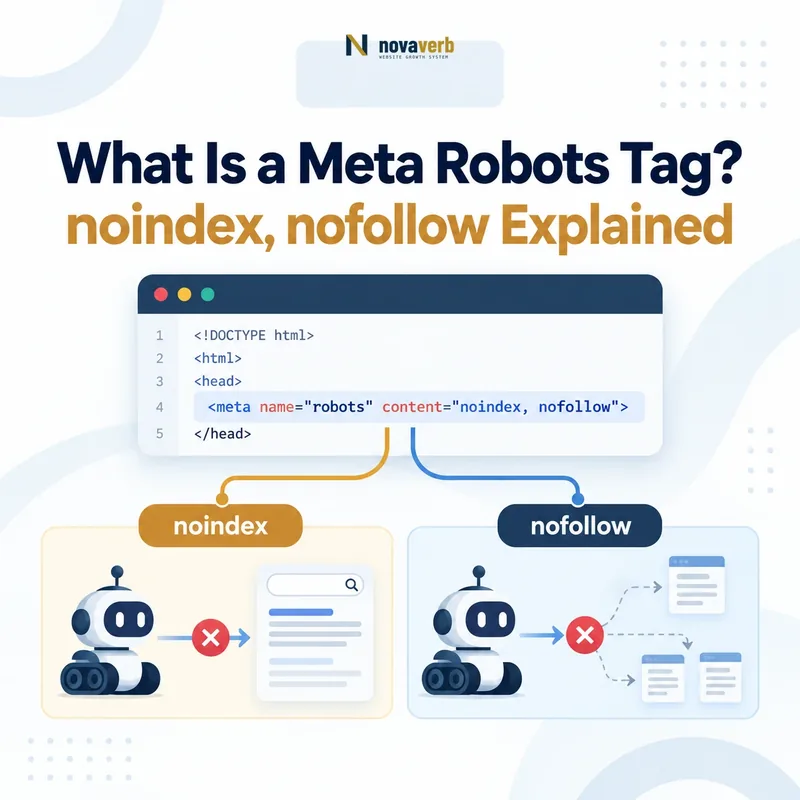
A meta robots tag is an HTML element that provides supported search crawlers with page-level instructions about indexing, link handling and search-result presentation. Common rules include noindex, nofollow, nosnippet and noimageindex.
<meta name="robots" content="noindex, follow">The tag belongs inside the document’s <head>. The crawler must be able to request the page before it can read and apply the rule.
Use the Meta Tag Checker to inspect the served metadata of a public URL. Use Crawl Explorer when you need robots-directive evidence across the full crawled inventory.
What Does a Meta Robots Tag Do?
A meta robots tag tells compliant search crawlers whether a page may be indexed and how its content or links may be used in search. The rule applies to the page containing the tag rather than to the entire website.
The element contains three functional parts:
| Part | Example | Purpose |
|---|---|---|
| HTML element | <meta> |
Provides document-level metadata inside the HTML head. |
| Crawler target | name="robots" |
Applies the supported rules to compliant search crawlers generally. |
| Rules | content="noindex, follow" |
Lists one or more crawler rules separated by commas. |
A crawler must first request and parse the page before it can observe the tag. The rule is therefore different from a robots.txt directive, which is checked before the crawler requests the blocked page.
What Does noindex Mean?
noindex tells supported search engines not to include the page in their search results. The page can remain publicly accessible, receive traffic from direct links and continue to be requested by crawlers.
<meta name="robots" content="noindex">Common cases where noindex may be appropriate include:
- Internal search-result pages with no independent search value
- Account, cart or checkout pages
- Thank-you and confirmation pages
- Temporary campaign pages that should remain accessible
- Filter combinations that should not become search destinations
- Thin utility pages that serve users but not organic acquisition
The rule is applied only after the crawler revisits the page and sees the tag or corresponding HTTP header. A page may therefore remain visible temporarily after noindex is deployed.
What Does nofollow Mean in a Robots Meta Tag?
A page-level nofollow rule tells supported crawlers not to follow links found on that page. It applies broadly to the page’s outgoing links and differs from the rel="nofollow" attribute placed on one individual link.
<meta name="robots" content="nofollow">| Implementation | Scope | Example use |
|---|---|---|
<meta name="robots" content="nofollow"> |
Links across the entire page | A page-level rule, used only when links on the page should broadly not be followed. |
<a rel="nofollow" href="..."> |
One specific link | An individual untrusted or unendorsed destination. |
Page-level nofollow is rarely appropriate for ordinary navigation, category pages, articles or other pages that help crawlers discover the site. It can unintentionally weaken crawl routes to useful URLs.
What Do index and follow Mean?
index permits supported search engines to consider the page for indexing, while follow permits crawlers to follow links found on the page. These are the default behaviors and normally do not need to be declared.
| Rule | Meaning | Is explicit declaration required? |
|---|---|---|
index |
The page may be considered for indexing. | No. It is the default behavior. |
follow |
Links on the page may be followed. | No. It is the default behavior. |
all |
Equivalent to index, follow for Google. |
No. It generally adds no new instruction. |
none |
Equivalent to noindex, nofollow for Google. |
Only when that restrictive outcome is intended. |
Allowing indexing does not guarantee that a page will be indexed. Search engines still evaluate accessibility, canonicalization, duplication, content and other indexing conditions.
What Other Robots Meta Directives Exist?
Robots directives can also control snippets, cached copies, image indexing and preview limits. Support varies by search engine, so each rule should be checked against the documentation of the crawler being targeted.
| Directive | Primary effect | Typical consideration |
|---|---|---|
nosnippet |
Prevents a text or video snippet from being shown in supported Google results. | Can reduce the information available to searchers before they click. |
max-snippet:[number] |
Limits the number of text characters Google may use in a snippet. | Use a negative value when no limit is intended. |
max-image-preview:[setting] |
Controls the maximum image-preview size Google may display. | Supported values include none, standard and large. |
max-video-preview:[number] |
Limits the length of animated video previews. | A value of zero can allow a static image where available. |
noimageindex |
Requests that images on the page not be indexed from that page. | The same image may still be discovered through another page. |
unavailable_after:[date] |
Requests that the page stop appearing after the specified date. | Useful only when the expiration date is accurate and maintained. |
notranslate |
Prevents Google from offering a translated version in search. | Can reduce accessibility for users searching in another language. |
What Is X-Robots-Tag?
X-Robots-Tag is an HTTP response header that applies supported robots rules without placing a meta element in HTML. It is especially useful for PDFs, images, video files and other non-HTML resources.
HTTP/1.1 200 OK
Content-Type: application/pdf
X-Robots-Tag: noindex
An HTML page can also receive an X-Robots-Tag header, but teams should avoid creating conflicting rules between the header and the document head.
Common use cases include:
- Preventing a downloadable PDF from appearing as an independent search result
- Applying noindex to dynamically generated file types
- Managing rules at the web-server or CDN layer
- Applying directives to groups of resources through server configuration
Meta Robots Tag vs robots.txt
A robots meta tag controls supported indexing and presentation behavior after a page is fetched; robots.txt controls whether a compliant crawler may request a path. They solve different problems and should not be used interchangeably.
| Dimension | Meta robots or X-Robots-Tag | robots.txt |
|---|---|---|
| Primary purpose | Control indexing, link handling and search presentation. | Control crawler access to URL paths. |
| When read | After the crawler requests the resource. | Before the crawler requests a blocked URL. |
| Can prevent crawling? | No. | Yes, for compliant crawlers. |
| Can reliably remove a public URL from search? | noindex can after the page is crawled and processed. |
No. A blocked URL may still be indexed from other signals. |
| Can protect private data? | No. | No. |
| Typical use | Keep an accessible utility page out of search results. | Prevent unnecessary crawling of a generated URL space. |
Test crawler access separately with the Robots.txt Checker.
Meta Robots Tag vs Canonical Tag
Use noindex when a page should not appear in search; use a canonical tag when substantially similar pages should be grouped around one representative URL. Canonicalization preserves a preferred page, while noindex excludes the page carrying the rule.
| Question | Use noindex | Use rel=canonical |
|---|---|---|
| Should this page appear as a search result? | No. | Possibly, but another equivalent URL should represent it. |
| Is there an equivalent preferred page? | Not required. | Yes. |
| Primary outcome | Exclude this URL from supported search indexes. | Consolidate duplicate URLs around a representative. |
| Typical example | A thank-you page. | A tracking-parameter version of an article. |
A page should not normally declare another URL canonical while also carrying noindex unless the interaction has been deliberately tested and documented. The signals communicate different preferred outcomes.
Review the full distinction in What Is a Canonical Tag?.
When Should You Use noindex?
Use noindex when a page must remain accessible but should not function as an organic search destination. The decision should be based on the page’s purpose, not solely on low traffic or perceived content weakness.
- Account pages: User-specific dashboards, settings and profile screens.
- Transaction steps: Cart, checkout and payment-process pages.
- Confirmation pages: Thank-you or successful-submission states.
- Internal search: Dynamically generated search-result pages without independent value.
- Temporary experiments: Test variants that must remain accessible during evaluation.
- Utility pages: Pages intended for existing users rather than search acquisition.
- Filtered states: Combinations that should remain usable but not become indexable landing pages.
- Development copies: Publicly accessible staging pages while stronger access protection is being implemented.
Noindex should not be the default response to thin or underperforming content. A page may need improvement, consolidation, a redirect or removal instead.
When Should You Not Use noindex?
Do not use noindex when the real requirement is URL consolidation, permanent redirection, access restriction or content improvement. Removing a page from search can hide the symptom without correcting the underlying architecture.
Noindex is usually the wrong control when:
- A duplicate page should consolidate signals to a preferred equivalent.
- An old URL has permanently moved to a valid replacement.
- Private information must be protected from unauthorized access.
- A removed resource has no replacement and should return 404 or 410.
- A current product or service page merely performs poorly.
- A category page needs stronger content or internal linking.
- A pagination page is needed to discover products or articles.
- A temporary ranking decline has not been properly diagnosed.
Why Is a noindex Page Still Appearing in Google?
A noindex page may continue appearing until Google recrawls it and processes the new rule. The directive may also be missing from the version Google receives, blocked from discovery or overridden by an implementation error.
Check these conditions in order:
- Google has not revisited the URL. The previous indexed state can remain until a new crawl occurs.
- robots.txt blocks the page. Googlebot cannot retrieve the noindex directive.
- The rule exists only in the CMS. It may not appear in the live served or rendered output.
- JavaScript attempts to remove noindex. Google may stop processing before the script changes the original rule.
- The header and HTML disagree. An X-Robots-Tag may apply a different rule.
- The wrong crawler is targeted. A
googlebot-specific rule does not necessarily apply to other search engines. - The rule contains invalid or conflicting values. The crawler may not interpret the page as intended.
What Happens When Multiple Robots Rules Conflict?
Conflicting robots rules create unnecessary uncertainty and can result in the more restrictive supported rule being applied by Google. A page should normally have one intentional policy expressed consistently across HTML and HTTP headers.
| Observed combination | Likely interpretation | Preferred correction |
|---|---|---|
index and noindex |
Conflicting indexing instructions. | Remove the rule that does not match the approved page state. |
follow and nofollow |
Conflicting link-handling instructions. | Publish one page-level policy. |
| HTML says index; HTTP header says noindex | The restrictive HTTP rule can exclude the page. | Align the application and server configuration. |
| Robots tag says noindex; robots.txt disallows crawling | The crawler may never see the noindex rule. | Allow crawling until the rule is processed. |
| Global robots tag plus stricter Googlebot tag | Googlebot receives the combined negative restrictions. | Use crawler-specific rules only when the difference is intentional. |
How Do You Check a Meta Robots Tag?
Check the served HTML, rendered HTML, HTTP headers, robots.txt access and Google’s observed state. Looking only at an SEO-plugin setting does not prove which rule is delivered to crawlers.
- Open the live URL. Confirm its final status and redirect destination.
- Inspect source HTML. Search the document head for
name="robots"and crawler-specific tags. - Inspect rendered HTML. Check whether JavaScript adds, removes or changes the rule.
- Inspect HTTP headers. Look for one or more
X-Robots-Tagvalues. - Check robots.txt. Confirm that crawlers can request the URL when they need to read noindex.
- Check the canonical. Verify that indexing and canonicalization instructions express the same page strategy.
- Inspect mobile output. Confirm that mobile and desktop variants do not expose different indexing rules.
- Use URL Inspection. Review Google’s reported indexing state and the HTML seen in a live test.
- Run a fresh crawl. Verify the directive across the affected template or URL cohort.
Check one public page with the Meta Tag Checker. Use Site Health Audit when the rule may affect an entire template.
Common Meta Robots Tag Mistakes
The most serious robots-tag mistakes apply noindex to valuable templates, hide rules in uninspected HTTP headers or block crawling before the crawler can process the directive.
| Mistake | Why it matters | Preferred correction |
|---|---|---|
| Sitewide noindex remains after launch | Large sections or the entire site can be excluded from search. | Add production-release QA for representative templates. |
| robots.txt blocks a noindex page | The crawler cannot retrieve the rule. | Allow crawling until noindex is processed. |
| Canonical points elsewhere while page is noindexed | The implementation expresses two different outcomes. | Choose consolidation or exclusion based on page purpose. |
| X-Robots-Tag is forgotten | The page can remain noindexed despite clean HTML. | Inspect live HTTP headers. |
| Mobile receives a different directive | Mobile-first indexing may use the restrictive mobile state. | Align mobile and desktop metadata. |
| JavaScript removes initial noindex | Google may skip rendering after seeing noindex. | Serve the intended rule in the initial HTML. |
| Low-traffic pages are mass-noindexed | Traffic alone does not determine page value. | Review intent, quality, duplication and business role. |
| noindex is used for private data | The page remains publicly accessible. | Require authentication or remove the information. |
| Page-level nofollow is added by default | Useful internal and external routes may not be followed. | Use link-level relationships only where appropriate. |
Meta Robots Tag Checklist
A robots-directive implementation passes QA when the intended page state is visible in the live response, accessible to the target crawler and consistent across templates and technical signals.
- The page’s intended search state is documented.
- The live final URL is confirmed.
- The HTTP response is appropriate.
- The robots tag appears inside the HTML head.
- The rule uses supported syntax.
- No mutually exclusive values are present.
- Rendered HTML matches the served intention.
- X-Robots-Tag headers are inspected.
- robots.txt does not block required noindex processing.
- Canonical and indexing rules are aligned.
- Mobile and desktop directives match where required.
- The rule is tested on every affected template.
- Noindex is not being used as access control.
- Page-level nofollow is justified.
- Snippet restrictions are intentional.
- Sitemap membership matches the desired state.
- Internal links do not promote retired URLs unnecessarily.
- Search Console evidence is reviewed where applicable.
- A fresh crawl verifies the deployed scope.
- The deployment date and owner are recorded.
Frequently Asked Questions About Meta Robots Tags
What is a meta robots tag?
What does noindex mean?
What does nofollow mean?
Do I need index, follow on every page?
Does noindex stop Googlebot from crawling a page?
Can I put noindex in robots.txt?
Can a robots.txt-blocked page still appear in Google?
What is X-Robots-Tag?
Should a noindexed page be in the XML sitemap?
Can noindex protect private information?
How long does noindex take to work?
How can I check robots tags sitewide?
Audit noindex, nofollow and X-Robots-Tag
Check the rules crawlers actually receive - not only the settings displayed in your CMS. Inspect the live HTML, rendered metadata, HTTP headers, robots.txt access, canonical relationship and affected template scope before changing a page’s indexing state.
Use the free Meta Tag Checker for one public URL. Move to Crawl Explorer when you need a filterable URL inventory, or Site Health Audit when noindex conflicts may affect important products, categories or articles.
Novaverb connects robots directives with crawl access, response headers, canonicalization and live-page evidence so teams can distinguish a deliberate indexing policy from a template-level mistake.