
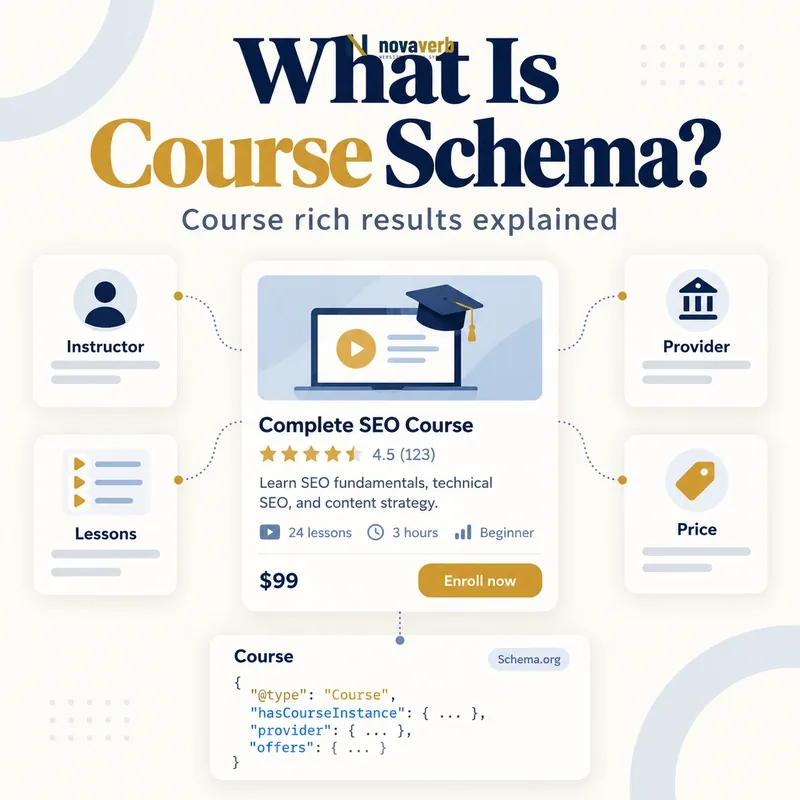
What Is Course Schema?
The Course type describes the curriculum itself: its name, description, provider, prerequisites, outcomes and credentials. A CourseInstance can represent a particular cohort, schedule, location, instructor or delivery mode. A Course list uses ItemList to organize several course entities for discovery.
Markup does not turn a short video, sales webinar, public event or article into a course. It cannot verify instruction quality, accreditation or learning outcomes. The visible program, enrollment process and provider evidence must support every educational claim.
- Identify the exact page, asset, entity or relationship described in this section.
- Inspect the live implementation and retain the observed evidence.
- Compare the observation with the intended meaning and its primary specification.
- Correct any mismatch, then retest the live result.
- Record the accountable owner and review date.
| Property or node | Represents | Evidence source |
|---|---|---|
| Course | Reusable curriculum | Academic or training catalog |
| name | Course title | Public course page |
| description | Subject and learning scope | Approved syllabus |
| provider | Organization delivering course | Institution record |
| courseCode | Stable catalog code | Course system |
| coursePrerequisites | Required prior knowledge | Admissions policy |
| educationalCredentialAwarded | Completion credential | Credential policy |
| hasCourseInstance | Specific offering | Enrollment schedule |
| syllabusSections | Curriculum modules | Published syllabus |
- Model a real curriculum with learning outcomes.
- Separate the course from each scheduled offering.
- Ground provider and credential claims in records.
Primary specification: Schema.org definition for Course.
Course schema describes a genuine structured learning program, not any content that teaches one isolated fact.
How Does Course Schema Work?
A parser reads the Course name, short description and provider, then follows list or instance relationships. An ItemList can enumerate course URLs in a stable order. A CourseInstance can identify when and where the curriculum is delivered, its instructor, mode and offer.
Syntax validation cannot prove that students enroll, instructors lead the program or a credential is recognized. The catalog, learning-management system, enrollment system and institutional policy remain authoritative. Template output should follow those sources rather than duplicate manually maintained marketing fields.
- The exact page, asset, entity or relationship covered by this section
- The live implementation rather than an editor-only preview
- The primary specification or first-party record defining the expected behavior
- The validation result, accountable owner and review date
| Stage | Graph action | Failure example |
|---|---|---|
| Define | Assign one Course identity | Individual lesson treated as whole course |
| Describe | Map subject and outcomes | Promotional slogan used as description |
| Provide | Connect real institution | Affiliate called provider |
| Structure | Link syllabus and prerequisites | Modules absent from visible page |
| Offer | Create CourseInstance | Cohort schedule merged into Course |
| List | Add ordered ItemList URLs | Search results copied dynamically |
| Maintain | Sync catalog and enrollment | Retired course remains open |
- Confirm the content meets the course definition.
- Create a stable curriculum identity.
- Map provider, outcomes and prerequisites.
- Connect current course instances.
- Validate catalog and enrollment paths.
The graph works when one stable curriculum connects to truthful providers, learning details and current offerings.
Course vs CourseInstance vs Event
An SEO fundamentals curriculum can remain the same across spring and fall cohorts. Each cohort can differ by instructor, start date, location or online mode and therefore becomes a CourseInstance. A one-hour public SEO webinar is usually an Event rather than a Course when it lacks a curriculum sequence and roster.
Self-paced courses can still have an instance or offer context when learners enroll and complete a structured program. A single tutorial article or two-minute video remains content, not a Course, even when educational.
- Identify the exact page, asset, entity or relationship described in this section.
- Inspect the live implementation and retain the observed evidence.
- Compare the observation with the intended meaning and its primary specification.
- Correct any mismatch, then retest the live result.
- Record the accountable owner and review date.
| Learning situation | Primary type | Why |
|---|---|---|
| Reusable SEO curriculum | Course | Defines subject and modules |
| Fall cohort of that curriculum | CourseInstance | Specific schedule and instructor |
| Self-paced enrolled program | Course plus suitable instance or offer | Structured learner journey |
| One public webinar | Event | Single scheduled presentation |
| Conference workshop series | Event or Course based on real structure | Evaluate curriculum and roster |
| Single tutorial video | VideoObject | Not a curriculum |
| Wiki guide | Article | Editorial educational content |
| Course catalog | ItemList plus Course items | Organizes multiple curricula |
- Separate reusable content from delivery.
- Do not label every webinar a course.
- Use content types for isolated lessons and guides.
Use Course for curriculum, CourseInstance for a particular offering and Event for scheduled experiences without a full course structure.
Which Course Schema Properties Matter Most?
Current Course list documentation requires a name and description for each represented course and uses provider as a supported high-value field. Course titles should contain only the real curriculum name, not prices, discounts or “best course” claims. Descriptions should state the subject and outcome concisely.
The provider should be the organization that delivers the source course content, connected through Organization schema. Add credentials only when the institution actually awards them under a documented policy.
- The exact page, asset, entity or relationship covered by this section
- The live implementation rather than an editor-only preview
- The primary specification or first-party record defining the expected behavior
- The validation result, accountable owner and review date
| Property | Priority | Audit question |
|---|---|---|
| name | Required for supported Course list | Is it the real course title? |
| description | Required for supported Course list | Does it state subject and outcome? |
| provider | Supported and important | Who delivers the curriculum? |
| url or @id | High | Does it resolve to the canonical course? |
| courseCode | Useful | Is the code stable in the catalog? |
| coursePrerequisites | Useful | Are requirements visible and current? |
| educationalCredentialAwarded | Conditional | Is the credential genuinely awarded? |
| availableLanguage | Useful | Can learners complete the course in that language? |
| hasCourseInstance | Useful | Are current offerings connected? |
- Use the canonical course name.
- Write a specific learning description.
- Reference the real provider.
- Add catalog and prerequisite facts.
- Connect only genuine credentials and instances.
Start with a clear course identity, concise learning description and real provider before adding credentials, instances or catalog detail.
How Does Course List Markup Use ItemList?
The list can live on a summary page that links to course detail pages or on one all-in-one page with anchored course sections. Positions should reflect a stable visible order, not personalization or paid placement hidden from users. Each URL must identify the corresponding course.
A detail page used in the course list should contain its Course data and be paired with the list architecture. Search and filter pages are poor sources when their order and contents change by session. Feature eligibility does not guarantee a displayed list.
- Identify the exact page, asset, entity or relationship described in this section.
- Inspect the live implementation and retain the observed evidence.
- Compare the observation with the intended meaning and its primary specification.
- Correct any mismatch, then retest the live result.
- Record the accountable owner and review date.
| List requirement | Implementation | Failure example |
|---|---|---|
| Minimum item count | At least three Course items | One course marked as carousel |
| List container | ItemList | Unrelated Course nodes without list |
| List entry | ListItem | Raw URL array |
| position | Stable integer order | Duplicate or missing positions |
| url | Unique canonical course URL | Same URL for every item |
| name | Real course title | Price or promo phrase |
| description | Concise course scope | Generic provider slogan |
| provider | Real delivering organization | Marketplace mistaken for instructor |
- Publish at least three qualifying courses.
- Keep positions and URLs visible and stable.
- Pair list pages with complete detail pages.
A valid course list is a stable visible collection of at least three real courses with ordered unique destinations.
How Should Course Instances, Modes and Schedules Be Modeled?
Two cohorts of the same curriculum may have different dates, instructors or tuition and should not overwrite one another. Online, in-person and blended delivery need accurate courseMode and location context. A self-paced instance can state its real access pattern without inventing fixed class dates.
Enrollment windows, capacity and pricing belong to the offering or instance context. Do not leave a past cohort marked open because the curriculum remains available. Connect instructors through real Person profiles only when they actually lead that instance.
- The exact page, asset, entity or relationship covered by this section
- The live implementation rather than an editor-only preview
- The primary specification or first-party record defining the expected behavior
- The validation result, accountable owner and review date
| Offering case | Instance model | Quality check |
|---|---|---|
| Spring classroom cohort | CourseInstance with schedule and Place | Dates and campus are exact |
| Live online cohort | CourseInstance with online mode | Session access follows enrollment |
| Blended program | CourseInstance with mixed delivery details | On-site and online requirements clear |
| Self-paced enrollment | CourseInstance or offer context | No invented meeting schedule |
| Two instructors by cohort | Distinct instance instructor relationships | Actual assignments represented |
| Rolling monthly starts | Separate or patterned instances by system design | Available dates remain current |
| Past cohort | Closed or archived instance | No active enrollment offer |
| Same curriculum in Spanish | Language-specific instance or course policy | Learner can complete in stated language |
- Separate curriculum from scheduled delivery.
- Assign real mode, dates and location.
- Connect current instructor and language.
- Map enrollment offer and capacity.
- Close past instances promptly.
CourseInstance keeps time, place, instructor and enrollment facts out of the reusable curriculum identity.
How Should Providers, Instructors and Credentials Be Used?
A marketplace that hosts third-party courses is not always the provider of each curriculum. Distinguish the platform, institution and instructor from operational evidence. Instructor biographies should avoid invented expertise and connect to ProfilePage identities when profiles exist.
A completion badge, attendance certificate, academic credit and professional credential are different outcomes. Use educationalCredentialAwarded or related properties only when the named award is real and the public page explains its issuer and conditions.
- Identify the exact page, asset, entity or relationship described in this section.
- Inspect the live implementation and retain the observed evidence.
- Compare the observation with the intended meaning and its primary specification.
- Correct any mismatch, then retest the live result.
- Record the accountable owner and review date.
| Role or outcome | Correct relationship | Avoid |
|---|---|---|
| University delivering curriculum | provider Organization | Hosting vendor as provider |
| Independent instructor’s own course | Provider and instructor roles as supported | Invented institution |
| Marketplace hosting partner course | Separate platform and provider identities | Marketplace automatically claimed as teacher |
| Named cohort instructor | Person on CourseInstance | Generic staff page |
| Completion certificate | Credential when genuinely awarded | Attendance treated as certification |
| Academic credit | numberOfCredits with institutional basis | Invented credit value |
| Professional license preparation | Description of preparation | Claiming license is awarded |
| Accreditation claim | Visible verified institutional evidence | Unverified badge |
- Separate platform, provider and instructor.
- Connect teaching roles to real instances.
- Describe credentials and credit precisely.
Course authority should come from truthful provider, instructor and credential relationships rather than promotional titles or fabricated accreditation.
What Course Schema Mistakes Are Common?
Catalog templates can create duplicate Course IDs for each cohort, fragmenting one curriculum. The opposite problem merges distinct programs under one generic identity. Personalized lists may output unstable positions and URLs that require login.
Educational claims require particular care. Markup should not imply accreditation, guaranteed employment, transferable credit or professional licensing without evidence. Validation cannot test instructional quality or legal recognition.
- The exact page, asset, entity or relationship covered by this section
- The live implementation rather than an editor-only preview
- The primary specification or first-party record defining the expected behavior
- The validation result, accountable owner and review date
| Mistake | Learner or SEO risk | Correction |
|---|---|---|
| Single tutorial marked Course | Wrong educational model | Use Article, Video or HowTo |
| Public webinar marked Course | No curriculum or roster | Use Event |
| Two-item Course list | Does not meet supported list minimum | Use at least three qualifying courses |
| Price in course name | Promotional title | Use curriculum title only |
| Marketplace as false provider | Wrong institution identity | Identify actual provider |
| Cohort creates new curriculum ID | Fragmented Course | Use CourseInstance |
| Expired cohort remains open | Failed enrollment | Close instance and offer |
| Unverified credential claim | Misleading outcome | Verify or remove |
- Confirm each item meets the course definition.
- Reconcile Course and CourseInstance IDs.
- Verify provider and instructor roles.
- Audit list count, order and URLs.
- Test credentials and enrollment status.
Course markup fails when curriculum, provider, credential, list or enrollment facts are exaggerated, merged or stale.