
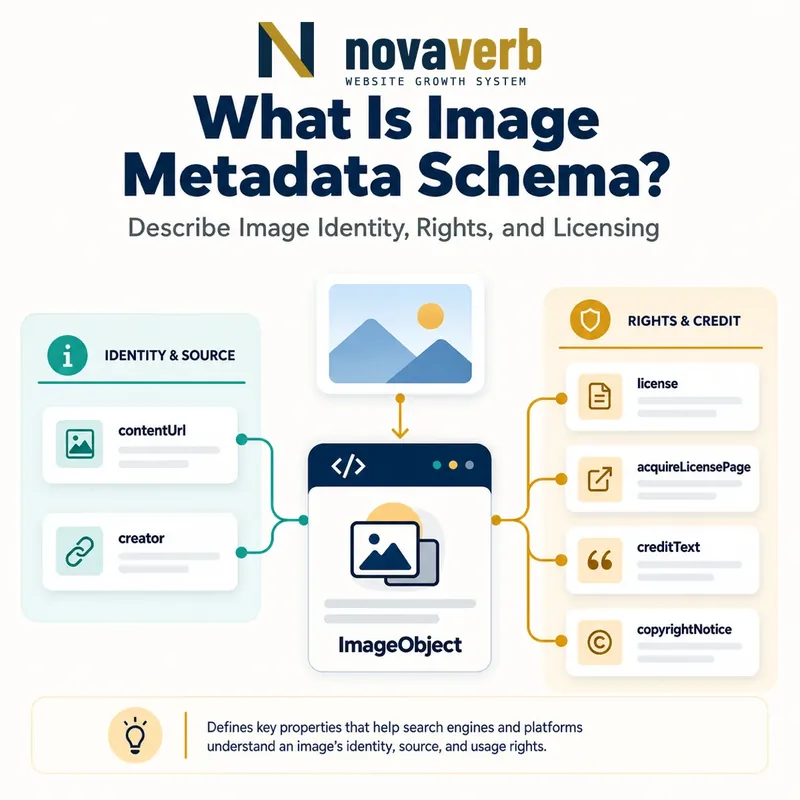
What Is Image Metadata Schema?
Image Metadata Schema is ImageObject structured data that identifies an image file and communicates creator, credit, copyright and licensing information.
The contentUrl points to the actual image asset. Rights-related fields can include creator, creditText, copyrightNotice, license and acquireLicensePage. Search systems can use this data to show additional details in image results, and a valid license URL can make an image eligible for a Licensable badge. Metadata does not transfer ownership, grant rights beyond the linked license or guarantee the badge. It must describe the specific image shown on the page and agree with the visible credit and rights information.
- Identify the exact page, asset, entity or relationship described in this section.
- Inspect the live implementation and retain the observed evidence.
- Compare the observation with the intended meaning and its primary specification.
- Correct any mismatch, then retest the live result.
- Record the accountable owner and review date.
| Property | Meaning | Example |
|---|---|---|
| contentUrl | Actual image file | /photos/puppy.jpg |
| creator | Who created it | Photographer name |
| creditText | Publication credit line | Studio / photographer |
| copyrightNotice | Current copyright claim | © Owner 2026 |
| license | Terms governing use | License URL |
| acquireLicensePage | How to obtain rights | Checkout or contact URL |
- Identify the actual file.
- Name the responsible rights parties.
- Link to clear usage terms.
Primary specification: Google Search image metadata documentation.
Image metadata is useful when it connects one exact asset to transparent, enforceable rights information.
How Is Image Metadata Different From Image SEO?
Image metadata focuses on rights, attribution and licensing, while broader Image SEO covers crawlability, relevance, filenames, alt text, context, dimensions and performance.
A descriptive alt attribute helps accessibility and explains the image in page context; it is not a copyright notice. A fast WebP file can improve delivery without communicating who owns the photo. Conversely, perfect license metadata cannot make a blocked or low-quality asset discoverable. Use both disciplines together: Image SEO for discovery and user experience, and ImageObject or IPTC rights fields for creator and usage information. Do not stuff keywords into creditText or pretend that a license field replaces legal review of your actual rights.
- The exact page, asset, entity or relationship covered by this section
- The live implementation rather than an editor-only preview
- The primary specification or first-party record defining the expected behavior
- The validation result, accountable owner and review date
| Concern | Primary mechanism | Question answered |
|---|---|---|
| Accessibility | alt text | What does the image convey? |
| Discovery | page context and crawl access | Can the image be found? |
| Performance | format and dimensions | Does it load efficiently? |
| Attribution | creator/creditText | Who receives credit? |
| Licensing | license/acquireLicensePage | How may it be used? |
- Audit technical image access.
- Add accurate descriptive context.
- Map rights and credit fields.
- Verify license destinations.
Treat rights metadata as a complement to image optimization, not a replacement for it.
Which ImageObject Properties Are Required?
ImageObject needs contentUrl and at least one of creator, creditText, copyrightNotice or license for the documented image-metadata enhancement.
Use contentUrl whenever possible because it precisely identifies the image content; url is supported as a less precise fallback in existing markup. The second requirement can be met by a creator, a publication credit, a copyright notice or a license URL. Once one is supplied, the others become useful recommended context when they are known. For Licensable badge eligibility through structured data, license is necessary. A page-level WebPage image reference without a distinct ImageObject may not provide enough asset-specific rights detail for multiple photographs.
- Identify the exact page, asset, entity or relationship described in this section.
- Inspect the live implementation and retain the observed evidence.
- Compare the observation with the intended meaning and its primary specification.
- Correct any mismatch, then retest the live result.
- Record the accountable owner and review date.
| Field | Requirement | Quality check |
|---|---|---|
| contentUrl | Required asset URL | Matches rendered image |
| creator | One rights option | Person or Organization |
| creditText | One rights option | Publication-ready credit |
| copyrightNotice | One rights option | Current owner notice |
| license | One rights option; badge-critical | Public terms URL |
| acquireLicensePage | Recommended | Actionable licensing path |
- Prefer contentUrl.
- Use asset-specific fields.
- Add license for badge eligibility.
Meet the minimum with accurate data, then complete the rights record wherever the source supports it.
What Is the Difference Between License and acquireLicensePage?
license links to the terms governing image use, while acquireLicensePage tells a user where or how to obtain permission or a license.
A Creative Commons terms page or a publisher’s image-use agreement can be the license destination when it actually governs that asset. The acquireLicensePage might be an image-specific checkout, a licensing request form or a contact page that explains the process. These URLs may be the same only when one page genuinely serves both purposes. Do not send license to a generic homepage, privacy policy or terms page that never addresses image reuse. A free image can still have a license, and an “all rights reserved” image may have an acquisition contact if negotiated use is possible.
- The exact page, asset, entity or relationship covered by this section
- The live implementation rather than an editor-only preview
- The primary specification or first-party record defining the expected behavior
- The validation result, accountable owner and review date
| Scenario | license | acquireLicensePage |
|---|---|---|
| Creative Commons photo | Specific CC terms | Source/download instructions |
| Stock image | Usage agreement | Image checkout page |
| Editorial archive | Rights policy | Licensing request form |
| Negotiated rights | Copyright terms | Contact workflow |
| No reuse offered | Clear rights statement | Optional or unavailable |
- Identify governing terms.
- Map the acquisition workflow.
- Test public accessibility.
- Remove generic unrelated destinations.
The two URLs are correct when one explains permitted use and the other provides a practical path to obtain rights.
How Should Creator, Credit and Copyright Be Modeled?
Use creator for the maker, creditText for the requested publication credit and copyrightNotice for the current rights owner’s notice.
The photographer may be the creator, while an agency or employer owns copyright under contract and the desired credit line names both. These fields should not be forced to the same value when the roles differ. creator can be a Person or Organization with a name. creditText is the line a publisher should display. copyrightNotice identifies the copyright claim, ideally with the current owner and year where appropriate. Do not infer ownership from who uploaded the file, the domain hosting it or EXIF camera fields. Rights transfers and work-for-hire relationships need authoritative records.
- Identify the exact page, asset, entity or relationship described in this section.
- Inspect the live implementation and retain the observed evidence.
- Compare the observation with the intended meaning and its primary specification.
- Correct any mismatch, then retest the live result.
- Record the accountable owner and review date.
| Role | Property | Example |
|---|---|---|
| Photographer | creator | Alex Rivera |
| Commissioning studio | creditText | Alex Rivera / North Studio |
| Current owner | copyrightNotice | © North Studio 2026 |
| Uploader | Not automatically a rights role | CMS editor |
| Camera maker | Not creator | Equipment metadata |
- Use authoritative rights records.
- Avoid uploader-based inference.
- Update ownership transfers.
- Preserve requested credit format.
Keep creator, credit and ownership distinct so the published metadata reflects real legal and attribution roles.
Structured Data vs IPTC Photo Metadata
Structured data associates rights with each image instance on a web page, while IPTC metadata travels inside the image file itself.
With ImageObject markup, the publisher must add metadata wherever the image appears because the association belongs to that page instance. IPTC fields are embedded once in the asset and can persist as the file moves, provided optimization and export tools do not strip them. Either method can support the documented enhancement. Teams may use both for resilience, but conflicts create risk: when structured data and IPTC disagree, the structured values take precedence for this feature. Establish one rights system of record and generate both outputs from it instead of maintaining parallel manual copies.
- The exact page, asset, entity or relationship covered by this section
- The live implementation rather than an editor-only preview
- The primary specification or first-party record defining the expected behavior
- The validation result, accountable owner and review date
| Dimension | Structured data | IPTC metadata |
|---|---|---|
| Location | Page markup | Inside image file |
| Maintenance | Every image instance | Once per retained asset |
| Portability | Page-specific | Travels with file |
| CMS resizing | Markup can persist | Metadata may be stripped |
| Conflict handling | Takes precedence | Secondary when conflicting |
- Inventory current metadata methods.
- Select the rights source of truth.
- Configure export retention.
- Detect field conflicts.
Choose one authoritative rights record and keep every structured and embedded representation synchronized.
How Should Responsive and Reused Images Be Handled?
For responsive images, point contentUrl to the representative actual asset and keep the same rights facts across renditions; for reused images, annotate each page instance or preserve IPTC data.
A srcset may contain several widths of the same photograph. The ImageObject can identify a representative content URL while credit and license remain consistent across derivatives. Crops or edits that create materially different works may need their own asset records and rights review. When the same photo appears on several articles, structured data must be present for each occurrence if that is the chosen method; embedded IPTC can travel with every exported copy. CDN query strings, signed URLs and transformations should not cause one photo to look like hundreds of unrelated rights records.
- Identify the exact page, asset, entity or relationship described in this section.
- Inspect the live implementation and retain the observed evidence.
- Compare the observation with the intended meaning and its primary specification.
- Correct any mismatch, then retest the live result.
- Record the accountable owner and review date.
| Case | Metadata action | Risk |
|---|---|---|
| srcset widths | Share one rights identity | Duplicate records |
| Editorial crop | Confirm same rights scope | Different derivative terms |
| Multiple pages | Markup every instance | Missing reuse metadata |
| CDN transformation | Preserve stable asset mapping | Expiring contentUrl |
| Downloaded copy | Retain IPTC when used | Stripped ownership data |
- Map derivatives to source assets.
- Use stable representative URLs.
- Annotate every reuse.
Responsive delivery is correct when every rendition resolves to the same verified rights record unless it is truly a separate work.
What Image Metadata Mistakes Are Common?
Common mistakes include using page URLs as contentUrl, linking generic terms, confusing creator with owner, stripping IPTC data and copying one license record across unrelated images.
A template may mark the article URL as the image content or apply the site owner as creator to every user-uploaded photo. License links may lead to a generic footer policy that says nothing about image reuse. Image compression services can remove embedded rights fields, while structured data remains stale after a rights transfer. Multiple images on a gallery page may all reference the hero asset because the CMS exposes only one global field. Another mistake is assuming a Licensable badge proves legal ownership; it only reflects supplied metadata and eligibility, not a rights adjudication.
- The exact page, asset, entity or relationship covered by this section
- The live implementation rather than an editor-only preview
- The primary specification or first-party record defining the expected behavior
- The validation result, accountable owner and review date
| Mistake | Impact | Correction |
|---|---|---|
| Page URL in contentUrl | Wrong asset identity | Use image file URL |
| Generic terms link | Unclear permission | Link specific license |
| Uploader as creator | False attribution | Use rights record |
| Stripped IPTC | Lost portable metadata | Configure export retention |
| One record for gallery | Misattributed rights | Create per-image objects |
| Badge as ownership proof | False legal claim | Verify independently |
- Resolve each asset URL.
- Verify roles and ownership.
- Open licensing destinations.
- Compare structured and IPTC data.
The highest-risk defect is metadata that grants, attributes or implies rights the publisher does not actually control.