
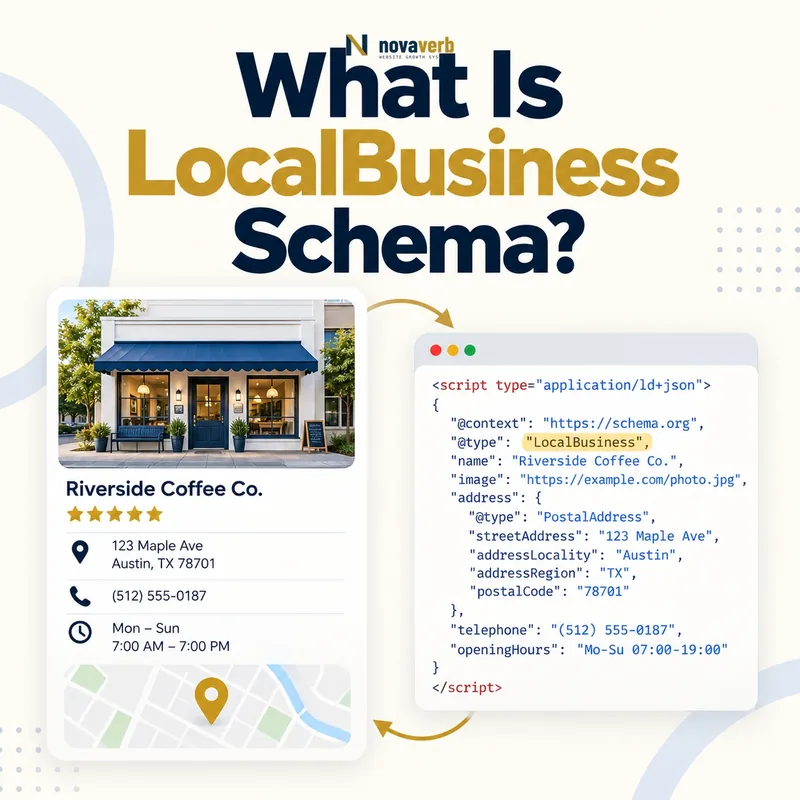
What Is LocalBusiness Schema?
LocalBusiness is a subtype of Organization and Place. It is designed for a business users can associate with a physical location or a genuine local service operation. A restaurant, dental office, repair shop, hotel or retail branch may qualify. A software company with only a registered office and no local customer experience usually belongs under Organization instead.
The markup expresses facts already visible and supportable. It does not create a location, verify a listing, make an address public safely or guarantee local rankings. The page, business records and customer experience should agree before the structured graph is added.
- Identify the exact page, asset, entity or relationship described in this section.
- Inspect the live implementation and retain the observed evidence.
- Compare the observation with the intended meaning and its primary specification.
- Correct any mismatch, then retest the live result.
- Record the accountable owner and review date.
| Field | What it describes | Evidence to verify |
|---|---|---|
| name | Public location name | Signage and business records |
| @id | Stable location identity | Canonical location URL |
| address | Mailable street location | Published contact page |
| telephone | Customer contact number | Active phone route |
| openingHoursSpecification | Normal operating hours | Operational schedule |
| geo | Latitude and longitude | Verified map position |
| areaServed | Real service geography | Delivery or service policy |
| priceRange | Broad customer price expectation | Published offering |
- Represent a real customer-facing operation.
- Keep local facts visible and current.
- Use one durable identity per location.
Primary specification: Schema.org definition for LocalBusiness.
LocalBusiness schema is a structured identity for a real local operation, not a shortcut for manufacturing geographic relevance.
How Does LocalBusiness Schema Work?
A parser reads the type and properties, then evaluates whether they form a coherent local entity. A location page can identify one branch with a stable @id. The main organization can reference that branch as a department or related location, while reviews, offers or services should connect only when the relationship is accurate.
Syntax validation checks the shape of the data, not operational truth. An address can be perfectly formatted yet belong to a mailbox, former tenant or private residence. A phone number may be valid text but route nowhere. Reliable implementation therefore combines graph design, visible page evidence and recurring business-data checks.
- The exact page, asset, entity or relationship covered by this section
- The live implementation rather than an editor-only preview
- The primary specification or first-party record defining the expected behavior
- The validation result, accountable owner and review date
| Stage | Structured action | Common failure |
|---|---|---|
| Scope | Choose one real location | One node mixes several branches |
| Classify | Select truthful subtype | Generic type hides useful context |
| Identify | Assign stable @id | ID changes across templates |
| Locate | Add verified address and geo | Map pin points elsewhere |
| Operate | Publish current hours | Holiday closure omitted |
| Connect | Reference parent and location page | Branch treated as parent company |
| Maintain | Update operational changes | Closed location remains active |
- Confirm the location is eligible.
- Choose the most accurate subtype.
- Map visible facts to properties.
- Connect the branch to its parent.
- Validate and monitor changes.
The markup works when one truthful location identity connects consistent page, contact and operating facts.
LocalBusiness vs Organization Schema
A national retailer can have one Organization node and hundreds of LocalBusiness nodes. Each store keeps its own ID, URL, hours and telephone while referencing the parent company. Conversely, a remote SaaS company may need only Organization markup even if incorporation records contain an address.
Do not duplicate the parent’s identity at every branch. Legal name, brand and corporate profiles can live on the organization; branch names, local phones and location hours belong on location nodes. When a single-site business is both company and location, the graph may still model the relationships cleanly without inventing two conflicting identities.
- Identify the exact page, asset, entity or relationship described in this section.
- Inspect the live implementation and retain the observed evidence.
- Compare the observation with the intended meaning and its primary specification.
- Correct any mismatch, then retest the live result.
- Record the accountable owner and review date.
| Situation | Primary model | Why |
|---|---|---|
| Remote software company | Organization | No local customer location |
| Independent restaurant | Restaurant subtype | One public dining location |
| Retail chain headquarters | Organization | Parent corporate entity |
| Retail chain branch | Store subtype | Distinct local address and hours |
| Service-area plumber | Suitable LocalBusiness subtype | Real local service operation |
| Virtual office only | Organization | Address does not establish local service |
| Hospital campus | MedicalOrganization or suitable subtype | Specialized institution and place |
| Department inside store | Department relationship when useful | Not a duplicate parent |
- Separate corporate and branch identities.
- Attach local facts to the local node.
- Avoid LocalBusiness for virtual presence alone.
Use Organization for the enterprise and LocalBusiness for each genuine customer-facing location or local operation.
Which LocalBusiness Type Should You Choose?
Specific types such as Restaurant, Dentist, AutoRepair, Hotel and Store communicate useful category context. A business with several services should select the type that best represents the location rather than stacking unrelated categories for coverage. Additional services can be modeled separately when the page and offering support them.
Type choice should match what customers encounter. A medical clinic is not automatically a pharmacy because it dispenses limited supplies, and a marketing agency is not a store because it sells services. If the business model changes, update both visible content and structured data together.
- The exact page, asset, entity or relationship covered by this section
- The live implementation rather than an editor-only preview
- The primary specification or first-party record defining the expected behavior
- The validation result, accountable owner and review date
| Business | Likely subtype | Avoid |
|---|---|---|
| Restaurant | Restaurant | FoodEstablishment plus unrelated types |
| Dental practice | Dentist | Generic Organization only |
| Auto repair shop | AutoRepair | AutomotiveBusiness categories not offered |
| Hotel | Hotel or suitable lodging subtype | Apartment without lodging service |
| Grocery location | GroceryStore | Every retail subtype |
| Real estate office | RealEstateAgent | Property listings as separate offices |
| Home service provider | Relevant service subtype when available | Fake storefront address |
| Mixed operation | Primary truthful subtype | Keyword-driven type stacking |
- List the location’s primary customer activity.
- Find the closest supported subtype.
- Check that visible page language agrees.
- Use additional relationships only for real offerings.
The best subtype is the narrowest accurate description of the location’s real primary business.
Which LocalBusiness Properties Matter Most?
Start with identity and contact accuracy. Use PostalAddress fields consistently, including street, locality, region, postal code and country. For US businesses, preserve the real state and ZIP format rather than translating or compressing the address into one ambiguous string.
Add latitude and longitude only after verifying the entrance or service point. Use images, price range, payment details, menus, reservations or departments only when maintained. An optional property that becomes stale can be more harmful to data quality than leaving it out.
- Identify the exact page, asset, entity or relationship described in this section.
- Inspect the live implementation and retain the observed evidence.
- Compare the observation with the intended meaning and its primary specification.
- Correct any mismatch, then retest the live result.
- Record the accountable owner and review date.
| Property | Priority | Audit question |
|---|---|---|
| @id | Foundational | Is it unique and stable for this branch? |
| name | High | Does it match the public location name? |
| url | High | Does it resolve to the canonical branch page? |
| address | High | Is every component accurate? |
| telephone | High | Does it reach this location or service route? |
| openingHoursSpecification | High | Are normal hours current? |
| geo | Useful | Does the point represent the correct place? |
| parentOrganization | Useful for chains | Does it reference the real parent? |
| image | Optional | Is it a representative maintained asset? |
- Keep address components structured.
- Give every branch its own stable ID.
- Remove optional facts that cannot be maintained.
Prioritize durable identity and customer-critical operating facts before adding optional descriptive properties.
How Should Hours and Special Hours Be Marked Up?
Each regular specification connects days of the week with opening and closing times. Split schedules can use multiple intervals. Overnight hours require careful date and time logic so the closing time belongs to the following day. A 24-hour operation should be expressed consistently with the site’s actual schedule.
Special hours prevent the normal weekly pattern from misrepresenting a known exception. They should use explicit dates and be removed or refreshed after the event. Structured hours must match the location page and operational systems; users lose confidence when search surfaces and the front door disagree.
- The exact page, asset, entity or relationship covered by this section
- The live implementation rather than an editor-only preview
- The primary specification or first-party record defining the expected behavior
- The validation result, accountable owner and review date
| Hours case | Markup approach | Quality check |
|---|---|---|
| Weekday schedule | OpeningHoursSpecification | Days and timezone are correct |
| Weekend schedule | Separate applicable days | No accidental weekday reuse |
| Split hours | Multiple intervals | No overlapping periods |
| Overnight operation | Correct open and next-day close | Date boundary tested |
| Open 24 hours | Consistent full-day expression | Business truly operates continuously |
| Holiday hours | SpecialOpeningHoursSpecification | Specific date included |
| Temporary closure | Dated closure plus visible notice | Reopening status monitored |
| Appointment only | Visible policy and accurate representation | Do not invent public walk-in hours |
- Document the normal weekly schedule.
- Model split and overnight periods carefully.
- Add dated exceptions before they occur.
- Reconcile every public hours source.
Regular hours establish the weekly pattern, while dated special hours communicate exceptions without corrupting that pattern.
How Do Service Areas and Multiple Locations Differ?
A plumber may travel across several cities from one legitimate base. Those cities can describe service coverage, but they do not become branches without staffed or customer-facing locations. Conversely, a chain with three stores should not merge their addresses, phones and hours into one node merely because they share a brand.
Use areaServed at a practical scale supported by real operations. Nationwide or statewide claims should match licensing, delivery and staffing reality. For multiple locations, create one canonical landing page per meaningful branch and connect each node to the parent Organization described in Organization schema.
- Identify the exact page, asset, entity or relationship described in this section.
- Inspect the live implementation and retain the observed evidence.
- Compare the observation with the intended meaning and its primary specification.
- Correct any mismatch, then retest the live result.
- Record the accountable owner and review date.
| Scenario | Correct model | Incorrect shortcut |
|---|---|---|
| One plumber serving five cities | One business plus service area | Five invented branch nodes |
| Three staffed stores | Three LocalBusiness nodes | One address array on one node |
| Delivery radius | Area or geographic coverage | Fake storefront at every ZIP |
| National ecommerce brand | Organization | LocalBusiness for shipping destinations |
| Franchise locations | Separate locations with relationships | One corporate phone for all branches |
| Mobile service operator | Truthful service-area business | Private home presented as storefront |
| Department with own hours | Department or separate node when warranted | Hours merged into parent |
| Closed branch | Remove active claims and preserve truthful page state | Leave normal hours published |
- Do not turn service coverage into fictional offices.
- Create separate nodes for real branches.
- Connect each branch to the correct parent.
Service areas extend one operation’s reach; real branches remain separate identities with their own verifiable local data.
What LocalBusiness Schema Mistakes Are Common?
NAP means name, address and phone. Minor formatting differences are usually less important than factual conflicts, but consistent canonical data reduces ambiguity. The most serious errors are operational: a disconnected number, a moved address, a closed location shown as open or a service area exaggerated for keyword reach.
Another frequent problem is templating one JSON-LD block across every location without replacing all branch fields. This can make dozens of pages claim the same address or ID. Structured-data plugins also may output a second node alongside custom markup. Audit the rendered HTML rather than only the editor.
- The exact page, asset, entity or relationship covered by this section
- The live implementation rather than an editor-only preview
- The primary specification or first-party record defining the expected behavior
- The validation result, accountable owner and review date
| Mistake | User or SEO risk | Correction |
|---|---|---|
| Virtual office presented as store | Misleading local presence | Use truthful Organization or service model |
| Same @id on every branch | Entities collapse together | Unique durable ID per location |
| Old opening hours | Failed visits and calls | Sync operating schedules |
| Wrong subtype | Category ambiguity | Choose primary real operation |
| Duplicate plugin markup | Conflicting nodes | Consolidate graph output |
| Merged branch addresses | No clear place identity | One node per branch |
| Broad unsupported areaServed | Inflated coverage claim | Use operational territory |
| Invisible conflicting facts | Trust and parsing conflict | Align visible page and JSON-LD |
- Inspect rendered structured data.
- Compare every fact with the live location.
- Resolve duplicate nodes and IDs.
- Retest after template or operational changes.
Most failures come from false, stale or duplicated business facts - not from missing optional vocabulary.