
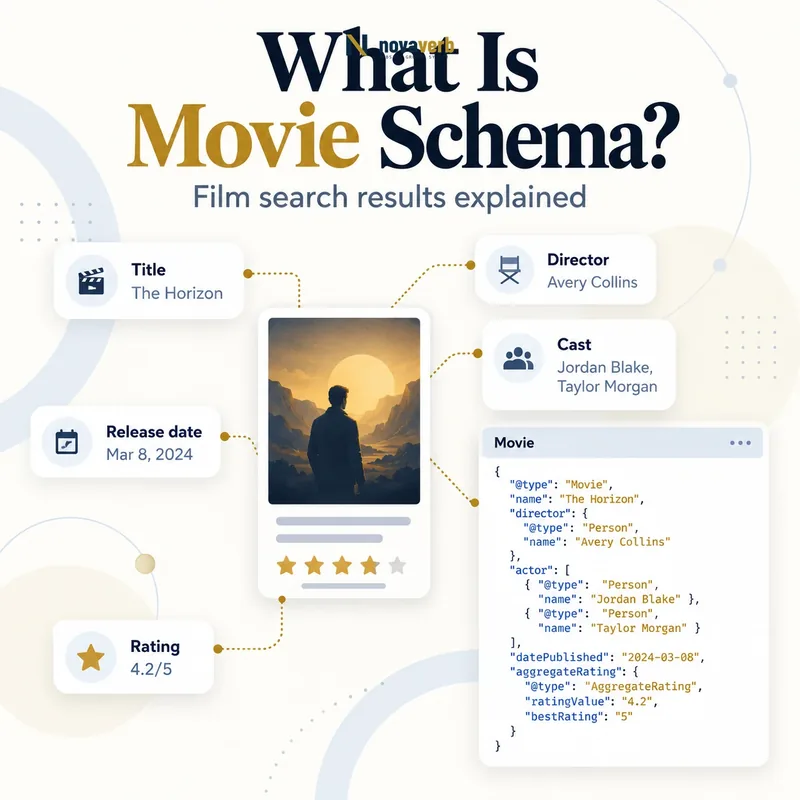
What Is Movie Schema?
Movie Schema is structured data that identifies films in an ordered list so eligible mobile search results can present a site-specific movie carousel.
The content entity is Movie, while ItemList and ordered ListItem objects provide carousel structure. Every movie needs an accurate title and representative poster image. Director, release date, review and aggregate rating data can add useful context when visible and truthful. This feature serves list discovery - such as a collection of notable films - not a generic video player, a knowledge-panel claim or a watch-button integration. Valid markup establishes only technical eligibility; it does not guarantee a carousel, ranking position or click-through increase. The documented movie carousel is a mobile experience.
- Identify the exact page, asset, entity or relationship described in this section.
- Inspect the live implementation and retain the observed evidence.
- Compare the observation with the intended meaning and its primary specification.
- Correct any mismatch, then retest the live result.
- Record the accountable owner and review date.
| Layer | Type | Purpose |
|---|---|---|
| Collection | ItemList | Defines the ordered movie set |
| Entry | ListItem | States position and URL or item |
| Film | Movie | Describes one title |
| Creator | Person | Identifies director |
| Reputation | Review/AggregateRating | Summarizes genuine evaluation |
- Create a real movie collection.
- Use accurate film identity.
- Preserve visible list order.
Primary specification: Schema.org definition for Movie.
Movie Schema works best when an authentic editorial list maps cleanly to identifiable film entities.
Which Pages Can Use Movie Carousel Markup?
Movie carousel markup belongs on pages that visibly list multiple movies of the same content type, using either a summary-page or all-in-one-page architecture.
A summary page might list “Best Science Fiction Movies of 2026” and link each entry to a dedicated movie detail page on the same domain. An all-in-one page can contain the full information for every movie and link to visible anchors on that page. A single movie review does not form a carousel, nor does a category page that mixes films, television series, games and books. The list must contain at least two ListItem objects for the standard carousel structure, and every structured item shown in the list must also be represented to users.
- The exact page, asset, entity or relationship covered by this section
- The live implementation rather than an editor-only preview
- The primary specification or first-party record defining the expected behavior
- The validation result, accountable owner and review date
| Page model | Eligible structure | URL pattern |
|---|---|---|
| Summary page | ItemList links to detail pages | Unique same-domain URLs |
| All-in-one list | Movie nested in each ListItem | Current-page anchors |
| Single movie page | No carousel by itself | Movie detail only |
| Mixed media list | Not a homogeneous movie list | Separate content types |
| Hidden collection | Not acceptable | Render all items visibly |
- Classify the page architecture.
- Confirm at least two movies.
- Keep one item type.
- Render the full structured list.
Choose a carousel architecture only when the visible page genuinely presents an ordered collection of movies.
Which Movie Properties Are Required?
Each Movie in the carousel needs an accurate name and a crawlable high-resolution image that represents that film.
The name should be the film title, not the review headline, ranking number, ticket price or promotional slogan. The image should use a poster-like 6:9 aspect ratio or a close crop that remains eligible, and the URL must be crawlable and indexable. Supported formats include common web image types documented for the feature. Avoid logos, generic cinema graphics, cast photos that do not identify the film or a poster borrowed from another release. Optional facts such as director, release date and ratings improve context but cannot repair a wrong title or image.
- Identify the exact page, asset, entity or relationship described in this section.
- Inspect the live implementation and retain the observed evidence.
- Compare the observation with the intended meaning and its primary specification.
- Correct any mismatch, then retest the live result.
- Record the accountable owner and review date.
| Property | Requirement | Quality check |
|---|---|---|
| name | Required | Exact movie title |
| image | Required | Representative poster |
| aspect ratio | 6:9 target | Avoid wide landscape art |
| image URL | Crawlable/indexable | Stable 200 response |
| dateCreated | Recommended | Actual release date |
| director | Recommended | Correct Person |
- Use the official display title.
- Provide a relevant poster.
- Test image crawlability.
Required movie identity is complete when title and poster unmistakably describe the same film users see in the list.
How Should ItemList and ListItem Work?
ItemList contains the movie collection, and each ListItem assigns a unique one-based position plus the correct destination or nested Movie entity.
The position determines carousel order, so values should begin at one, remain unique and match the visible ranking. On a summary page, each ListItem uses its position and a unique URL for a same-domain movie detail page. On an all-in-one page, each list entry nests a Movie and uses a URL that points to a nearby visible anchor on the current page. Do not use duplicate destinations, skip hidden entries or let client-side sorting change the page without regenerating structured positions. Pagination requires a deliberate editorial and technical model rather than repeating position one across every page.
- The exact page, asset, entity or relationship covered by this section
- The live implementation rather than an editor-only preview
- The primary specification or first-party record defining the expected behavior
- The validation result, accountable owner and review date
| Architecture | ListItem content | Critical rule |
|---|---|---|
| Summary page | position + url | Unique same-domain detail URL |
| All-in-one page | position + item Movie | Current-page anchor URL |
| Visible order | 1, 2, 3… | Matches markup |
| Filtered list | Regenerated items | No hidden stale entities |
| Pagination | Page-specific ordered set | Avoid duplicate position logic |
- Enumerate visible movies.
- Assign one-based positions.
- Validate every destination.
- Retest sorting and pagination.
The list is reliable when each position resolves to the same movie and order that the visitor sees.
How Should Movie Posters Be Optimized?
Use high-resolution, crawlable poster images near a 6:9 ratio that accurately represent the specific movie and release.
A theatrical poster or authorized key art is usually more suitable than a wide trailer thumbnail. Alternate cuts, remakes and films sharing a title need artwork that matches the structured release. Avoid tiny images, CSS backgrounds unavailable to crawlers, expiring signed URLs and assets blocked by robots rules. Rights and licensing still apply; schema does not grant permission to republish artwork. The poster should also be visible or clearly associated with the movie on the page. Broader asset discoverability can follow Image SEO, while the carousel-specific crop remains a separate eligibility concern.
- Identify the exact page, asset, entity or relationship described in this section.
- Inspect the live implementation and retain the observed evidence.
- Compare the observation with the intended meaning and its primary specification.
- Correct any mismatch, then retest the live result.
- Record the accountable owner and review date.
| Image issue | Effect | Fix |
|---|---|---|
| Wide 16:9 still | Poor poster crop | Use 6:9 artwork |
| Blocked CDN URL | Asset unavailable | Permit crawl access |
| Wrong remake poster | Identity mismatch | Match release |
| Low resolution | Weak display quality | Supply high-resolution image |
| Generic site logo | Not representative | Use movie artwork |
- Match title and release.
- Target the documented ratio.
- Keep URLs stable and crawlable.
- Verify usage rights.
Poster optimization is finished when the asset is accessible, licensed, high quality and unambiguously tied to that movie.
How Should Directors, Dates and Ratings Be Added?
Add director, release date, reviews and aggregate ratings only when each value is visible, correctly scoped and supported by source records.
The director is a Person with the correct name; movies with multiple credited directors can include the applicable people. dateCreated represents the movie’s release date, not the article publication date, streaming availability date or page update timestamp. A nested Review needs a valid author and rating data, while AggregateRating must summarize genuine evaluations using accurate counts and scale. Follow Review Schema and Aggregate Rating Schema rather than copying scores from an unrelated source without permission or context.
- The exact page, asset, entity or relationship covered by this section
- The live implementation rather than an editor-only preview
- The primary specification or first-party record defining the expected behavior
- The validation result, accountable owner and review date
| Property | Correct meaning | Common confusion |
|---|---|---|
| director | Film director | Article author |
| dateCreated | Movie release date | Page publish date |
| review | One authored evaluation | Marketing quote |
| aggregateRating | Average of many ratings | Editor score |
| ratingCount | Actual rating submissions | Page views |
- Verify film credits.
- Separate release and article dates.
- Trace review authorship.
- Recalculate rating aggregates.
Optional movie facts improve trust only when their entity, date and rating scope are exact.
Movie Schema vs VideoObject and Media Actions
Movie identifies the creative film, VideoObject describes a specific video asset, and Media Actions power watch experiences through a separate integration.
A movie page may embed a trailer, but the trailer is a VideoObject, not the movie itself. The film entity can relate to video media without collapsing those identities. A movie carousel helps users explore an ordered movie list; it does not create a play button or streaming entitlement. Watch actions require media-feed and deep-link work beyond the Movie carousel documentation. A knowledge-panel claim is also a different process. Use Video SEO for trailer discovery and keep playback availability, subscription requirements and regional restrictions accurate in the systems that own them.
- Identify the exact page, asset, entity or relationship described in this section.
- Inspect the live implementation and retain the observed evidence.
- Compare the observation with the intended meaning and its primary specification.
- Correct any mismatch, then retest the live result.
- Record the accountable owner and review date.
| Goal | Primary model | Not equivalent to |
|---|---|---|
| Film identity | Movie | Trailer file |
| Trailer discovery | VideoObject | Whole film entity |
| Movie list | ItemList + Movie | Watch action |
| Playback button | Media Actions integration | Carousel markup |
| Knowledge panel claim | Verification process | Movie list schema |
- Separate film and video assets.
- Treat watch actions as another integration.
- Keep availability claims out of the carousel.
Use each vocabulary for its real job instead of expecting Movie markup to create playback or ownership features.
What Movie Schema Mistakes Are Common?
Common mistakes include marking a single page as a carousel, mixing media types, using landscape thumbnails, duplicating positions and attaching ratings or dates to the wrong movie.
Publishers may create an ItemList with one film or include TV series beside movies because the page calls everything “watchable.” Summary pages sometimes point to external streaming services rather than unique same-domain detail URLs. All-in-one pages may omit anchors or use URLs that do not identify visible items. Templates can repeat position one, retain removed films, copy the same poster across remakes or use the article date as dateCreated. Another error is assuming the carousel appears on desktop even though the documented experience is mobile-only. These problems require semantic and rendered-page checks.
- The exact page, asset, entity or relationship covered by this section
- The live implementation rather than an editor-only preview
- The primary specification or first-party record defining the expected behavior
- The validation result, accountable owner and review date
| Mistake | Impact | Correction |
|---|---|---|
| One-item list | No real carousel | Use multiple movies |
| Mixed Movie and TVSeries | Wrong homogeneous type | Separate lists |
| External detail URLs | Summary-page violation | Use same-domain pages |
| No anchor on all-in-one page | Broken item destination | Add visible anchor |
| Article date as release | Wrong film fact | Use release date |
| Wide thumbnail | Image ineligibility | Use poster ratio |
- Validate list cardinality and type.
- Open every URL or anchor.
- Compare title, poster and release.
- Test rendered mobile output.
The most serious error is a list item that sends users to a different title, release or content type than the structured movie.