
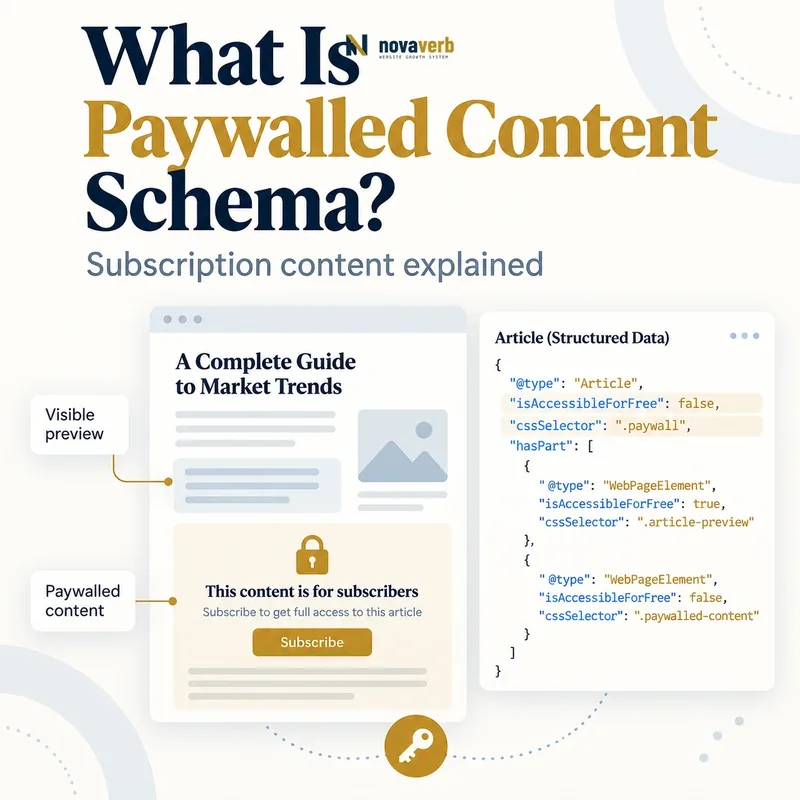
What Is Paywalled Content Schema?
The approach helps distinguish intentionally restricted indexable content from cloaking. A compatible CreativeWork such as Article, NewsArticle, Course, Review or WebPage can declare its access state. WebPageElement nodes in hasPart identify the HTML sections covered by the access restriction.
This markup applies only when the publisher wants the content crawled and indexed. It is not a mechanism for granting crawler access to private SaaS dashboards, customer reports, account data or confidential documents. Access control remains a security decision outside schema.
- Identify the exact page, asset, entity or relationship described in this section.
- Inspect the live implementation and retain the observed evidence.
- Compare the observation with the intended meaning and its primary specification.
- Correct any mismatch, then retest the live result.
- Record the accountable owner and review date.
| Property or node | Represents | Evidence source |
|---|---|---|
| CreativeWork | Indexable content item | Canonical content page |
| isAccessibleForFree | Whether access is unrestricted | Entitlement policy |
| hasPart | Restricted page segment | Rendered document structure |
| WebPageElement | Specific protected section | HTML wrapper |
| cssSelector | Class selecting protected section | Rendered CSS class |
| Article or subtype | Actual content type | Editorial template |
| mainEntityOfPage | Canonical page relationship | Preferred URL |
| author | Responsible creator | Editorial record |
- Use markup only for content intended for indexing.
- Identify the real restricted sections.
- Keep app and customer data outside public search surfaces.
Primary specification: Google Search paywalled-content structured data documentation.
Paywall markup describes intentionally restricted public-facing content; it never replaces authentication, authorization or data-security controls.
How Does Paywalled Content Markup Work?
The page wraps protected content in a class such as paywall. The structured graph uses hasPart with a WebPageElement whose cssSelector points to .paywall and whose access flag is false. Multiple separate restricted sections can use several WebPageElement nodes.
The crawler still needs an implementation consistent with what authorized and unauthorized users receive. Markup does not excuse serving materially different content deceptively. If protected content must never reach an unauthorized browser, enforce that server-side rather than hiding it with JavaScript or CSS.
- The exact page, asset, entity or relationship covered by this section
- The live implementation rather than an editor-only preview
- The primary specification or first-party record defining the expected behavior
- The validation result, accountable owner and review date
| Stage | Action | Failure example |
|---|---|---|
| Classify | Choose correct CreativeWork type | Dashboard called Article |
| Declare | Set access flag false | Paid article marked free |
| Wrap | Add class to restricted section | Selector points nowhere |
| Map | Create WebPageElement in hasPart | Protected content omitted |
| Deliver | Apply secure access design | Full premium data sent to browser |
| Render | Keep public and crawler logic consistent | Crawler receives unrelated full text |
| Maintain | Update selectors with templates | CSS rename breaks mapping |
- Confirm the content should be indexed.
- Select the truthful CreativeWork type.
- Wrap restricted sections with stable classes.
- Map them through hasPart.
- Test rendering and access boundaries.
The graph works when selectors match rendered restricted sections and the delivery model preserves both indexing intent and real access control.
Which Content Types Support Paywall Markup?
The primary type should match the actual page. A subscription research article can be Article; a gated training curriculum may be Course; a members-only review can remain Review. Do not use a generic WebPage merely to avoid supplying required properties of a more specific type.
Private software screens are different. A backlink report, site crawl, billing page or customer project contains account-scoped data and should not become indexable because WebPage is technically a CreativeWork. Public product education can use Article schema; the application remains protected.
- Identify the exact page, asset, entity or relationship described in this section.
- Inspect the live implementation and retain the observed evidence.
- Compare the observation with the intended meaning and its primary specification.
- Correct any mismatch, then retest the live result.
- Record the accountable owner and review date.
| Surface | Use paywall markup? | Reason |
|---|---|---|
| Subscription news article | Yes when intended for indexing | Editorial CreativeWork |
| Premium research guide | Yes when indexed under access policy | Restricted content product |
| Registered course lesson | Potentially when intended for indexing | Supported Course or WebPage context |
| Members-only review | Potentially | Supported Review context |
| SaaS marketing report preview | Only if it is a public content product | Evaluate real indexing intent |
| Customer backlink report | No public markup | Private project data |
| Authenticated SEO dashboard | No public markup | Application surface |
| Billing or account page | No public markup | Sensitive account data |
- Use the most specific truthful content type.
- Require explicit indexing intent.
- Exclude authenticated product and customer surfaces.
Choose paywall markup for indexable content products, never for private application surfaces or customer data.
Which Paywall Properties Matter Most?
The top-level access flag communicates that the CreativeWork includes restricted access. hasPart adds granularity for partial paywalls. Current technical guidance allows class selectors rather than IDs, complex selectors or element names, and protected sections should not be nested inside one another.
Keep the content type’s own required properties complete. An Article still needs accurate headline, author, dates and canonical relationships according to its use. Paywall fields do not replace the underlying schema.
- The exact page, asset, entity or relationship covered by this section
- The live implementation rather than an editor-only preview
- The primary specification or first-party record defining the expected behavior
- The validation result, accountable owner and review date
| Property | Value or role | Audit question |
|---|---|---|
| isAccessibleForFree | false | Does access require payment or registration? |
| hasPart | One or more WebPageElement nodes | Are all protected sections represented? |
| hasPart.@type | WebPageElement | Is the section type correct? |
| hasPart.isAccessibleForFree | false | Is that section actually restricted? |
| cssSelector | .className | Does the class exist in rendered HTML? |
| CreativeWork @type | Article, Course, Review or other supported type | Does it match page purpose? |
| mainEntityOfPage | Canonical page identity | Does it resolve to preferred URL? |
| author and dates | Content provenance | Do editorial records match? |
- Complete the primary CreativeWork schema.
- Set the content access flag to false.
- List each restricted WebPageElement.
- Use stable class-only selectors.
- Verify no protected sections are nested.
A correct implementation combines a complete CreativeWork graph with a false access flag and exact non-nested class-selected restricted sections.
How Do Hard, Metered and Registration Walls Differ?
A hard paywall may show only a public introduction before subscription. A metered system changes access based on a user’s reading allowance. A registration wall can be price-free yet still mean the content is not accessible to everyone without sign-in. Therefore “no charge” is not the same as isAccessibleForFree: true under this content-access model.
The page should explain the access requirement before collecting personal or payment data. Consent, privacy and billing obligations depend on jurisdiction and product design; schema does not decide them. Maintain one canonical content URL rather than producing separate public and subscriber identities.
- Identify the exact page, asset, entity or relationship described in this section.
- Inspect the live implementation and retain the observed evidence.
- Compare the observation with the intended meaning and its primary specification.
- Correct any mismatch, then retest the live result.
- Record the accountable owner and review date.
| Access model | User condition | Markup consideration |
|---|---|---|
| Hard paywall | Paid entitlement required | Restricted content flagged false |
| Metered paywall | Allowance exhausted after reads | Page remains restricted by policy |
| Registration wall | Account required without payment | Still not accessible to everyone |
| Free preview | Intro open, remainder restricted | Map protected section in hasPart |
| Institutional access | Entitlement through organization | Restriction remains real |
| Temporary free access | Policy changes by date | Update page and markup together |
| Public article | No access condition | isAccessibleForFree true or omit by design |
| Private app record | Authenticated authorization | Do not seek public indexing |
- Separate price-free access from unrestricted access.
- Explain the entitlement before conversion.
- Keep one canonical URL across access states.
Access models differ commercially, but each should disclose the restriction clearly and preserve one truthful canonical content identity.
How Should CSS Selectors and Page Sections Be Built?
If a page contains two separate protected regions, each can use its own WebPageElement or share a documented class where the output remains unambiguous. Avoid selectors tied to minified build hashes, experiment variants or presentation classes that change without the access policy.
Test the rendered DOM after consent banners, personalization and hydration. A selector that exists only in source code but disappears after rendering does not describe the final page. Nested restricted containers can double-count or confuse section boundaries, so flatten the access wrappers.
- The exact page, asset, entity or relationship covered by this section
- The live implementation rather than an editor-only preview
- The primary specification or first-party record defining the expected behavior
- The validation result, accountable owner and review date
| Selector pattern | Use | Reason |
|---|---|---|
| .paywall | Good | Simple access-specific class |
| .premium-section | Good | Readable stable boundary |
| #paywall | Do not use for supported cssSelector guidance | ID selector |
| article .locked | Do not use | Complex selector rather than class only |
| div | Do not use | Element selector is too broad |
| .css-a8f92 | Avoid | Build-generated unstable class |
| Nested .paywall containers | Avoid | Overlapping restricted sections |
| Separate .section-a and .section-b | Use as multiple hasPart nodes | Distinct non-nested regions |
- Create access-specific class names.
- Wrap each restricted region once.
- Declare matching WebPageElement nodes.
- Inspect the rendered DOM.
- Regression-test after frontend builds.
Stable access-specific classes should map one-to-one with the public rendered boundaries of restricted content.
How Can Paywalls Avoid Cloaking and Data Leaks?
A crawler may need to understand the content intended for indexing, but users should see a truthful preview and clear access requirement rather than unrelated teaser text. The markup exists to describe the restriction, not to permit deceptive content substitution.
If premium text, proprietary datasets or customer information must not reach an unauthorized browser, do not include those bytes in HTML, JSON, source maps or API responses. CSS blur, hidden DOM, disabled controls and JavaScript overlays are not security controls. Server-side authorization must gate every protected resource.
- Identify the exact page, asset, entity or relationship described in this section.
- Inspect the live implementation and retain the observed evidence.
- Compare the observation with the intended meaning and its primary specification.
- Correct any mismatch, then retest the live result.
- Record the accountable owner and review date.
| Implementation | Search consistency | Security outcome |
|---|---|---|
| Server-rendered preview plus declared restriction | Clear public experience | Protected bytes withheld |
| Full premium HTML hidden by CSS | Potentially misleading | Content leaks in source |
| Client API returns full content before check | Unreliable access story | Network response leaks |
| Crawler-only full unrelated version | Cloaking risk | No user equivalence |
| Canonical page with honest excerpt | Consistent identity | Can be secure |
| Authenticated API authorization | Independent of markup | Correct app protection |
| robots block private app | Useful discovery control | Not a substitute for login |
| Public schema on customer report | Wrong indexing intent | Potential data exposure |
- Never treat CSS or JavaScript as authorization.
- Keep crawler and user content purpose consistent.
- Exclude confidential app data from public markup.
Search transparency and application security are separate duties: declare indexable paywalls honestly and enforce confidential access on the server.
What Paywalled Content Schema Mistakes Are Common?
Template changes can rename paywall classes while JSON-LD retains old selectors. Metering experiments may render different wrappers and access flags. AMP, mobile and desktop versions can drift. Audit every production variant rather than one editor preview.
Commercial truth matters too. A page described as subscriber-only should not lead to a broken checkout or undisclosed plan requirement. Conversely, a newly free article should not remain marked restricted. Validation cannot test entitlement or leakage.
- The exact page, asset, entity or relationship covered by this section
- The live implementation rather than an editor-only preview
- The primary specification or first-party record defining the expected behavior
- The validation result, accountable owner and review date
| Mistake | Risk | Correction |
|---|---|---|
| Private dashboard uses paywall markup | Wrong public indexing intent | Keep app protected and nonpublic |
| isAccessibleForFree true on restricted page | Access mismatch | Set false |
| Selector class missing | Protected section not identified | Sync template and JSON-LD |
| Complex or ID selector | Unsupported mapping pattern | Use class-only selector |
| Nested protected wrappers | Ambiguous sections | Flatten boundaries |
| Full content hidden client-side | Data leak | Enforce server authorization |
| Crawler receives unrelated full copy | Cloaking risk | Maintain content equivalence |
| Checkout or registration broken | Failed conversion | Repair entitlement flow |
- Confirm public indexing intent.
- Compare access flag and rendered sections.
- Test selectors across variants.
- Inspect source and network responses for leaks.
- Complete registration or subscription flow.
Paywall markup fails when indexing intent, selector mapping, entitlement and security boundaries do not describe the same page.