
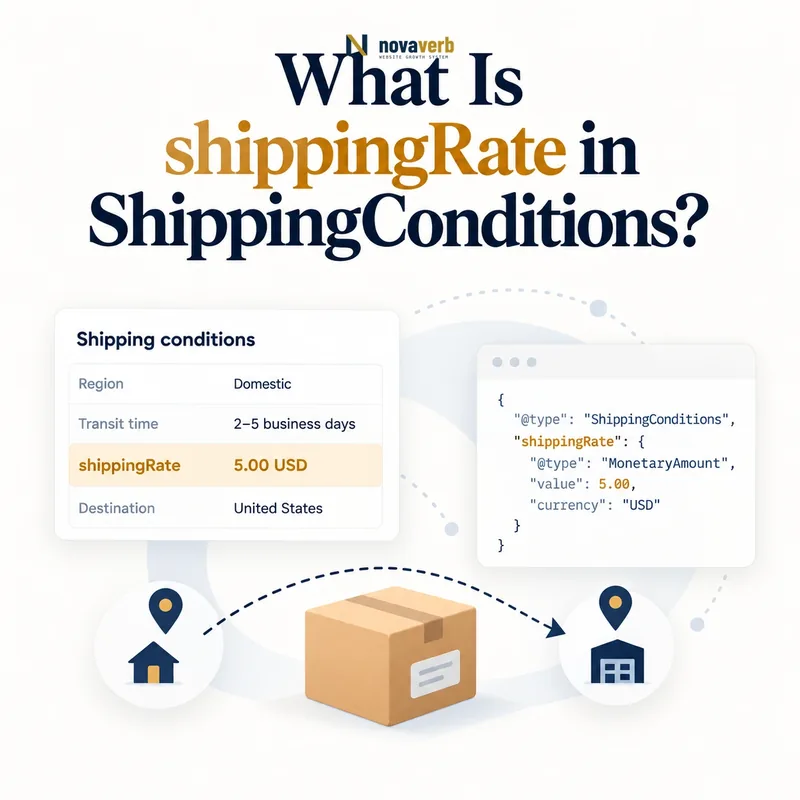
What Is shippingRate in ShippingConditions?
shippingRate states the shipping cost for a matched destination and condition using MonetaryAmount or ShippingRateSettings.
A simple flat or zero rate can use MonetaryAmount. A calculated rule can use ShippingRateSettings for fixed components, weight-based amounts, order-based percentages, or free-shipping thresholds. The surrounding ShippingConditions controls which route, cart, product, weight, quantity, dimension, or season receives that rate.
The amount must match checkout for the same service and inputs. A rate is not a tax, duty, product price, or total delivery promise, and it should not silently omit mandatory shipping surcharges.
- Identify the exact page, asset, entity or relationship described in this section.
- Inspect the live implementation and retain the observed evidence.
- Compare the observation with the intended meaning and its primary specification.
- Correct any mismatch, then retest the live result.
- Record the accountable owner and review date.
| Case | Meaning | Action |
|---|---|---|
| shippingRate | Shipping cost outcome | $7.95 |
| MonetaryAmount | Simple flat or free rate | value and currency |
| ShippingRateSettings | Calculated rate | Fixed plus variable |
| ShippingConditions | Match context | Destination and cart |
- Choose flat or calculated representation.
- Include currency.
- Test the complete matched condition.
Use the free backlink checker to identify linked commerce pages before changing shipping prices.
Primary specification: Schema.org definition for shippingRate.
shippingRate is accurate when the same customer inputs produce the same shipping charge in markup and checkout.
Where Does shippingRate Belong?
shippingRate can appear on ShippingConditions and OfferShippingDetails, and ShippingRateSettings can also contain a nested monetary shippingRate used by its calculation.
Parent context determines scope. ShippingConditions attaches the cost to a reusable service rule. OfferShippingDetails attaches it to an Offer-specific shipping detail. A ShippingRateSettings node can combine the monetary base with percentage components and destination scope.
Do not attach shippingRate directly to Product, Offer, ShippingService, or Organization without the supported path. The parent must explain which service, geography, product, and cart receive the amount.
- The exact page, asset, entity or relationship covered by this section
- The live implementation rather than an editor-only preview
- The primary specification or first-party record defining the expected behavior
- The validation result, accountable owner and review date
| Case | Meaning | Action |
|---|---|---|
| ShippingConditions | Reusable rule | Service scope |
| OfferShippingDetails | Offer-specific detail | Product scope |
| ShippingRateSettings | Calculated settings | Nested rate component |
| Product direct | Wrong context | Use Offer path |
- Identify rate scope.
- Choose the supported parent.
- Add amount or settings.
- Connect destination and service.
- Validate the graph.
Compare ShippingConditions and OfferShippingDetails.
Correct placement binds each shipping charge to the exact policy or Offer it prices.
When Should You Use MonetaryAmount?
Use MonetaryAmount when the matched shipping charge is a simple flat, zero, maximum, or bounded monetary value that does not require a calculation formula.
A $7.95 standard rate or $0 free rate is straightforward. Include currency and use numeric money fields. In ShippingConditions, the published amount should represent the cost customers actually see for the matched destination, cart, and service.
Do not use a flat amount when checkout adds unavoidable per-pound, percentage, remote-area, or item-count components. If the final rate varies, use ShippingRateSettings or create separate conditions that express the actual tiers.
- Identify the exact page, asset, entity or relationship described in this section.
- Inspect the live implementation and retain the observed evidence.
- Compare the observation with the intended meaning and its primary specification.
- Correct any mismatch, then retest the live result.
- Record the accountable owner and review date.
| Case | Meaning | Action |
|---|---|---|
| $7.95 standard | Flat rate | MonetaryAmount |
| $0 standard | Free rate | Explicit zero |
| $5–$10 estimate | Bounded amount | Only if truthful |
| $5 + $1/lb | Calculated rate | Use settings |
| Remote surcharge | Variable by region | Separate or calculated |
- Confirm the final charge is flat.
- Set numeric value.
- Add currency.
- Test checkout totals.
Review MonetaryAmount in shipping schema.
MonetaryAmount is the right choice when one matched rule resolves to one stable monetary shipping cost.
When Should You Use ShippingRateSettings?
Use ShippingRateSettings when the shipping cost is calculated from fixed charges, shipment weight, order value, destination, or free-shipping thresholds.
A rule can combine a base monetary shippingRate with weightPercentage or orderPercentage logic and other rate settings. The model must mirror the actual checkout formula rather than approximate it for markup.
Calculated settings require clear units, currency, qualifying cart amount, and destination scope. If the rate engine has carrier-live pricing that cannot be represented stably, do not publish a fabricated fixed approximation.
- The exact page, asset, entity or relationship covered by this section
- The live implementation rather than an editor-only preview
- The primary specification or first-party record defining the expected behavior
- The validation result, accountable owner and review date
| Case | Meaning | Action |
|---|---|---|
| Base plus weight | Calculated setting | Weight component |
| Percent of order | Calculated setting | Order component |
| Free above threshold | Calculated or tier rule | Qualifying amount |
| Carrier-live quote | Highly dynamic | Avoid stale approximation |
| Simple flat rate | No formula needed | Use MonetaryAmount |
- Document the checkout formula.
- Map each component.
- Set currency and units.
- Test representative carts.
- Avoid unsupported approximations.
See ShippingRateSettings for the full calculated model.
ShippingRateSettings is useful when every published component reproduces the live rate calculation.
How Should Free Shipping Be Represented?
Free shipping should use an explicit zero monetary rate for the qualifying service and condition rather than omitting shippingRate or labeling every service free.
A cart may receive free standard shipping above $50 while express remains paid. The zero rate must share the same destination, orderValue, product eligibility, quantity, weight, and season used by checkout.
Visible banners, cart progress messages, product pages, structured data, and checkout must use one qualifying subtotal formula. If discounts remove eligibility, the matched condition should change accordingly.
- Identify the exact page, asset, entity or relationship described in this section.
- Inspect the live implementation and retain the observed evidence.
- Compare the observation with the intended meaning and its primary specification.
- Correct any mismatch, then retest the live result.
- Record the accountable owner and review date.
| Case | Meaning | Action |
|---|---|---|
| Zero standard rate | Free shipping | value 0 and currency |
| Express remains $15 | Separate service | Do not inherit zero |
| Free above $50 | orderValue tier | Match subtotal |
| Oversize excluded | Product or weight rule | Preserve exception |
| Rate omitted | Unknown cost | Not equivalent to free |
- Represent zero explicitly.
- Separate service levels.
- Define threshold calculation.
- Test discounts and exclusions.
Use orderValue for cart thresholds.
Free shipping is truthful when only the qualifying service, cart, destination, and product receive an explicit zero rate.
How Should Currency and Rounding Work?
Currency and rounding should match the checkout market, monetary precision, component order, and final displayed shipping amount.
A rate of 10 without currency is ambiguous. USD, CAD, and EUR tiers need independent context. Percentage and weight components can produce fractions of a cent, so rounding before or after summing components can change the customer charge.
Document whether checkout rounds each component or only the final rate. Do not freeze a converted threshold or rate from one day as a permanent value for another market.
- The exact page, asset, entity or relationship covered by this section
- The live implementation rather than an editor-only preview
- The primary specification or first-party record defining the expected behavior
- The validation result, accountable owner and review date
| Case | Meaning | Action |
|---|---|---|
| 7.95 USD | Clear US rate | Use currency |
| 7.95 without code | Ambiguous | Add currency |
| Weight component | Fractional cents | Match rounding stage |
| Market conversion | Volatile amount | Use stable market policy |
| Displayed 8.00 vs 7.99 | Precision mismatch | Repair formula |
- Match cart currency.
- Use numeric money fields.
- Document rounding sequence.
- Test fractional components.
- Validate localized markets.
A shipping rate is interpretable when currency, precision, and rounding reproduce the amount shown at checkout.
How Do Rate Tiers and Destinations Interact?
Rate tiers should combine destination, service, order value, quantity, weight, dimensions, and product scope so one cart receives one rate per eligible shipping option.
A California cart below $50 may pay $7.95, while a Hawaii cart pays $15 and an order above $50 receives free standard shipping only in qualifying regions. Heavy or oversized products may require separate rates despite the same subtotal.
Build a decision matrix and test intersections. Broad country rules and narrow state or ZIP rules need deterministic specificity, while standard and express remain separate selectable services.
- Identify the exact page, asset, entity or relationship described in this section.
- Inspect the live implementation and retain the observed evidence.
- Compare the observation with the intended meaning and its primary specification.
- Correct any mismatch, then retest the live result.
- Record the accountable owner and review date.
| Case | Meaning | Action |
|---|---|---|
| CA, below $50 | $7.95 standard | Base tier |
| CA, $50+ | $0 standard | Value tier |
| HI, any cart | $15 standard | Region tier |
| Oversize product | Freight rate | Product and size tier |
| Express option | Separate paid rate | Parallel service |
- Resolve destination.
- Resolve product and cart constraints.
- Select service level.
- Apply one rate.
- Test intersections.
Use shippingDestination to scope geographic pricing.
Rate tiers are coherent when each cart resolves to one price for every distinct eligible service.
What shippingRate Schema Mistakes Are Common?
Common mistakes include missing currency, treating an omitted rate as free, using a flat amount for a variable formula, excluding mandatory surcharges, mixing service levels, overlapping tiers, and publishing stale prices.
Other defects include copying one market's rate to another, using product price as shipping cost, ignoring rounding, applying one Offer exception to the catalog, and treating syntax validation as proof of checkout parity.
Shared rate defects can affect an entire catalog. Repair the authoritative pricing configuration and regenerate markup rather than patching pages individually.
- The exact page, asset, entity or relationship covered by this section
- The live implementation rather than an editor-only preview
- The primary specification or first-party record defining the expected behavior
- The validation result, accountable owner and review date
| Case | Meaning | Action |
|---|---|---|
| No currency | Ambiguous charge | Add market code |
| Rate omitted as free | False zero | Publish explicit value |
| Flat proxy for variable rate | Checkout mismatch | Use settings |
| Express inherits free | Service overreach | Separate options |
| Old surcharge | Stale cost | Sync authority |
- Extract every rate and parent.
- Validate type and currency.
- Find overlaps and omitted components.
- Compare checkout carts.
- Repair the source.
shippingRate defects require monetary, formula, service, geography, tier, and checkout validation together.