
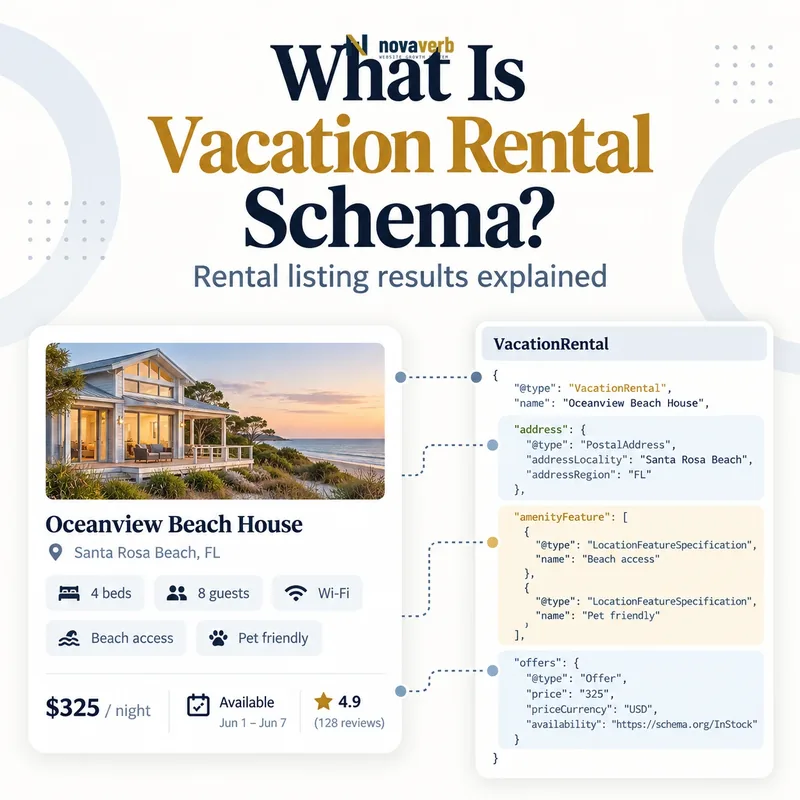
What Is Vacation Rental Schema?
Vacation Rental Schema is structured data that describes one bookable short-term accommodation, including its identity, guest capacity, location, images and property features.
The top-level entity is VacationRental, and a nested Accommodation under containsPlace holds unit details such as occupancy, beds, bedrooms, bathrooms, rooms, floor size and amenities. The listing itself carries a stable identifier, name, coordinates and images. Optional fields can add address, check-in and checkout time, language, reviews and aggregate ratings. The search integration is not open to every site by markup alone: it is intended for approved vacation-rental partners with Hotel Center access and additional onboarding. Valid JSON-LD without that commercial integration does not guarantee a vacation-rental result.
- Identify the exact page, asset, entity or relationship described in this section.
- Inspect the live implementation and retain the observed evidence.
- Compare the observation with the intended meaning and its primary specification.
- Correct any mismatch, then retest the live result.
- Record the accountable owner and review date.
| Layer | Entity | Purpose |
|---|---|---|
| Listing | VacationRental | Property identity and location |
| Unit | Accommodation | Capacity and room details |
| Feature | LocationFeatureSpecification | Amenity availability |
| Bed | BedDetails | Bed type and quantity |
| Reputation | Review or AggregateRating | Guest feedback |
- Describe one real bookable property.
- Keep listing data consistent.
- Confirm integration eligibility.
Primary specification: Google Search vacation-rental structured data documentation.
VacationRental markup is a property-data contract inside a broader partner integration, not a standalone rich-result shortcut.
Who Is Eligible to Use VacationRental Markup?
Vacation-rental sites must satisfy program eligibility and complete Hotel Center onboarding; adding schema alone does not complete the integration.
The public implementation guide is written for sites already connected with a technical account manager and able to use Hotel Center. Interested operators may express interest, but submission does not promise program acceptance. Partners also need property listing data, pricing, availability and landing-page behavior that remain synchronized. A small property manager may use a crawled list feed generated from structured pages, while another partner may provide XML. Individual hosts should not assume that copying an example creates search distribution. First determine whether the inventory is classified as vacation rental rather than hotel and whether the business can maintain accurate bookable data at scale.
- The exact page, asset, entity or relationship covered by this section
- The live implementation rather than an editor-only preview
- The primary specification or first-party record defining the expected behavior
- The validation result, accountable owner and review date
| Requirement | Why it matters | Evidence |
|---|---|---|
| Program access | Feature is limited | Hotel Center account |
| Technical onboarding | Connects inventory systems | Approved integration |
| Listing feed | Supplies property facts | Crawled schema or XML |
| Price feed | Supplies current rates | Partner data pipeline |
| Landing pages | Supports booking journey | Matching property and price |
- Confirm lodging category.
- Establish program access.
- Choose a listing-feed method.
- Connect rates and landing pages.
Eligibility is proven through completed partner onboarding and maintained feeds, not through validator success alone.
Which VacationRental Properties Are Required?
A VacationRental needs containsPlace with occupancy, a stable identifier, at least eight qualifying images, precise coordinates and a listing name.
The nested Accommodation must include occupancy as a QuantitativeValue whose integer value states the maximum permitted guests. identifier must remain stable when the title, owner-facing description or room inventory changes, and the same property needs the same ID across languages. Images require a minimum set that includes bedroom, bathroom and common-area coverage. Latitude and longitude need sufficient precision to locate the property accurately. The public name should identify the listing without stuffing destinations or promotional claims. Required fields must agree with the property feed and landing page.
- Identify the exact page, asset, entity or relationship described in this section.
- Inspect the live implementation and retain the observed evidence.
- Compare the observation with the intended meaning and its primary specification.
- Correct any mismatch, then retest the live result.
- Record the accountable owner and review date.
| Property | Required value | Failure example |
|---|---|---|
| containsPlace | One Accommodation | Unit details at wrong level |
| occupancy.value | Maximum guests | Beds used as capacity |
| identifier | Stable property ID | Changes with title |
| image | At least 8 qualifying photos | No bathroom image |
| latitude/longitude | At least 5 decimal precision | City-center coordinates |
| name | Listing name | Keyword-stuffed title |
- Preserve a durable property ID.
- Use policy-compliant image coverage.
- Verify coordinates and capacity.
Required fields pass when they identify the same physical property across schema, feeds, languages and booking pages.
How Should containsPlace and Occupancy Work?
containsPlace should hold one Accommodation representing the rentable unit, and occupancy should state the maximum number of guests permitted to stay.
Occupancy is not the number of beds, bedrooms or people selected in the current search. A cabin with two queen beds may sleep four, while local rules or host policy may cap it at three; the structured value should reflect the real bookable maximum. The nested unit can specify additionalType such as EntirePlace, PrivateRoom or SharedRoom, plus bed details, bedroom count, bathroom total and floor size. Do not create several Accommodation objects for optional room configurations when the landing page sells one unit. Multi-unit inventory needs stable property and unit modeling that matches the partner feed.
- The exact page, asset, entity or relationship covered by this section
- The live implementation rather than an editor-only preview
- The primary specification or first-party record defining the expected behavior
- The validation result, accountable owner and review date
| Unit fact | Property | Meaning |
|---|---|---|
| Maximum guests | occupancy.value | Allowed capacity |
| Rental mode | additionalType | Entire, private or shared |
| Bedrooms | numberOfBedrooms | Sleeping rooms |
| Bathrooms | numberOfBathroomsTotal | Full-equivalent total |
| Beds | bed | Type and count |
| Area | floorSize | Measured unit size |
- Identify the bookable unit.
- Set permitted occupancy.
- Add room and bed facts.
- Compare with booking controls.
The nested Accommodation is correct when it reproduces the exact unit and capacity a traveler can book.
How Should Address and Coordinates Be Modeled?
Use the full physical address and accurate coordinates for the rental, while respecting only legitimate safety and program handling rules.
A PostalAddress can contain street address, unit number, locality, region, postal code and two-letter country code. A P.O. box is not a physical rental location. Latitude and longitude should locate the property with at least five decimal places, not the destination city, property manager office or neighborhood centroid. Privacy-sensitive display rules may affect what a traveler sees publicly, but the integration still needs consistent property identity and location. Conflicting address, map pin and feed coordinates can merge the wrong listings or damage trust. Validate geocoding from the authoritative property record rather than a manually dragged marketing map pin.
- Identify the exact page, asset, entity or relationship described in this section.
- Inspect the live implementation and retain the observed evidence.
- Compare the observation with the intended meaning and its primary specification.
- Correct any mismatch, then retest the live result.
- Record the accountable owner and review date.
| Location field | Good value | Risk |
|---|---|---|
| streetAddress | Physical unit address | P.O. box |
| addressLocality | Actual city | Nearby popular destination |
| addressRegion | State or region | Inconsistent abbreviation |
| postalCode | Property postal code | Management-office code |
| latitude/longitude | Exact property location | City centroid |
- Use the physical property record.
- Validate coordinate precision.
- Detect feed and page mismatches.
- Handle unit numbers consistently.
Location data is reliable when address, coordinates, feed identity and landing page all resolve to one property.
What Image Requirements Matter Most?
Vacation-rental listings need at least eight accurate property photos, including bedroom, bathroom and common-area coverage, with stable crawlable URLs.
Quantity is only the first gate. Images should show the actual listed unit, remain accessible without authentication and avoid placeholders, watermarks that obscure the property or photos borrowed from another unit. A hero-only gallery may look polished but fail to document essential spaces. When an operator replaces image URLs on every edit, feeds and crawlers may repeatedly lose established assets; stable URLs with updated content management are easier to maintain. Use descriptive visible captions and accurate image metadata where helpful, following the broader principles in Image SEO. Test URL status, dimensions and property attribution after each feed refresh.
- The exact page, asset, entity or relationship covered by this section
- The live implementation rather than an editor-only preview
- The primary specification or first-party record defining the expected behavior
- The validation result, accountable owner and review date
| Image set | Minimum evidence | Quality check |
|---|---|---|
| Bedroom | At least one image | Matches bed inventory |
| Bathroom | At least one image | Shows listed unit |
| Common area | At least one image | Living or shared space |
| Total gallery | At least eight photos | Unique useful views |
| Image URL | Crawlable asset | 200 response and stable |
- Inventory gallery categories.
- Verify each photo’s property ID.
- Test crawlable stable URLs.
- Replace duplicates and placeholders.
A compliant gallery proves the property’s essential spaces instead of merely meeting an image count.
How Should Amenities and Property Types Be Added?
Add only supported amenities and property-type values that match the bookable unit, using exact names and truthful boolean or enumerated values.
The listing additionalType can describe a cabin, cottage, house, villa or another supported lodging category. The nested accommodation can distinguish entire place, private room and shared room. Amenities use LocationFeatureSpecification, with defined English names such as wifi, kitchen, pool, wheelchairAccessible or instantBookable - even on non-English listings when the integration requires those tokens. A missing amenity is not automatically false, and an amenity should not be marked true because it exists elsewhere in the building or resort unless guests of that unit genuinely have access. Non-boolean values can describe parking, internet or pool type and licensing where supported.
- Identify the exact page, asset, entity or relationship described in this section.
- Inspect the live implementation and retain the observed evidence.
- Compare the observation with the intended meaning and its primary specification.
- Correct any mismatch, then retest the live result.
- Record the accountable owner and review date.
| Feature | Value style | Example |
|---|---|---|
| wifi | Boolean | true |
| internetType | Enumerated text | Free |
| pool | Boolean | true |
| poolType | Enumerated text | Outdoor |
| licenseNum | Contextual text | Authority: number |
| additionalType | Property category | Cabin |
- Use supported feature names.
- Verify guest access.
- Separate boolean and enumerated values.
- Update changed amenities promptly.
Amenity markup should help a traveler filter accurately, never broaden the listing beyond what the booked unit includes.
What Vacation Rental Schema Mistakes Are Common?
Common mistakes include assuming open eligibility, unstable identifiers, insufficient image coverage, city-level coordinates, inflated occupancy and amenities copied across unrelated units.
A plugin may validate the JSON-LD while the operator has no Hotel Center integration. Property IDs can change whenever titles are regenerated, breaking continuity across languages and feeds. Portfolio templates may copy a pool, balcony or pet policy to every rental, while coordinates point to the management office. Some listings count sofa capacity that cannot actually be selected at checkout or show eight near-duplicate exterior photos without bedroom and bathroom evidence. Review averages may be stale or imported from a different property. These errors are operational, not merely syntactic, and require source-data reconciliation.
- The exact page, asset, entity or relationship covered by this section
- The live implementation rather than an editor-only preview
- The primary specification or first-party record defining the expected behavior
- The validation result, accountable owner and review date
| Mistake | Impact | Correction |
|---|---|---|
| No partner onboarding | No completed integration | Confirm eligibility first |
| Changing identifier | Duplicate property history | Use immutable ID |
| City-center coordinates | Wrong location | Use property coordinates |
| Copied amenities | Filter mismatch | Use unit-level data |
| Inflated occupancy | Unbookable promise | Match booking maximum |
| Weak gallery | Incomplete listing | Add required room coverage |
- Check onboarding state.
- Reconcile property identity.
- Test required media and location.
- Run representative bookings.
The highest-priority defect is any property fact that leads a traveler to a different location, capacity or amenity than the booking delivers.