
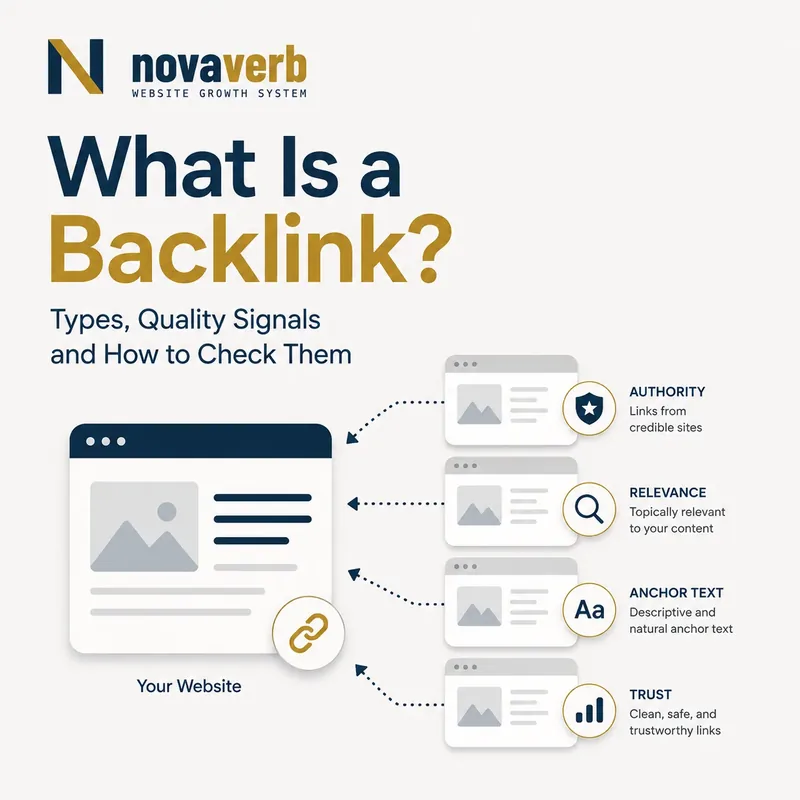
What Is a Backlink?
A backlink is a link from a page on one website to a page on another website. It is also called an inbound link because the destination website receives the link from an external source.
If Site A links to a page on Site B, Site B has received a backlink from Site A. The visible words in the link are the anchor text, the linking page is the source page, and the linked page is the destination page.
Source page on Website A
→ clickable link
→ destination page on Website B
= one observed backlink
A backlink record proves that a link was observed at a specific source URL when the data provider crawled it. It does not by itself prove that the link is valuable, trusted, indexed or responsible for a ranking change.
- Identify the external source page.
- Record the linked destination page.
- Keep the individual link separate from the referring-domain count.
Section takeaway: A backlink is a link from a page on one website to a page on another website. It is also called an inbound link because the destination website receives the link from an external source.
How Do Backlinks Work?
A backlink creates a navigable path between websites and gives crawlers another route for discovering the destination URL.
- A publisher adds an HTML link to a source page.
- A visitor or crawler loads that source page.
- The link exposes a destination URL and anchor context.
- A crawler may follow the URL and discover or revisit the destination.
- Search systems can evaluate the link alongside relevance, site context and many other signals.
The simplest standard link looks like this:
<a href="https://example.com/guide">technical SEO guide</a>Links can also carry attributes such as nofollow, sponsored or ugc. Those attributes describe the publisher's relationship to the link; they do not turn an irrelevant link into a useful recommendation.
Section takeaway: A backlink creates a navigable path between websites and gives crawlers another route for discovering the destination URL.
Backlink vs Referring Domain
A backlink is one link; a referring domain is the external domain that supplies one or more links.
| Metric | What it counts | Example |
|---|---|---|
| Backlinks | Individual observed links | Twenty pages on one site link to you: 20 backlinks |
| Referring domains | Distinct external domains | Those twenty links all come from one site: 1 referring domain |
| Referring pages | Distinct source URLs | Ten source URLs contain two links each: 10 referring pages |
| Linked pages | Your destination URLs receiving links | The links point to three of your pages: 3 linked pages |
Do not add backlinks and referring domains together. They answer different questions and naturally differ by large amounts.
- Use backlink count for individual observed links.
- Use referring-domain count for distinct external websites.
- Use referring-page count for exact source URLs.
Section takeaway: A backlink is one link; a referring domain is the external domain that supplies one or more links.
Inbound Links vs Outbound Links vs Internal Links
The same link is outbound from the source website and inbound to the destination website; an internal link stays within the same website.
- Inbound link or backlink: an external site links to your site.
- Outbound link: your page links to another site.
- Internal link: one page on your site links to another page on the same site.
These labels describe direction and ownership, not quality. An internal link can be highly useful for navigation and discovery, while an external backlink can be irrelevant or manipulative.
For site structure, read The Truth About Internal Linking: Quality Over Quantity.
Section takeaway: The same link is outbound from the source website and inbound to the destination website; an internal link stays within the same website.
Dofollow vs Nofollow Backlinks
“Dofollow” usually means a normal link without a restrictive rel value; a nofollow link includes rel="nofollow" to qualify the publisher's relationship to the destination.
| Link form | HTML | Publisher signal |
|---|---|---|
| Normal link | <a href="…"> | No special relationship qualifier |
| Nofollow | rel="nofollow" | The publisher does not want to make an unqualified endorsement |
| Sponsored | rel="sponsored" | The placement is advertising, sponsorship or compensation |
| UGC | rel="ugc" | The link appears in user-generated content |
“Dofollow” is common industry vocabulary, not an HTML attribute. There is no rel="dofollow" requirement.
- Inspect the rel attribute on the actual link.
- Separate normal, nofollow, sponsored and UGC relationships.
- Evaluate relevance and placement independently from the attribute.
Section takeaway: “Dofollow” usually means a normal link without a restrictive rel value; a nofollow link includes rel="nofollow" to qualify the publisher's relationship to the destination.
What Makes a Backlink High Quality?
A useful backlink comes from a legitimate, relevant page, appears in meaningful editorial context, points to the right destination and can send interested visitors.
| Signal | What to inspect | Why it matters |
|---|---|---|
| Topical relevance | Source page topic and surrounding copy | The recommendation makes sense to the reader |
| Editorial reason | Why the publisher selected this destination | Earned references are more defensible than inserted links |
| Source legitimacy | Real ownership, original content and normal audience | Reduces dependence on artificial networks |
| Placement | Main content, author bio, navigation, footer or comment | Placement changes context and likely visibility |
| Destination fit | Whether the linked page satisfies the promise | Protects user experience and conversion intent |
| Technical accessibility | Status, canonical, indexability and redirect chain | A broken destination wastes the recommendation |
- Verify topical and audience relevance.
- Confirm a legitimate editorial or business reason for the link.
- Check that the destination satisfies the source page's promise.
Section takeaway: A useful backlink comes from a legitimate, relevant page, appears in meaningful editorial context, points to the right destination and can send interested visitors.
Does Anchor Text Matter?
Anchor text gives users and crawlers concise context about the linked destination, but natural backlink profiles use varied wording rather than one repeated commercial phrase.
- Brand anchor: the company or product name.
- Descriptive anchor: a plain description of the destination.
- URL anchor: the visible address.
- Generic anchor: wording such as “read the guide.”
- Image link: the image alternative text can supply context.
Review whether the wording accurately describes the destination. Repeated exact-match anchors created through controlled placements deserve investigation because they can reveal an artificial acquisition pattern.
Section takeaway: Anchor text gives users and crawlers concise context about the linked destination, but natural backlink profiles use varied wording rather than one repeated commercial phrase.
Editorial vs Self-Created Backlinks
An editorial backlink is selected by an independent publisher because the destination helps its audience; a self-created backlink is placed by the site being promoted or its agent.
| Type | Example | Review question |
|---|---|---|
| Editorial citation | A guide cites original research | Did the publisher independently choose the source? |
| Partner link | A verified integration or association page | Does the relationship exist and help users? |
| Directory listing | A relevant professional directory | Is the directory curated and used by its audience? |
| User-generated link | A forum answer or profile | Does it solve the discussion rather than promote blindly? |
| Paid placement | A sponsored article or advertisement | Is the commercial relationship disclosed and qualified? |
- Identify who selected and placed the link.
- Document any commercial or partnership relationship.
- Judge the placement from its real context, not its label alone.
Section takeaway: An editorial backlink is selected by an independent publisher because the destination helps its audience; a self-created backlink is placed by the site being promoted or its agent.
Homepage Backlinks vs Deep-Page Backlinks
A homepage backlink supports the brand or company as a whole, while a deep-page backlink points directly to a specific resource, product, study or tool.
Deep links often create a clearer reader journey because the destination matches the source-page context. A guide about checking backlinks should normally link to the exact checker or tutorial, not force the visitor to search from the homepage.
- Use the homepage for company-level references.
- Use a product page for commercial evaluation.
- Use a guide for an explanatory citation.
- Use a free tool when the reader's next action is to run a check.
Section takeaway: A homepage backlink supports the brand or company as a whole, while a deep-page backlink points directly to a specific resource, product, study or tool.
New, Lost and Reclaimed Backlinks
A new backlink was first observed during the current measurement window; a lost backlink was previously observed but is no longer present or reachable.
“New” and “lost” depend on crawler coverage and timestamps. A data provider can report only what it observed, so a lost record can mean the link was removed, the page became inaccessible, the destination changed, or the provider has not recrawled the same state.
Reclamation focuses on recoverable cases: broken destination URLs, accidental removals, incorrect mentions and migrations that left valuable source pages pointing through avoidable redirects.
- Record first-seen and last-seen timestamps.
- Verify the current source-page state.
- Create a reclamation task only when the relationship is recoverable.
Section takeaway: A new backlink was first observed during the current measurement window; a lost backlink was previously observed but is no longer present or reachable.
How Do You Find Backlinks to Any Website?
Enter a domain or URL into a backlink checker, then inspect referring domains, source pages, destination pages, anchor text and link attributes.
- Choose whether you are checking an entire domain or one URL.
- Run the Novaverb Free Backlink Checker.
- Separate total backlinks from unique referring domains.
- Open the actual source page for important results.
- Verify the link is present and the destination resolves correctly.
- Group results by relevance, destination and next action.
For a step-by-step walkthrough, read How to Check Backlinks for Any Website in 5 Minutes.
Section takeaway: Enter a domain or URL into a backlink checker, then inspect referring domains, source pages, destination pages, anchor text and link attributes.
How Do You Check Your Own Backlinks?
Check your own backlink profile by combining the links reported by your connected first-party search data with an external backlink index, then verify important source pages directly.
- Export currently known links and referring domains.
- Group destination URLs by page type and business purpose.
- Identify broken destinations, redirect chains and unexpected canonical targets.
- Review new and lost links within a defensible observation window.
- Separate brand mentions, editorial citations, partnerships, paid placements and spam.
- Assign a specific action only where the evidence supports one.
Use Backlinks Explorer when the job requires ongoing evidence and change tracking rather than a one-time lookup.
Section takeaway: Check your own backlink profile by combining the links reported by your connected first-party search data with an external backlink index, then verify important source pages directly.
How Do You Check Competitor Backlinks?
Competitor backlink research compares external pages that link to competing domains but not yet to your relevant destination.
- Choose true search competitors for the topic, not only business competitors.
- Compare referring domains and the exact pages attracting links.
- Classify why each source linked: data, tool, definition, quote, template or news.
- Find a legitimate content or product gap you can satisfy better.
- Prioritize sources whose audience overlaps yours.
- Record outreach or content work as a test, not as a guaranteed link.
Use Competitor Top Pages to identify pages attracting visibility, then use Competitive Analysis to connect page, keyword and backlink evidence.
Section takeaway: Competitor backlink research compares external pages that link to competing domains but not yet to your relevant destination.
How Do You Evaluate a Backlink?
Evaluate a backlink by checking the real source page, its relationship to your topic, the link's placement and attributes, and whether the destination delivers what the source promises.
- Open the exact referring page.
- Confirm the source status and canonical URL.
- Read the surrounding paragraph and page topic.
- Identify the visible anchor or linked image.
- Record
nofollow,sponsoredorugcattributes. - Check whether the link is editorial, paid, user-generated or sitewide.
- Open the destination and confirm a stable, relevant response.
- Choose keep, monitor, reclaim, disclose, investigate or ignore.
Section takeaway: Evaluate a backlink by checking the real source page, its relationship to your topic, the link's placement and attributes, and whether the destination delivers what the source promises.
Which Backlinks Can Create Risk?
Backlinks deserve investigation when they are purchased without appropriate qualification, generated at scale, hidden, injected, exchanged primarily to manipulate signals or placed across unrelated low-value pages.
- Large groups of unrelated pages using repeated commercial anchors.
- Sitewide links with no genuine user or partnership purpose.
- Networks created mainly to publish promotional links.
- Paid placements presented as independent editorial recommendations.
- Hacked or injected links the publisher did not intend.
- Automated comments, profiles or forum posts created at scale.
A strange-looking domain is not proof of harm. Document the pattern, ownership, placement and acquisition relationship before escalating.
Read Understanding Link Buying and Manual Actions for the commercial-placement boundary.
Section takeaway: Backlinks deserve investigation when they are purchased without appropriate qualification, generated at scale, hidden, injected, exchanged primarily to manipulate signals or placed across unrelated low-value pages.
Should You Disavow Backlinks?
Do not create a disavow file merely because a backlink tool reports low scores or unfamiliar domains.
First determine whether your team or its agents participated in manipulative link creation, whether a manual action or concrete risk exists, and whether removal is possible. A third-party toxicity label is a screening signal, not evidence of what Google did.
- Confirm whether manipulative acquisition occurred.
- Check for Google-specific evidence in Search Console.
- Review the exact scope before submitting a high-impact change.
Section takeaway: Do not create a disavow file merely because a backlink tool reports low scores or unfamiliar domains.
How Do You Earn Backlinks?
Earn backlinks by publishing something a specific audience can cite, use, verify or share: original evidence, a practical tool, a clear definition, a reusable template or a uniquely complete solution.
| Asset | Why a publisher might link | Proof needed |
|---|---|---|
| Original research | Supports a claim with data | Method, sample and date |
| Free tool | Lets readers complete a task | Accurate output and clear limits |
| Definitive guide | Explains a difficult topic clearly | Current sources and useful examples |
| Template or checklist | Saves implementation time | Usable instructions and scope |
| Expert contribution | Adds direct experience | Named expertise and attributable evidence |
Promotion makes the right people aware of the asset. It does not guarantee coverage, ranking or a link.
- Create an asset a specific audience can cite or use.
- Show the method and evidence behind factual claims.
- Promote the asset to relevant publishers without promising a link.
Section takeaway: Earn backlinks by publishing something a specific audience can cite, use, verify or share: original evidence, a practical tool, a clear definition, a reusable template or a uniquely complete solution.
How Do Backlinks Fit Into an SEO Audit?
A backlink audit should connect every observation to a destination, business purpose and verified action instead of producing a large unprioritized export.
- Protect: monitor important editorial links and linked assets.
- Repair: fix broken destinations and unnecessary redirect chains.
- Reclaim: investigate recoverable lost links and unlinked mentions.
- Improve: strengthen weak linked pages that no longer satisfy the source context.
- Investigate: document suspicious acquisition patterns before acting.
- Expand: find legitimate topic and source gaps.
Use Site Audit to prioritize link findings alongside crawl and page evidence, then use the Decision Ladder to select the next verified action.
Section takeaway: A backlink audit should connect every observation to a destination, business purpose and verified action instead of producing a large unprioritized export.
Common Backlink Mistakes
Common backlink mistakes chase totals and provider scores while ignoring source relevance, destination quality, acquisition history and the real next action.
| Mistake | Why it fails | Preferred correction |
|---|---|---|
| Counting links as domains | One site can create thousands of links | Report both metrics separately |
| Judging from one score | The number is a provider estimate | Inspect the source and relationship |
| Buying exact-match anchors | Creates an artificial acquisition pattern | Earn relevant editorial references |
| Ignoring destination health | Good sources can point to broken pages | Check status, redirects and content fit |
| Calling every lost link removable | The source may be gone or recrawl delayed | Verify current source state first |
| Disavowing unfamiliar domains | Unfamiliar does not prove manipulation | Act only from documented evidence |
| Reporting acquisition as impact | A new link does not prove rankings changed | Measure outcomes separately over time |
- Keep backlinks and referring domains as separate metrics.
- Inspect the source page instead of relying on one provider score.
- Measure search impact separately from link acquisition.
Section takeaway: Common backlink mistakes chase totals and provider scores while ignoring source relevance, destination quality, acquisition history and the real next action.
Backlink Audit Checklist
A backlink review passes QA when the source, destination, relationship, observation time and next action are clear enough for another analyst to reproduce.
- The checked domain or URL scope is recorded.
- The data source and refresh time are recorded.
- Backlinks and referring domains are reported separately.
- The exact source and destination URLs are retained.
- The source page status and canonical are checked.
- The destination response and redirect chain are checked.
- Anchor text and link attributes are recorded.
- Source relevance and surrounding context are reviewed.
- Editorial, sponsored, UGC and controlled placements are separated.
- Sitewide links are identified.
- New and lost observations use a defined time window.
- Important links are verified on the live source page.
- Third-party metrics are labeled as provider estimates.
- Google-specific claims use Search Console evidence.
- Each finding has a specific next action.
- The action is retested and timestamped after completion.
Section takeaway: A backlink review passes QA when the source, destination, relationship, observation time and next action are clear enough for another analyst to reproduce.
Frequently Asked Questions About Backlinks
What is a backlink in SEO?
What is the difference between a backlink and a referring domain?
Are inbound links and backlinks the same?
What is a dofollow backlink?
Do nofollow backlinks matter?
How do I check backlinks for free?
How do I find competitor backlinks?
What makes a backlink valuable?
Can backlinks hurt SEO?
Should I buy backlinks?
How many backlinks do I need?
How often should I check backlinks?
- Backlinks count individual external links.
- Referring domains count distinct external websites.
- Important links should be verified on their live source pages.
Section takeaway: A backlink is a link from a page on one website to a page on another website.
Check the Link Before You Judge the Score
Start with the actual source page, destination and link relationship. Use totals and provider metrics to find records worth reviewing, then verify what is live before assigning an action.
Novaverb connects backlink observations, live crawl evidence and destination health so teams can move from a large export to a verified next action.
Explore the complete SEO tools system or use the Decision Ladder to separate protect, repair, reclaim, investigate and expand decisions.
- Open the source page and verify the link.
- Check the destination response and relevance.
- Choose the next action from evidence rather than a provider score.
Section takeaway: Start with the actual source page, destination and link relationship. Use totals and provider metrics to find records worth reviewing, then verify what is live before assigning an action.