
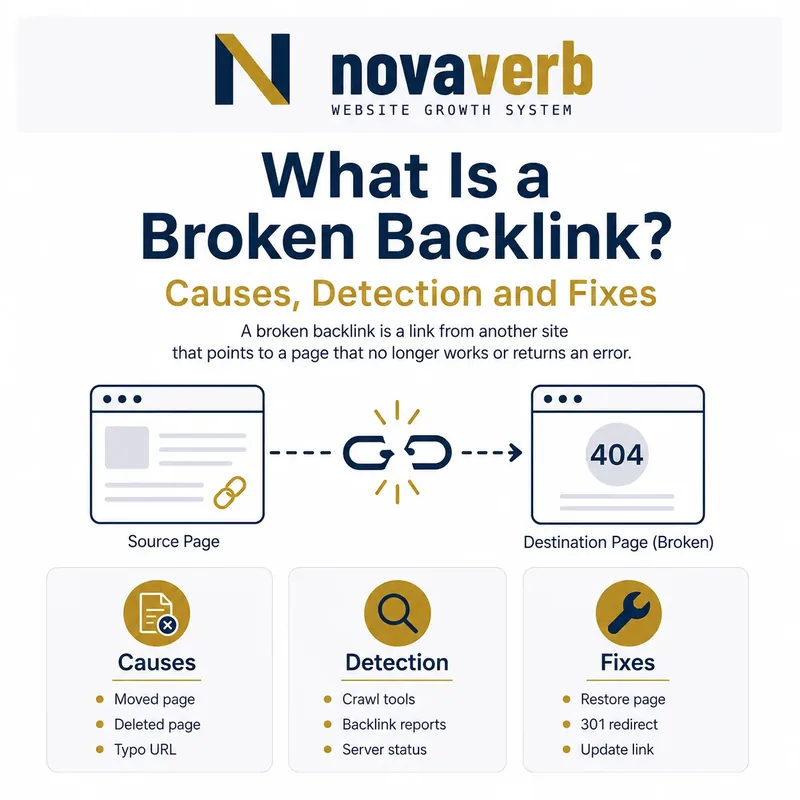
What Is a Broken Backlink?
The link itself still exists on another website, but the route behind it no longer works as promised. For example, an article may link to a research guide that was deleted during a migration. The external source remains visible while the destination now returns a 404 response.
A broken backlink is therefore different from a lost backlink. A broken backlink can still be present on the source page; a lost backlink is no longer observed under the provider’s current data and measurement window. Verify the live source and destination before assigning either label.
- Open the exact external source page
- Confirm that the link is still present
- Resolve the destination and any redirects
- Compare the final page with the anchor and surrounding context
| Observed state | Source link | Destination | Working label |
|---|---|---|---|
| Link remains, target returns 404 | Present | Broken | Broken backlink |
| Link was removed | Absent | Not applicable | Lost backlink |
| Link reaches equivalent content | Present | Healthy | Working backlink |
| Link reaches unrelated content | Present | Live but mismatched | Relevance problem |
A backlink is broken when the live route fails the promise made by the source link.
Why Do Backlinks Break?
Content operations cause many broken backlinks. Teams consolidate articles, change URL patterns, remove old campaigns or launch a new CMS without mapping legacy destinations. Infrastructure failures can also interrupt links through DNS errors, expired domains or persistent server responses.
Not every retired URL deserves restoration. A discontinued offer, unsafe download or obsolete claim may need to remain unavailable. The correct action depends on whether a current page can honestly satisfy the original link’s purpose.
- Unmapped URL migration
- Deleted or consolidated content
- Incorrect internal redirect rule
- Expired or changed domain
- Persistent server or DNS failure
- Typo in the external destination URL
| Cause | What you can observe | Likely owner |
|---|---|---|
| Deleted page | 404 or 410 response | Content team |
| Migration gap | Old URL has no mapping | SEO and engineering |
| Redirect fault | Chain, loop or wrong destination | Engineering |
| Domain failure | DNS or connection error | Infrastructure |
| Source typo | Only the linking URL is malformed | External publisher |
Identify the actual failure before choosing a fix, because deletion, migration and source errors require different owners.
Broken Backlink vs Broken Internal Link
You can normally update a broken internal link at its source because you control the page. With a broken backlink, you often control only the destination. That makes restoring content or adding a relevant redirect faster than waiting for an external publisher to edit its page.
Keep the datasets separate during diagnosis. Internal links come from a first-party crawl of your pages; backlinks to your property come from an external link index and require verification on the observed source page.
- Classify the source as internal or external
- Record which side you control
- Repair the closest controllable point
- Re-crawl or re-check after the change
| Link problem | Source | Fastest controllable fix | Verification |
|---|---|---|---|
| Broken internal link | Your website | Update the source href | Re-crawl your site |
| Broken backlink | External website | Restore or redirect the destination | Open source and final target |
| Malformed external URL | External website | Request a source correction | Revisit the linking page |
The distinction matters because the source location determines what your team can repair directly.
Which Status Codes Create Broken Backlinks?
Status codes describe the HTTP route, not the complete reader experience. A 301 response may be technically valid yet lead to a homepage that does not answer the original link. Conversely, a short maintenance interruption may not justify changing a long-standing URL.
Record the complete redirect chain and final response. Use the Novaverb guide to 404 Not Found when the destination is missing, and distinguish that state from a deliberate 410 Gone response.
- Check the first response
- Follow every redirect hop
- Record the final status
- Inspect whether final content matches the source context
- Repeat transient checks before escalating
| Response pattern | Interpretation | Next check |
|---|---|---|
| 404 | Destination not found | Look for an equivalent replacement |
| 410 | Destination intentionally removed | Confirm whether retirement is still correct |
| 5xx | Server could not serve the page | Retest and inspect duration |
| Redirect loop | No usable final destination | Repair redirect rules |
| 301 to unrelated page | Route works but intent is lost | Choose a relevant target |
Treat a backlink as repaired only when its final destination works and still satisfies the link’s context.
How Do You Find Broken Backlinks?
Start with a backlink index rather than guessing from server logs alone. The free backlink checker can surface observed source pages, anchors and destinations for an initial review. Provider data is a discovery queue; the live source and destination supply the evidence for action.
Prioritize URLs with meaningful sources, relevant context, recurring referral visits or clear business value. Avoid spending equal effort on every error row, because stale scrapers and low-value duplicates can consume time without changing a useful customer path.
- Export observed backlinks and referring pages
- Normalize destination URLs
- Resolve status and redirect chains
- Group failures by final destination
- Open the live external sources
- Prioritize verified relationships
| Audit field | Why it matters | Required evidence |
|---|---|---|
| Source URL | Identifies the external document | Live source page |
| Anchor text | Shows the promised destination | Rendered link label |
| Original target | Preserves the linked URL | Observed href |
| Final target | Shows where the route ends | Redirect resolution |
| Final status | Confirms availability | Live HTTP response |
| Last checked | Dates the observation | Verification timestamp |
A reliable broken-backlink list connects every provider row to a verified live source, destination and timestamp.
How Do You Fix a Broken Backlink?
Restore the URL when the original content remains useful and can be maintained accurately. Use a permanent redirect when a clear replacement covers the same purpose. Contact the publisher when the destination contains a typo or when a more precise live URL exists but cannot be reached from the broken route.
Do not redirect every missing URL to the homepage. A generic destination rarely satisfies a specific anchor and can hide rather than solve the failure. If no honest replacement exists, leaving the URL retired may be the correct outcome.
- Read the source anchor and surrounding sentence
- Identify the content the source expected
- Choose restore, redirect, outreach or retire
- Implement one direct destination
- Test the old URL and final content
- Record the change and recheck the source
| Situation | Preferred action | Pass condition |
|---|---|---|
| Original content remains valid | Restore the URL | Old target serves the intended content |
| Equivalent replacement exists | Add one direct 301 | Final page matches the source context |
| External href contains a typo | Request correction | Publisher updates the source |
| No safe equivalent exists | Keep retired | No misleading redirect is introduced |
The right fix preserves meaning first and URL continuity second.
When Should You Restore a Deleted Page?
Use archived editorial records, current product knowledge and the referring context to reconstruct the user need. Do not copy an obsolete page simply to recover a link. The restored destination should meet today’s quality bar and clearly answer the expectation created by the backlink.
If several old URLs covered the same intent, consolidate them into one maintained resource and redirect only the genuinely equivalent routes. This can simplify ownership while keeping defensible paths intact.
- The topic still serves a real user task
- The information can be kept accurate
- External sources remain relevant
- The URL has no stronger equivalent replacement
- Restoration will not recreate harmful or obsolete claims
Restore content for a continuing user need, not merely to make an error count disappear.
When Should You Redirect a Broken Backlink?
A product version moving to a current product page, a merged guide moving to its maintained replacement or a corrected slug moving to the canonical URL can support a direct redirect. Unrelated category pages and homepages are weaker choices because they change the task behind the click.
Update your own internal links to the final URL even after adding the redirect. This removes unnecessary hops inside the site and keeps the redirect available primarily for external references you cannot edit.
- Match topic and user intent
- Use one permanent hop
- Point to the canonical destination
- Update controllable internal sources
- Test status, content and canonical after release
| Old destination | Candidate target | Decision |
|---|---|---|
| Outdated version guide | Maintained version guide | Redirect if scope is equivalent |
| Merged glossary entry | Complete consolidated definition | Redirect |
| Deleted campaign | Homepage | Usually do not redirect |
| Misspelled slug | Correct canonical slug | Redirect directly |
A redirect repairs a backlink only when the final page is a credible continuation of the original destination.
What Is Backlink Reclamation?
A reclamation queue can include broken destination URLs, unlinked brand mentions, malformed links and high-value links removed during a source update. Each category needs different proof and outreach. A broken destination is often controllable internally; a removed source link depends on the publisher’s current editorial choice.
Keep reclamation separate from broad link building. The evidence begins with a specific historical or observed relationship, and success means that relationship is live and useful again.
- Broken destination reclamation
- Incorrect URL correction
- Lost-link review
- Unlinked mention outreach
- Redirect and canonical cleanup
| Reclamation type | Evidence | Primary action |
|---|---|---|
| Broken target | Live external link reaches an error | Restore or redirect |
| Malformed href | Source URL contains an error | Publisher correction |
| Lost link | Previously observed link is absent | Verify change, then assess outreach |
| Unlinked mention | Brand named without a link | Request a useful citation when appropriate |
Backlink reclamation starts from an observed relationship and ends only when the repaired path is verified live.
How Should You Prioritize Broken Backlinks?
Do not prioritize from an authority score alone. Provider metrics can help sort a large dataset, but the decision should also use the exact referring page, anchor, placement and intended destination. A moderate source that sends qualified visitors can be more valuable to the business than a high score with no meaningful context.
Novaverb’s SEO tools system connects backlink observations with destination health and follow-up work so teams can move from a record to a verified action.
- Confirm the source link exists
- Check topical and business relevance
- Measure destination importance
- Estimate repair effort and risk
- Choose an owner and verification date
| Priority input | Higher priority | Lower priority |
|---|---|---|
| Evidence | Live link and repeatable failure | Stale unverified export |
| Source | Relevant editorial page | Unrelated automated page |
| Destination | Important evergreen or product page | Obsolete low-value asset |
| Repair | Direct safe replacement | No honest equivalent |
| Demand | Observed referral or customer path | No known user consequence |
Fix the relationships with the clearest evidence and customer consequence before chasing the largest raw total.
Frequently Asked Questions About Broken Backlinks
- Verify the source before calling a link active
- Verify the destination before assigning a fix
- Keep broken and lost links as separate states
Are all 404 backlinks worth fixing?
Is a redirected backlink broken?
Can I redirect broken backlinks to my homepage?
What is the difference between a lost and broken backlink?
How often should broken backlinks be checked?
Can a nofollow backlink be broken?
Does fixing a backlink guarantee rankings?
What tool can check broken backlinks?
A defensible broken-backlink decision always states what was observed, what was changed and how the repaired route was verified.
Find the Broken Path, Then Repair the Right URL
Use the backlink checker to build the queue, inspect each important source and connect the final action to the page that should satisfy the click. For recurring reviews, Novaverb keeps the observation, destination health and next action in one SEO workflow.
- Discover observed broken destinations
- Open the source and verify the link
- Choose the smallest honest repair
- Retest the final route with a fresh timestamp
Repair the relationship only after the source, destination and reader expectation agree.