
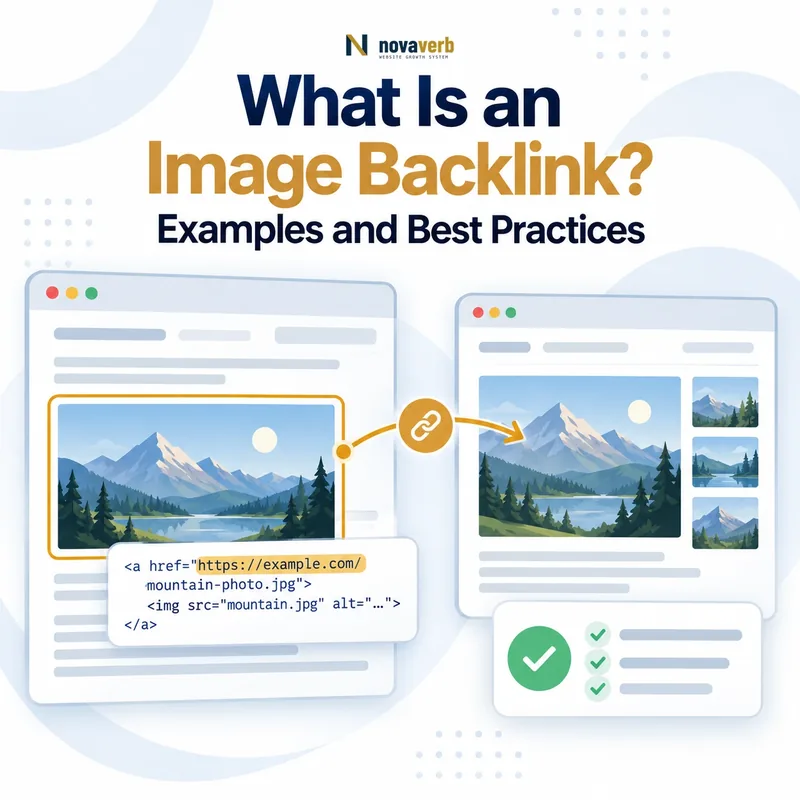
What Is an Image Backlink?
Common visual assets include infographics, charts, diagrams, maps, product screenshots, photographs and data visualizations. The backlink may point to the original image file, the page hosting the asset, a related report or another relevant destination.
An embedded image without a hyperlink is an image mention, not a backlink. Verify the rendered source and HTML because a visible credit can be plain text, and a clickable image can use an empty or image-derived anchor.
- Clickable image element
- Caption attribution link
- Source-credit link
- Linked logo or badge
- Screenshot with nearby citation
- Infographic embed attribution
- Destination hosting original asset
| Visual use | Backlink present? | Evidence |
|---|---|---|
| Clickable infographic | Yes | Image wrapped in link |
| Caption with linked source | Yes | Text attribution anchor |
| Plain-text website credit | No | Mention without hyperlink |
| Hotlinked image only | Not necessarily | Image source is not a page link |
| Linked logo in partner page | Yes | Image link to destination |
| Screenshot without credit | No observed link | Visual mention only |
An image backlink exists only when the visual or its surrounding attribution contains a verifiable hyperlink to the destination.
How Do Image Backlinks Work in HTML?
A linked image has no conventional visible anchor phrase, so tools may report its alt text, file name or an empty value as anchor context. Alt text primarily describes the image for accessibility; it should not be stuffed with target keywords to influence reports.
A hotlinked image loads the file from another domain through its image source attribute but may not create a clickable backlink. Inspect both the image source and any enclosing anchor before classifying the relationship.
- Anchor href as link destination
- Image src as file location
- Alt text as image description
- Caption as visible context
- Rel attributes on the anchor
- Rendered click behavior
- Final redirect destination
| HTML element or field | Role | Common confusion |
|---|---|---|
| Anchor href | Clickable destination | Mistaken for image file source |
| Image src | Loads visual file | Assumed to be a backlink |
| Alt attribute | Describes image | Treated as guaranteed anchor |
| Figcaption | Visible supporting text | May or may not link |
| Rel attribute | Marks link relationship | Does not define editorial value |
| Redirect chain | Resolves final target | Hidden broken destination |
Classify image links by the actual anchor destination and click behavior, while treating image source, alt text and captions as separate evidence.
What Types of Images Earn Backlinks?
An infographic can summarize a complex process, while a chart can support a factual claim and a screenshot can document a product state. Photography can earn links when it is original, relevant and licensed for the publisher’s intended use.
The asset still needs provenance, accessible context and a stable home. A beautiful image without a clear source, method or usage policy can be difficult for responsible publishers to reference.
- Original data charts
- Process diagrams
- Maps and geographic visuals
- Technical illustrations
- Product screenshots
- Before-and-after evidence
- Original photography
- Infographics and visual summaries
| Visual asset | Publisher need | Citation requirement |
|---|---|---|
| Data chart | Support a claim | Source and methodology |
| Diagram | Explain a system | Clear labels and context |
| Map | Show location or distribution | Data origin and date |
| Screenshot | Document interface or result | Product and version context |
| Photography | Illustrate a real subject | Rights and credit terms |
| Infographic | Summarize a process | Original useful synthesis |
The strongest visual combines original utility with enough provenance and context for another publisher to cite it responsibly.
Image Backlinks vs Text Backlinks
A text link can describe the destination explicitly. A linked image depends more heavily on alt text, caption, surrounding copy and visual purpose to set user expectations. A separate attribution link often provides clearer source language than making the image alone clickable.
Neither format is universally better. Select the implementation that helps users understand the reference, respects accessibility and licensing, and reaches the exact page supporting the visual.
- Visible text versus visual click target
- Different anchor reporting
- Alt and caption context
- Accessibility requirements
- Image licensing and attribution
- Same need for destination relevance
- Same need for live verification
| Dimension | Image backlink | Text backlink |
|---|---|---|
| Click target | Visual asset | Visible words |
| Context | Alt, caption and surrounding copy | Anchor and surrounding copy |
| Accessibility | Alt and keyboard behavior matter | Descriptive anchor matters |
| Attribution | Often explicit source credit | May be inline citation |
| Tool reporting | Can show empty or image anchor | Usually reports text anchor |
| Evaluation | Visual purpose and destination | Phrase and destination fit |
Use the link format that communicates the destination clearly and preserves accessibility, attribution and source relevance.
Why Are Image Backlinks Valuable?
A widely used chart can introduce a report to new readers, while a diagram can send practitioners to a detailed guide. Image usage also reveals which visual explanations publishers find useful, informing future content and product education.
Do not assume every embedded image produces valuable traffic or search benefit. Measure verified referring pages, qualified referrals, asset engagement and assisted outcomes separately from provider counts.
- Qualified referral visits
- Attribution to original work
- Discovery of reports and tools
- Evidence of visual demand
- Brand and expert visibility
- Broader deep-link destinations
- Opportunities for mention reclamation
| Potential value | Evidence | Limitation |
|---|---|---|
| Referral traffic | Sessions from source page | Image may not be clicked |
| Source attribution | Visible linked credit | License terms vary |
| Asset discovery | Visits to original page | Not a ranking guarantee |
| Content insight | Repeated visual usage | Monitoring is incomplete |
| Brand exposure | Relevant publisher context | Attribution can be removed |
| Commercial support | Assisted actions | Causality is hard to isolate |
Image backlinks deserve investment when verified source use creates audience, attribution or business value beyond a raw link count.
How Do You Create Link-Worthy Visual Assets?
A visual should communicate something easier to understand, compare or remember than the surrounding prose. Build from reliable first-party data, qualified expertise or a clearly documented synthesis rather than decorating generic claims.
Publish the asset on a stable linkable asset page with a title, explanation, date, methodology, accessible alternative and licensing or attribution guidance. Maintain the underlying data and destination after promotion.
- Define the audience question
- Choose the information relationship to visualize
- Verify data and source rights
- Design for clarity before decoration
- Add labels, dates and methodology
- Write useful alt text and text alternative
- Publish on a stable canonical page
- State reuse and attribution terms
- Test mobile and accessible behavior
- Assign an update schedule
| Creation layer | Required output | Quality check |
|---|---|---|
| Purpose | One visual question | Audience understands the task |
| Evidence | Traceable data or expertise | Claims can be verified |
| Design | Clear hierarchy and labels | Meaning survives resizing |
| Accessibility | Alt and text alternative | Nonvisual access works |
| Reuse | Rights and credit guidance | Publisher can comply |
| Maintenance | Owner and update date | Asset remains current |
A visual asset becomes reference-ready when clarity, evidence, accessibility, reuse terms and maintenance are designed together.
How Do You Find and Reclaim Image Mentions?
Use image search, file-name searches, distinctive caption phrases, analytics referrals and backlink data to discover possible uses. Confirm that the visual is actually yours, that the page is live and that an existing link is not already present elsewhere in the attribution.
Approach publishers proportionately. State the exact image and page, provide the preferred original source URL and explain applicable credit terms. Do not make legal threats without authority or assume every use requires a backlink; licensing and fair-use questions may require qualified review.
- Inventory owned visual assets and source URLs
- Search images, filenames and distinctive text
- Open the exact external page
- Confirm ownership and version
- Check image, caption and existing links
- Review license and prior permissions
- Select attribution, link, correction or no action
- Send a concise factual request
- Verify the live outcome
- Record relationship and evidence
| Observed use | Possible action | Required check |
|---|---|---|
| Image with plain credit | Request link if appropriate | Credit and license terms |
| Image with broken source link | Offer current destination | Final URL relevance |
| Modified chart with source | Review accuracy and terms | Method and permission |
| Licensed stock image | No ownership-based request | License holder |
| Fair-use context | Seek qualified review if needed | Legal authority |
| Already linked attribution | Monitor | Source and destination health |
Reclamation should protect accurate attribution and user access while respecting ownership, licensing and publisher context.
How Do You Audit and Monitor Image Backlinks?
Start with Backlink Checker to find representative image-related links and use Backlinks Explorer to organize source pages, anchors and destinations. Review the broader backlink profile before judging repeated image usage.
Connect reclamation, redirects, asset updates and monitoring through the SEO tools system. Store source URL, image identity, implementation, attribution, destination, rights context, verification date and result.
- Collect candidate image-link records
- Open each exact referring page
- Identify the visual and ownership
- Inspect image link and attribution
- Resolve the final destination
- Check licensing or relationship context
- Group syndication and duplicate uses
- Protect, repair, reclaim or monitor
- Assign owner and retest date
| Audit finding | Action | Completion evidence |
|---|---|---|
| Correct live image citation | Protect and monitor | Source and target healthy |
| Linked image points to old URL | Repair redirect | Equivalent destination |
| Plain attribution without link | Evaluate reclamation | Publisher decision recorded |
| Syndicated copies | Group event | Accurate source count |
| Unclear rights or ownership | Pause and review | Authority established |
| Misleading modified visual | Request correction if authorized | Accurate live version |
An image-link audit is complete when source use, ownership, implementation, destination and proportionate next action are documented.
Frequently Asked Questions About Image Backlinks
- Verify the exact implementation
- Preserve attribution evidence
- Keep source destinations healthy
What is an image backlink?
Does hotlinking an image create a backlink?
Does image alt text count as anchor text?
What images earn the most links?
How can I find sites using my images?
Can I request a link for every image use?
Where should an image backlink point?
Do image backlinks guarantee rankings?
Image backlink decisions should be based on verified source implementation, ownership, attribution terms and destination usefulness.
Turn Visual Citations Into Verified Backlinks
Check backlinks free, organize visual-source evidence in Backlinks Explorer and manage attribution, repair and asset updates through the complete SEO workflow.
- Inventory original visuals
- Discover referring pages
- Verify link implementation
- Review rights and attribution
- Repair destinations
- Measure qualified outcomes
The best image backlink gives publishers reliable visual evidence and gives readers a clear path to its original context.