
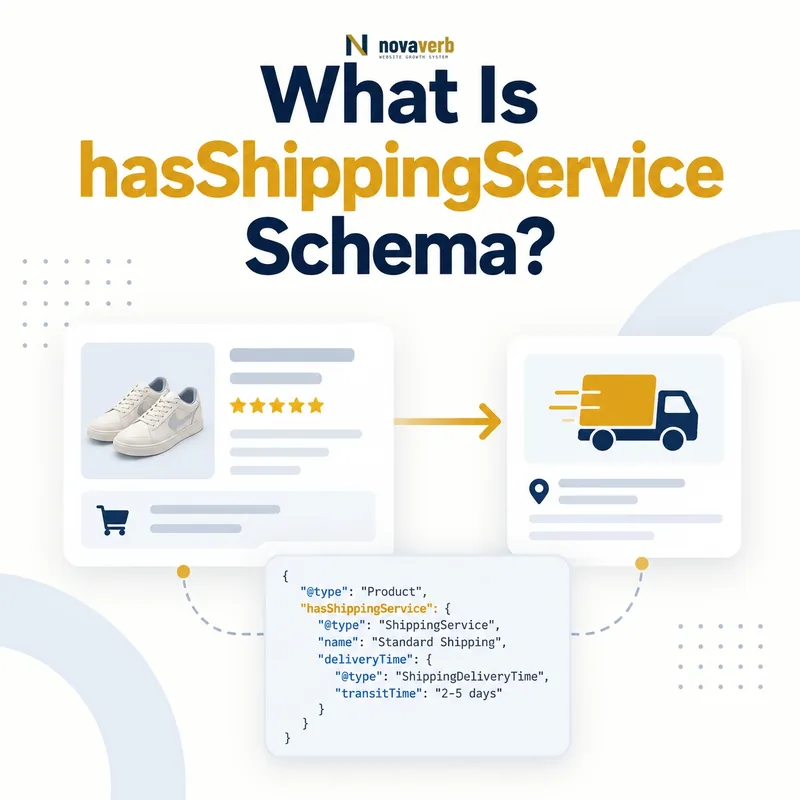
What Is hasShippingService Schema?
hasShippingService is a Schema.org property that connects an OfferShippingDetails or Organization entity to a ShippingService offered by the organization.
Its expected value is ShippingService. The service can organize fulfillment type, handling time, shipping conditions, and member-tier eligibility into a coherent entity instead of scattering unrelated shipping facts across a page.
The term is in Schema.org's new area, so implementation feedback and adoption can still shape its definitions. Treat vocabulary validity, consumer support, and checkout truth as three separate checks before scaling it across a US ecommerce catalog.
- Identify the exact page, asset, entity or relationship described in this section.
- Inspect the live implementation and retain the observed evidence.
- Compare the observation with the intended meaning and its primary specification.
- Correct any mismatch, then retest the live result.
- Record the accountable owner and review date.
| Case | Meaning | Action |
|---|---|---|
| hasShippingService | Relationship property | Connect to service |
| OfferShippingDetails | Supported parent | Offer-specific context |
| Organization | Supported parent | Merchant-wide context |
| ShippingService | Expected value | Model service criteria |
| New area | Developing vocabulary area | Verify consumers |
- Use a supported parent.
- Point to a ShippingService entity.
- Preserve stable identity.
- Test the target consumer and checkout.
Use the free backlink checker to identify linked product pages before changing a shared shipping-service graph.
Primary specification: Schema.org definition for hasShippingService.
hasShippingService is accurate when the connected service represents the same fulfillment option and conditions a shopper can actually select.
Where Can hasShippingService Be Used?
hasShippingService can be used on OfferShippingDetails for Offer-level shipping context and on Organization for services offered across the merchant.
Choose placement from the policy scope. An Offer-specific service belongs with the relevant OfferShippingDetails. A genuinely merchant-wide service may be declared from Organization, but its conditions must still prevent it from overreaching into excluded products, sellers, markets, or membership cohorts.
Do not attach the property directly to Product, Offer, ShippingConditions, ShippingRateSettings, or MonetaryAmount. Those entities play different roles in the graph even when they participate in the same checkout outcome.
- The exact page, asset, entity or relationship covered by this section
- The live implementation rather than an editor-only preview
- The primary specification or first-party record defining the expected behavior
- The validation result, accountable owner and review date
| Case | Meaning | Action |
|---|---|---|
| OfferShippingDetails | Offer-scoped service | Use for product Offers |
| Organization | Merchant-scoped service | Use only when broadly true |
| Product | Unsupported parent | Route through Offer |
| ShippingConditions | Service child | Not parent of property |
| MonetaryAmount | Rate value | Keep separate |
- Identify policy scope.
- Choose Offer or merchant parent.
- Create one stable service entity.
- Attach conditions beneath the service.
Review OfferShippingDetails before selecting the Offer-level path.
Correct placement keeps service ownership explicit without turning a narrow shipping option into a universal merchant promise.
What Does ShippingService Represent?
ShippingService represents the criteria used to determine whether and how an Offer can be shipped to a customer.
It is a StructuredValue that can carry fulfillmentType, handlingTime, shippingConditions, and validForMemberTier. The service is therefore more than a carrier name: it organizes the operational rules that define an available fulfillment option.
Give each material service a stable identity and a human-readable name, but do not infer conditions from the name. Standard, Express, Pickup, and Members Free Shipping still need explicit timing, price, destination, eligibility, and exception data.
- Identify the exact page, asset, entity or relationship described in this section.
- Inspect the live implementation and retain the observed evidence.
- Compare the observation with the intended meaning and its primary specification.
- Correct any mismatch, then retest the live result.
- Record the accountable owner and review date.
| Case | Meaning | Action |
|---|---|---|
| fulfillmentType | Fulfillment mode | Specify supported enumeration |
| handlingTime | Order-to-dispatch delay | Use ServicePeriod context |
| shippingConditions | Constraints and price | Attach applicable rules |
| validForMemberTier | Membership eligibility | Scope benefit |
| name | Readable service label | Not policy proof |
- Identify the actual fulfillment option.
- Assign stable identity.
- Add handling behavior.
- Add complete conditions.
- Add tier scope when real.
A ShippingService entity is complete when its identity and operational criteria reproduce one selectable fulfillment option.
How Do ShippingConditions Work Under a Service?
shippingConditions attaches one or more ShippingConditions policies whose specified constraints must all be met for that condition set to apply to the ShippingService.
Conditions can constrain destination, origin, order value, item count, weight, dimensions, seasonal periods, availability, transit time, and rate. Multiple condition entities can represent standard versus exceptional routes without mixing every rule into one ambiguous record.
Treat each condition as a conjunction within its own scope. If a cart misses one required boundary, that condition should not supply its price or timing. Model alternate eligible scenarios as separate deterministic conditions.
- The exact page, asset, entity or relationship covered by this section
- The live implementation rather than an editor-only preview
- The primary specification or first-party record defining the expected behavior
- The validation result, accountable owner and review date
| Case | Meaning | Action |
|---|---|---|
| Destination + weight | Both must match | Apply condition |
| Order value outside range | Condition fails | Try another policy |
| doesNotShip true | Unavailable outcome | Stop rate selection |
| Seasonal override | Date-limited policy | Check effective period |
| Multiple conditions | Alternative cohorts | Keep boundaries distinct |
- List all required constraints.
- Group facts that apply together.
- Separate alternative policies.
- Resolve prohibitions before rates.
- Test boundary carts.
See ShippingConditions schema.
ShippingConditions stay reliable when every applicable constraint is satisfied before their rate or transit time is used.
How Should handlingTime Be Modeled?
Within ShippingService, handlingTime should use ServicePeriod so duration, cutoff time, and business days can describe the order-to-dispatch process together.
Handling time starts when the order is received and ends when goods leave the warehouse or are prepared for pickup. It is separate from transit time, which begins after dispatch and ends at customer arrival.
Preserve the local cutoff zone, exact boundary behavior, weekday schedule, holidays, warehouse closures, preorder delays, and origin-specific calendars. A generic one-day value can be false for orders placed after cutoff or on non-business days.
- Identify the exact page, asset, entity or relationship described in this section.
- Inspect the live implementation and retain the observed evidence.
- Compare the observation with the intended meaning and its primary specification.
- Correct any mismatch, then retest the live result.
- Record the accountable owner and review date.
| Case | Meaning | Action |
|---|---|---|
| duration | Preparation interval | Use supported unit |
| cutoffTime | Same-day boundary | Include time zone |
| businessDays | Operating calendar | Preserve weekdays |
| Warehouse closure | Exception | Adjust start |
| Pickup preparation | On-site readiness | Use same handling concept |
- Record order timestamp and zone.
- Apply cutoff boundary.
- Count valid business periods.
- Add exceptions.
- Compare dispatch promise.
handlingTime is accurate when identical order timestamps produce the same dispatch or pickup-ready time as fulfillment operations.
How Do You Model Standard, Express, and Pickup Services?
Model standard, express, pickup, and other materially different fulfillment options as distinct ShippingService entities with their own handling, conditions, rates, timing, and eligibility.
A cheap slower option and a fast expensive option should not share one service identity if their operational criteria differ. Pickup should not inherit shipping destinations or carrier transit rules that do not apply to on-site fulfillment.
At the same time, avoid duplicating entities for cosmetic names alone. Use one service identity when the underlying policy is truly identical, and separate it when checkout exposes a distinct option or different condition matrix.
- The exact page, asset, entity or relationship covered by this section
- The live implementation rather than an editor-only preview
- The primary specification or first-party record defining the expected behavior
- The validation result, accountable owner and review date
| Case | Meaning | Action |
|---|---|---|
| Standard delivery | Lower cost, slower transit | Separate service |
| Express delivery | Higher cost, faster transit | Separate service |
| On-site pickup | Preparation without carrier route | Separate fulfillment type |
| Same policy, two labels | Cosmetic difference | Consider one identity |
| Different seller service | Different authority | Separate scope |
- List selectable checkout options.
- Compare fulfillment criteria.
- Create stable service identities.
- Attach distinct conditions.
- Test each option independently.
Service modeling is appropriately granular when every checkout option has one matching entity and no entity invents a choice shoppers cannot select.
How Do Member Tiers Affect hasShippingService?
Membership-specific shipping services can use validForMemberTier, but the benefit must remain limited to the exact tiers and Offers that receive it at checkout.
An Organization may expose members-free and paid-standard services, while an OfferShippingDetails entity can have its own tier-scoped option. A free rate without tier eligibility can turn a private benefit into a universal public promise.
Use stable tier identifiers that match the membership program graph. Test signed-out shoppers, every eligible tier, ineligible tiers, expired memberships, trial states, excluded products, and destination exceptions.
- The exact page, asset, entity or relationship covered by this section
- The live implementation rather than an editor-only preview
- The primary specification or first-party record defining the expected behavior
- The validation result, accountable owner and review date
| Case | Meaning | Action |
|---|---|---|
| Gold tier free service | Eligible member benefit | Add tier identity |
| Signed-out shopper | Not eligible | Use public service |
| Expired member | No current benefit | Match checkout |
| Excluded product | Tier does not override | Keep product condition |
| Unsupported destination | No service | Preserve availability |
- Identify authoritative tier IDs.
- Attach only eligible services.
- Keep public alternatives.
- Test auth and exception cohorts.
Tier-scoped shipping is honest when only eligible members receive the service and every public shopper retains the correct alternative.
What hasShippingService Mistakes Are Common?
Common mistakes include using the wrong parent or value type, attaching empty ShippingService entities, treating service names as policy, mixing standard and express conditions, omitting member scope, combining handling and transit time, and widening merchant-level services too far.
Other defects include duplicate service IDs, orphaned conditions, conflicting rates, destinations with both available and unavailable outcomes, stale calendars, missing currencies, and graph structures that validate but disagree with checkout.
Fix the commerce and fulfillment sources rather than patching one rendered page. A shared Organization-level service can affect a large catalog, so quantify reach, stage changes, and retain regression carts for every important condition cohort.
- Identify the exact page, asset, entity or relationship described in this section.
- Inspect the live implementation and retain the observed evidence.
- Compare the observation with the intended meaning and its primary specification.
- Correct any mismatch, then retest the live result.
- Record the accountable owner and review date.
| Case | Meaning | Action |
|---|---|---|
| String value only | Wrong expected type | Create ShippingService |
| Service with no conditions | Incomplete option | Add true policy |
| Standard and express merged | Ambiguous outcome | Separate services |
| Tier omitted | Benefit overreach | Add eligibility |
| Handling equals transit | Timing error | Separate phases |
- Crawl every relationship.
- Validate parent and entity identity.
- Inspect conditions and eligibility.
- Compare selectable checkout options.
- Repair shared sources.
hasShippingService defects require relationship, service, condition, eligibility, timing, and checkout validation together.