
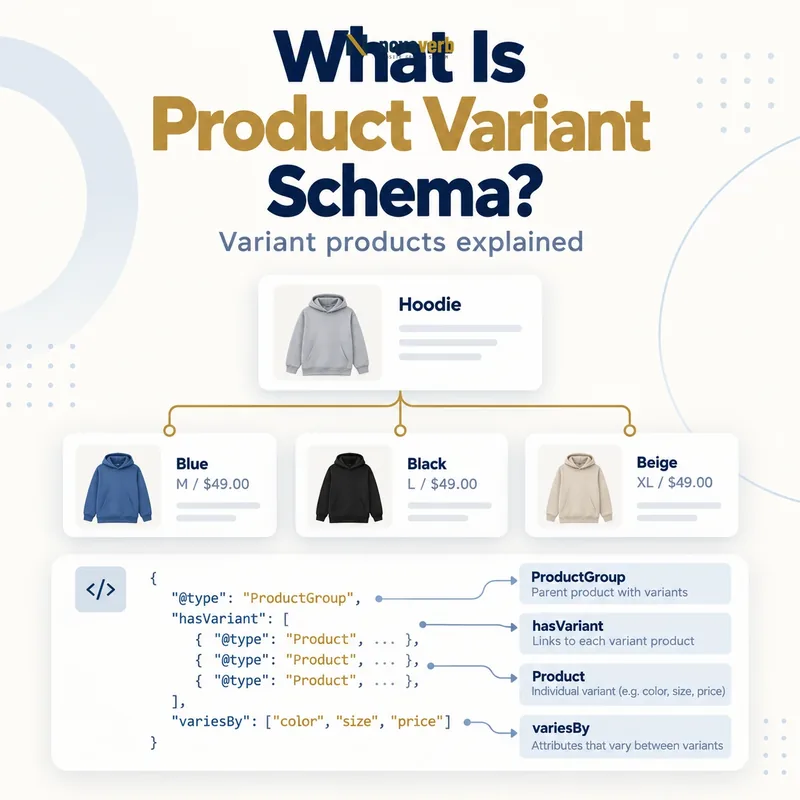
What Is Product Variant Schema?
Product Variant Schema is structured data that groups purchasable versions of one product family while preserving each variant’s unique attributes, identifier and offer.
The parent entity is usually ProductGroup, while each selectable color, size, material or pattern is a distinct Product. The group identifies what all variants share and declares the dimensions that vary. Individual products carry the exact SKU, GTIN, image, attribute values, price, currency, availability and purchase URL that belong to that selection. This structure helps a machine distinguish one coat offered in six combinations from six unrelated coats. It complements Product Schema; it does not replace the required product and offer facts. Correct markup can support eligibility for variant-aware merchant experiences, but it cannot guarantee display or rankings.
- Frame the decision raised by What Is Product Variant Schema.
- Confirm its value type and the object it describes.
- Compare the markup with visible page information.
- Correct the source data or template without inventing values.
- Validate the rendered result and monitor future changes.
| Entity | Meaning | Example |
|---|---|---|
| ProductGroup | Shared product family | Classic running shoe |
| Product | One purchasable variant | Blue, size 10 |
| Offer | Price and availability | USD 89, in stock |
| Variant dimension | Attribute that changes | color and size |
- Define one coherent product family.
- Identify every purchasable variant.
- Keep offer data variant-specific.
The useful unit is a truthful group plus complete, directly purchasable variants.
The decision for What Is Product Variant Schema should rest on live, traceable evidence and a verified follow-up check.
How Does ProductGroup Connect Product Variants?
ProductGroup connects variants through hasVariant or through each Product’s isVariantOf relationship to a stable parent group.
A nested graph places variant products inside hasVariant, which is compact and natural for a single product page. A separated graph gives the parent a stable @id and lets each product point back with isVariantOf, which can fit some CMS architectures. In both designs, productGroupID identifies the parent family and variesBy lists the supported distinguishing properties. Do not mix unrelated models simply because they share a brand or category. A variant group implies that the products differ only along declared dimensions while retaining the parent’s shared identity.
- Evidence for How Does ProductGroup Connect Product Variants: the live structured-data entity and property relationship
- The expected value type and any nested object
- Visible page information that supports the structured value
- Related offer or catalog fields needed for interpretation
- A fresh validation result after the page changes
| Relationship | Direction | Use |
|---|---|---|
| hasVariant | Group to Product | Nested family graph |
| isVariantOf | Product to group | Separated entities |
| productGroupID | Group identifier | Parent SKU |
| inProductGroupWithID | Variant identifier link | Alternative group association |
- Assign a unique group identifier.
- Declare the variation dimensions.
- Connect every active product.
- Detect orphan or cross-group variants.
Choose one consistent relationship pattern and ensure every product resolves to exactly one intended group.
The decision for How Does ProductGroup Connect Product Variants should rest on live, traceable evidence and a verified follow-up check.
Which Properties Belong on ProductGroup?
Place shared facts on ProductGroup and keep values that change by selection on each variant Product.
The group may hold a common name, description, brand, material, pattern, audience, review or aggregate rating when those facts truly represent the whole family. productGroupID identifies the family, and variesBy names dimensions such as color, size, suggested age, suggested gender, material or pattern. A group is not normally the purchasable inventory unit, so do not assign one price or availability when variants differ. Shared values reduce duplication, but inheritance should never conceal a variant exception. If one color uses a different material or one size has a different price, put that value on the relevant Product.
- Frame the decision raised by Which Properties Belong on ProductGroup.
- Confirm its value type and the object it describes.
- Compare the markup with visible page information.
- Correct the source data or template without inventing values.
- Validate the rendered result and monitor future changes.
| Property | Best level | Reason |
|---|---|---|
| brand | Group | Usually shared |
| productGroupID | Group | Family identity |
| variesBy | Group | Declares dimensions |
| aggregateRating | Group when representative | Applies across variants |
| sku | Variant | Inventory identity |
- Centralize shared identity.
- Declare only supported variation dimensions.
- Move exceptions to variant records.
A group should contain only facts that remain true after any valid variant is selected.
The decision for Which Properties Belong on ProductGroup should rest on live, traceable evidence and a verified follow-up check.
Which Properties Belong on Each Variant?
Each variant Product needs a unique identity, explicit variation values and an Offer that matches the selected page state.
Use a unique SKU or GTIN where available, a specific name, a variant-relevant description and the exact image for that selection. Fill the attributes declared by variesBy; a group that varies by color and size should not leave those fields blank on some products. The offer URL must preselect the same combination and display its price, availability and add-to-cart state. A generic parent image or stale inventory value makes a technically connected graph commercially unreliable. Shipping and returns can reference accurate policies such as Merchant Shipping Policy Schema and Merchant Return Policy Schema.
- Evidence for Which Properties Belong on Each Variant: the live structured-data entity and property relationship
- The expected value type and any nested object
- Visible page information that supports the structured value
- Related offer or catalog fields needed for interpretation
- A fresh validation result after the page changes
| Variant property | Evidence | Failure example |
|---|---|---|
| sku or gtin | Catalog identifier | Same SKU on two sizes |
| color and size | Selected attributes | Markup says blue, page says green |
| image | Selected media | Generic parent image |
| Offer URL | Direct selection | Opens default variant |
| availability | Inventory state | Out-of-stock item marked available |
- Check unique identifiers.
- Populate all declared dimensions.
- Open every offer URL.
- Compare image, price and stock.
Every variant record should reproduce the exact selection a buyer reaches through its URL.
The decision for Which Properties Belong on Each Variant should rest on live, traceable evidence and a verified follow-up check.
How Should variesBy Be Used?
Use variesBy to list only the supported properties that distinguish products inside the group, using precise Schema.org property references.
Common supported dimensions include color, size, material, pattern, suggested age and suggested gender. The list describes the group’s variant logic, so every member should provide applicable values for those dimensions. Do not use variesBy for arbitrary merchandising labels such as “best seller,” shipping speed or temporary discount. If a custom characteristic cannot be represented by a supported variation property, you may still describe it visibly, but avoid pretending it is a recognized variant dimension for a search feature. Keep catalog attribute names normalized so “Navy,” “navy blue” and “Dark Blue” do not create unintended product families.
- Frame the decision raised by How Should variesBy Be Used.
- Confirm its value type and the object it describes.
- Compare the markup with visible page information.
- Correct the source data or template without inventing values.
- Validate the rendered result and monitor future changes.
| Dimension | Appropriate value | Not a dimension |
|---|---|---|
| color | Navy | Best seller |
| size | US 10 | Free shipping |
| material | Leather | Holiday sale |
| pattern | Striped | Limited stock |
| suggestedGender | Unisex | Member price |
- Use supported property URLs.
- Normalize catalog values.
- Require values on each variant.
- Exclude promotional labels.
The variesBy list is accurate when it explains every intended difference and no temporary merchandising state.
The decision for How Should variesBy Be Used should rest on live, traceable evidence and a verified follow-up check.
Single-Page vs Multi-Page Variant Markup
Use a single-page model when all selections share one canonical product page, and a multi-page model when important variants live on separate crawlable pages.
On a single-page implementation, query parameters or another distinct URL can preselect each variant while one base URL represents the overall group. The markup can nest all variants under one ProductGroup. On a multi-page implementation, each page must be self-contained and describe the entities needed to understand that page; variants on other pages can be linked by URL. There may be no single group URL when equally important variant pages distribute the family. Architecture must follow actual rendering and navigation, not a preferred schema sample. Server-side initial markup is safer for price and stock that change quickly because delayed JavaScript can create crawl timing gaps.
- Evidence for Single-Page vs Multi-Page Variant Markup: the live structured-data entity and property relationship
- The expected value type and any nested object
- Visible page information that supports the structured value
- Related offer or catalog fields needed for interpretation
- A fresh validation result after the page changes
| Architecture | Canonical approach | Markup responsibility |
|---|---|---|
| Single page | One group canonical | All variants can be nested |
| Multi page | Variant pages may stand alone | Each page self-contained |
| Hybrid | Requires explicit rules | Avoid conflicting signals |
| Client-only selector | Distinct preselection URL needed | Initial state must match |
- Map current URL behavior.
- Choose single or multi-page rules.
- Make every selection addressable.
- Verify initial HTML and rendered state.
Select the model that matches how users and crawlers actually reach and purchase each variant.
The decision for Single-Page vs Multi-Page Variant Markup should rest on live, traceable evidence and a verified follow-up check.
How Should Canonical URLs Work for Variants?
Canonical URLs should reflect whether variants are alternate states of one page or independently valuable pages, while every variant remains directly preselectable.
For a single-page family, one distinct canonical URL normally represents the overall ProductGroup, often the base URL without selectors. Parameterized URLs may load specific combinations, but they should not contradict the selected state in markup or UI. For a multi-page architecture, each meaningful variant page can be independently canonical when its content and search value justify that treatment. Canonicalizing every distinct variant to a parent while publishing self-contained variant markup can send mixed consolidation signals. Conversely, self-canonicalizing near-duplicate pages without useful differentiation can waste crawl and indexing attention. Review canonical tags, internal links, sitemaps and structured URLs together.
- Frame the decision raised by How Should Canonical URLs Work for Variants.
- Confirm its value type and the object it describes.
- Compare the markup with visible page information.
- Correct the source data or template without inventing values.
- Validate the rendered result and monitor future changes.
| Scenario | Canonical pattern | Key check |
|---|---|---|
| One interactive page | Base group URL | Parameters preselect correctly |
| Distinct color pages | Self-canonical when valuable | Content and inventory differ |
| Thin duplicate size pages | Often consolidate | No unique value |
| Discontinued variant | Redirect or retire carefully | Do not preserve false offer |
- Inspect canonical tags.
- Test preselected URLs.
- Compare sitemap entries.
- Remove contradictory linking.
Canonical strategy is coherent when page identity, structured URLs and internal discovery tell the same story.
The decision for How Should Canonical URLs Work for Variants should rest on live, traceable evidence and a verified follow-up check.
What Product Variant Schema Mistakes Are Common?
Common mistakes include duplicate identifiers, incomplete dimensions, generic URLs, mismatched offers and grouping products that differ beyond the declared variant attributes.
A parent may claim variations by color and size while half its products omit size. An offer URL may open the default black item even though markup describes red. Catalog imports often reuse a parent SKU as every child SKU or expose unavailable combinations created by a Cartesian product. Teams also copy the parent price and image onto all variants, leave discontinued items marked in stock, or use one canonical pattern across architectures that need different treatment. Syntax validation cannot prove that a blue size-medium product is actually selectable, purchasable and priced as stated, so operational checks are essential.
- Evidence for What Product Variant Schema Mistakes Are Common: the live structured-data entity and property relationship
- The expected value type and any nested object
- Visible page information that supports the structured value
- Related offer or catalog fields needed for interpretation
- A fresh validation result after the page changes
| Mistake | Impact | Correction |
|---|---|---|
| Duplicate child SKU | Ambiguous identity | Use inventory-level ID |
| Missing variesBy value | Incomplete family | Populate attribute |
| URL opens wrong selection | Broken purchase path | Fix preselection |
| Parent price copied | False offer | Use variant price |
| Impossible combination | Phantom inventory | Generate only real products |
- Validate structure.
- Detect duplicate IDs.
- Open every variant URL.
- Run representative carts.
The most serious error is a variant graph that describes a combination the store cannot sell.
Start with a relevant free SEO check, continue the evidence workflow in Site Health, and review pricing when comparing continuous monitoring with a one-time manual review.
The decision for What Product Variant Schema Mistakes Are Common should rest on live, traceable evidence and a verified follow-up check.