
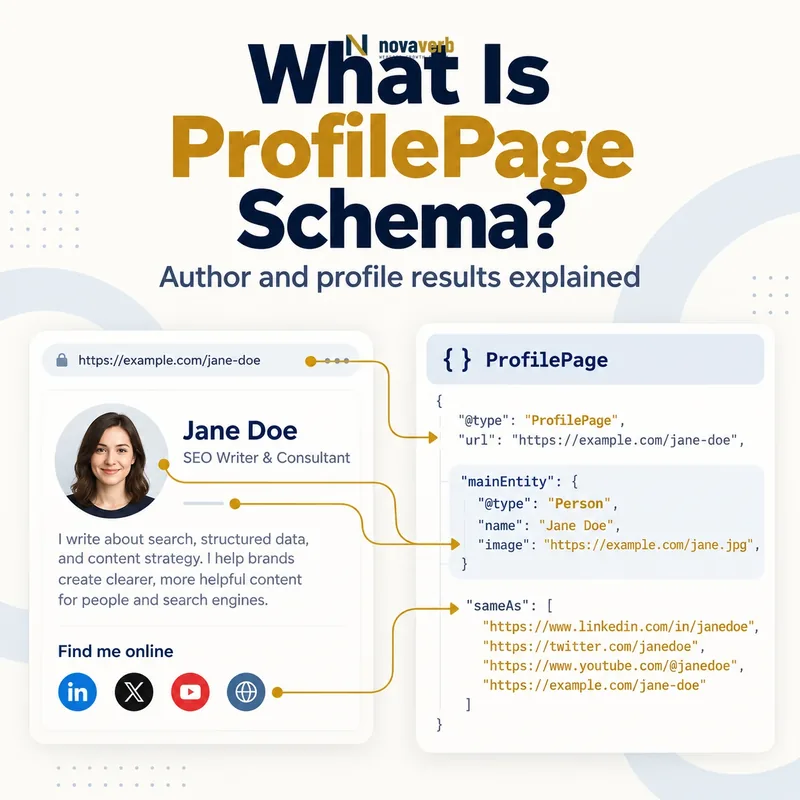
What Is ProfilePage Schema?
The ProfilePage node describes the page, while its mainEntity identifies the Person or Organization the profile is about. This separation matters: a profile document is not the human, and a human is not the URL. Articles, forum posts and other content can reference the stable creator identity.
Profile markup expresses public profile facts. It does not verify credentials, prove expertise, create reputation or guarantee a richer search presentation. Names, affiliations, descriptions, images and external profiles need visible evidence and a responsible owner.
- Identify the exact page, asset, entity or relationship described in this section.
- Inspect the live implementation and retain the observed evidence.
- Compare the observation with the intended meaning and its primary specification.
- Correct any mismatch, then retest the live result.
- Record the accountable owner and review date.
| Node or property | Represents | Evidence source |
|---|---|---|
| ProfilePage | Dedicated profile document | Canonical profile URL |
| mainEntity | Person or Organization profiled | Visible page focus |
| name | Public creator name | Byline and profile |
| alternateName | Handle or known alternative | Platform identity |
| identifier | Stable platform ID | Account database |
| description | Public bio or byline | Approved profile content |
| image | Creator portrait or logo | Visible profile media |
| sameAs | External pages for same entity | Verified official profiles |
- Make one creator the primary page focus.
- Separate document and entity identities.
- Publish only supportable profile facts.
Primary specification: Schema.org definition for ProfilePage.
ProfilePage schema connects one real creator identity to its dedicated profile page without claiming authority the evidence cannot support.
How Does ProfilePage Schema Work?
A parser reads the profile page, resolves its mainEntity and can follow references from Article, DiscussionForumPosting or QAPage content. A stable Person ID lets multiple bylines point to the same creator without rebuilding a different identity on every article.
The graph can include recent activity through related content nodes, but those URLs should resolve to pages with the full content and their own appropriate markup. Syntax validation cannot prove account ownership, employment, credentials or authorship, so the CMS and editorial records remain authoritative.
- The exact page, asset, entity or relationship covered by this section
- The live implementation rather than an editor-only preview
- The primary specification or first-party record defining the expected behavior
- The validation result, accountable owner and review date
| Stage | Graph action | Failure example |
|---|---|---|
| Scope | Choose one affiliated creator | Team directory marked as one profile |
| Identify | Assign stable Person or Organization ID | New author ID per article |
| Describe | Map approved public bio | Unsupported credential added |
| Connect | Reference creator from content | Article points to different person |
| Activity | Link full content URLs | Snippet treated as complete post |
| Maintain | Update human-edited profile facts | Every page view changes dateModified |
| Validate | Compare profile and records | Schema lists former role as current |
- Confirm a single profile focus.
- Create stable page and entity IDs.
- Map approved visible fields.
- Connect genuine authored content.
- Validate identity and lifecycle changes.
The graph works when one stable creator identity connects a dedicated visible profile to the content that creator genuinely produced.
ProfilePage vs Person and Organization Schema
An employee bio page can be a ProfilePage whose mainEntity is a Person. A company contributor account can use Organization as mainEntity when the organization truly creates the content. The company’s primary About page may instead center on broader Organization identity rather than functioning as an affiliated creator profile.
Do not assign ProfilePage to a staff directory, author archive with no meaningful profile or review page about an unaffiliated business. The page’s main purpose and relationship to the hosting site determine the correct model.
- Identify the exact page, asset, entity or relationship described in this section.
- Inspect the live implementation and retain the observed evidence.
- Compare the observation with the intended meaning and its primary specification.
- Correct any mismatch, then retest the live result.
- Record the accountable owner and review date.
| Page situation | Primary model | Reason |
|---|---|---|
| Named author bio | ProfilePage plus Person | One creator is primary focus |
| Employee profile | ProfilePage plus Person | Affiliated individual |
| Brand contributor account | ProfilePage plus Organization | Organization creates content |
| Staff directory | CollectionPage | Lists many people |
| Company homepage | WebSite and Organization context | Not primarily a creator profile |
| Independent company review | Review or Article context | Company is not affiliated profile |
| Article byline only | Article author reference | Page is article, not profile |
| Forum member page | ProfilePage plus Person or Organization | One affiliated account |
- Classify the page and subject separately.
- Require a single primary entity.
- Use collection types for directories.
Use ProfilePage for the dedicated document and Person or Organization for the single affiliated creator it describes.
Which ProfilePage Properties Matter Most?
A stable internal identifier helps preserve account identity when a display name or handle changes. The visible name should match the creator’s chosen public representation. A description can explain role, subject coverage or relevant experience, but every credential and affiliation needs evidence from the creator or authoritative employment records.
Use a real profile image when available; omit the property rather than supplying a default avatar as if it represents the person. sameAs should point only to external pages that represent the same entity, not articles about the creator, employers, partners or backlinks.
- The exact page, asset, entity or relationship covered by this section
- The live implementation rather than an editor-only preview
- The primary specification or first-party record defining the expected behavior
- The validation result, accountable owner and review date
| Property | Priority | Audit question |
|---|---|---|
| mainEntity | Required for supported feature | Is one Person or Organization the page focus? |
| name | High | Does it match the visible public name? |
| identifier | Useful | Is it stable despite handle changes? |
| alternateName | Situational | Is this a real public handle or alias? |
| description | Useful | Are role and credentials supportable? |
| image | Useful | Does it represent the creator? |
| sameAs | Selective | Does each URL represent the same entity? |
| dateCreated | Optional | Is the profile creation time known? |
| dateModified | Optional | Was profile metadata meaningfully edited? |
- Set page and main-entity identities.
- Map name and stable platform ID.
- Publish an evidence-backed description.
- Add a representative image.
- Verify every sameAs target.
Prioritize a stable main entity and accurate public identity before adding optional activity or relationship data.
How Should Author Profiles Connect to Articles?
The byline, profile link, ProfilePage mainEntity and Article author should agree. Multiple authors remain separate nodes rather than one combined name. Guest contributors can have their own profiles without being represented as employees, and editorial teams should be Organizations only when they genuinely hold authorship responsibility.
A profile may list recent articles using related content nodes, but it should not claim work the person did not create. Connect publication facts using Article schema and publisher identity through Organization schema.
- Identify the exact page, asset, entity or relationship described in this section.
- Inspect the live implementation and retain the observed evidence.
- Compare the observation with the intended meaning and its primary specification.
- Correct any mismatch, then retest the live result.
- Record the accountable owner and review date.
| Authorship case | Graph relationship | Avoid |
|---|---|---|
| Single staff author | Article.author references Person ID | Name-only duplicate nodes |
| Guest author | Separate Person and truthful profile | False employee affiliation |
| Two coauthors | Array of distinct Person IDs | Combined Person name |
| Editorial team | Organization author when accountable | Fabricated individual |
| Ghostwritten company content | Accountable disclosed entity | Invented expert persona |
| Former employee article | Preserve historical authorship | Removing author identity blindly |
| Updated by second editor | Model contribution policy truthfully | Replacing original author without record |
| Profile activity feed | Link canonical article URLs | Copying partial posts as full entities |
- Reuse the same creator ID everywhere.
- Preserve multi-author and guest relationships.
- Keep historical authorship truthful.
A trustworthy author graph uses one creator identity across byline, profile and article while preserving real contribution and affiliation.
How Should Credentials, Affiliations and sameAs Be Used?
A creator-supplied bio can support their stated experience, but professional licenses, degrees and current roles should be checked against appropriate records when they affect high-stakes claims. Do not turn conference attendance, tool use or client lists into credentials. Employment history should distinguish current and former relationships.
sameAs is an identity link, not a portfolio, backlink or citation list. A personal website or verified social account may qualify; an interview, article, directory mention or company page usually represents a different resource. Maintain an approval workflow so removed accounts and changed handles do not linger.
- The exact page, asset, entity or relationship covered by this section
- The live implementation rather than an editor-only preview
- The primary specification or first-party record defining the expected behavior
- The validation result, accountable owner and review date
| Claim or URL | Use | Evidence check |
|---|---|---|
| Current job title | Description or affiliation context | Employment record and public page |
| Professional license | Relevant credential property when appropriate | Issuing authority |
| Degree | Credential context when useful | Creator and institution evidence |
| Personal website | sameAs when same person | Ownership and identity match |
| Verified social profile | sameAs | Name, image and ownership match |
| Interview about creator | Not sameAs | About the entity, not the entity |
| Employer homepage | Affiliation relationship | Different entity |
| Article written by creator | Authorship relationship | Content is not identity page |
- Separate identity, affiliation and content relationships.
- Verify sensitive credentials.
- Confirm ownership of sameAs profiles.
- Mark former roles accurately.
- Remove stale relationships promptly.
Identity relationships strengthen a profile only when each claim and URL is traceable to the represented creator.
Can ProfilePage Schema Improve SEO or E-E-A-T?
A coherent author graph makes it easier to understand who created content and where their profile lives. That clarity can support article, forum and community contexts. The actual value still comes from accountable authorship, accurate bios, original work, editorial quality and a history that users can evaluate.
Do not add impressive but unsupported biographies to influence quality assessment. Measure creator-page discovery, branded queries and engagement without claiming schema caused ranking changes. The same profile can support useful internal navigation even when no special search appearance is shown.
- Identify the exact page, asset, entity or relationship described in this section.
- Inspect the live implementation and retain the observed evidence.
- Compare the observation with the intended meaning and its primary specification.
- Correct any mismatch, then retest the live result.
- Record the accountable owner and review date.
| SEO or trust goal | Possible contribution | Separate requirement |
|---|---|---|
| Author disambiguation | Stable Person ID and profile | Real public identity |
| Content attribution | Article references creator | Genuine authorship record |
| First-hand perspective | Creator activity relationships | Actual original contributions |
| Credential clarity | Visible evidence-backed bio | Verified qualifications |
| Community appearance | Conditional feature eligibility | Platform and content compliance |
| Rankings | No guarantee | Relevance, quality and authority |
| E-E-A-T | Cannot be generated by markup | Demonstrated experience and trust |
| CTR | May vary by result presentation | Observed query-level measurement |
- Use schema for attribution clarity.
- Let evidence support credentials and experience.
- Report observed outcomes without causal overclaiming.
Profile markup supports identity clarity; genuine work, evidence and accountability must earn every trust signal.
What ProfilePage Schema Mistakes Are Common?
Template errors can make every author archive share one Person ID or assign the site Organization as mainEntity even when the visible page is about an individual. Default avatars, placeholder descriptions and deleted accounts may remain in the graph after the page changes.
Interaction statistics need particular care. Current supported guidance limits them to activity on the hosting platform, not follower totals copied from unrelated networks. Counts need authoritative computation and should be omitted when they cannot be maintained accurately.
- The exact page, asset, entity or relationship covered by this section
- The live implementation rather than an editor-only preview
- The primary specification or first-party record defining the expected behavior
- The validation result, accountable owner and review date
| Mistake | Risk | Correction |
|---|---|---|
| Staff directory as ProfilePage | No single main entity | Use CollectionPage |
| Same Person ID for all authors | Identity collision | Unique stable account IDs |
| Invented expert persona | False accountability | Use real responsible creator |
| Unsupported credential | Trust and compliance risk | Verify or remove |
| Default avatar as creator image | Misrepresentation | Omit image or use real asset |
| External followers copied as local | Wrong interaction evidence | Use hosting-platform counts only |
| Every render updates dateModified | False profile freshness | Use human-edited metadata time |
| sameAs link collection | Blurred identity | Keep same-entity URLs only |
- Inventory profile types and entity IDs.
- Find identity collisions and placeholders.
- Verify credentials and affiliations.
- Recalculate or remove unsupported counts.
- Test profile and content relationships.
Profile schema fails when identity, evidence or lifecycle data is fabricated, merged or allowed to drift.