
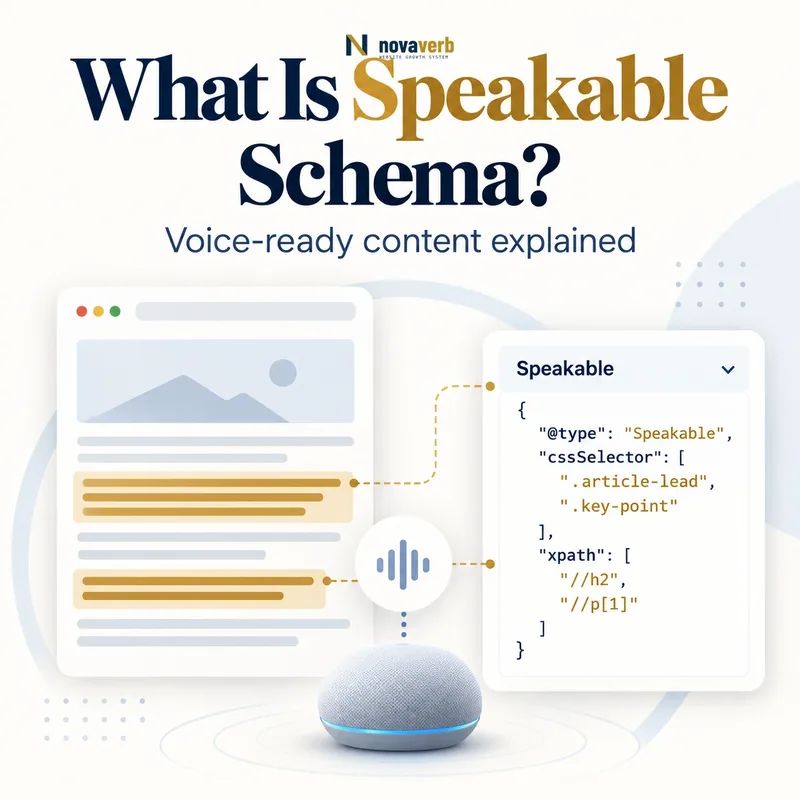
What Is Speakable Schema?
Speakable Schema is structured data that identifies short sections of an Article or WebPage as especially suitable for text-to-speech playback.
The speakable property takes a SpeakableSpecification that locates visible content with CSS selectors or XPath expressions. The documented Google feature is a beta for English-language news publishers and users in the United States with Google Home devices set to English. It is designed for topical news queries, where a voice assistant may read selected article sections and attribute the source. Markup does not turn every page into a voice answer, does not guarantee selection and does not improve ordinary rankings by itself. The selected text must remain concise, understandable without visual context and faithful to the article.
- Identify the exact page, asset, entity or relationship described in this section.
- Inspect the live implementation and retain the observed evidence.
- Compare the observation with the intended meaning and its primary specification.
- Correct any mismatch, then retest the live result.
- Record the accountable owner and review date.
| Layer | Type/property | Purpose |
|---|---|---|
| Page entity | Article or WebPage | Defines the document |
| Selection | speakable | Connects TTS content |
| Locator | SpeakableSpecification | Identifies sections |
| CSS path | cssSelector | Targets HTML classes or elements |
| XML path | xPath | Targets nodes or attributes |
- Use eligible English news content.
- Select visible concise passages.
- Treat playback as unguaranteed.
Primary specification: Schema.org definition for speakable.
Speakable is a precise audio-selection layer for eligible news content, not a generic voice-search ranking tag.
Who Can Use Speakable Markup?
The documented beta works for English-language publishers serving US users whose Google Home devices are set to English, particularly for topical news content.
Schema.org defines speakable broadly, but the current search feature has a narrower operational scope. A US news publisher can mark concise headlines or summaries on relevant articles. A SaaS landing page, product description, evergreen glossary, recipe or local-business homepage should not be presented as eligible topical news merely because its text reads well aloud. Publishers outside the current country-language setup may still use the vocabulary for other consumers, but they should not claim this specific Assistant outcome. Because the feature is beta, eligibility and behavior may change, so implementation documentation needs periodic review.
- The exact page, asset, entity or relationship covered by this section
- The live implementation rather than an editor-only preview
- The primary specification or first-party record defining the expected behavior
- The validation result, accountable owner and review date
| Publisher/content | Feature fit | Reason |
|---|---|---|
| US English news publisher | Current documented scope | Topical news answers |
| English blog without news focus | Weak fit | Not topical news |
| Product landing page | No documented fit | Commercial page |
| Non-English article | Not current feature scope | Language limitation |
| Publisher outside US audience | No current US-device claim | Country limitation |
- Confirm publisher type.
- Check English content.
- Verify US audience/device scope.
- Review beta status regularly.
Use Speakable only where publisher, language, market and news intent all match the documented beta.
How Does SpeakableSpecification Work?
SpeakableSpecification tells a text-to-speech consumer exactly which visible nodes on the page contain the preferred spoken summary.
The object appears as the value of speakable under an Article or WebPage. It includes either a cssSelector array or an xPath array. A selector can target a headline and a short summary block, while XPath can identify nodes or a metadata attribute in an XML-like document view. Multiple locators may combine into one conceptual spoken excerpt. Do not point to content loaded only after interaction, inaccessible hidden text or strings that differ from what users can read. The locator contract is fragile when templates change, so automated checks should confirm every selector resolves.
- Identify the exact page, asset, entity or relationship described in this section.
- Inspect the live implementation and retain the observed evidence.
- Compare the observation with the intended meaning and its primary specification.
- Correct any mismatch, then retest the live result.
- Record the accountable owner and review date.
| Component | Function | Example |
|---|---|---|
| speakable | Page property | Links selected content |
| SpeakableSpecification | Locator object | Defines targeting method |
| cssSelector | CSS-based selection | .article-summary |
| xPath | XPath-based selection | /html/body/main/h1 |
| Multiple values | Combined spoken content | Headline + summary |
- Choose one locator method.
- Target stable semantic elements.
- Verify resolved text after rendering.
A SpeakableSpecification is valid operationally only when every locator resolves to the intended visible text.
CSS Selector vs XPath for Speakable
Use CSS selectors when stable classes are available and XPath when the document structure or metadata attribute is more naturally addressed that way; do not combine both in one specification.
CSS selectors are familiar to frontend teams and can survive moderate template restructuring when they target semantic classes such as .speakable-headline or .speakable-summary. Generic selectors such as p:first-child are brittle and may capture advertisements or datelines after an edit. XPath can target title nodes or metadata content precisely, but positional paths break when wrappers move. The documented implementation expects either cssSelector or xPath, not both. Whichever method you choose, tests should parse the production DOM and confirm the selected text length, visibility and meaning.
- The exact page, asset, entity or relationship covered by this section
- The live implementation rather than an editor-only preview
- The primary specification or first-party record defining the expected behavior
- The validation result, accountable owner and review date
| Criterion | CSS selector | XPath |
|---|---|---|
| Best use | Semantic HTML classes | Structured node/attribute paths |
| Team familiarity | Usually high | Often specialized |
| Brittle pattern | Positional pseudo-selector | Absolute indexed path |
| Stable pattern | Dedicated class | Semantic relative path |
| Specification rule | Use alone | Use alone |
- Inspect template semantics.
- Select CSS or XPath.
- Avoid positional dependencies.
- Add resolution tests.
Choose the locator your publishing templates can keep stable and test it against the rendered document.
What Content Should Be Marked Speakable?
Mark a concise headline or summary that delivers the article’s essential news in clear standalone sentences suitable for audio.
The selected passage should make sense without a screen, image or preceding paragraph. Two or three sentences - roughly 20 to 30 seconds of audio per section - is a useful target for listening quality. Focus on key facts rather than the entire article, since long playback can be cut off before important information. If the top of the story contains a dense sentence, rewrite it into shorter sentences for the visible article rather than supplying a hidden simplified version only to machines. Keep names, dates and numbers pronounceable and preserve uncertainty or attribution that materially changes the news.
- Identify the exact page, asset, entity or relationship described in this section.
- Inspect the live implementation and retain the observed evidence.
- Compare the observation with the intended meaning and its primary specification.
- Correct any mismatch, then retest the live result.
- Record the accountable owner and review date.
| Content choice | Good for TTS? | Reason |
|---|---|---|
| Concise headline | Yes | Sets topic |
| Two-sentence summary | Yes | Provides key facts |
| Entire article | No | Too long and unfocused |
| Photo caption | Usually no | Needs visual context |
| Dateline | Usually no | Can sound confusing |
| Hidden alternate text | No | Not visible to readers |
- Select key facts.
- Write standalone sentences.
- Target 20–30 seconds per section.
- Keep important attribution.
Speakable text should be the shortest visible passage that preserves the article’s essential meaning and qualifications.
What Content Should Not Be Speakable?
Do not select content that is confusing without visuals, overly long, promotional, navigation-heavy or disconnected from the page’s main news.
Datelines can sound like part of a sentence, photo captions depend on an unseen image, and source-credit blocks may be mistaken for story content. Advertisements, subscription prompts, related links, byline controls and social-sharing labels do not answer a topical news query. Do not mark only sensational fragments that omit essential context, such as selecting “Company collapses” while the article says a test environment briefly failed. Paywalled publishers should ensure the selected text and page treatment comply with their visible access model and Paywalled Content Schema where applicable.
- The exact page, asset, entity or relationship covered by this section
- The live implementation rather than an editor-only preview
- The primary specification or first-party record defining the expected behavior
- The validation result, accountable owner and review date
| Content | Why exclude | Alternative |
|---|---|---|
| Dateline | Audio ambiguity | Include location in sentence if essential |
| Photo caption | Visual dependency | Use article summary |
| Source list | Not narrative answer | Keep visible outside selection |
| Ad/promo | Commercial interruption | Exclude container |
| Navigation | No news value | Target main content |
| Decontextualized quote | Misleading | Select full qualified sentence |
- Listen without looking at the page.
- Remove visual dependencies.
- Exclude commercial and navigation blocks.
- Restore missing context.
Exclude anything that would make a listener misunderstand the story or hear page chrome instead of news.
How Does Speakable Relate to Article Schema?
Article Schema identifies the news or editorial document, while speakable selects the specific parts of that document best suited for audio playback.
A NewsArticle can provide headline, image, author, publication date and modification date. The speakable property then points to the visible headline or summary within that same page. Speakable does not replace the article entity or excuse incomplete authorship and date information. Use Article Schema as the page foundation, and keep headline text, selectors and visible content aligned. A WebPage can also carry speakable, but the current feature’s news-query context means publishers should not generalize that vocabulary into claims for every content format.
- Identify the exact page, asset, entity or relationship described in this section.
- Inspect the live implementation and retain the observed evidence.
- Compare the observation with the intended meaning and its primary specification.
- Correct any mismatch, then retest the live result.
- Record the accountable owner and review date.
| Concern | Article/NewsArticle | Speakable |
|---|---|---|
| Document identity | Yes | No |
| Author/date/image | Article properties | Not replacements |
| Audio passage | No selection by itself | Yes |
| Topical news eligibility | Content context | Section targeting |
| Visible text match | Page content | Locator result |
- Preserve article identity.
- Keep headline and dates accurate.
- Select visible nodes within the same page.
Build the complete news article entity first, then use Speakable to identify only its best audio excerpt.
What Speakable Schema Mistakes Are Common?
Common mistakes include applying Speakable to non-news pages, selecting whole articles, combining CSS and XPath, targeting broken selectors and marking hidden or contextless text.
A marketing plugin may add speakable to every blog post and landing page despite the beta’s topical-news scope. Selectors can point to classes removed by a redesign, capture several unrelated modules or return no text on mobile templates. Some publishers select the entire body, dateline and captions, creating confusing audio. Others create a machine-only summary that is absent from the rendered page. Claims that Speakable improves voice-search rankings or secures Assistant playback are also unsupported. Syntax may pass while selector resolution and content quality fail, so real rendered testing matters.
- The exact page, asset, entity or relationship covered by this section
- The live implementation rather than an editor-only preview
- The primary specification or first-party record defining the expected behavior
- The validation result, accountable owner and review date
| Mistake | Impact | Correction |
|---|---|---|
| Sitewide non-news markup | Wrong feature scope | Limit eligible templates |
| Whole-body selector | Poor TTS experience | Select key summary |
| CSS plus XPath | Invalid specification choice | Use one method |
| Removed class | No selected content | Add regression test |
| Hidden summary | Content mismatch | Render visibly |
| Guaranteed voice claim | False expectation | State beta eligibility only |
- Confirm page eligibility.
- Resolve selectors in production.
- Review spoken output.
- Remove unsupported claims.
The highest-risk defect is markup that selects misleading or invisible text while claiming a guaranteed voice outcome.