
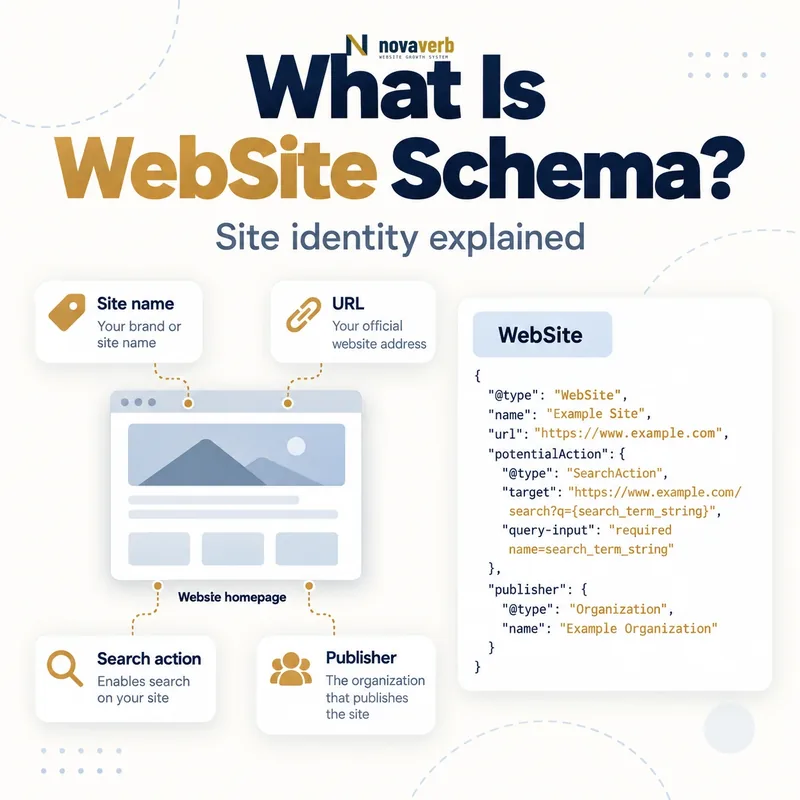
What Is WebSite Schema?
The WebSite type represents the site as a whole, not every individual page and not the company itself. A WebPage node represents one URL; an Organization node represents the business or institution; WebSite connects the publication property to its publisher. Stable IDs keep these entities separate while preserving their real relationships.
For search visibility, the most practical current use is expressing a preferred site name on the homepage. Markup is an input rather than a command, and it cannot force a particular label, create brand recognition or guarantee a search presentation.
- Frame the decision raised by What Is WebSite Schema.
- Confirm its value type and the object it describes.
- Compare the markup with visible page information.
- Correct the source data or template without inventing values.
- Validate the rendered result and monitor future changes.
| Node or property | Represents | Evidence source |
|---|---|---|
| WebSite | Entire website property | Canonical domain and homepage |
| name | Preferred site name | Homepage branding |
| alternateName | Recognized alternative | Public brand usage |
| url | Canonical site URL | Preferred protocol and host |
| @id | Stable website identity | Graph naming policy |
| publisher | Publishing organization | Ownership and editorial evidence |
| inLanguage | Primary or supported language context | Actual content locale |
| WebPage | Individual page | Canonical page URL |
- Model the site separately from the business.
- Use one canonical homepage identity.
- Keep name signals consistent and recognizable.
WebSite schema identifies the publication property and its preferred site identity without merging the site, pages and organization.
The decision for What Is WebSite Schema should rest on live, traceable evidence and a verified follow-up check.
How Does WebSite Schema Work?
A crawler reads the homepage graph and compares it with visible branding, title elements, headings, Open Graph values and references elsewhere. The WebSite can point to an Organization publisher, while individual WebPage or Article nodes can reference the same WebSite through appropriate relationships.
Syntax validation checks structure, not brand truth. A site can declare a generic keyword phrase or another company’s name and still produce valid JSON-LD. Consistency, uniqueness and recognizable public use determine whether the preferred identity is credible.
- Evidence for How Does WebSite Schema Work: the live structured-data entity and property relationship
- The expected value type and any nested object
- Visible page information that supports the structured value
- Related offer or catalog fields needed for interpretation
- A fresh validation result after the page changes
| Stage | Graph action | Failure example |
|---|---|---|
| Scope | Choose domain or subdomain property | Folder treated as separate site |
| Identify | Assign stable WebSite @id | Different ID on every page |
| Name | Set concise preferred name | Keyword slogan used as site name |
| Alternate | Add recognized fallback | List of promotional taglines |
| URL | Use canonical homepage | Tracking or regional parameter URL |
| Publish | Reference real Organization | Hosting company used as publisher |
| Validate | Compare homepage signals | Structured name conflicts with header |
- Define the site-level entity.
- Choose the canonical homepage URL.
- Set preferred and recognized alternate names.
- Connect the correct publisher.
- Validate rendered homepage signals.
The graph works when one canonical homepage expresses a stable site identity that agrees with visible branding and publisher evidence.
The decision for How Does WebSite Schema Work should rest on live, traceable evidence and a verified follow-up check.
WebSite vs WebPage vs Organization Schema
Novaverb can be an Organization that publishes the Novaverb WebSite. A Wiki article is a WebPage or Article within that website. Reusing one type for all three creates ambiguous identities: the company is not a URL document, and a page is not the entire domain.
Use stable IDs such as distinct fragments for the website and organization. Connect them through publisher or other truthful relationships. Review Organization schema for business identity and Article schema for editorial pages.
- Frame the decision raised by WebSite vs WebPage vs Organization Schema.
- Confirm its value type and the object it describes.
- Compare the markup with visible page information.
- Correct the source data or template without inventing values.
- Validate the rendered result and monitor future changes.
| Entity | Primary type | Example responsibility |
|---|---|---|
| Business or nonprofit | Organization | Owns or publishes properties |
| Entire canonical domain | WebSite | Carries site name preference |
| Subdomain with distinct identity | WebSite when independently branded | Represents that site property |
| Homepage document | WebPage | Individual root URL page |
| Wiki guide | Article and WebPage context | Editorial content at one URL |
| Product landing page | WebPage plus product entity | Commercial page |
| Author profile | ProfilePage plus Person | Identity page for contributor |
| Category archive | CollectionPage | Groups multiple pages |
- Give each real entity its own type and ID.
- Do not use WebSite as the company record.
- Do not create a new WebSite node for every URL.
Separate site, page and organization nodes, then connect them through explicit truthful relationships.
The decision for WebSite vs WebPage vs Organization Schema should rest on live, traceable evidence and a verified follow-up check.
Which WebSite Schema Properties Matter Most?
The name should be concise and match how the site presents itself on the homepage. An alternateName can provide a common acronym or fallback, but it should not become a keyword list. The URL should identify the canonical homepage using the preferred protocol and host.
Use one stable @id and reference it consistently from relevant nodes. Publisher should connect to the real Organization rather than repeating disconnected name strings. Schema.org permits many inherited properties, but site-name clarity usually depends on a small consistent set.
- Evidence for Which WebSite Schema Properties Matter Most: the live structured-data entity and property relationship
- The expected value type and any nested object
- Visible page information that supports the structured value
- Related offer or catalog fields needed for interpretation
- A fresh validation result after the page changes
| Property | Priority | Audit question |
|---|---|---|
| @type WebSite | Foundational | Does the node represent the whole site? |
| name | High | Is this the concise recognized site name? |
| url | High | Is it the canonical homepage URL? |
| @id | High graph practice | Is it stable across templates? |
| alternateName | Useful | Is it a genuine known alternative? |
| publisher | Useful | Does it reference the real publishing entity? |
| inLanguage | Situational | Does it reflect actual site language context? |
| description | Optional | Does it describe the site without keyword stuffing? |
- Set the canonical WebSite ID and URL.
- Choose a concise visible name.
- Add one recognized alternate when useful.
- Reference the canonical publisher.
- Omit properties without stable evidence.
A compact consistent WebSite node is stronger than a large graph filled with generic, duplicated or promotional properties.
The decision for Which WebSite Schema Properties Matter Most should rest on live, traceable evidence and a verified follow-up check.
Where Should WebSite Schema Be Placed?
Repeating the complete WebSite node on every page is usually unnecessary and increases the chance of drift. Other templates can reference the stable WebSite ID when their graph needs the relationship. If sitewide injection is unavoidable, ensure every copy is byte-consistent and does not inherit per-page titles as the site name.
For distinct subdomains, decide whether each functions as an independently named site. A help center or regional subdomain should not automatically receive a new identity. Folder paths do not qualify as domain-level site identities for site-name behavior.
- Frame the decision raised by Where Should WebSite Schema Be Placed.
- Confirm its value type and the object it describes.
- Compare the markup with visible page information.
- Correct the source data or template without inventing values.
- Validate the rendered result and monitor future changes.
| Placement case | Recommended approach | Risk to avoid |
|---|---|---|
| Canonical homepage | Publish complete WebSite node | Conflicting duplicate nodes |
| Internal article | Reference WebSite ID if needed | Rebuilding site identity from article title |
| Product page | Connect page to site and publisher | New WebSite per product |
| Subdomain with own brand | Evaluate separate WebSite | Assuming all subdomains are independent |
| Regional folder | Keep parent WebSite | Treating folder as new domain site |
| Alternate hostname | Canonicalize to preferred host | Two competing site identities |
| Staging environment | Exclude public production identity | Indexable duplicate markup |
| Client-rendered homepage | Verify rendered JSON-LD | Script fails before crawler sees it |
- Make the canonical homepage authoritative.
- Reference rather than duplicate site nodes.
- Evaluate subdomains by real identity, not URL shape alone.
The homepage should own the complete site identity, while other pages reference that identity only when the graph requires it.
The decision for Where Should WebSite Schema Be Placed should rest on live, traceable evidence and a verified follow-up check.
How Does WebSite Schema Affect Site Names?
A strong name is unique, concise and recognizable. It should appear consistently in structured data, visible homepage branding, title context and other relevant metadata. Generic phrases such as “Best SEO Tools USA” are weak site identities unless they are genuinely established brands.
A displayed name can differ from the requested name when evidence conflicts, the name is not distinctive or systems need time to recrawl the homepage. Fix contradictions first instead of creating multiple WebSite nodes. Site name is separate from each page’s title link.
- Evidence for How Does WebSite Schema Affect Site Names: the live structured-data entity and property relationship
- The expected value type and any nested object
- Visible page information that supports the structured value
- Related offer or catalog fields needed for interpretation
- A fresh validation result after the page changes
| Signal | Strong implementation | Weak implementation |
|---|---|---|
| WebSite.name | Concise public brand | Keyword-heavy slogan |
| alternateName | Known acronym or fallback | List of query variations |
| Homepage logo text | Matches brand identity | Different corporate name without context |
| Homepage H1 or heading context | Supports the same site | Generic topic only |
| og:site_name | Consistent value | Old brand name |
| Title element | Compatible site identity | Unrelated marketplace label |
| External references | Recognize same site name | Multiple conflicting names |
| Canonical URL | Stable preferred host | Redirecting or tracking URL |
- Choose the recognized preferred name.
- Align homepage visible and metadata signals.
- Remove obsolete brand variants.
- Request recrawl after meaningful correction.
- Observe the actual displayed result.
WebSite markup communicates a site-name preference; consistent recognizable branding determines whether that preference is credible.
The decision for How Does WebSite Schema Affect Site Names should rest on live, traceable evidence and a verified follow-up check.
What Happened to Sitelinks Search Box Markup?
Older tutorials often add a SearchAction under WebSite and promise an internal search box beneath branded results. That promise is obsolete. Keeping unsupported search-box markup does not provide the former display, and removing it does not affect the separate site-name use of WebSite.
Teams should remove redundant SearchAction code when it adds maintenance cost, creates broken search URLs or confuses QA. It may remain for another known consumer only when that purpose is documented. Never report its presence as a current ranking or CTR enhancement.
- Frame the decision raised by What Happened to Sitelinks Search Box Markup.
- Confirm its value type and the object it describes.
- Compare the markup with visible page information.
- Correct the source data or template without inventing values.
- Validate the rendered result and monitor future changes.
| Feature or element | Current status | Action |
|---|---|---|
| WebSite site-name markup | Supported | Maintain accurate homepage node |
| Sitelinks search box visual | Removed globally | Do not forecast display |
| SearchAction for former box | Unsupported for that feature | Remove if no other purpose |
| Other sitelinks | Separate automated feature | Do not confuse with search box |
| Search Console search-box report | Removed | Do not expect monitoring data |
| Rich Results Test highlighting | Removed for search box | Use generic validation as needed |
| Site rankings | Unaffected by removal itself | Measure separately |
| Legacy documentation | Often outdated | Use current primary sources |
- Separate site names from the retired search box.
- Remove obsolete promises and unnecessary code.
- Preserve WebSite identity markup.
Keep WebSite markup for truthful site identity, but retire sitelinks search-box expectations and unsupported CTR claims.
The decision for What Happened to Sitelinks Search Box Markup should rest on live, traceable evidence and a verified follow-up check.
What WebSite Schema Mistakes Are Common?
Theme and plugin combinations can generate multiple WebSite nodes with different IDs or publishers. International deployments may mistakenly translate the brand name, while staging or alternate hosts publish the same production identity. These conflicts make the graph less coherent even when each node validates.
Another error is treating a site-name preference as guaranteed output. Debug evidence across homepage branding, canonical host, redirects and metadata. Do not keep changing the name daily; recrawl and processing require stable signals.
- Evidence for What WebSite Schema Mistakes Are Common: the live structured-data entity and property relationship
- The expected value type and any nested object
- Visible page information that supports the structured value
- Related offer or catalog fields needed for interpretation
- A fresh validation result after the page changes
| Mistake | Risk | Correction |
|---|---|---|
| Different site name per page | Fragmented identity | One homepage-owned name |
| WebSite and Organization merged | Entity ambiguity | Separate IDs and types |
| Generic keyword phrase | Weak recognizable identity | Use established brand |
| Tracking URL as WebSite.url | Canonical conflict | Use clean homepage URL |
| Multiple plugin nodes | Conflicting publishers or names | Choose one output owner |
| Translated brand without real variant | Identity drift | Preserve actual brand usage |
| Staging publishes production ID | Duplicate environment signals | Exclude or block staging |
| Search box CTR promise | Outdated feature claim | Remove expectation |
- Inventory every WebSite node.
- Resolve IDs, names and canonical URLs.
- Separate publisher Organization.
- Remove duplicate generators.
- Retire unsupported search-box claims.
WebSite schema failures usually come from fragmented identity and stale expectations rather than insufficient property count.
Start with a relevant free SEO check, continue the evidence workflow in Site Health, and review pricing when comparing continuous monitoring with a one-time manual review.
The decision for What WebSite Schema Mistakes Are Common should rest on live, traceable evidence and a verified follow-up check.